Access your Back Office at your fingertips.
Download the app now on Google Play Store.
Scan the QR code
You can also scan QR code with your phone to download the app.
Updating a loan status
Updated
On this page
Introduction
Loan lifecycle management is an important part of lending operations because it ensures loan records accurately reflect the borrower’s repayment status and the real state of the loan. In some cases, a loan may no longer be active or valid even after repayment has been collected, making it necessary to manually close the loan by updating its status.
For lenders, properly managing loan statuses helps maintain accurate portfolio reporting, improve accounting records, and reduce operational inconsistencies. This is especially important when repayment has been made for a loan that was never fully utilized, when excess repayments have been collected, or when only a negligible balance remains on a loan.
The Terminate Loan feature in the Lendsqr admin console allows admins to close loans that should no longer remain active in the system. This helps prevent unnecessary repayment tracking, reduces loan book inaccuracies, and ensures borrower records remain up to date.
This guide explains when to terminate a loan, how to update a loan status to Terminated, best practices for handling repayments, and common scenarios where loan termination is appropriate.
What does “Terminated” loan status mean?
A Terminated loan status indicates that a loan is no longer valid or active and should be closed within the system.
Unlike fully active loans that continue through repayment schedules, a terminated loan is treated as closed and removed from active loan management processes.
Termination is typically used when:
A borrower repaid funds for a loan they never actually withdrew
A loan is no longer operationally valid
The system collected repayment on an inactive or unused loan
A very small outstanding balance remains and the lender chooses to close the loan
An internal decision is made to write off a negligible balance
This status helps lenders maintain cleaner loan records and avoid operational confusion.
When should you terminate a loan?
There are several situations where terminating a loan may be the appropriate action.
1. When repayment was collected, but funds were never withdrawn
One common scenario occurs when a loan passes its due date, but the borrower never actually withdrew the loan funds.
However, due to an automated process or repayment setup, the system may still collect repayments from the borrower’s:
Wallet
Debit card
Direct debit mandate
Linked repayment account
In this situation, the loan should be updated to Terminated because the borrower did not actually benefit from the disbursement.
Important note on excess repayments
If the system collected more money than required, including:
Interest charges
Extra repayments
Overpayments
The excess amount must be reversed appropriately.
Failure to reverse excess repayments may create borrower disputes and accounting inconsistencies.
2. When a very small balance remains
There may also be cases where a borrower has repaid nearly the entire loan but only a negligible amount remains outstanding.
For example:
A minor system rounding difference
Small accrued charges
Minimal unpaid balances
Rather than continuing recovery efforts for insignificant amounts, an admin may decide to terminate the loan and close it operationally.
This is particularly useful when the cost of collection outweighs the remaining balance.
Why terminating loans matters for lenders
Managing loan status correctly helps lenders maintain operational accuracy.
Proper loan termination supports:
Cleaner portfolio reporting
Accurate repayment records
Better financial reconciliation
Improved borrower experience
Reduced loan servicing overhead
Better compliance and audit tracking
Leaving inactive loans open unnecessarily can distort loan performance metrics and increase operational confusion.
Before updating a loan status, ensure you have the required permissions.
Typically, users may require:
Access to loan management modules
Permission to modify loan statuses
Admin or super admin privileges
Authorization to process reversals where necessary
Some organizations may restrict loan termination access to senior operations staff or risk teams.
Before terminating a loan
Before updating a loan to Terminated, verify the following:
The borrower did not withdraw loan funds where applicable
Repayment status has been reviewed
Any excess repayment has been identified
Refund or reversal requirements have been assessed
Internal approval processes have been completed if required
Taking these precautions helps prevent accidental loan closure.
Step-by-step guide on updating a loan status
Step 1: Locate the loan
Locate the loan using the loan search process outlined in the previous section. You can typically find the loan by:
Borrower name
Loan ID
Account details
Loan status filters
Open the relevant loan profile once identified.
Step 2: Open loan actions
Inside the loan profile, navigate to the top-right corner of the page.
Click the three dots menu to open additional loan actions. This dropdown contains available administrative actions for the selected loan.
Step 3: Select terminate loan
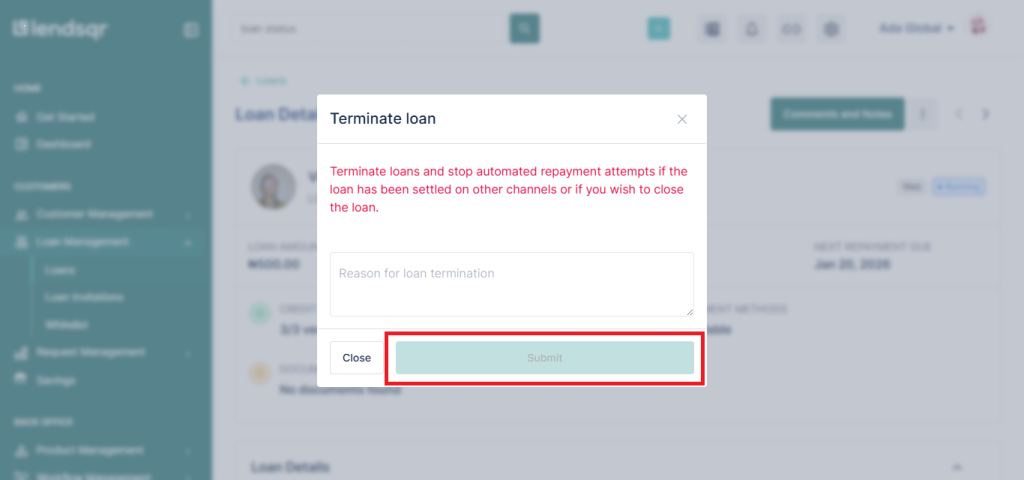
From the dropdown menu, select Terminate Loan. This action opens a modal where termination details can be entered. Before proceeding, ensure you are terminating the correct loan.
Step 4: Fill in the required details
Inside the modal, complete all required fields.
Depending on your organization’s configuration, this may include:
Termination reason
Internal notes
Approval references
Repayment adjustment details
Reversal information where applicable
Ensure all details are accurate before submission.
Step 5: Submit and confirm
Click Submit. You may be prompted to confirm the action before the update is finalized. After confirmation:
The loan status will update to Terminated
The loan will no longer remain fully active
Internal loan records will reflect the updated status
Review the updated loan profile to ensure the status change was successful.
What happens after a loan is terminated?
Once a loan has been terminated:
The loan exits active servicing workflows
Repayment tracking may stop depending on configuration
Reporting records are updated
Loan portfolio accuracy improves
The borrower’s loan history reflects the final status
Where reversals are required, finance or operations teams may also need to process refund actions.
Important note on allowed status changes
Currently, admins can only manually update loans to:
Terminated
Settled
This limitation helps maintain consistency in loan lifecycle management and prevents unauthorized status manipulation.
Use cases for terminating loans
Loans never withdrawn by borrowers
A borrower receives loan approval but never withdraws the funds. Repayment is mistakenly collected later. The loan should be terminated after resolving repayment adjustments.
Small remaining balances
A borrower repays almost the entire loan but only a very minor balance remains. Operations teams may terminate the loan instead of pursuing recovery for insignificant amounts.
System repayment errors
Repayments may occasionally be processed on loans that should no longer be active. Loan termination helps correct these inconsistencies.
Loan write-offs
Organizations may choose to operationally close loans with negligible balances after internal approval.
Best practices for loan termination
Best practices for repayment verification
Always verify repayment history before terminating a loan to avoid closing loans incorrectly.
Best practices for reversing excess repayments
Where borrowers were overcharged, ensure excess funds are reversed promptly. This helps maintain customer trust and reduces disputes.
Best practices for documenting termination reasons
Always include clear internal notes explaining why a loan was terminated. This improves audit visibility and operational transparency.
Best practices for approval workflows
For sensitive loan changes, establish internal approval processes before termination. This reduces operational risk.
Best practices for post-termination reviews
Review terminated loans periodically to identify recurring operational issues that may be causing improper loan activation or repayment collection.
Frequently asked questions
What does a terminated loan mean?
A terminated loan is a loan that is no longer valid, active, or operational and has been manually closed within the system.
When should I terminate a loan?
You should terminate a loan when repayment was collected on a loan that was never withdrawn, when a negligible balance remains, or when the loan is no longer operationally valid.
Can I terminate any loan?
This depends on your permissions and organizational policy. Some teams may restrict termination rights to admins or super admins.
What happens if excess repayment was collected?
Any excess repayment, including any interest or overpayments, should be reversed appropriately.
Does terminating a loan remove repayment records?
No. Historical loan and repayment records are typically retained for reporting, audit, and compliance purposes.