Access your Back Office at your fingertips.
Download the app now on Google Play Store.
Scan the QR code
You can also scan QR code with your phone to download the app.
How to delete your organization
Updated
On this page
There are several reasons a lender might need to delete their organization account on Lendsqr. You may be winding down a lending pilot, consolidating multiple accounts into one, closing a product line, or simply moving on from the platform entirely. Whatever the reason, Lendsqr gives you the ability to delete your organisation account directly from the admin console.
Before you proceed, there is one thing you need to understand clearly: deletion is permanent and cannot be reversed. Once your organisation account is deleted, it cannot be recovered. This guide walks you through everything you need to know before deleting, the exact steps to follow, and what happens after the deletion is complete.
Before you delete
Deleting your organisation account on Lendsqr is a significant and irreversible action. Before you proceed, take the time to work through the following checks.
Withdraw all remaining funds Before your organisation can be deleted, you must withdraw any remaining funds from your disbursement account and ensure your service account balance is within the required limits. You will not be able to access or withdraw funds after the account is deleted, so this step must be completed first.
Settle or terminate all active loans All active loans must be either fully repaid or formally terminated before you can delete your organisation. You will not be able to manage or close loans after the account is deleted, so do not proceed until your loan book is clear.
Understand what deletion means for your data Deletion on Lendsqr is permanent. Once your organisation account is deleted, the action cannot be undone. Before deleting, ensure you have exported any records, reports, or data you may need for future reference, compliance purposes, or regulatory obligations in your market. Lenders operating across different markets should check their local data retention requirements before proceeding, as some regions require financial institutions to retain customer and transaction records for a specified period even after an account is closed.
Check your permissions Only the super admin of the organisation account can delete the organisation. If you are not the super admin, you will not see the delete option. Contact your super admin to proceed.
Conditions for deletion
To successfully delete your organization account, you must meet all of the following conditions before proceeding:
You must be the super admin of the organization account
Your organization account must have fewer than 10 customers
The balance in your disbursement account must be less than 1,000 Naira or its equivalent in your local currency
The balance in your service account must be less than 5,000 Naira or its equivalent in your local currency
You must not have any active loans
If you are operating in a market outside Nigeria, calculate the equivalent threshold in your local currency before proceeding to confirm you meet the balance conditions.
If you wish to delete your account but do not currently meet one or more of these conditions, do not attempt to force the deletion. Instead, email [email protected] to discuss your situation. The support team can advise on the appropriate steps to take.
Step-by-step: how to delete your organization account
Once you have confirmed that you meet all the conditions above and have withdrawn your funds and cleared your loans, follow these steps to delete your organisation.
Log into the Lendsqr admin console
Navigate to settings icon
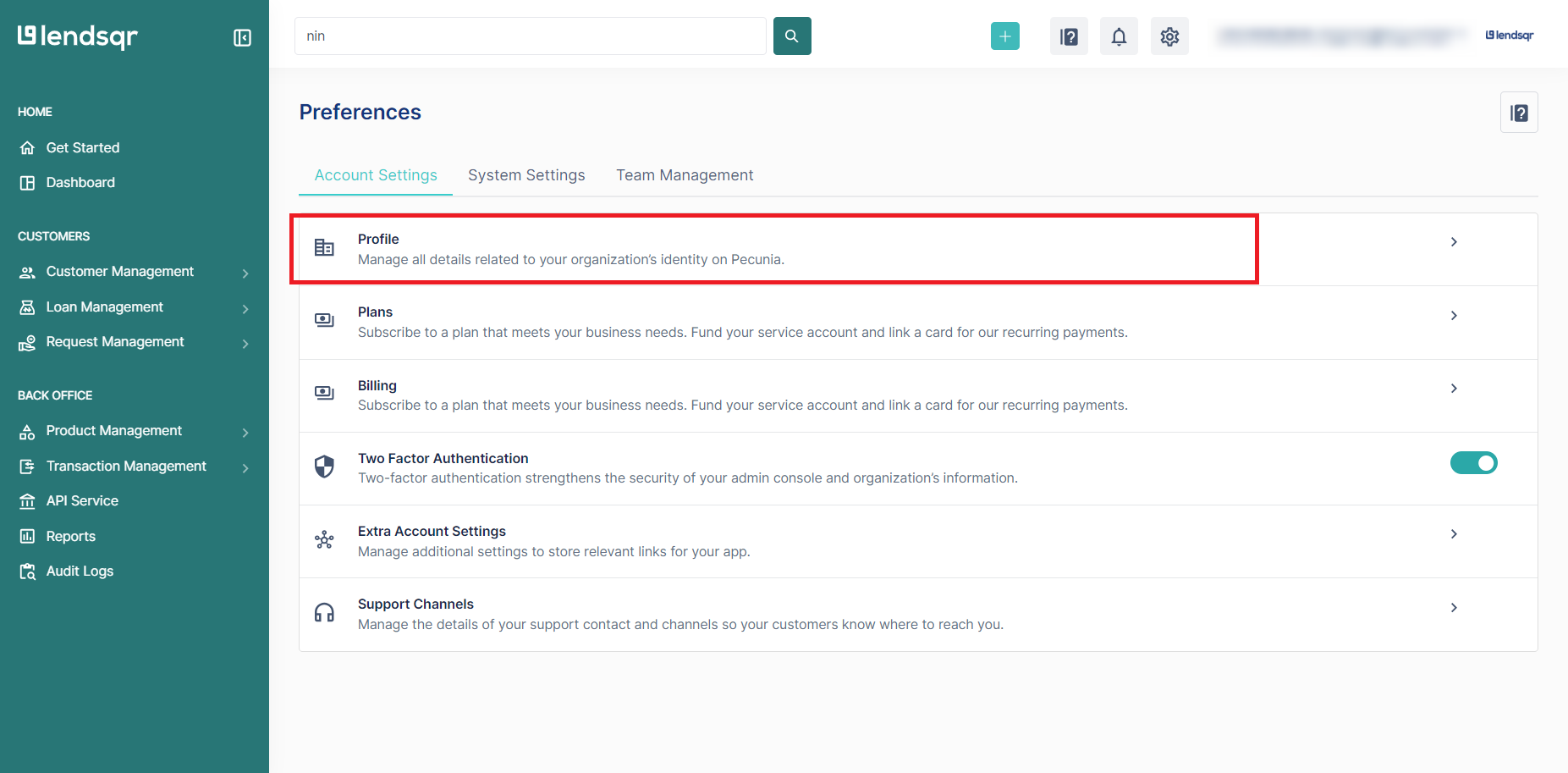
Click on ‘Profile’
Click on ‘Delete Organization’
Enter your organization name and click “Yes, Delete Organization” to confirm the deletion of your organization
If you have not set up your 2FA, you will be directed to set this up.
Enter the authentication code generated by the authenticator application
Your account will be successfully deleted.
What happens after deletion
Once your organisation account is deleted, the following applies:
Access is immediately revoked: You and all team members will lose access to the Lendsqr admin console immediately. There is no grace period.
The deletion is permanent: The account cannot be recovered or restored. If you want to use Lendsqr again in the future, you will need to create a new organization account from scratch.
Funds cannot be recovered after deletion: Any funds left in your disbursement or service account at the time of deletion will not be accessible. This is why withdrawing all funds before deleting is essential.
Active loans cannot be managed after deletion: All loans must be settled or terminated before deletion. Any unresolved loan obligations remain your responsibility even after the account is deleted.
Data retention is your responsibility: Before deleting, ensure you have exported all records you need. Lenders in regulated markets should check their local compliance requirements around financial data retention before proceeding.