Access your Back Office at your fingertips.
Download the app now on Google Play Store.
Scan the QR code
You can also scan QR code with your phone to download the app.
Repay users’ loans on the Lendsqr admin console
Updated
On this page
What is manual loan repayment?
Use manual loan repayment when users repay a loan outside the app, bypassing Lendsqr channels like USSD, Card, or Transfers. This is also used when the user is successfully debited a certain amount for repaying a loan and this amount doesn’t reflect in the user’s wallet. The loan is to be repaid with the amount repaid and the schedule will update and show the outstanding balance or not if it is a total repayment.
Understanding the need for manual loan repayment
In an ideal digital lending environment, all loan repayments flow through automated channels that instantly update loan balances and schedules. Borrowers make payments via bank transfers, card transactions, USSD codes, or wallet deductions, and the system automatically reconciles these payments against outstanding loan obligations. However, real-world lending operations rarely conform perfectly to this ideal scenario.
Multiple situations arise where manual intervention becomes necessary to properly record loan repayments. Understanding these scenarios helps you recognize when manual repayment is the appropriate solution and ensures your loan portfolio accurately reflects actual repayment activity.
One common scenario involves borrowers who make payments through channels not integrated with your platform. A borrower might walk into a bank branch and make a cash deposit directly into your business account. They might send money through an informal money transfer service. They might even hand cash to a loan officer during a field visit. While these payment methods are legitimate, they occur outside your digital ecosystem and require manual recording to update the loan.
Technical glitches represent another frequent trigger for manual repayment. A borrower initiates a payment through your app, their bank account gets debited successfully, but due to network issues, API failures, or system errors, the payment confirmation never reaches your platform. The borrower has a debit alert proving payment, but their loan balance remains unchanged in your system. Manual repayment resolves this discrepancy by allowing you to credit the payment that technically succeeded but was not automatically recorded.
Reconciliation activities often uncover payments requiring manual recording. When you reconcile your bank statements against your loan portfolio, you might discover payments that were received but never matched to specific loans. Perhaps the borrower made a payment without including their loan reference number, making automatic matching impossible. Manual repayment lets you apply these orphaned payments to the correct loans after investigation confirms the payer’s identity.
Third-party collections also necessitate manual repayment in some cases. If you engage collection agencies or legal services to recover defaulted loans, recovered amounts might come through channels separate from your normal payment infrastructure. When a collection agency remits recovered funds, you need to manually record which loans those funds should be applied against.
Corporate or employer-facilitated repayments sometimes require manual processing as well. If you partner with employers to offer salary-based loans, the employer might remit lump sum payments covering multiple employee loans. You receive one large payment that needs to be broken down and manually applied to individual borrower accounts.
Risks of not recording off-platform payments
Failing to properly record payments made outside your platform creates multiple problems that undermine the integrity and profitability of your lending operation.
The most obvious issue is inaccurate loan portfolio reporting. When payments are received but not recorded, your system shows loans as delinquent or outstanding even though borrowers have actually paid. This distorts your portfolio health metrics, making your non-performing loan ratio appear worse than reality. When you report to investors, regulators, or internal management, your data does not reflect the true state of your business.
Inaccurate recording also damages borrower relationships and trust. Imagine a borrower who made a payment but continues receiving collection calls because your system shows the loan as unpaid. The borrower becomes frustrated, feels disrespected, and loses confidence in your organization. They might refuse to take future loans or share their negative experience with others, damaging your reputation.
From a collections perspective, failure to record payments wastes resources chasing borrowers who have already paid. Your team spends time and money on calls, messages, and field visits targeting people who are actually current on their obligations. These misdirected efforts could be better spent on genuinely delinquent accounts.
Unrecorded payments also create accounting and audit challenges. Your bank statements show funds received, but your loan portfolio does not reflect corresponding reductions in outstanding balances. This mismatch complicates financial reconciliation and can trigger audit findings or regulatory concerns about your financial controls.
In severe cases, unrecorded payments expose you to legal risk. If a borrower can prove they made payments that you failed to record, and you continue collection efforts or report them to credit bureaus as delinquent, they might have grounds for legal action claiming harassment or credit damage.
When to use manual repayment versus other solutions
While manual repayment is a powerful tool, it is not always the appropriate solution for payment recording issues. Understanding when to use it versus other approaches ensures you apply the right fix to each situation.
Use manual repayment when you have confirmed evidence that a payment was genuinely made but was not captured by your system. This evidence might include bank statements showing funds received, borrower debit alerts from their bank, cash receipts issued by your staff, or documentation from third-party payment facilitators. Without solid evidence, manually recording a repayment based solely on borrower claims creates risk of fraud or error.
For situations where payments were made through your platform but failed due to technical issues that are now resolved, you might be able to trigger automatic reconciliation rather than manual repayment. If your technical team can replay the transaction or force a status check with the payment gateway, the system might automatically record the payment without manual intervention.
When dealing with systematic integration issues affecting multiple payments, fixing the underlying integration problem and running a batch reconciliation process might be more efficient than manually processing each payment individually. Manual repayment works best for isolated incidents rather than systematic failures.
For disputed payments where you are not certain whether the borrower actually made payment, investigation should precede any manual recording. Request bank statements, payment confirmations, or other proof before manually crediting the loan. Prematurely recording disputed payments creates reconciliation problems if you later determine the payment was not actually made.
Best practices for processing manual repayments
Implementing manual loan repayment requires careful attention to accuracy, documentation, and controls. Follow these best practices to maintain the integrity of your loan portfolio while efficiently resolving off-platform payment issues.
Always require supporting documentation before processing manual repayments. Attach copies of bank statements, payment receipts, debit alerts, or other proof to the loan record. This documentation protects you in audits and disputes while creating a clear audit trail explaining why the manual repayment was necessary.
Implement dual authorization for manual repayments above certain thresholds. Requiring a supervisor or manager to approve large manual repayments prevents errors and deters fraud. A loan officer cannot unilaterally record a fictitious repayment if another person must verify and approve it.
Use detailed, standardized comments when recording manual repayments. Rather than vague notes like “customer paid,” document specific details such as “Cash payment received at branch on March 15, 2024, receipt number 12345, counted and verified by Jane Doe.” Detailed comments help future reviewers understand exactly what happened.
Reconcile manually recorded repayments against bank statements regularly. At least monthly, verify that all manual repayments you recorded correspond to actual funds received in your bank account. This reconciliation catches errors and ensures manual repayments are not being used to manipulate portfolio metrics.
Monitor patterns in manual repayments to identify systematic issues. If you find yourself processing many manual repayments for a particular payment channel, it might indicate an integration problem that needs technical resolution. If certain loan officers process significantly more manual repayments than others, it might indicate training needs or potential fraud.
Restrict access to manual repayment functionality to authorized personnel only. Not every user of your admin console should be able to trigger manual repayments. Limit this capability to trained staff with legitimate business needs, and maintain logs of who processed each manual repayment.
Set clear policies on acceptable timeframes for manual repayments. How long after the payment was supposedly made can you still record it manually? Allowing manual repayments for payments allegedly made months or years ago creates risk. A reasonable policy might allow manual recording within 30 to 60 days of the claimed payment date with appropriate documentation.
Steps to manually repay a loan
When you have verified that a manual repayment is necessary and appropriate, follow these steps to process it correctly in the Lendsqr admin console.
Step 1: Locate the loan and access the repayment option
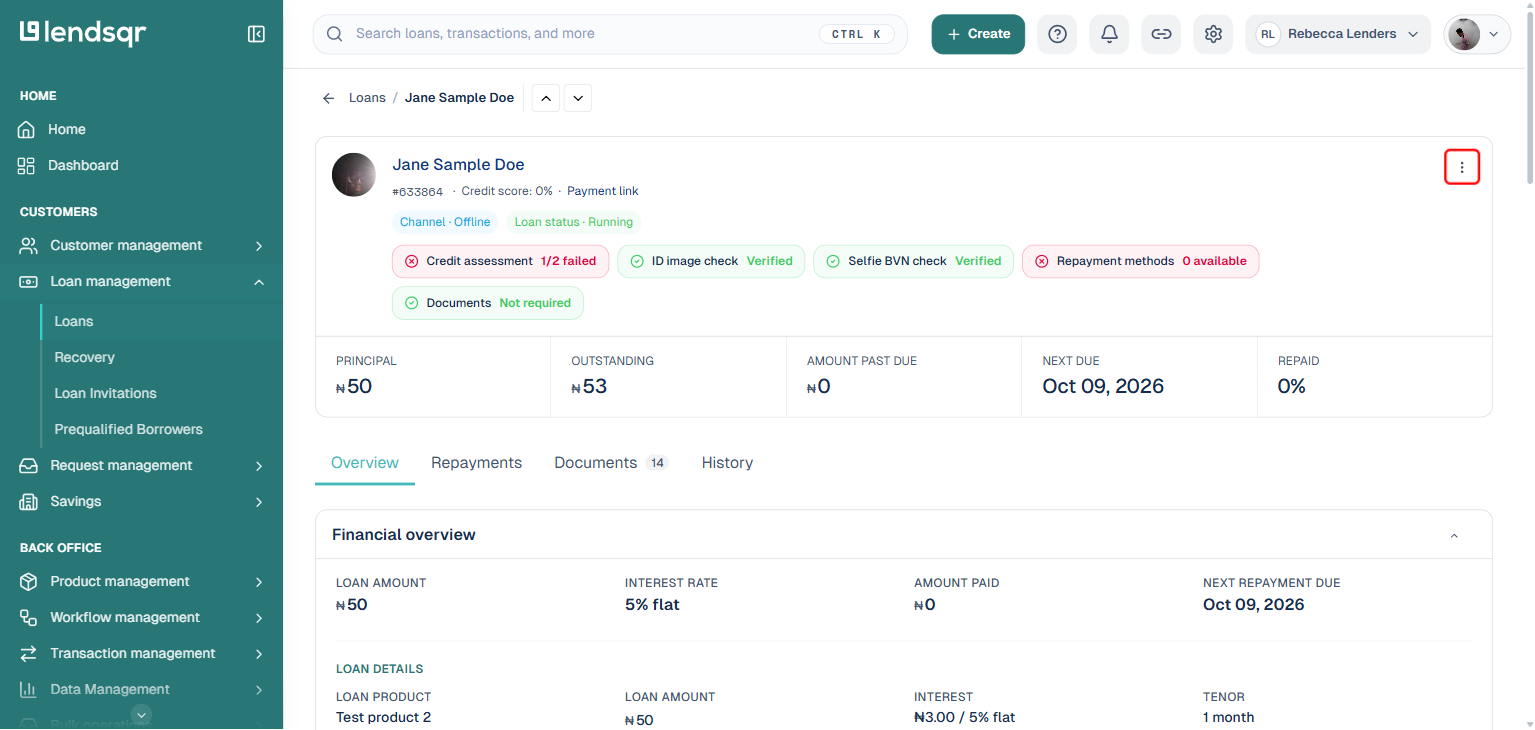
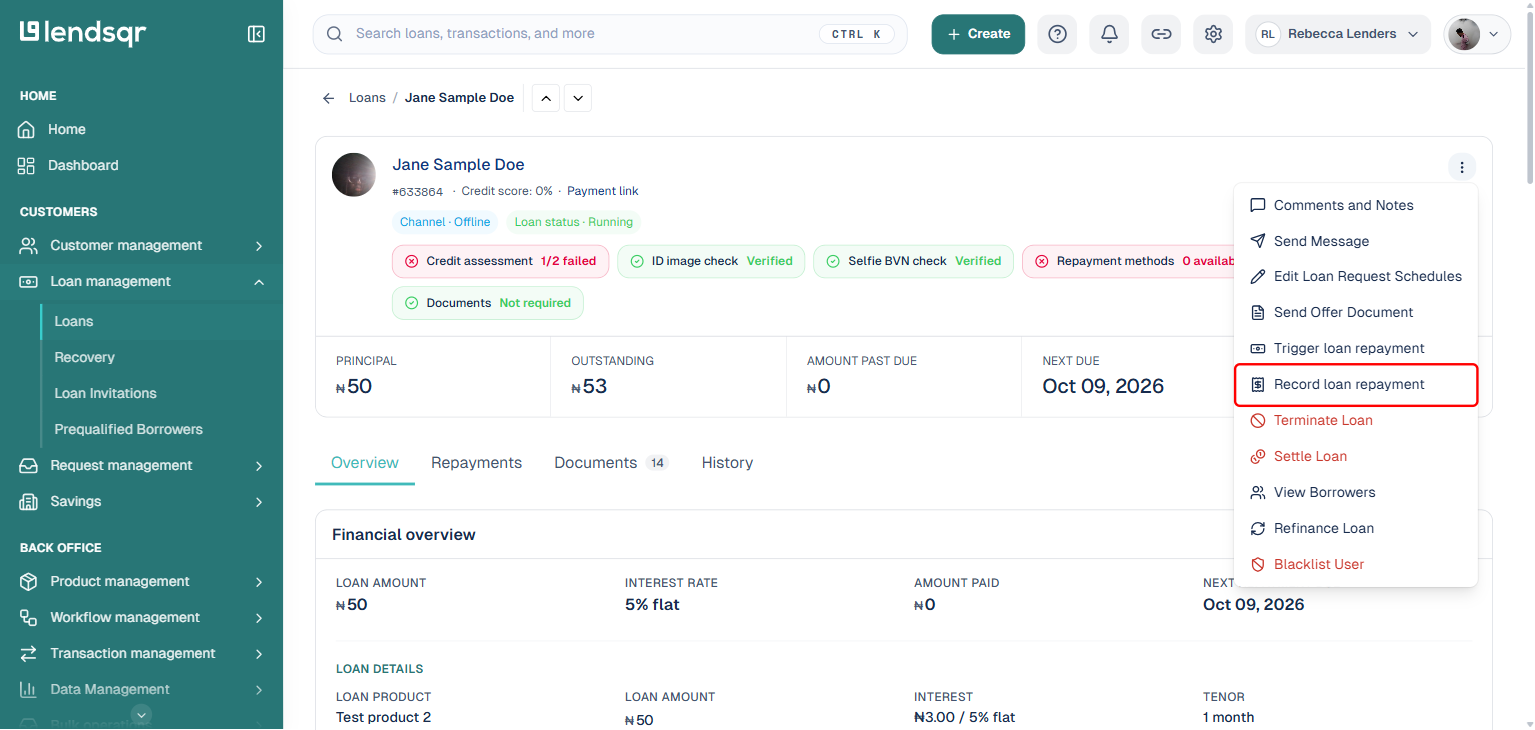
Firstly, locate a loan you want to manually repay. Click the three dots (“More actions“) at the top right corner of the loan page, then click “Record loan repayment” (this is a separate option from “Trigger loan repayment,” which is for triggering automatic reconciliation rather than recording an off-platform payment). A panel will open.
Step 2: Enter repayment details and submit
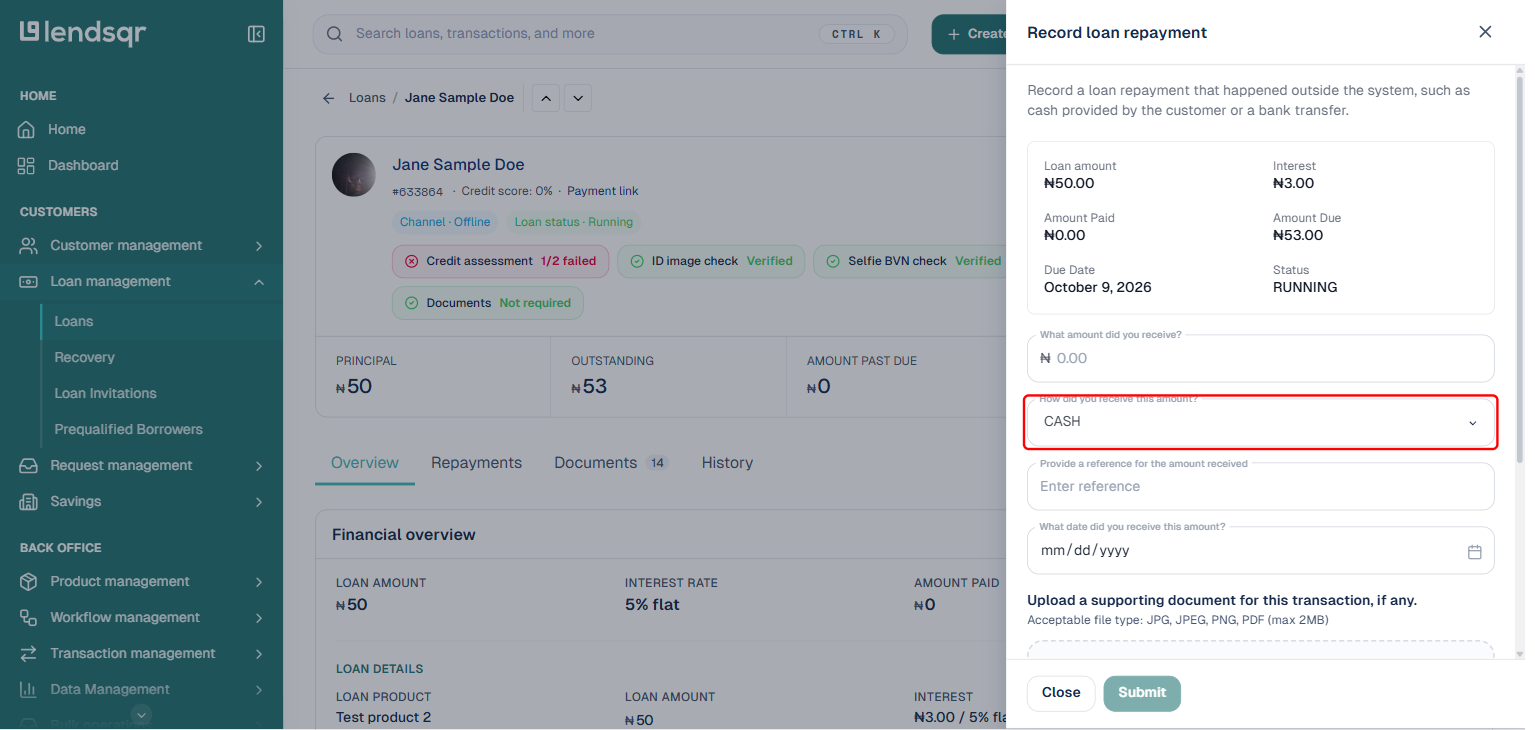
The “Record loan repayment” panel shows the loan’s amount, interest, amount paid, amount due, due date, and status at the top for reference. Below that, enter several pieces of information that document the repayment being recorded.
First, enter “What amount did you receive?” This should be the exact amount the borrower paid, which might be a partial payment toward the outstanding balance or a full payment that completely settles the loan.
Next, select “How did you receive this amount?” from the channel dropdown: Bank Transfer, Cash, Collateral, or Others. Pick whichever matches how the payment actually reached you.
Provide a reference for the amount received, and the date you received it. You can also upload a supporting document, such as a bank statement, receipt, or debit alert (JPG, JPEG, PNG, or PDF, up to 2MB), which is exactly the kind of documentation the best practices above recommend keeping on file.
After entering all required information and verifying its accuracy, click “Submit” to proceed with recording the loan repayment or partial repayment. The system will prepare to update the loan balance and schedule based on the amount you entered.
Step 3: Enter your 2FA key to authorize the repayment
As a security measure to prevent unauthorized or accidental manual repayments, the system requires two-factor authentication before finalizing the transaction. Enter your 2FA key or code when prompted.
After entering the correct 2FA code, the system will authorize and process the repayment. The loan will be repaid by the amount you specified. The loan schedule will automatically update to reflect the payment, showing the new outstanding balance if it was a partial payment, or showing the loan as fully repaid if the payment amount covered the entire outstanding balance.
What happens after manual repayment is recorded
Once you successfully process a manual repayment, several things happen in the system to ensure the loan record accurately reflects the payment.
The loan’s outstanding balance decreases by the repayment amount. If the borrower owed 50,000 naira and you recorded a 20,000 naira manual repayment, the outstanding balance becomes 30,000 naira. If the manual repayment amount equals or exceeds the total outstanding balance, the loan status changes to fully repaid or closed.
The repayment schedule updates to show which installments have been satisfied by the payment.
Common mistakes to avoid
When processing manual repayments, certain errors occur frequently. Being aware of these pitfalls helps you avoid them.
Do not record manual repayments without proper verification. If a borrower claims they paid but you have not confirmed the payment actually reached your account, investigate thoroughly before recording anything. Prematurely crediting unverified payments creates reconciliation nightmares.
Avoid vague or missing comments. Every manual repayment should have detailed comments explaining the circumstances. Future reviewers, auditors, or even yourself months later will need this context to understand what happened.
Do not apply payments to the wrong loan. When borrowers have multiple loans, ensure you record repayments against the correct loan account. Carefully verify loan IDs and details before processing.
Avoid processing manual repayments when automated solutions are available. If a payment failed due to a temporary technical issue that has been resolved, using the system’s reconciliation or retry features might be more appropriate than manual intervention.
Do not bypass authorization controls. If your organization requires supervisor approval for manual repayments, follow that process even if it takes longer. Controls exist for important reasons.
Manual loan repayment is a critical operational tool that ensures your loan portfolio accurately reflects all repayment activity, regardless of payment channel. By understanding when to use it, following proper procedures, maintaining thorough documentation, and implementing appropriate controls, you can efficiently resolve off-platform payment issues while maintaining the integrity of your lending operation.