Access your Back Office at your fingertips.
Download the app now on Google Play Store.
Scan the QR code
You can also scan QR code with your phone to download the app.
Creating a beneficiary on the Lendsqr admin console
Updated
On this page
When a borrower takes out a loan for a specific purpose such as paying school fees, buying equipment, or purchasing goods through a Buy Now Pay Later arrangement, there is often a strong case for sending the funds directly to the intended recipient rather than to the borrower. This is where beneficiaries come in.
A beneficiary is a third party whose bank account a borrower’s loan can be disbursed into upon the borrower’s request. Instead of the borrower receiving the funds and making the payment themselves, the lender transfers the money directly to the beneficiary’s account. This keeps the loan purpose-driven, reduces the risk of misuse, and gives lenders full visibility into where funds are going.
This guide explains why beneficiaries matter, who can manage them, and how to create one step by step.
Why beneficiaries matter
Beneficiaries are one of the most effective tools a lender can use to ensure loan funds are used for their intended purpose. By directing disbursements to a verified third party, lenders reduce the risk of fraud, improve transparency, and make it easier for compliance and operations teams to track how loans are being used.
Here are two real-world examples that illustrate how beneficiaries work in practice:
Scenario 1, Educational loan. A borrower named Tolu applies for a ₦500,000 educational loan to pay her university fees. Instead of receiving the funds directly, she requests that the payment go straight to ABC University’s bank account. The lender creates ABC University as a beneficiary on the Lendsqr admin console, and when the loan is approved, the funds are disbursed directly to the university. Tolu’s fees are paid, the loan purpose is fulfilled, and the lender has a clear record of where the funds went.
Scenario 2, Buy Now Pay Later (BNPL) loan. A borrower named Chuka wants to buy a laptop using a BNPL loan. The lender pays TechStore Ltd directly as the beneficiary, ensuring the funds go to the vendor and not into Chuka’s personal account. The vendor receives payment, Chuka receives the laptop, and the lender can confirm the loan was used for its approved purpose. For more on third-party disbursements, read how to disburse a loan to a third party.
Beyond these scenarios, beneficiaries are useful for any lending product where the destination of funds needs to be controlled, including supplier financing, medical loans paid to hospitals, and agricultural loans paid to input suppliers across different markets.
Before you start
Before creating a beneficiary, confirm the following:
Roles and permissions. Not every admin can create or manage beneficiaries. To view, create, update, or delete beneficiaries, a team member must be assigned a role that includes the “Beneficiaries” permission. To review or update roles and permissions, navigate to Settings and select “Roles and Permissions”.
Subscription plan. The ability to view, add, and delete beneficiaries depends on your organisation’s subscription plan. If the Beneficiaries section is not accessible or the option to create a new beneficiary is unavailable, check your current plan and upgrade if necessary.
Bank account details. Before creating a beneficiary, have the following information ready:
The beneficiary’s bank name
The beneficiary’s 10-digit bank account number
The beneficiary’s email address
The beneficiary’s phone number
The beneficiary’s account name is retrieved automatically by the system once you enter a valid bank and account number, so you do not need to enter this manually.
Supported banks. The Lendsqr platform supports name inquiry and account verification for any bank account within the Nigerian financial industry. Lenders operating in other markets should confirm which banks are supported in their region before attempting to add a beneficiary.
How to create a beneficiary on the Lendsqr admin console
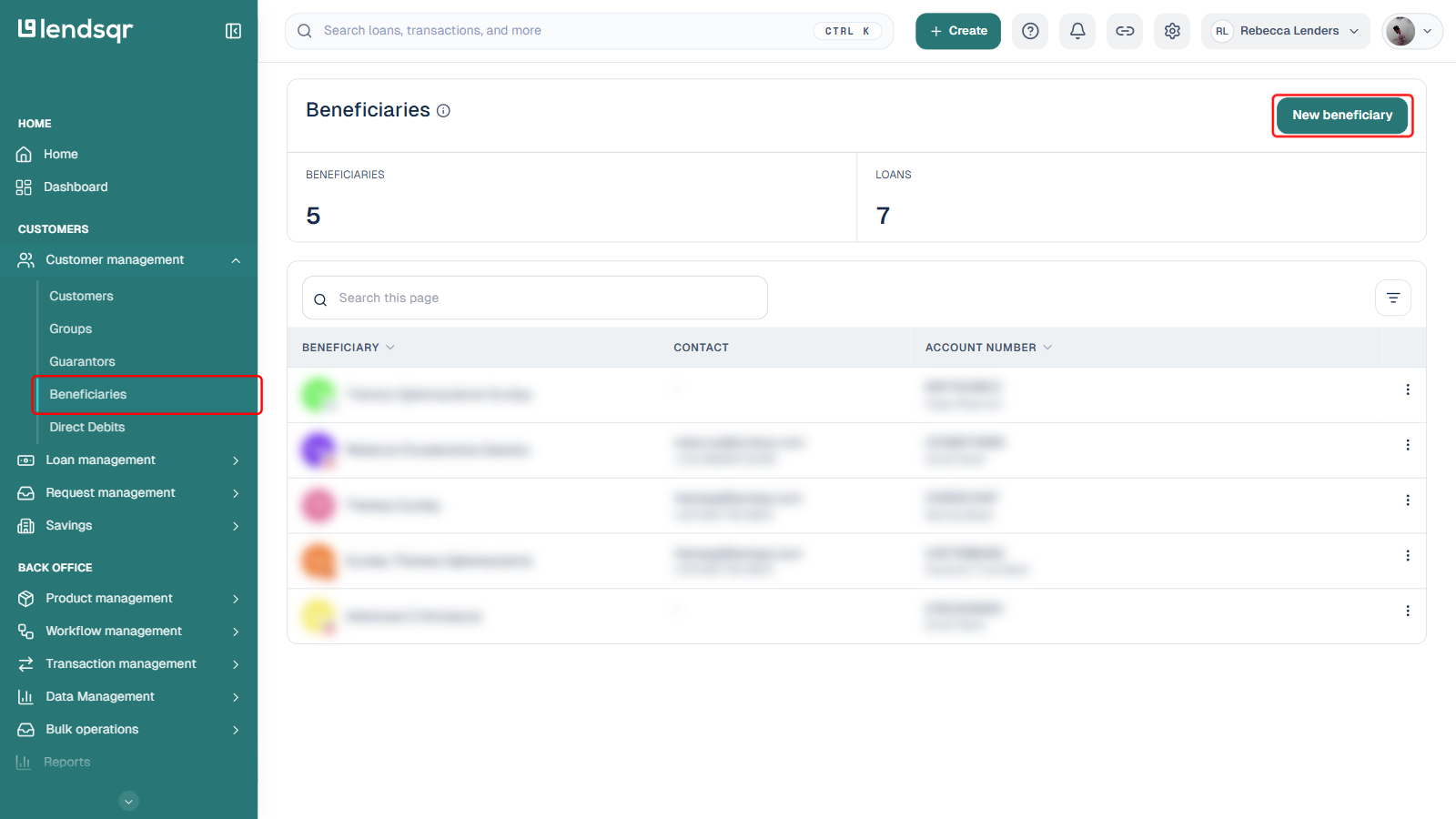
Log in to your Lendsqr admin console. On the left navigation pane, expand Customer management and select Beneficiaries. This opens the Beneficiaries page, where all existing beneficiaries are listed alongside a count of beneficiaries and the loans linked to them.
Click the New beneficiary button at the top right of the Beneficiaries page.
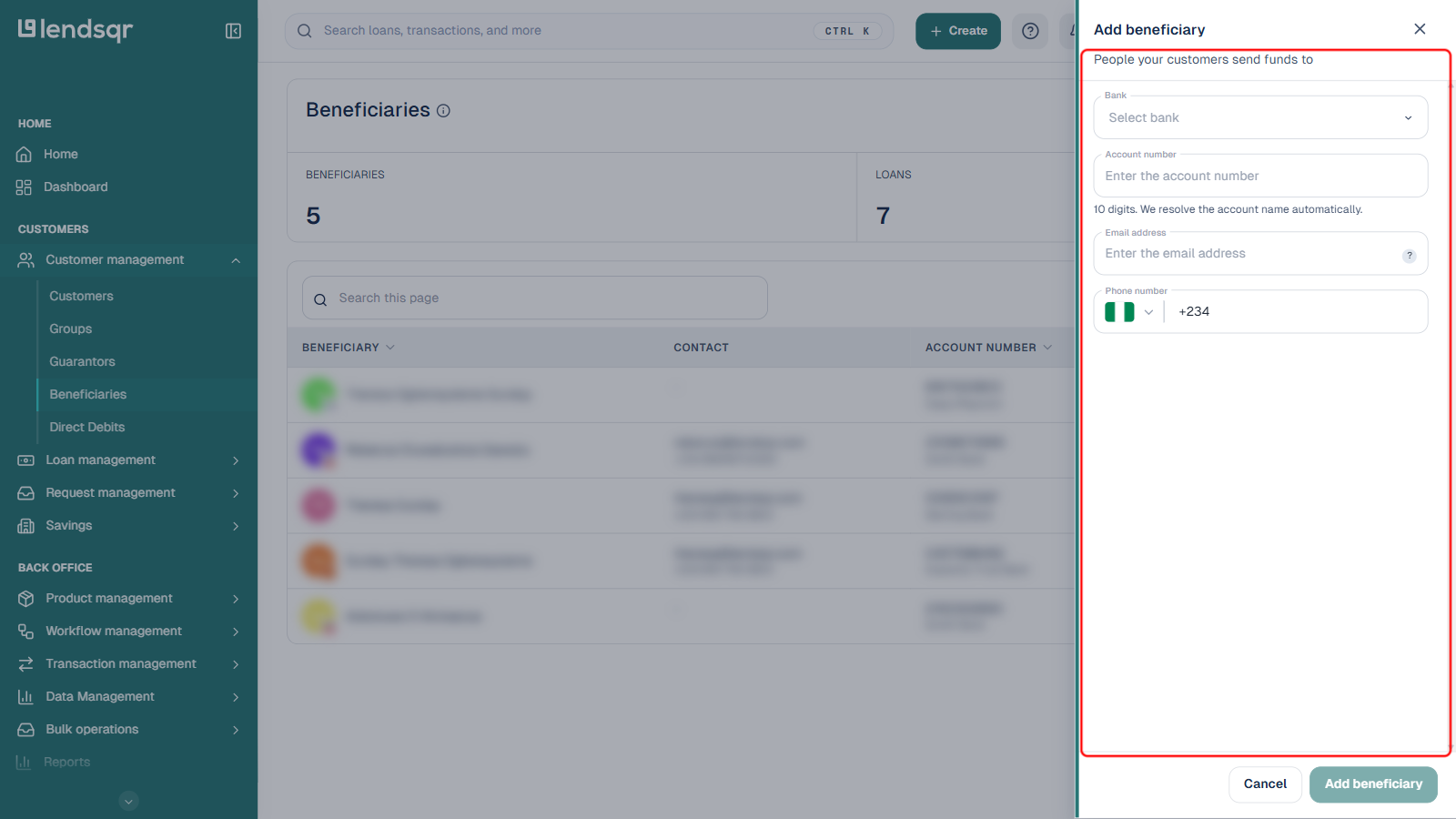
This opens an Add beneficiary side panel with a form for entering the new beneficiary’s details.
Select the beneficiary’s bank from the Bank dropdown.
Enter their 10-digit bank account number in the Account number field. Once a valid account number is entered, the system automatically verifies the details and resolves the account name, confirming that the account exists and belongs to the intended beneficiary.
Enter the beneficiary’s Email address and Phone number. These details are stored for contact and notification purposes.
Click Add beneficiary to save. This button stays disabled until the bank, account number, email, and phone fields are all filled in and the account has been verified.
Once saved, the beneficiary’s details, including their resolved account name, account number, bank name, email address, and phone number, are stored and visible on the Beneficiaries page.
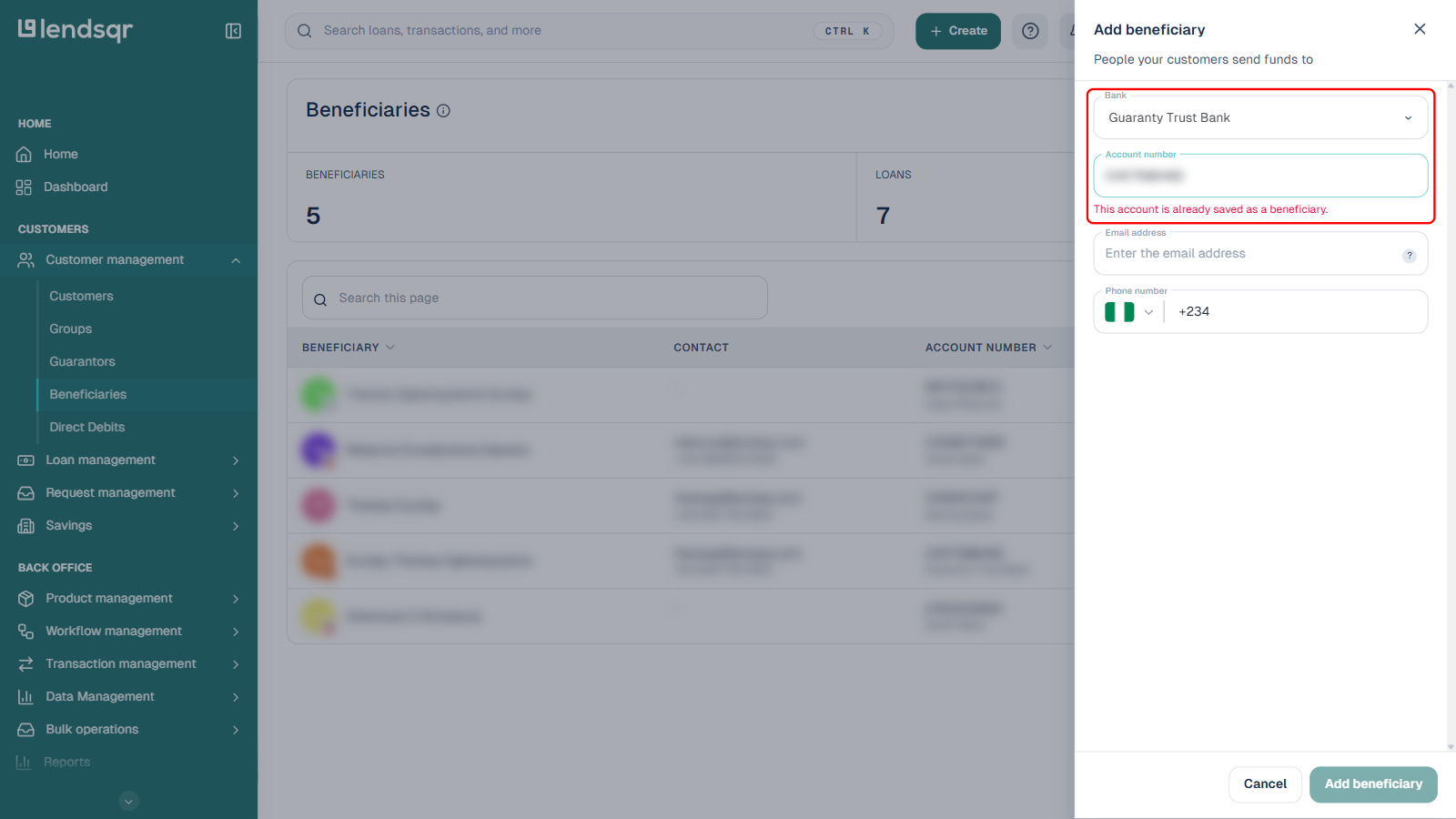
If you enter an account number that has already been saved as a beneficiary, the panel flags it immediately instead of letting you create a duplicate:
Selecting a beneficiary during loan disbursement
Once a beneficiary has been created and saved, it becomes available for selection when approving a third-party loan disbursement. The exact confirmation steps you see when clicking Approve on a loan request can vary. For example, a loan with outstanding risk or verification issues shows a warning screen first, requiring you to choose between contacting the customer, approving anyway, or declining, before you reach a third-party transfer step. For the full walkthrough of selecting a saved beneficiary during approval, see how to disburse a loan to a third party.
Direct disbursement. Funds reach the intended third party without delays or detours through the borrower’s account. This is particularly valuable in markets where lenders need to ensure that loan funds are used for specific, approved purposes.
Fraud prevention. By directing funds to a verified beneficiary account rather than the borrower, lenders reduce the risk of loan misuse. The bank verification step, and the duplicate-account check shown above, add extra layers of security when saving a beneficiary.
Clear audit trails. Every disbursement to a beneficiary is recorded in the system, giving your operations and compliance teams a clear and traceable record of where loan funds went. This is especially important for lenders operating in regulated markets where documentation of loan utilisation is required.
Improved borrower trust. For borrowers with specific financial goals such as paying school fees, purchasing equipment, or buying goods, knowing that the lender will handle the payment directly reduces the administrative burden on them and builds confidence in the lending process.
By setting up beneficiaries on Lendsqr, your lending operations remain transparent, organized, and aligned with regulatory best practices.