Access your Back Office at your fingertips.
Download the app now on Google Play Store.
Scan the QR code
You can also scan QR code with your phone to download the app.
Understanding how the USSD lending channel works on Lendsqr
Updated
On this page
Introduction
In recent years, digital lending has evolved significantly, driven by improvements in financial technology and growing demand for faster, more accessible financial services. However, one major challenge continues to exist across emerging markets, especially in regions with inconsistent internet access or low smartphone penetration: not every borrower can access mobile apps or web-based financial platforms.
For many customers, particularly in rural and underserved communities, feature phones remain the primary way they access digital services. This creates a gap for lenders who want to reach a broader market but are limited by internet-dependent channels.
This is where USSD lending becomes valuable.
USSD, which stands for Unstructured Supplementary Service Data, enables borrowers to access financial services directly from their mobile phones without requiring internet access or a smartphone. By dialing a simple shortcode, users can sign up, apply for loans, receive loan decisions, and repay loans using guided prompts.
For lenders, USSD opens up an entirely new customer segment, making it easier to expand financial inclusion, reach underserved borrowers, and scale lending operations beyond app and web users.
Recognizing the importance of this channel, Lendsqr has enhanced its infrastructure to support USSD-based lending, helping lenders provide seamless financial services to customers regardless of device type or internet availability.
In this guide, you will learn how USSD works on Lendsqr, what borrowers can do through the channel, the limitations lenders should be aware of, and how to configure USSD as a loan application channel.
USSD lending allows borrowers to access loan services by dialing a shortcode from their mobile phone.
Unlike mobile apps or websites, USSD sessions work entirely through GSM networks, meaning users do not need:
Internet access
Smartphones
Mobile applications
Data subscriptions
This makes USSD especially valuable in markets where internet accessibility remains inconsistent.
For example, a borrower who does not own a smartphone can still dial a lender’s USSD code, complete onboarding, apply for a nano loan, and receive a repayment mandate, all from a basic mobile phone.
For lenders, this significantly increases reach and accessibility. Instead of only serving digitally connected customers, lenders can extend services to:
Rural communities
Underbanked populations
Feature phone users
Low-data consumers
First-time borrowers
This helps bridge the digital divide while improving customer acquisition opportunities.
Why USSD matters for lenders
Many lenders focus heavily on mobile apps and websites, but doing so may unintentionally exclude a large segment of potential borrowers. In several African markets, smartphone ownership and stable internet access still vary significantly. USSD helps solve this challenge.
By introducing USSD as a lending channel, lenders can:
Reach customers without smartphones
Expand into underserved markets
Improve financial inclusion
Increase loan application volumes
Reduce dependency on app downloads
Serve low-data and offline customers
For lenders offering nano loans or short-term credit products, USSD can be particularly effective because borrowers often prioritize convenience and speed over advanced digital experiences.
For example, imagine a market trader who urgently needs a short-term working capital loan but does not have access to reliable internet. Rather than downloading an app, creating accounts, and navigating complicated onboarding, the borrower simply dials a shortcode and applies instantly.
This convenience can significantly improve loan accessibility and customer satisfaction.
Understanding how USSD works on Lendsqr
While USSD offers impressive accessibility, it also comes with limitations, especially around:
KYC requirements
Repayment mechanisms
Session restrictions
Cost management
To address these challenges, Lendsqr has strengthened its integrations to make USSD lending more practical and secure.
Below is an overview of what borrowers can do through the Lendsqr USSD channel.
Onboarding and identity verification
One of the biggest concerns with USSD lending is customer verification. Unlike web or mobile apps where borrowers can upload documents, selfies, and additional information, USSD sessions have limited functionality. To solve this challenge, Lendsqr enables a simplified onboarding and KYC process.
When new users dial the lender’s USSD code, they can sign up directly through guided prompts.
During onboarding:
The borrower’s phone number is retrieved
Their NIN is fetched using the phone number
The NIN is verified against the borrower’s BVN
This verification process helps confirm that:
The person dialing the USSD code is legitimate
The BVN belongs to the actual borrower
Identity fraud risks are reduced
For lenders, this creates an additional layer of confidence during borrower onboarding. Although USSD KYC may not be as extensive as app-based onboarding, it provides an effective way to support identity validation in low-tech environments.
Loan application through USSD
After onboarding, borrowers can begin applying for loans. Users are shown a list of loan products that have been configured by the lender for USSD availability. By following the prompts on their phone screen, borrowers can:
Browse eligible loan products
Select a preferred loan option
Submit loan requests
Receive loan offers
The process is intentionally designed to be simple because USSD interactions rely on short text-based sessions. However, it is important to understand that USSD borrowers are not exempt from your lending rules. Just like web and mobile borrowers, they still pass through your configured eligibility checks.
These checks may include:
Karma verification
Credit bureau checks
Loci verification
Borrower scoring
Internal credit risk rule rules
This means lenders maintain control over risk management regardless of application channel. For example, if your lending policy requires a borrower to meet certain scoring thresholds or pass fraud checks, those rules still apply to USSD applicants. This helps lenders maintain portfolio quality while scaling access.
Repayments are another area where USSD lending often becomes challenging. Since USSD users may not have access to debit card linking or app wallets, repayment collection can become difficult if not handled properly. To address this, Lendsqr uses direct debit mandates. Upon sign-up, borrowers are prompted to set up a repayment mandate that will be attached to their loans.
This allows lenders to collect repayments automatically without requiring borrowers to:
Link debit cards
Log into mobile apps
Complete manual repayment actions
For borrowers, this creates a smoother repayment experience. For lenders, it improves repayment collection efficiency and reduces friction. This also means users can apply for loans and repay successfully without needing traditional app-based payment flows.
Cross-channel accessibility for borrowers
One important thing to note is that USSD users are not restricted to only the USSD channel. Borrowers who sign up through USSD can still access:
Your web app
Your mobile app
Similarly, borrowers who initially signed up through web or mobile channels can also access services through USSD. This flexibility creates a more connected borrower experience.
For example, a customer may apply for a loan through USSD while traveling without internet, then later manage repayments or update information through the web app.
How to configure USSD as a lending channel
Before borrowers can apply for loans through USSD, lenders must enable USSD as a channel within their loan product settings. Follow the steps below.
Step 1: Open the loan product
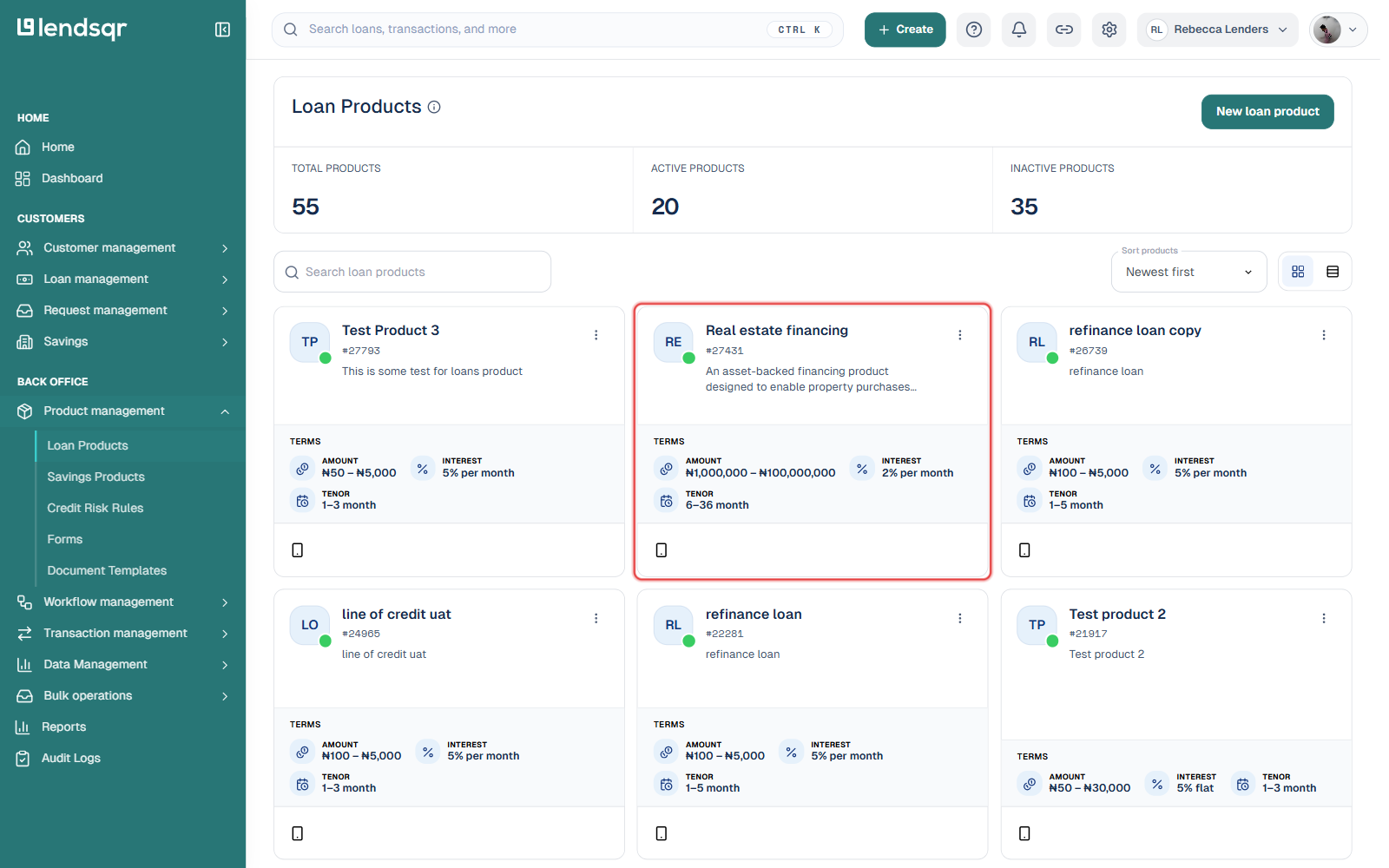
Log in to your Lendsqr admin console. In the side navigation, expand Product management and click Loan Products. This lists every loan product in your organization, along with total, active, and inactive product counts.
If you are creating a new product, click New loan product and complete the setup process. If the product already exists, click its card to open it. Channel configuration happens at the product level, so you’ll be working from an individual product’s page from here on.
Step 2: Open the Product settings tab
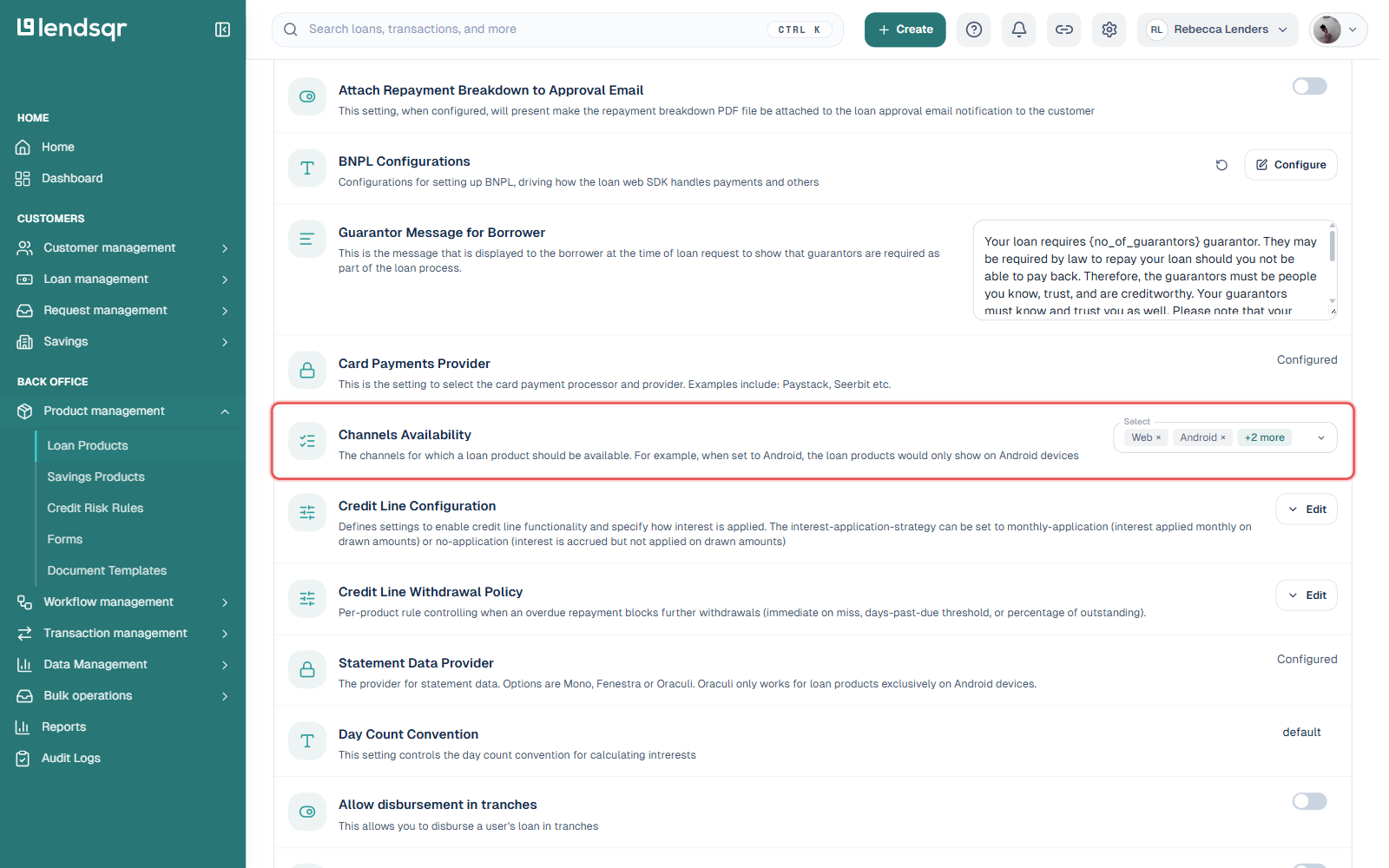
On the product’s page, switch from the Product details tab to the Product settings tab. This tab lists every configurable setting for the product, including form builders, toggles, and channel controls. Scroll down (or use the search box at the top of the tab) until you reach Channels Availability.
This setting controls which channels, such as Web, Android, iOS, Mobile, or USSD, the product is available on. If a channel isn’t selected here, borrowers on that channel won’t see the product at all.
Step 3: Select USSD and confirm it saved
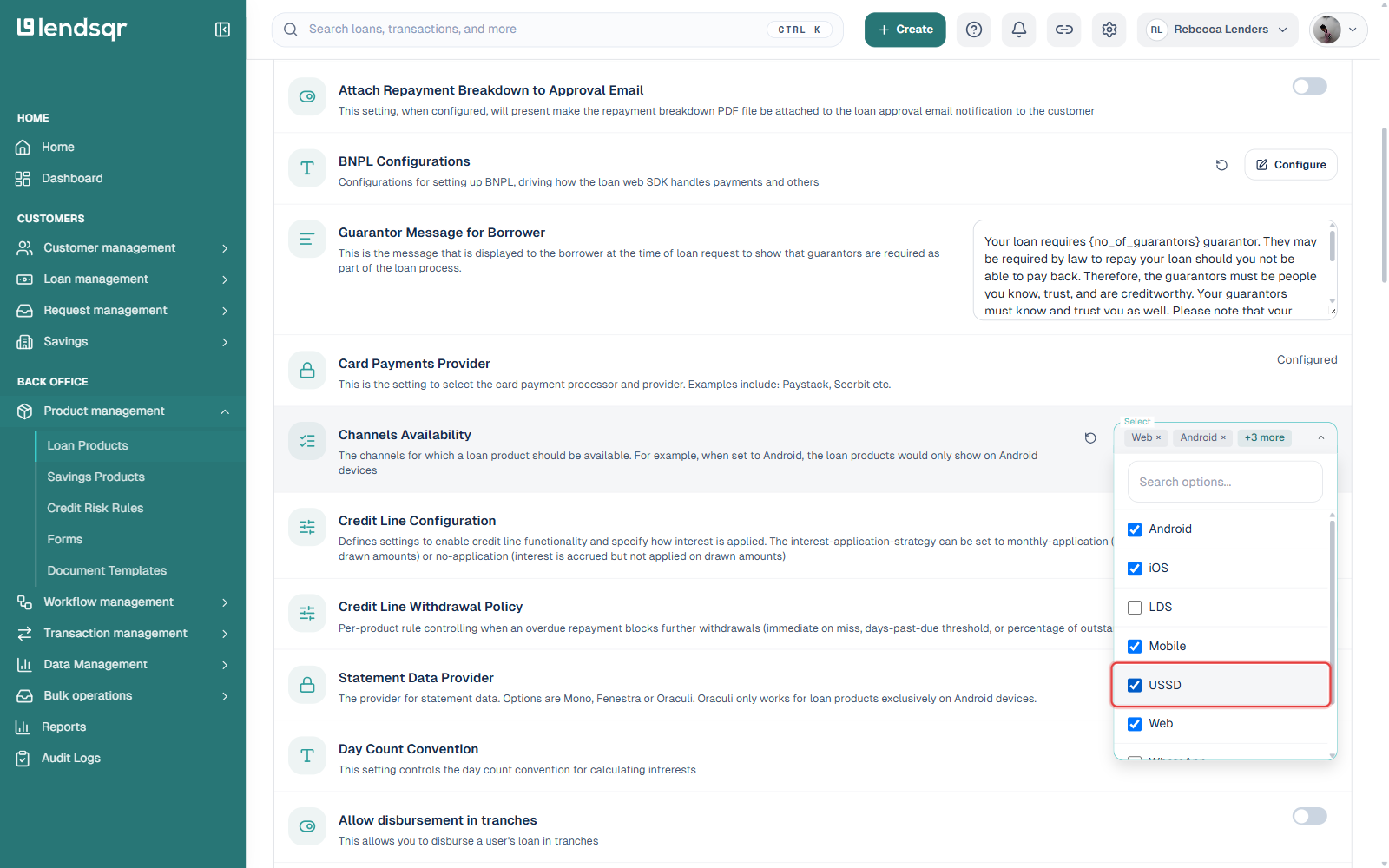
Click the Select field next to Channels Availability to open the channel list, then check the box next to USSD. The change saves automatically. A small undo icon briefly appears next to the field, letting you revert the change if you selected the wrong channel by mistake.
Click anywhere outside the dropdown to close it. The field now reflects the updated channel count, and USSD applicants can immediately see this loan product when they dial your USSD shortcode.
Relevant permissions
To configure USSD settings, you may need:
Access to product management
Permission to modify loan products
Admin or super admin access
If you are unable to edit channel settings, contact your organization administrator.
Best practices
USSD works best for straightforward lending products such as nano loans, salary advances, and short-term emergency credit. Complex application journeys may create friction during USSD sessions.
Because USSD sessions are time-sensitive, overly complicated requirements may increase borrower drop-off rates. Maintain strong risk controls while keeping the experience simple.
Track repayment behavior, approval rates, and default trends among USSD borrowers separately to better understand channel performance.
Ensure borrowers understand how direct debit mandates work to reduce repayment disputes.
Frequently asked questions
Can borrowers apply for loans without internet access?
Yes. USSD works through mobile network infrastructure and does not require internet access.
Do borrowers need smartphones to use USSD lending?
No. Borrowers can access USSD lending using feature phones or smartphones.
Will USSD borrowers still go through eligibility checks?
Yes. Borrowers still pass through configured credit risk rule and validation checks.
How are repayments collected for USSD loans?
Repayments are handled through direct debit mandates configured during onboarding.
Can USSD users later use the web or mobile app?
Yes. Borrowers can access multiple channels after signing up.