Access your Back Office at your fingertips.
Download the app now on Google Play Store.
Scan the QR code
You can also scan QR code with your phone to download the app.
Identifying bad actors through blacklisting on Lendsqr’s Karma database
Updated
On this page
Identifying bad actors using Lendsqr Karma
In lending, one of the most critical responsibilities is ensuring that credit is extended to the right customers. While many borrowers are genuine, some intentionally default on loans, commit fraud, or repeatedly exploit lending systems. These individuals are referred to as bad actors.
Lendsqr’s Karma system is designed to help lenders identify and manage such individuals effectively. By leveraging shared data across the ecosystem, Karma enables lenders to detect high-risk borrowers early and prevent avoidable losses.
This guide explains what bad actors are, why identifying them is important, how to use the Karma feature within your dashboard, and the governance considerations required when adding or searching records.
What are bad actors
Bad actors are individuals with a history of fraudulent activity, loan defaults, or behavior indicating a high likelihood of non-repayment.
These may include:
Borrowers who deliberately take loans without the intention to repay
Individuals who use false or inconsistent identity information
Customers who repeatedly default across multiple lenders
Users who attempt to exploit system loopholes
Bad actors are typically flagged and recorded in shared systems like Karma, which serves as Lendsqr’s blacklist database. This allows lenders to identify high-risk individuals across different platforms.
Why identifying bad actors is important
Identifying bad actors early helps protect your lending business from financial losses and operational inefficiencies.
When bad actors are not properly filtered:
Default rates increase
Recovery costs rise
Operational resources are wasted on high-risk users
Overall portfolio quality declines
By using tools like Karma, lenders can make more informed decisions, reduce exposure to risky borrowers, and maintain a healthier loan portfolio.
Understanding the karma (blacklist) feature in lendsqr
Karma is a system-level feature that allows lenders to record and access data about bad actors.
It functions as both:
A blacklist database where lenders can report verified risky users
A search system that allows lenders to check if a borrower has been flagged by other organizations
This shared intelligence strengthens fraud prevention and helps lenders make faster, more accurate decisions.
Identity types explained
When adding or searching for a Karma record, you will be required to provide an identity type. These identifiers help uniquely match individuals across systems.
Common identity types include:
BVN (Bank Verification Number): A unique identifier issued by Nigerian banks used to verify identity across financial institutions
Phone number: Often used as a primary contact and identity signal
Email address: Useful for detecting repeat usage across platforms
IP address: Helps identify suspicious patterns or device-level activity
Always ensure that identity data is accurate and verified before use.
Access and permission requirements
Not all users within your organization may have permission to add or manage Karma entries.
You should confirm with a super admin or system administrator which roles are authorized to:
Add a user to Karma
Search external Karma records
Edit or review existing entries
This ensures proper governance and prevents misuse of the blacklist system.
All actions related to Karma entries should be traceable through internal audit logs, allowing organizations to review who added or modified a record and when.
Step by step guide to adding a customer to karma
Adding a Karma entry allows your organization to flag a user as a bad actor based on verified behavior such as fraud or loan default.
Step 1: Open the Blacklist Customer option from the customer profile
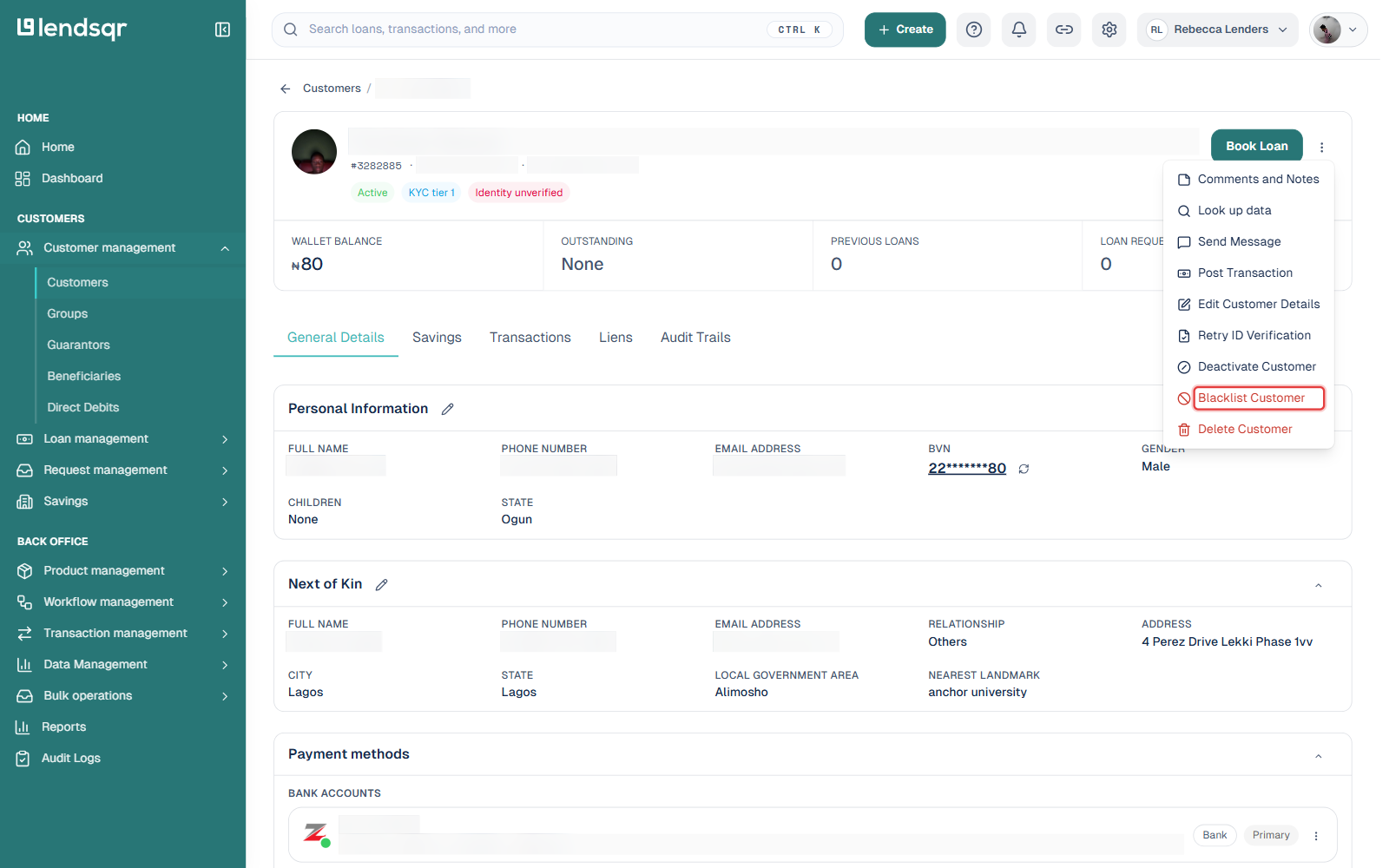
Navigate to Customer management > Customers and select the specific customer you want to blacklist. On the customer’s profile, click the three-dot menu next to the Book Loan button, then select Blacklist Customer from the dropdown.
Step 2: Confirm the customer’s identity details
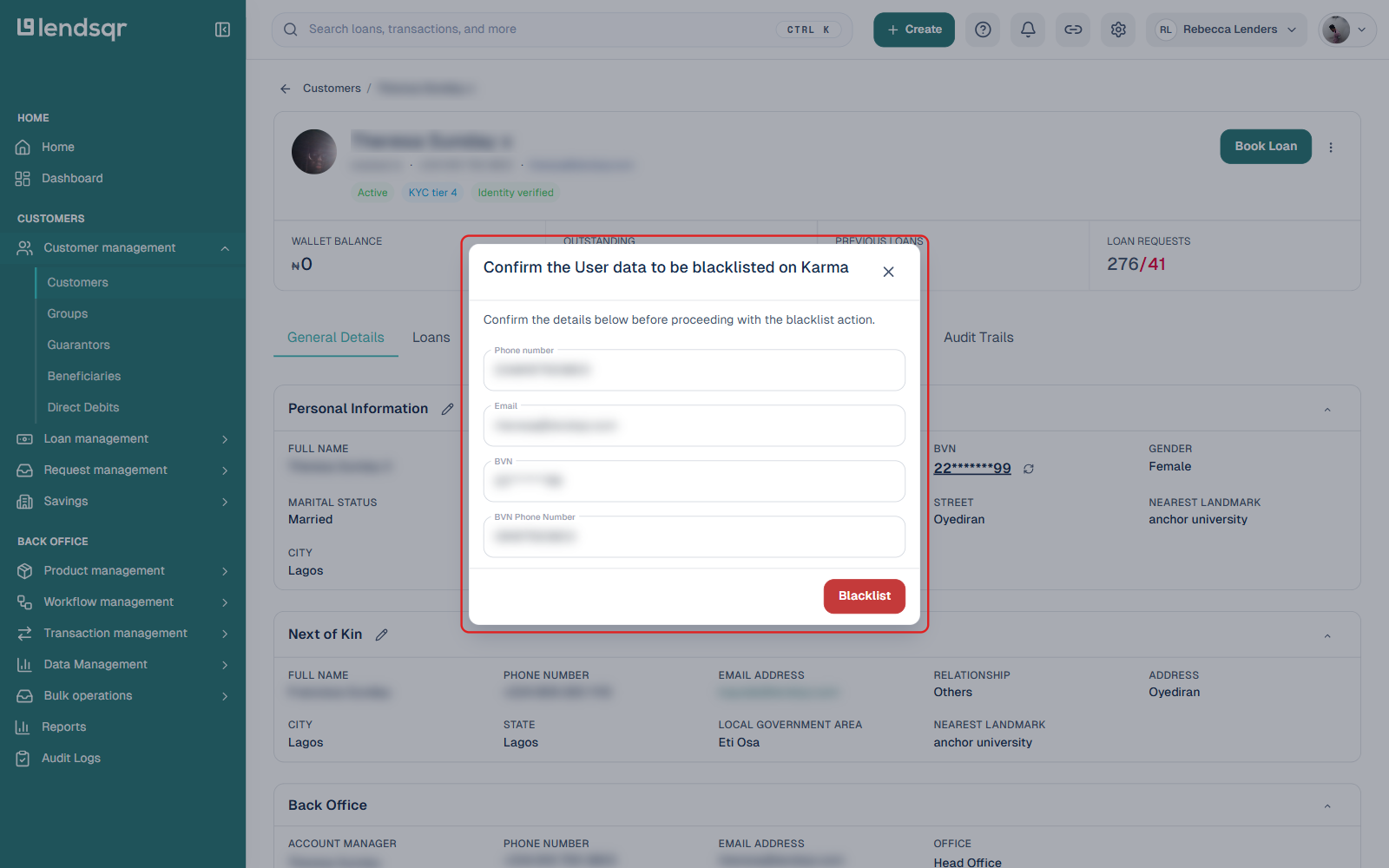
A modal titled “Confirm the User data to be blacklisted on Karma” opens, pre-filled with the identifiers already on the customer’s profile: Phone number, Email, BVN, and BVN Phone Number. Review these for accuracy before proceeding, since this is the data that gets recorded against the customer on Karma.
Step 3: Submit
Click Blacklist to submit. Unlike a manual identity-type or reason-code entry, this action uses the identifiers already recorded on the customer’s own profile, so there is no separate step to pick an identity type or type in supporting notes here — keep any reason or evidence for the blacklist decision in your own internal records instead.
Checking Karma before onboarding or lending
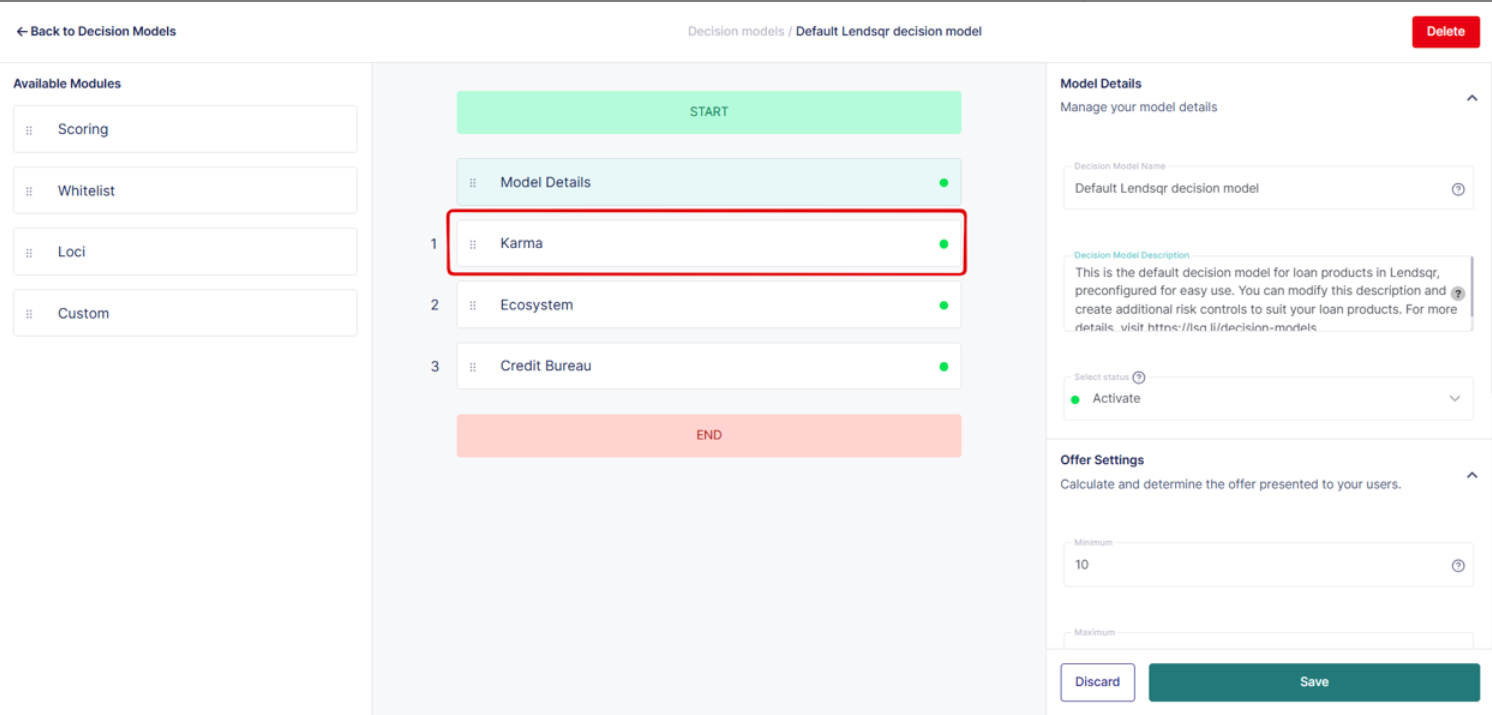
Rather than a manual search page, Karma checks in the admin console are mostly automatic and configurable. Under Settings > System Configuration > Underwriting and Credit Risk, you can enable Check Karma Before Transactions, Check Karma for Customer Auth, and Check Karma for Admin Auth to automatically block flagged identities from performing outbound transactions or signing up and signing in, without needing to look anyone up by hand.
For an on-demand lookup of a specific identity, use the Karma Blacklist Lookup endpoint through Adjutor, Lendsqr’s API platform. Each successful lookup is a paid call charged to your Adjutor service wallet, billed per query rather than a flat subscription.
Visibility and data sharing considerations
When you add a Karma entry, it contributes to a shared ecosystem of risk data.
However, visibility of this data may depend on system configurations and permissions. Other lenders may be able to see that an identity has been flagged, along with limited contextual information.
You should ensure that any data shared complies with applicable data protection and privacy regulations. Only verified and necessary information should be recorded.
Real-life scenarios
A borrower applies for a loan using a phone number that has previously been reported for fraud by another lender. When you search this number in Karma, you find a match and avoid approving a high-risk loan.
Another example is a customer who defaulted on a loan within your organization. By adding them to Karma, you ensure that other lenders are aware of this behavior, contributing to a safer lending ecosystem.
Editing, removal, and appeals
There may be situations where a Karma entry needs to be reviewed, updated, or removed.
If a borrower disputes a Karma record, you should:
Review internal records and supporting evidence
Confirm whether the entry was accurate at the time of submission
Update or remove the entry if it is found to be incorrect
Organizations should define internal workflows for handling such appeals to ensure fairness and accuracy.
Common errors and how to fix them
One common issue is entering incorrect identity details when adding a Karma entry. This reduces the effectiveness of the record. Always verify identity data before submission.
Another issue is selecting the wrong identity type. Ensure that the identity type matches the data provided.
Users may also attempt to search external Karma records without sufficient funds. Ensure your virtual account is funded before performing paid searches.
Failure to include supporting context such as amount or date can reduce the usefulness of a Karma entry. Always provide complete and accurate information.
Best practices for using karma
Only add Karma entries for verified cases of fraud or default. Avoid adding users based on assumptions or incomplete evidence.
Use multiple identity types where possible to improve traceability across systems.
Regularly search Karma before approving loans to identify risks early.
Maintain proper internal documentation for each entry to support audits and dispute resolution.
Ensure that all usage of Karma complies with data protection and regulatory requirements.
Conclusion
Identifying bad actors is a critical part of building a sustainable lending business. Lendsqr’s Karma feature provides a structured and collaborative way to detect, record, and share information about high-risk borrowers.
By understanding how to correctly add and search Karma entries, implementing proper governance, and following best practices, lenders can significantly reduce exposure to fraud and defaults.
Using Karma effectively not only protects your organization but also contributes to a more secure and reliable lending ecosystem overall.