Access your Back Office at your fingertips.
Download the app now on Google Play Store.
Scan the QR code
You can also scan QR code with your phone to download the app.
Adding custom images to loan or savings products
Updated
On this page
When borrowers open your lending app and see a list of loan or savings products, what helps them choose? In most cases, it is not just the interest rate or the loan limit. It is also how the product looks and feels on the screen.
A product with a clear, relevant image instantly communicates what it is for. A product with no image looks like a placeholder. And when borrowers cannot easily tell your products apart, they hesitate, get confused, or simply abandon the process entirely.
Lendsqr lets you add custom images to each of your loan and savings products directly from the admin console. As a result, you can give every product a distinct visual identity that helps borrowers make faster, more confident decisions. This guide explains why that matters and shows you exactly how to set it up.
Why visual differentiation matters for your loan products
Think about a lender that offers three different loan products: a quick personal loan, a payroll-backed loan, and an SME financing option. Without images, these products look nearly identical in the borrower’s app. The names are the only thing separating them, and borrowers have to read carefully to understand which one applies to them.
Now consider the same three products, each with a distinct image that reflects its purpose. A personal loan might show an everyday purchase. A payroll loan might feature an office setting. An SME product might use a market or business image. In that case, borrowers understand instantly, even before reading a single word of description.
Beyond clarity, product images also reinforce your brand. They signal that your platform is polished and professional. For borrowers who are evaluating multiple lending options, that first visual impression can be the deciding factor. In addition, savings products with appealing images have been shown to perform better in terms of sign-ups, because they make the act of saving feel tangible and rewarding.
In short, custom images are a simple but powerful tool for improving borrower engagement across your entire product catalogue.
How Lendsqr supports product image customization
Lendsqr gives every lender the ability to assign a unique image to each loan or savings product from within the admin console. This means that whenever a borrower views your product listing inside your web app or mobile app, they see the image you have chosen alongside the product name and details.
This feature fits into the broader set of branding and customization tools that Lendsqr provides. Alongside options like customizing your web app and setting up your microsite, product images help you build a cohesive, trustworthy lending experience from the very first screen a borrower sees.
Importantly, the process is straightforward. You do not need a designer or a developer to complete it. All you need is a suitable image and access to your admin console.
How to add a custom image to a loan or savings product
The steps below apply to both loan products and savings products. The process is the same for each.
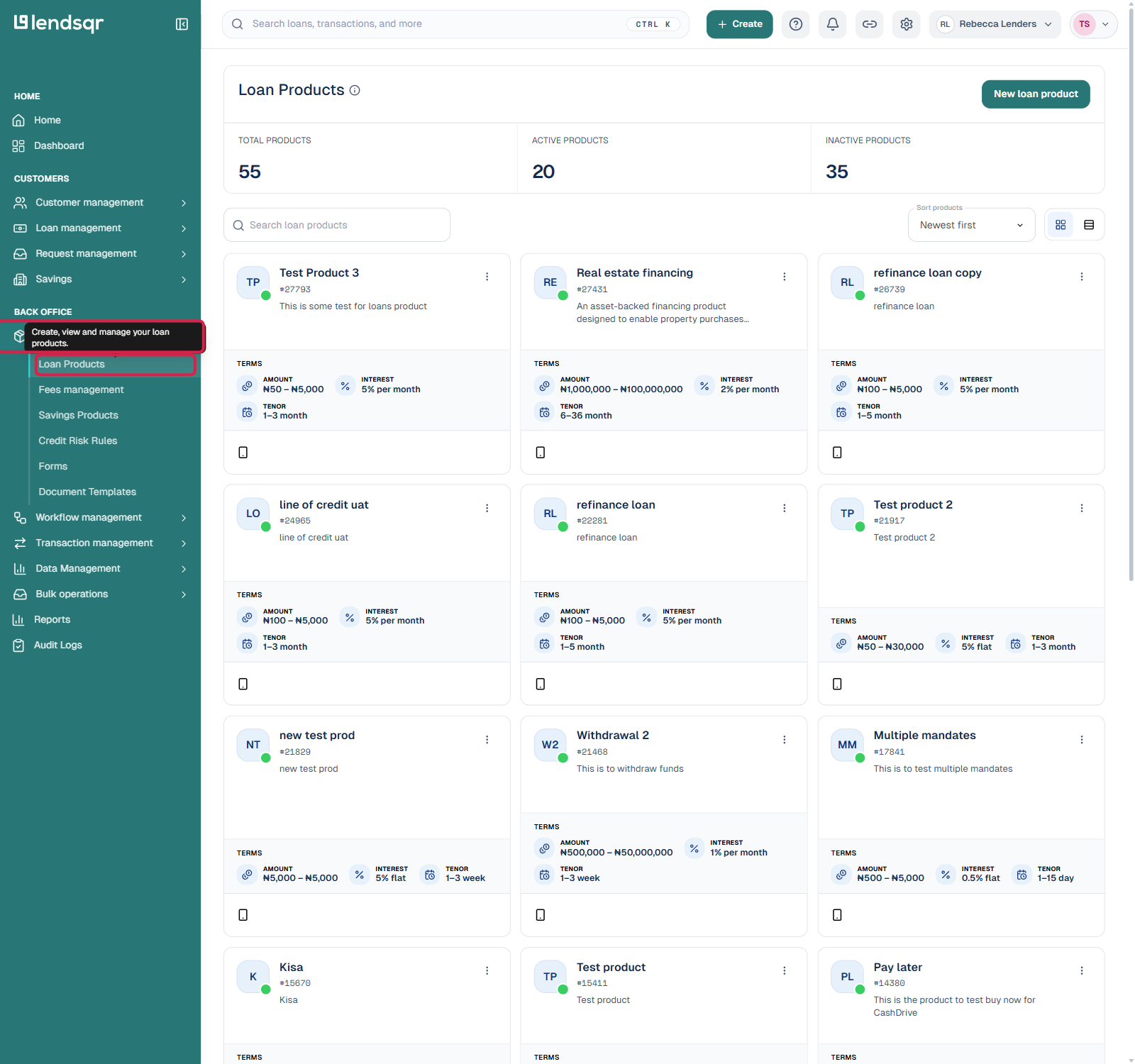
Log in to your Lendsqr Admin Console. From the sidebar, click “Product management”, then select “Loan Products” or “Savings Products” depending on which kind of product you’re customizing. You will see a list of all the products you have configured on your platform.
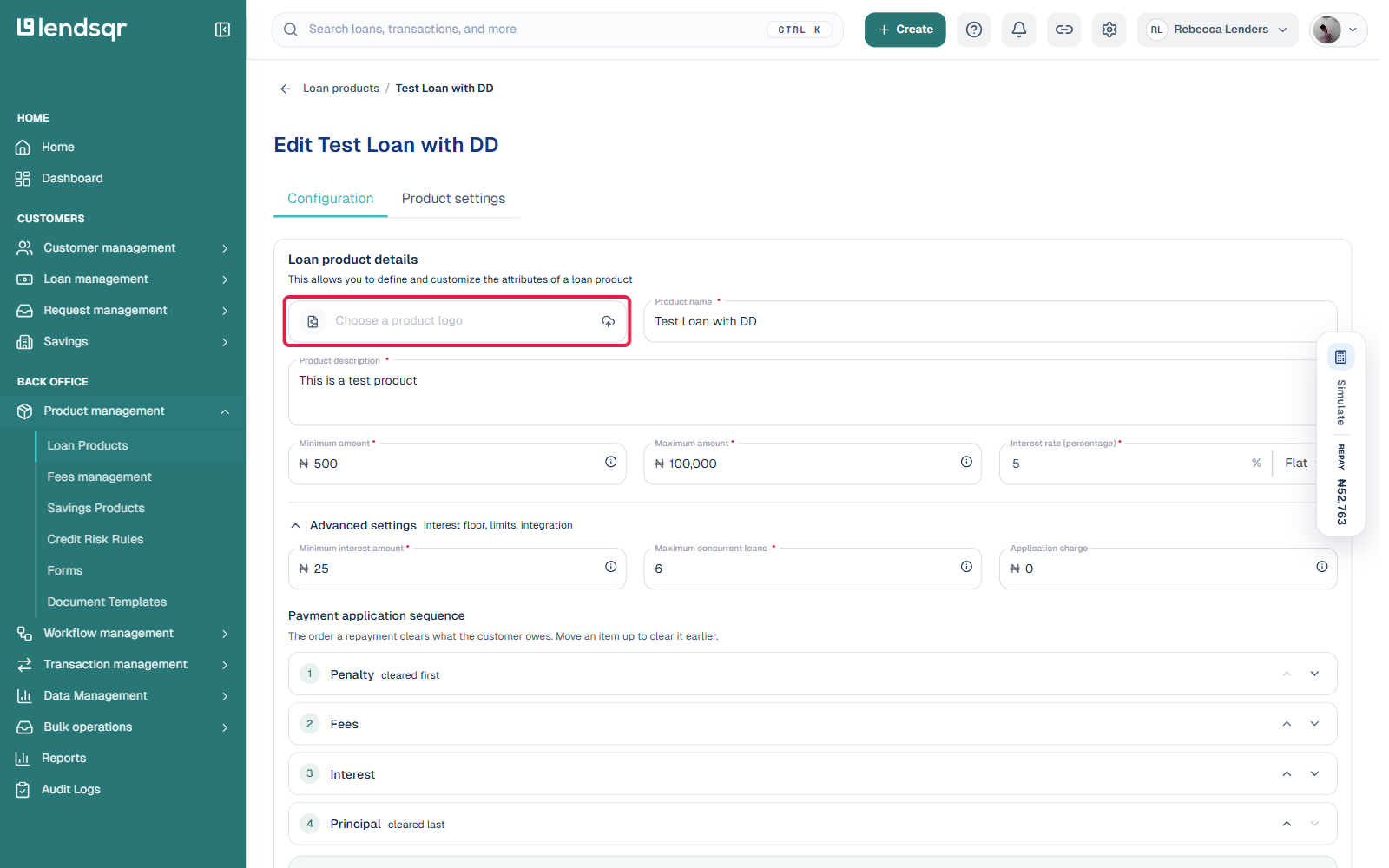
Find the specific product you want to update and click its card to open it, then click “Edit”.
On the Configuration tab, look for “Choose a product logo” at the top of the Loan product details section. Click it and select the image you want to use from your device. Make sure the image is high quality and relevant to the product you are customizing.
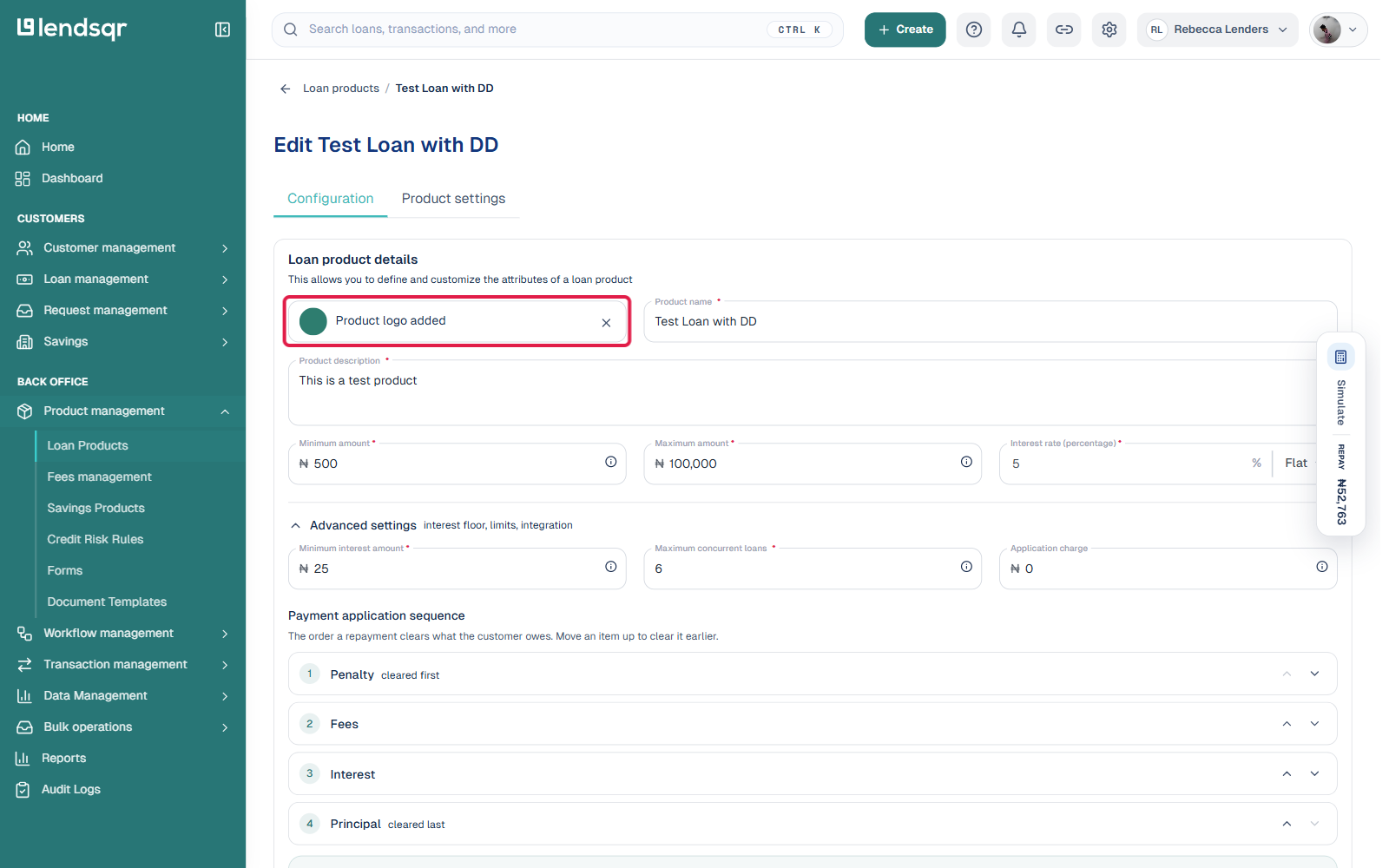
Once the upload completes, the field switches to a “Product logo added” confirmation with a small thumbnail preview. Take a moment to confirm the image looks correct. If you picked the wrong file, click the × next to the confirmation to remove it and upload again.
Finally, scroll down and click Save to apply your changes. Your product will now display the image you selected whenever borrowers view it inside your app.
Tips for choosing the right product images
Uploading an image is simple, but selecting the right one requires a bit of consideration. Here are a few practical guidelines to keep in mind:
Make sure the image is relevant to what the product is for. A savings product aimed at school fees, for example, could use an image related to education. A working capital loan for small businesses might use an image of a market stall or a storefront. Relevance helps borrowers connect immediately with the right product.
Use high-quality images. Blurry or pixelated images can make your platform look unfinished, which undermines the trust you are trying to build. Clear, well-lit images create a much stronger impression.
Keep visual consistency across your products. If all your images follow a similar style or color palette, your product catalogue will look cohesive rather than random. This reinforces your brand identity across the borrower experience.
Update your images periodically as your product offerings evolve. If you redesign a product or launch a seasonal campaign, refreshing the image is a quick way to signal that your platform is active and current.
Once you save your changes, every borrower who opens your app and navigates to your product listings will see the image you configured. For lenders with multiple products, this means each offering now has its own visual identity rather than just a text label.