Access your Back Office at your fingertips.
Download the app now on Google Play Store.
Scan the QR code
You can also scan QR code with your phone to download the app.
Downloading your disbursement transaction statement
Updated
On this page
Introduction
Your disbursement account is the financial engine behind every loan your platform processes. Every time a borrower receives a loan, funds leave this account. Every time a borrower repays, funds return to it. Over time, the volume of these transactions grows quickly and keeping track of them manually becomes impossible.
The disbursement transaction statement solves this. It gives you a complete, downloadable record of every inflow and outflow in your disbursement account over any period you choose. You can use it to reconcile your books, respond to audit requests, investigate specific transactions, or simply monitor the health of your lending operation at any point in time.
This guide explains what the disbursement transaction statement contains, how to download it, and what each term in the statement means.
What is a disbursement transaction statement?
A disbursement transaction statement is a summary of all financial activity in your disbursement account over a selected period. It records every transaction chronologically and shows how each one affected your account balance.
The statement includes transaction dates, narrations, references, credit amounts, debit amounts, and running account balances. It also shows your opening balance at the start of the period and your closing balance at the end, giving you a complete picture of how your funds moved during that time.
When you sign up on Lendsqr, the platform automatically creates a disbursement account for you. This account manages all loan-related inflows and outflows for your organization. The disbursement transactions page is the hub where all of this activity is recorded and where you can access and download your statement at any time.
When to download your disbursement transaction statement
The statement is useful in several practical situations.
At the end of each month, download the statement to reconcile your disbursement account against your internal financial records. This helps you catch discrepancies early and maintain accurate books.
When a borrower or team member disputes a transaction, download the statement for the relevant period and use the transaction reference to locate and verify the specific record in question.
During an audit or regulatory review, the statement provides a formal, exportable record of your lending activity that you can share with auditors or compliance officers.
When monitoring portfolio performance, the statement gives you a clear view of total disbursements and repayments over any period, supporting your reporting and analysis processes.
How to download the disbursement transaction statement
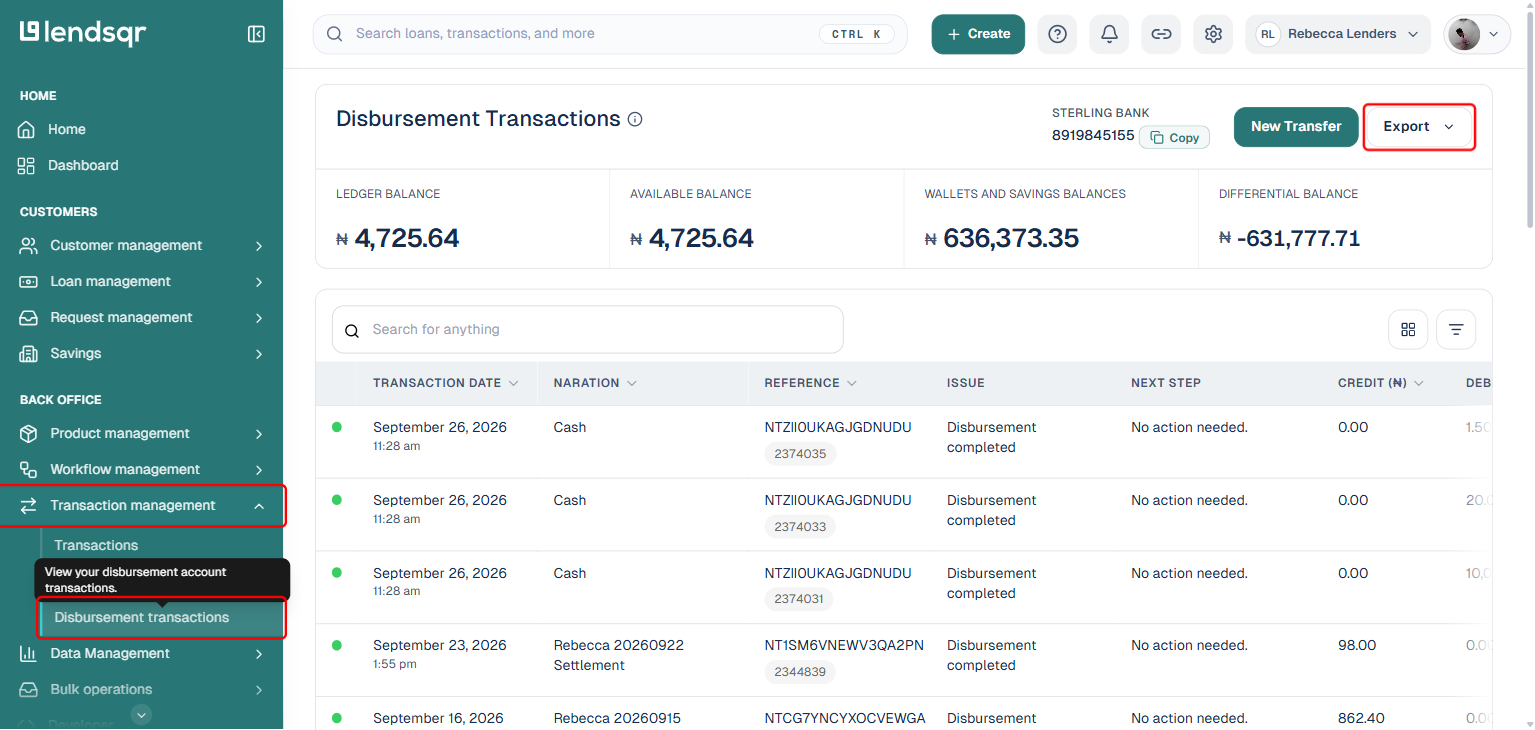
Navigate to the “Transaction Management” tab in the side navigation menu
From the dropdown menu, click on Disbursement Transactions
Once the disbursement transaction page is open, click on export at the top right corner of your screen
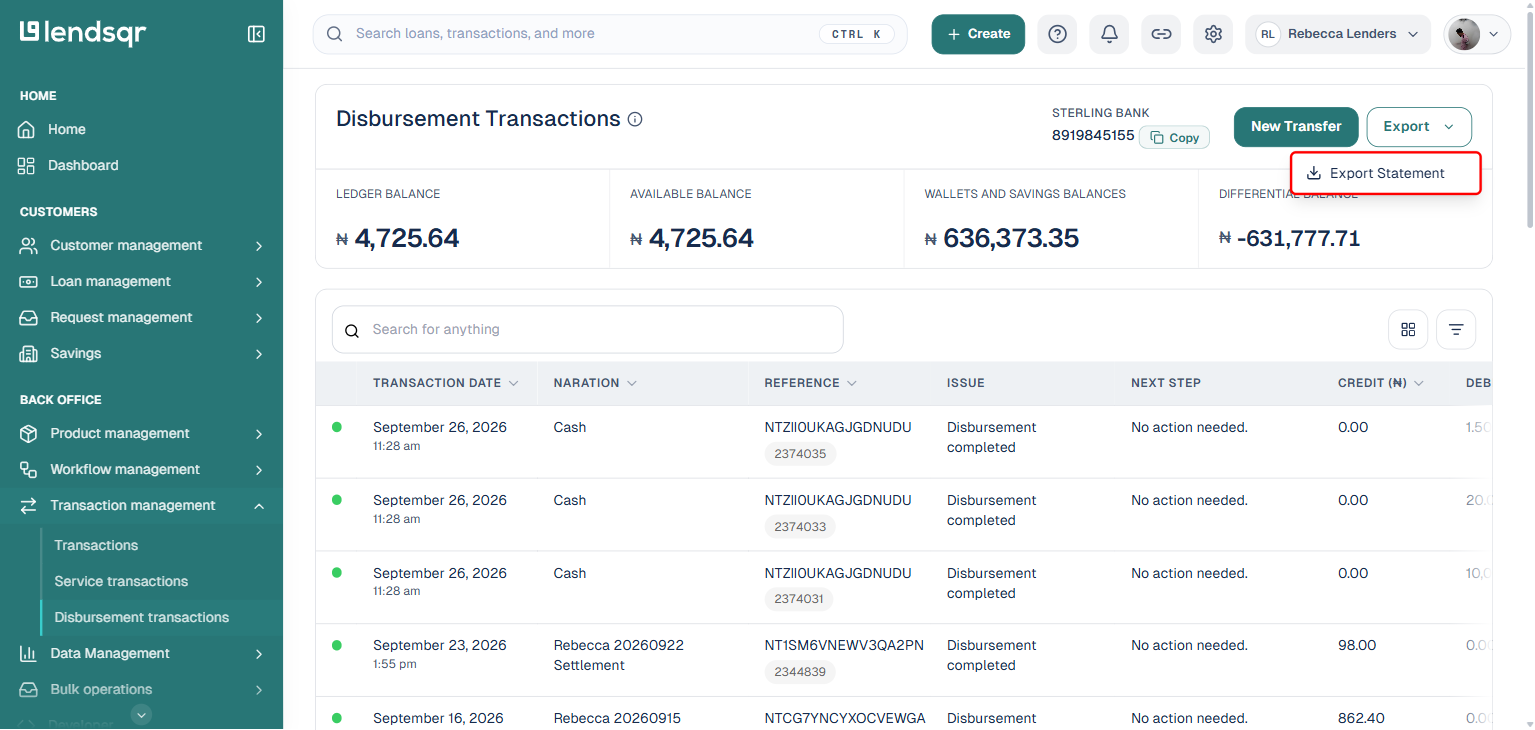
You would be given an option to Export statement
Click on Export statement
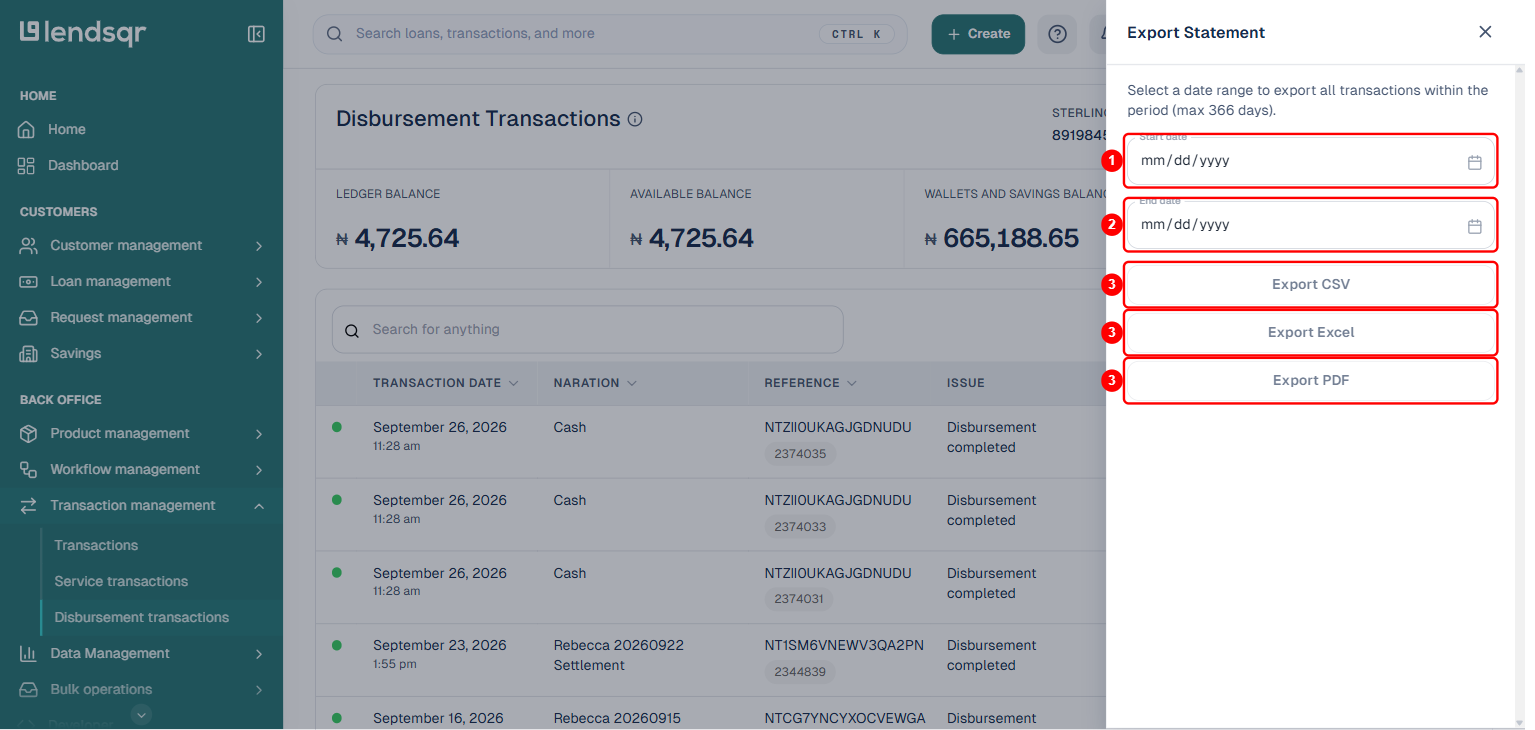
A modal with all of the information needed to successfully export your data will be shown to you.
Enter the Start Date (1) and End Date (2) for the transactions you want to export.
Choose your preferred format (3): CSV, Excel, or PDF.
Click the export button (3) for the chosen format. The file will be sent to your email.
The Disbursement Transaction Statement provides a detailed record of your transactions, including transaction dates, narrations, references, the credit and debit amounts, and account balances. It also outlines all inflows and outflows, presenting the final balance in your account as of the time of download.
Choosing the right export format
Each format serves a different purpose. Choose based on how you plan to use the statement.
CSV is best for importing into accounting software or running custom analysis in tools like Google Sheets. The raw data is easy to manipulate and filter.
Excel is best when you want to review and format the data directly in a spreadsheet with built-in tools for sorting, filtering, and basic calculations.
PDF is best for sharing with auditors, compliance officers, or external stakeholders who need a clean, non-editable document.
Understanding the terms in your statement
The disbursement transaction statement uses specific financial terms. Understanding each one helps you read and interpret the statement accurately.
Opening balance
The opening balance is the amount available in your disbursement account at the start of the selected period, specifically the day before your chosen start date. It is the baseline from which all activity during the period is measured. Every subsequent transaction in the statement builds on or reduces this figure.
Closing balance
The closing balance is the amount remaining in your disbursement account at the end of the selected period after all transactions have been processed. It reflects the final state of your account as of the last transaction in the statement. If your closing balance is lower than your opening balance, your disbursements exceeded your repayments during the period.
Inflows
Inflows are transactions where funds enter your disbursement account. The most common inflow on a lending platform is loan repayments from borrowers. When a borrower repays their loan, the funds return to your disbursement account and register as an inflow.
Outflows
Outflows are transactions where funds leave your disbursement account. Loan disbursements to borrowers are the primary outflow on a lending platform. Every time you disburse a loan, the amount leaves your account and registers as an outflow.
Credits
Credits are transactions that increase your disbursement account balance. In the context of your statement, credits correspond to inflows such as borrower repayments. Each credit entry increases the running balance in the statement.
Debits
Debits are transactions that decrease your disbursement account balance. In the context of your statement, debits correspond to outflows such as loan disbursements. Each debit entry reduces the running balance in the statement.
Transaction reference
A transaction reference is a unique identifier assigned to each transaction in your disbursement account. It functions as a tracking code that allows you and Lendsqr’s payment infrastructure to locate and verify the details of any specific transaction. Use the transaction reference when investigating a disputed payment or escalating a transaction issue to support.
Transaction date
The transaction date is the specific day on which a transaction was processed. Your statement lists transactions chronologically by date, allowing you to trace the history of your account activity and see exactly how your balance changed over time.