Access your Back Office at your fingertips.
Download the app now on Google Play Store.
Scan the QR code
You can also scan QR code with your phone to download the app.
Savings products on the Lendsqr admin console
Updated
On this page
Consider a microfinance institution that wants to offer its customers more than just loans. To build long-term relationships with borrowers and create a more sustainable lending ecosystem, the institution decides to launch three savings options: a fixed deposit for customers who want to lock a lump sum away for a set period, a regular savings plan for customers who want to save incrementally, and an interest-free option for customers whose faith prohibits the earning of interest. All three can be configured and managed directly from the Lendsqr admin console using savings products.
Savings products are one of the most powerful tools available to lenders on Lendsqr. They let you define the structure and terms of your savings offerings, set the minimum and maximum amounts customers can save, configure interest rates and tenor ranges, and create multiple offerings under a single product.
This guide explains what savings products are, how they relate to savings offerings, the savings types available, and how to create and manage them on the admin console.
What are savings products?
A savings product is the core template for a savings service on Lendsqr. It defines the overall structure of the savings service you want to offer, including its name, description, amount range, interest rate, tenor range, funding method, and savings type. Think of it as the parent container that holds the specific configurations your customers interact with.
Under each savings product, you can create one or more savings offerings. A savings offering is a specific variant built on top of the product. It defines an exact set of terms a customer can pick, including:
The minimum and maximum amounts a customer can save
The applicable interest rate and interest period
The tenor period and the minimum and maximum duration for which the savings can be held
For example, a lender might create a savings product called “Fixed Investments” and then configure several offerings under it, such as a three-month plan, a six-month plan, and a twelve-month plan, each with different minimum amounts and interest rates. This two-level structure lets you offer a range of savings options without creating an entirely separate product for each variation.
Savings types
When you create a savings product, you choose a Savings Type. The admin console offers three:
Regular Savings
Regular savings products let customers save incrementally over time, making deposits as often as they choose within the terms of the offering. These plans are flexible and suit customers who want to build savings gradually from their income. They work particularly well for customers who cannot commit a lump sum upfront but want to develop a savings habit.
Fixed Deposit
Fixed deposit products take a lump sum for a defined period and pay interest at the end of the tenor. The customer cannot withdraw the funds before the tenor expires without a penalty, making this a predictable, low-risk option. Fixed deposits suit customers who have a sum of money they do not need immediate access to and want to grow over a set period, such as a bonus or windfall.
Recurring Deposit
Recurring deposit products take contributions on a fixed schedule, for example a set amount every week or every month, over an agreed tenor. They suit customers who want the discipline of a scheduled contribution towards a target.
Interest-free (Halal) savings: Lendsqr does not have a separate Halal savings type. To offer an interest-free product for customers whose beliefs prohibit earning interest, create a product of any savings type and set its interest rate to zero. Offering an interest-free option is important for lenders operating in markets with significant Muslim populations and expands your addressable customer base.
Before you start
Roles and permissions. Not every admin can create or edit savings products. To perform this action, a team member must be assigned a role that includes the savings products permission. Lenders can grant this by assigning the Finance role or by creating a custom role with savings product management permissions selected. To review or update roles, go to Settings and select “Roles and Permissions”.
Plan your product structure. Before opening the admin console, decide on the product name and description, the savings type, the amount range, interest rate and tenor range, the funding method, and the offerings you want to configure under the product. Having this ready makes the configuration faster and reduces the risk of errors.
Currency and localisation. Make sure amounts and rates are configured in the currency and format relevant to your market. Lendsqr supports lenders across multiple markets, so ensure your product settings reflect your local currency and regulatory requirements.
How to create a savings product
Step 1: Open the savings products page
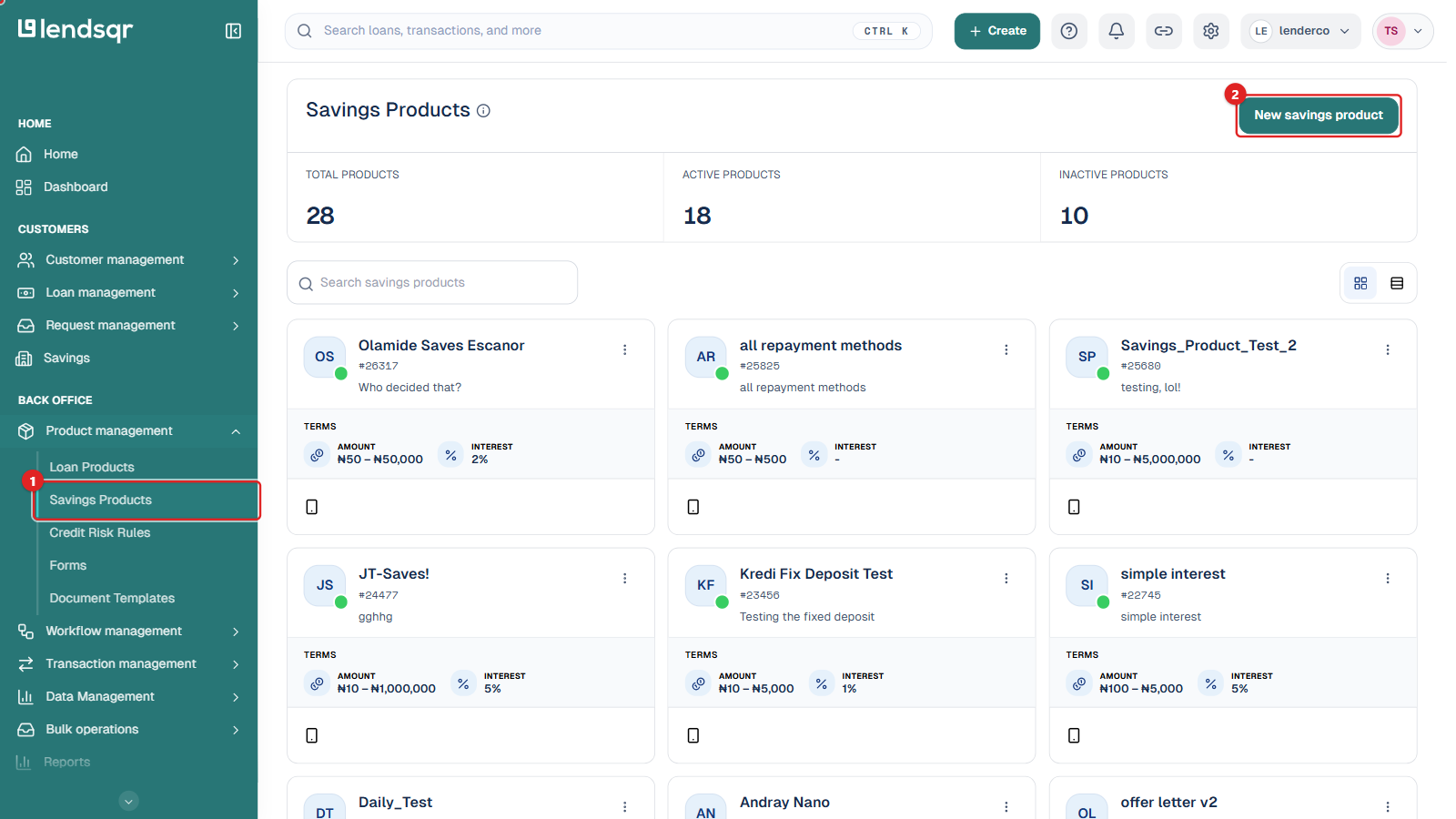
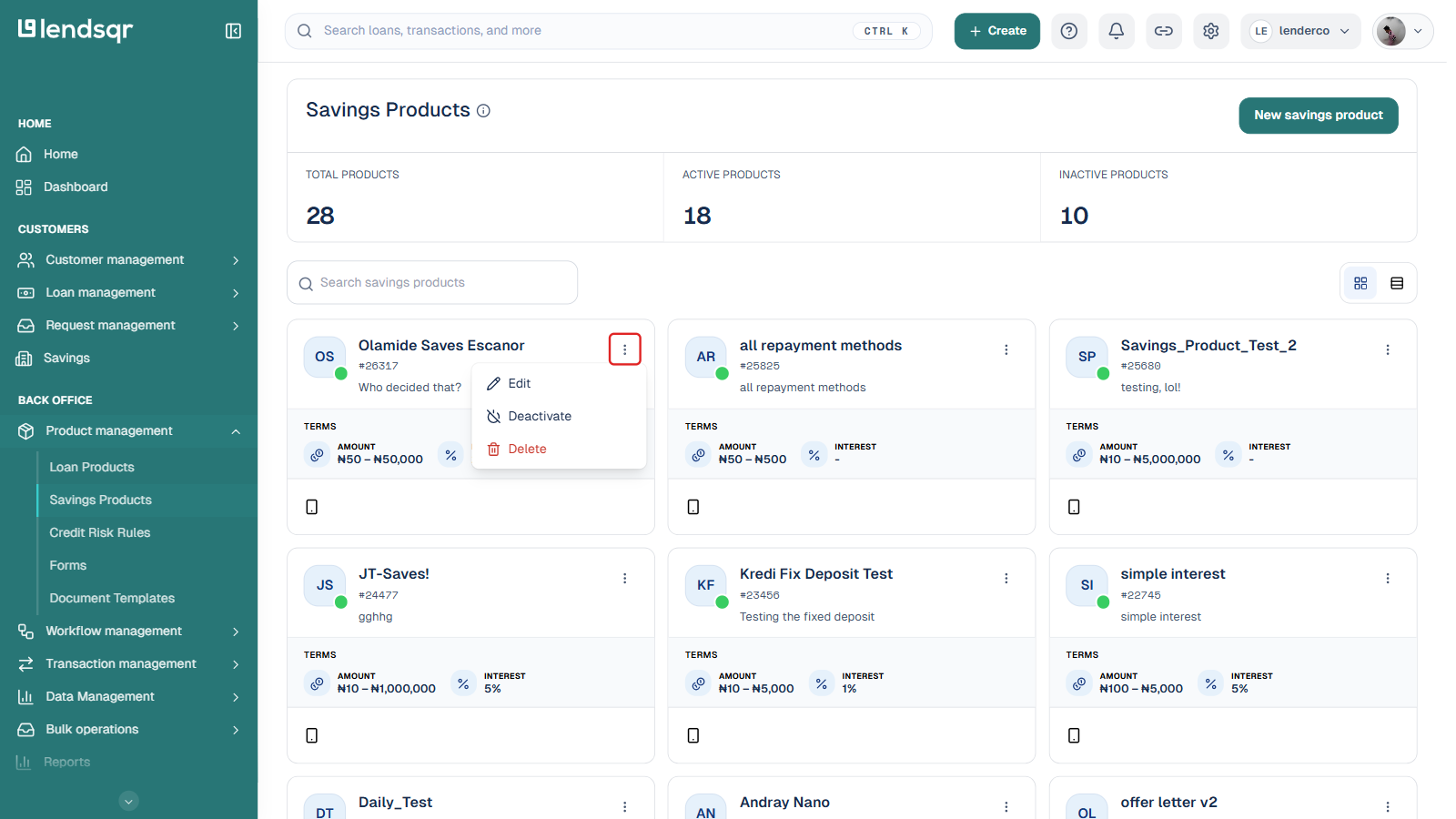
Log in to your Lendsqr admin console. In the left navigation, under Back Office, expand Product management and select Savings Products. This opens the savings products page, which lists all existing savings products along with counts of total, active, and inactive products.
Step 2: Open the new savings product form
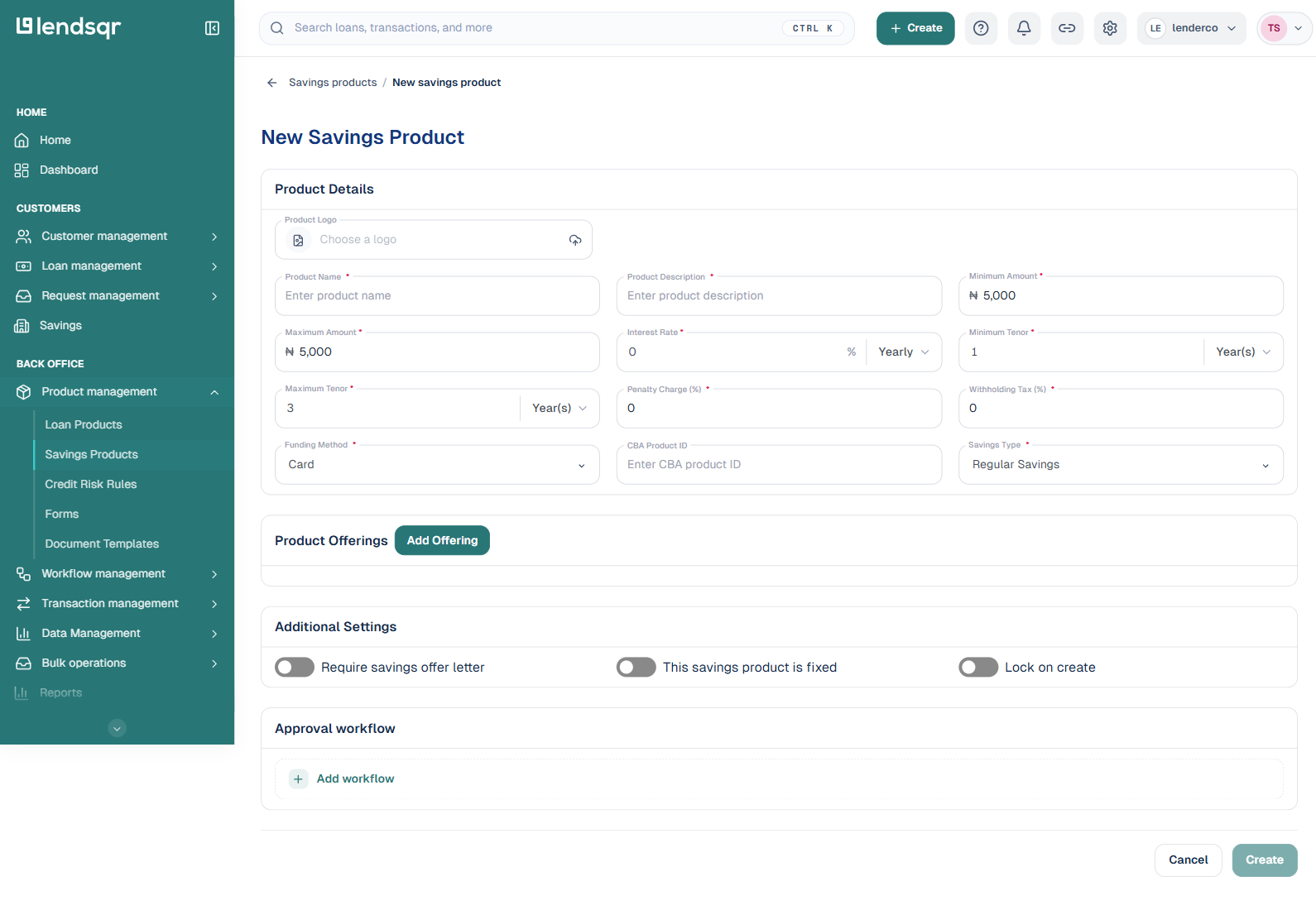
Click New savings product at the top right of the page. The New Savings Product form opens with a Product Details section, a Product Offerings section, an Additional Settings section, and an Approval workflow section.
Step 3: Fill in the product details
Complete the fields in the Product Details section:
Product Logo: an optional image shown against the product on the customer app.
Product Name: a clear, customer-facing name, for example “Fixed Investments” or “Regular Savings”.
Product Description: a short explanation of what the product is and who it is for.
Minimum Amount and Maximum Amount: the range a customer can save under this product.
Interest Rate: the rate customers earn, with a period selector (for example Yearly or Monthly). Set this to zero for an interest-free product.
Minimum Tenor and Maximum Tenor: the shortest and longest duration the savings can run, each with a period unit.
Penalty Charge (%): the charge applied when a customer breaks the terms, for example an early withdrawal on a fixed deposit.
Withholding Tax (%): the tax withheld on interest earned, where this applies in your market.
Funding Method: how contributions are collected, one of Card, Account, Hybrid, or Direct Debit.
CBA Product ID: an optional reference used to map this product to a core banking application.
Savings Type: one of Regular Savings, Fixed Deposit, or Recurring Deposit.
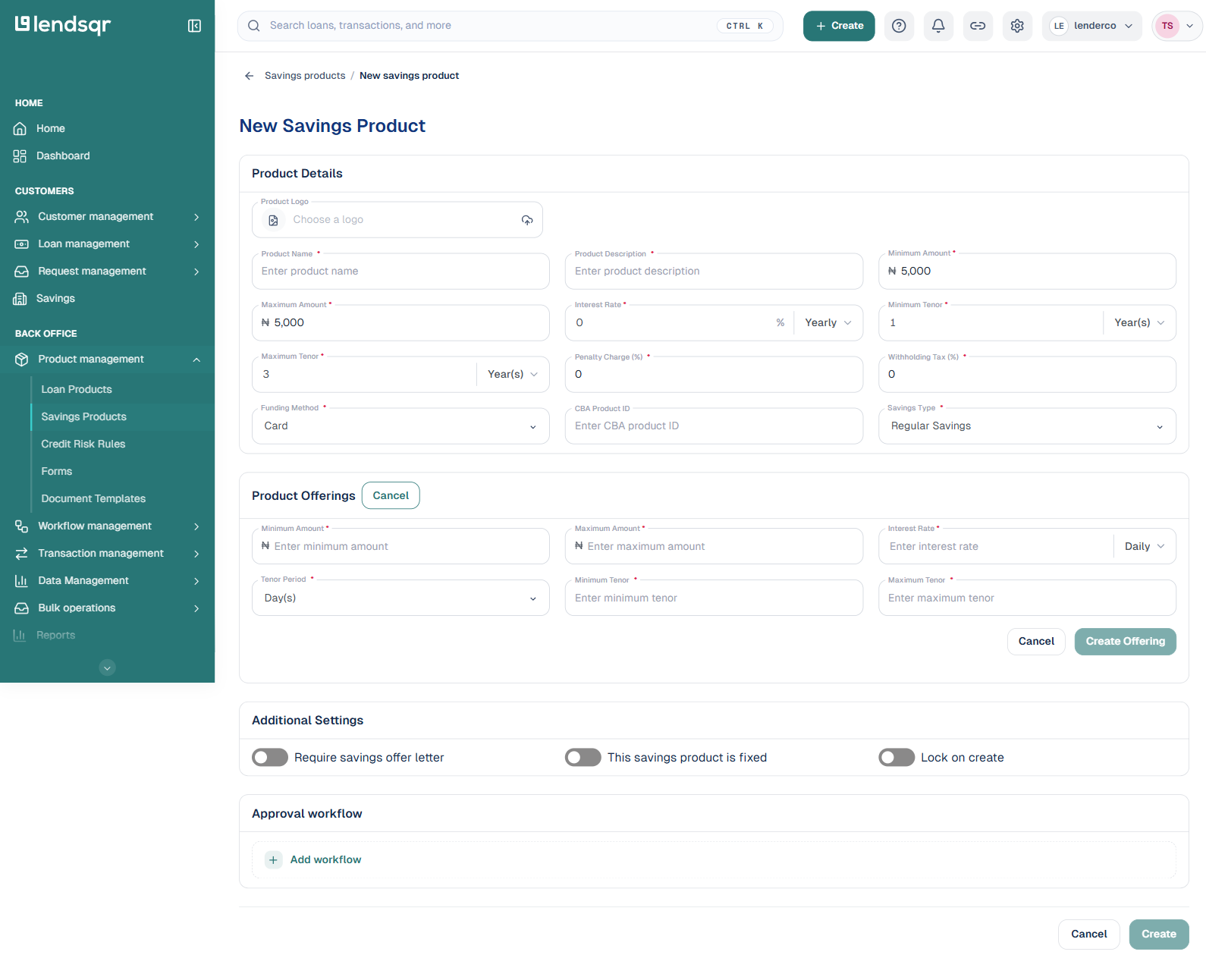
Step 4: Add one or more offerings
In the Product Offerings section, click Add Offering. A sub-form appears where you set the Minimum Amount, Maximum Amount, Interest Rate and its period, the Tenor Period, and the Minimum Tenor and Maximum Tenor for that offering. Click Create Offering to add it. Repeat to add more offerings under the same product. You can also add offerings later by editing the product.
Step 5: Set the additional settings
In Additional Settings, use the toggles as needed:
This savings product is fixed: marks the product as a fixed plan.
Lock on create: locks funds as soon as a plan is created on this product.
If withdrawals on this product should pass through an approval workflow, add one in the Approval workflow section.
Step 6: Create the product
Once every required field is filled in, click Create. The product is saved and appears on the savings products page. New savings products start inactive, so review the configuration and then activate the product when you are ready for customers to use it. See How to activate or deactivate a savings product.
Advanced settings on a product
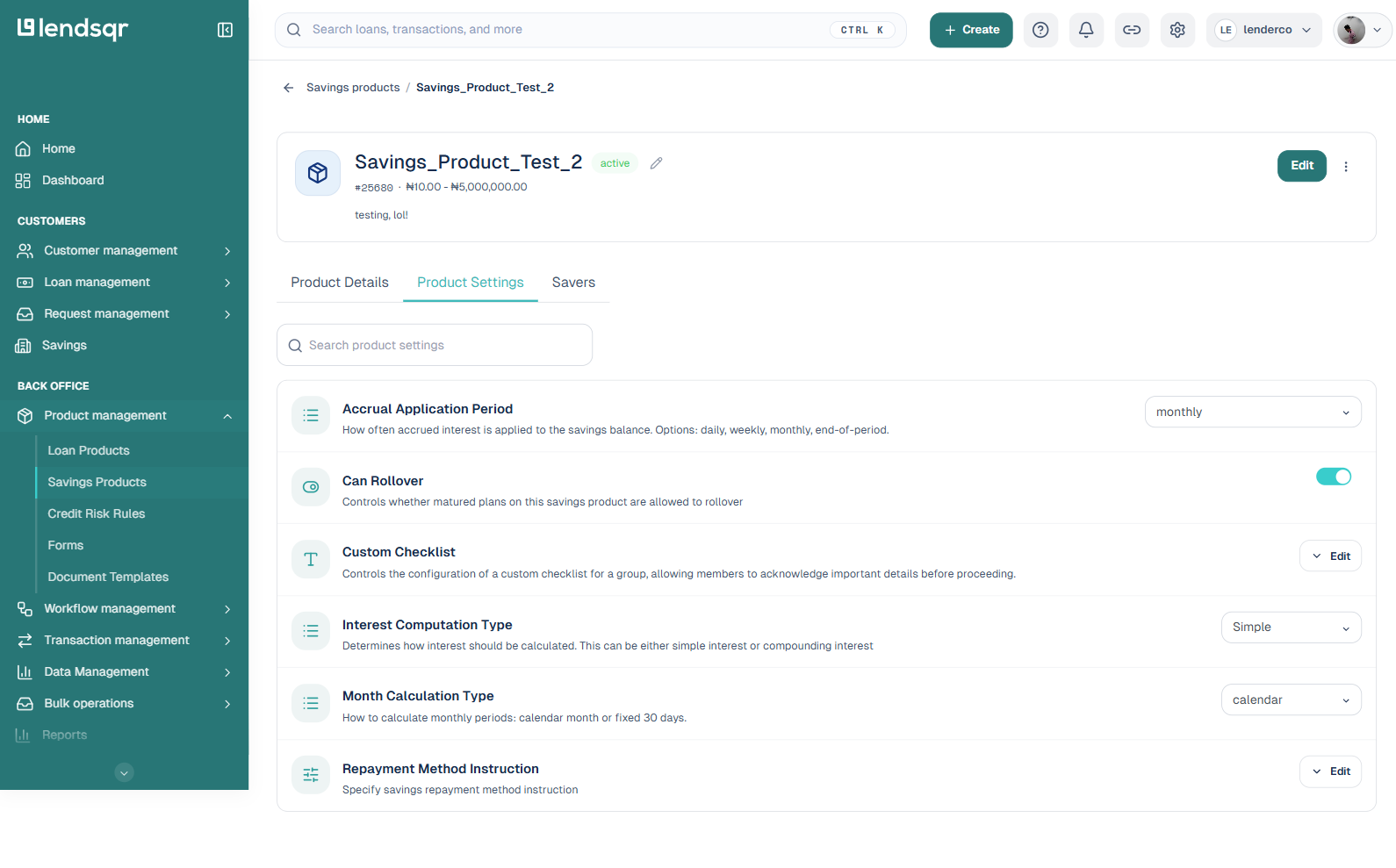
A savings product also has a Product Settings tab on its detail page, alongside Product Details and Savers. This tab holds a set of advanced attributes that go beyond what is on the create and edit forms:
Accrual Application Period: how often accrued interest is applied to the savings balance. Options are daily, weekly, monthly, or end-of-period.
Can Rollover: a toggle controlling whether matured plans on this product are allowed to roll over into a new term instead of paying out.
Custom Checklist: configures a checklist members must acknowledge before proceeding, when this product is used for a group.
Interest Computation Type: whether interest is calculated as simple interest or compounding interest.
Month Calculation Type: whether monthly periods are calculated by calendar month or as a fixed 30 days.
Repayment Method Instruction: the instruction text shown to customers about how repayment or funding works on this product.
Each setting shows its current value with an inline dropdown, toggle, or an Edit button, so you can change it without going back into the full edit form.
Editing, deactivating, and deleting a product from the list
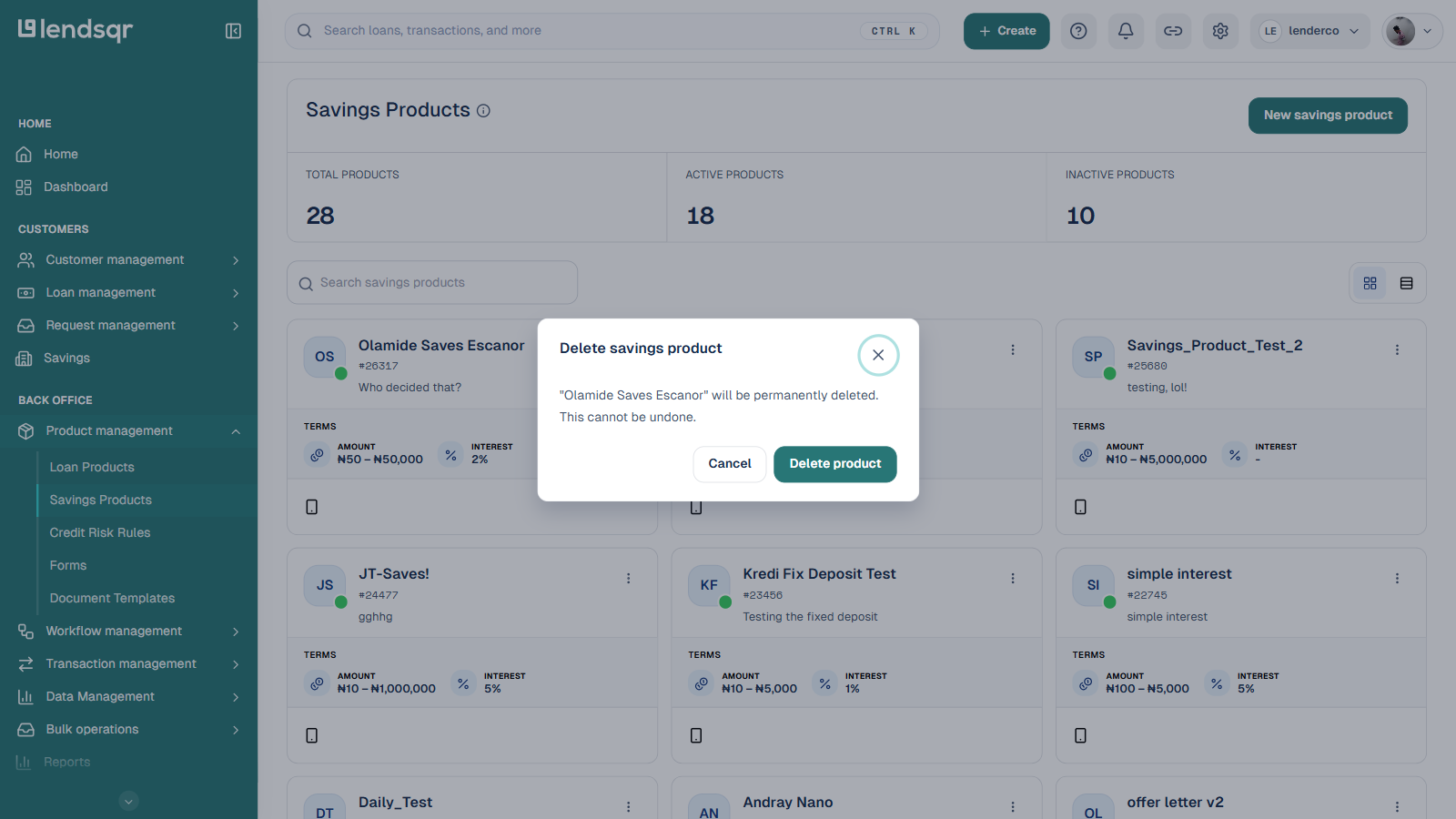
You do not always need to open a product’s detail page to manage it. On the Savings Products list, click the ⋮ (more options) icon on any product card to open a menu with three actions:
Delete: permanently removes the product after you confirm. This cannot be undone, so use it only for products that were created by mistake or never launched. A product with existing savers or transaction history should be deactivated instead of deleted, so that historical data stays available for reporting.
Best practices
Use clear, descriptive product names your customers will immediately understand. Avoid internal codes or abbreviations in customer-facing names.
Configure multiple offerings under a single product rather than creating a separate product for each variation. This keeps your product list manageable and makes it easier to report on savings performance by product.
Set realistic minimum amounts for your market. A minimum that is too high excludes lower-income customers who could benefit from saving.
Review interest rates regularly to keep them competitive and compliant with the regulations in your market.
Review the configuration before activating. Once a product is active and customers begin saving, changes to the terms may affect existing savers.