Access your Back Office at your fingertips.
Download the app now on Google Play Store.
Scan the QR code
You can also scan QR code with your phone to download the app.
How to manage your users’ savings
Updated
On this page
As a lender, you need more than a credit score to make good decisions. You need to understand how a borrower actually behaves with money. Do they save regularly? Are they moving toward a financial goal? Have their contributions slowed down recently? These questions matter, and your customers’ savings data is where the answers live.
The savings management feature on the Lendsqr admin console lets you view a customer’s full savings picture directly from their profile. This includes their savings plan details, their balance, their interest accruals, and a complete history of every transaction on their savings account. This article explains what each part of that data means, when you would use it, and how to access it.
What does savings management mean in lending?
Many digital lenders offer savings products alongside their loan products. A borrower might save toward a goal, contribute to a fixed deposit, or maintain a savings balance as a condition of borrowing. As a lender, keeping track of these savings is part of understanding the full financial picture of each customer.
Savings management in lending covers three things:
First, it means knowing what each borrower has saved and how their balance is growing over time.
Second, it means understanding the structure of their savings plan, including the type of product, target amounts, interest rates, and maturity dates.
Third, it involves reviewing the transaction history to assess how consistently a borrower contributes and whether their behavior aligns with their stated goals.
Why savings data matters for lenders
Savings data touches almost every important part of how a lending business operates. Here is why lenders who pay attention to it are better positioned than those who do not.
Better credit decisions. A borrower’s savings history gives you behavioral data that a credit score alone cannot capture. Consistent contributions over time signal financial discipline and reliability. This context can make the difference between a confident approval and an unnecessary decline.
Stronger risk assessment. When a borrower maintains a healthy savings balance, it reduces the risk that they will default when a financial shock hits. Lenders who factor savings behavior into their risk models tend to build more resilient portfolios.
Loan-to-savings ratios. Many lenders use a borrower’s savings balance to determine how much they can borrow. A borrower who has saved NGN 50,000 may qualify for a loan that is a multiple of that amount. This approach ties credit exposure directly to demonstrated saving behavior, which keeps risk in check.
Early warning signals. A drop in savings contributions or an unexpected withdrawal can flag a borrower who is under financial stress before they miss a loan repayment. Catching this early gives a lender the chance to reach out proactively rather than reactively.
Product cross-selling opportunities. A borrower who has completed a savings goal and grown their balance is a natural candidate for a loan offer. Savings data helps lenders identify the right customers to approach with new products at the right time.
Customer retention. When borrowers see that their savings progress is recognized and rewarded with better lending terms or faster approvals, they are more likely to stay with the same lender. Savings management is also relationship management.
Regulatory compliance. In many markets, regulators require lenders who accept savings to maintain proper records of customer savings balances, contributions, and interest accruals. Staying on top of savings data is not just good practice, it is a compliance requirement.
Consider a lender reviewing a loan application from a returning borrower. The borrower has a savings plan that has been running for six months. They have contributed regularly, and their balance is close to their target amount. This kind of track record is a strong signal, suggesting reliability, and a lender with access to this data is in a much better position to make a confident decision.
On the other hand, a borrower with a savings plan that shows no contributions over the past two months may warrant a closer look before a loan gets approved. The savings data does not make the decision on its own, but it adds important context that a basic credit check might miss.
How to view a customer’s savings on Lendsqr
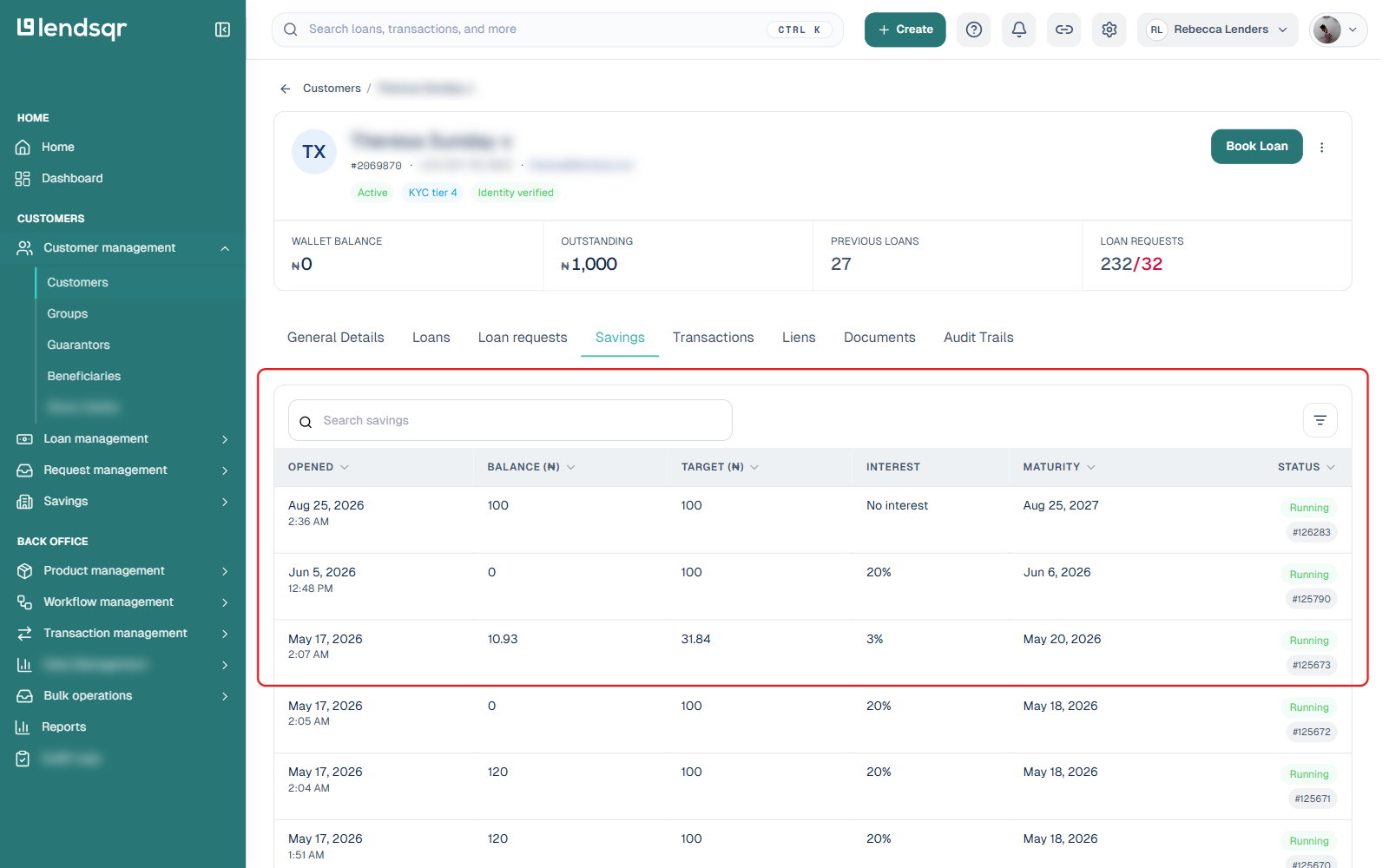
On the side navigation, go to Customer management under Customers, then select Customers. See Locating users’ profile page for a full walkthrough if this is your first time finding a specific customer.
Click on the customer whose savings you want to review, to open their profile.
Click the Savings tab. This lists every savings plan the customer holds, with the date each plan was opened, its current balance, target amount, interest rate, maturity date, and status.
Note that the Savings tab, along with the other activity tabs (Loans, Loan requests, Transactions, Liens), only appears on a customer’s profile if there is data behind it. If a customer has no savings plan, the Savings tab does not show up on their profile at all.
Click on a plan in the list to open its full details.
What you can see on a savings plan
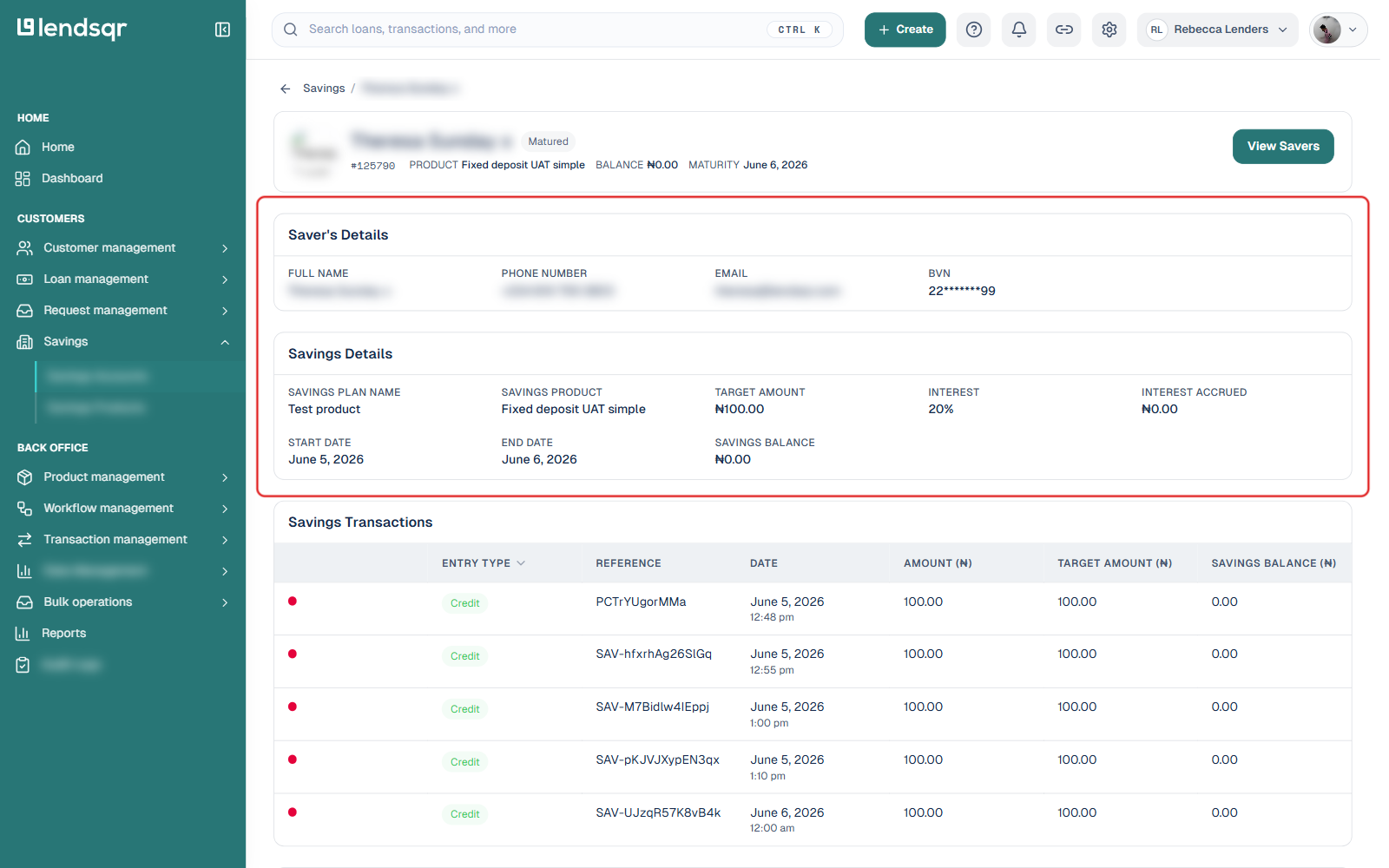
Opening a savings plan shows four sections:
Saver’s Details, showing the personal information tied to the savings account: the customer’s full name, phone number, email address, and BVN (where applicable to your organization’s country). It is a quick way to confirm you are looking at the right customer before reviewing their savings activity.
Savings Details, showing the structure of the plan: the savings plan name, the savings product it belongs to, the target amount, the interest rate, interest accrued so far, the start and end dates, and the current savings balance.
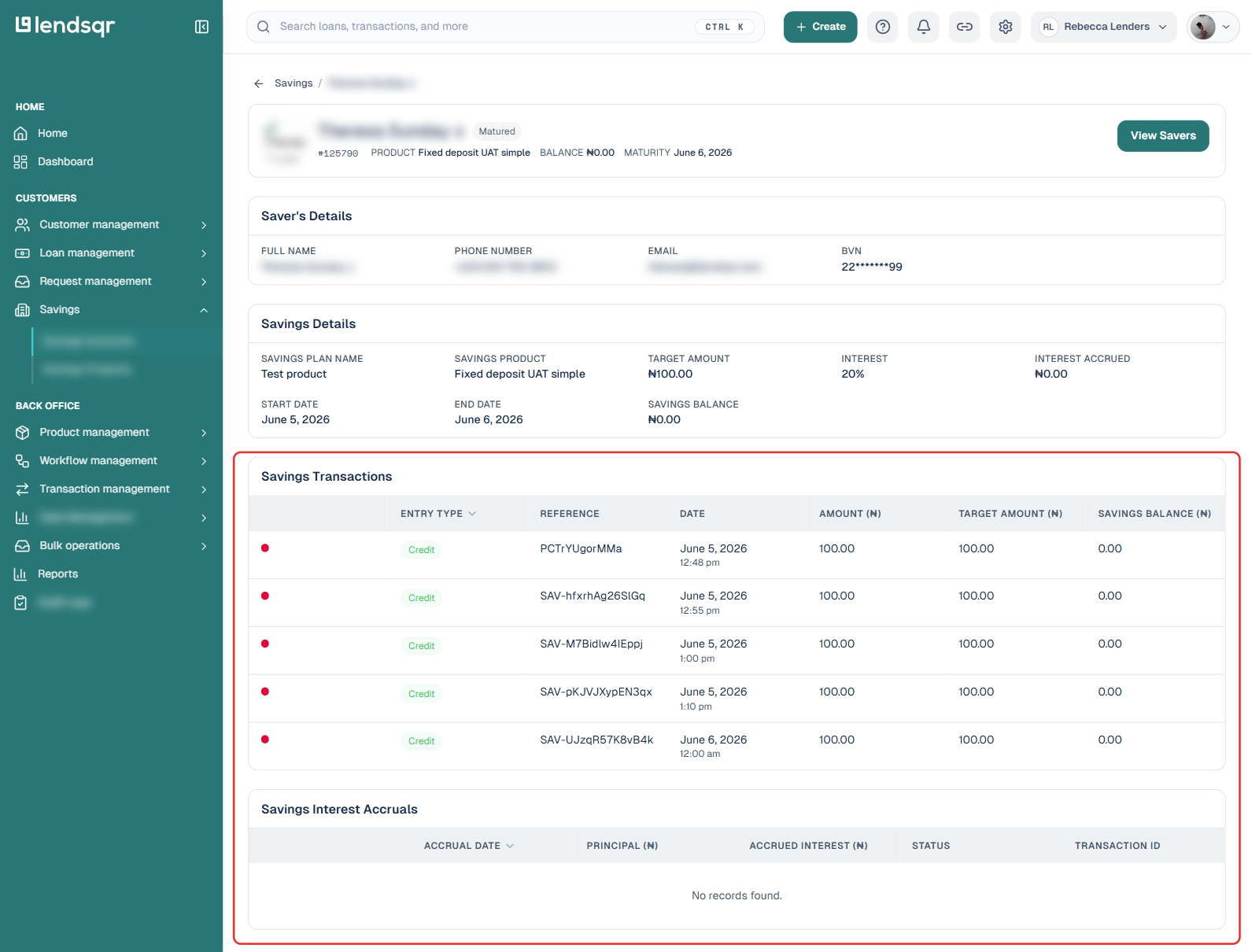
Savings Transactions, a table of every transaction on the plan, with entry type, reference, date, amount, target amount, and the resulting savings balance after each entry.
Savings Interest Accruals, a table of interest accrual events, with accrual date, principal, accrued interest, status, and a transaction ID. This is separate from the Interest Accrued figure shown in Savings Details, and stays empty until the plan has accrued interest that has actually posted.
When to use it: Savings Details is most valuable when you are making a lending decision for a customer. A loan officer reviewing a loan application would open this section to check whether the borrower is on track with their savings goals. If the target amount is 100,000 and the borrower has saved 80,000 over four months, that is a strong indicator of financial commitment. If the plan has been running for six months and the balance has barely moved, that tells a different story.
It is also useful when a borrower calls to ask about their current balance or the interest they have earned. Rather than directing them elsewhere, your support team can pull up this information directly from the admin console.
Savings Transactions is most useful for two purposes. The first is resolving disputes. If a borrower claims a contribution was not recorded, the transaction log lets you verify exactly what happened and when. The second is behavioral analysis. If you are deciding whether to extend a larger loan to a returning customer, reviewing their savings transaction history gives you a clear picture of how consistently they contribute. A borrower who has made regular contributions every month for a year is a very different risk profile from one who made a large lump-sum deposit right before applying.
What to look out for when reviewing savings
When reviewing a customer’s savings data, a few things are worth paying close attention to.
Consistency of contributions: Regular deposits over time suggest a borrower who follows through on their commitments. Gaps or erratic patterns may need further investigation before a lending decision is made.
Progress toward target: A borrower who is consistently moving toward their savings goal is demonstrating financial discipline. One who has barely moved the needle despite a long-running plan may be struggling financially.
Interest accrued vs. balance: Comparing the interest accrued to the current balance helps you understand how much of the growth is from the borrower’s own contributions and how much is from product performance.
These are not rigid rules. They are signals. A lender who understands how to read savings data is better equipped to serve their customers and protect their portfolio.