Access your Back Office at your fingertips.
Download the app now on Google Play Store.
Scan the QR code
You can also scan QR code with your phone to download the app.
How to set up line of credit (overdraft) products
Updated
On this page
Sometimes a customer needs cash quickly and does not want to fill out a new loan application every time. A line of credit solves this. Instead of borrowing one lump sum, the customer gets a limit they can draw from whenever they need money, and they only pay interest on the amount they actually use.
This guide shows you how to set up a line of credit product on Lendsqr, and explains the settings that control how it works.
What is a line of credit, and how does it work?
A line of credit is a type of revolving credit facility. Think of it like a pool of money a customer can dip into whenever they need to.
You, the lender, set a limit. The customer draws money from that limit when they need it. As they repay, that same amount becomes available to draw again. This is different from a normal loan, where the customer gets one full amount upfront and starts paying interest on all of it immediately.
With a line of credit, the customer only pays interest on the part they have drawn, not the full limit. And repaying the full amount does not close the line. It stays open so the customer can keep using it until it reaches its expiry date, or until you close it.
Example: A trader has a shop and needs quick cash to restock when a big customer places a large order. Instead of applying for a loan every time this happens, they draw from their credit line, sell the goods, and repay it. The line stays open for the next time they need it.
Another example: An employee’s car breaks down two weeks before payday. Instead of applying for a full loan, they draw just enough to cover the repair from their credit line, and repay it once they get paid.
Why offer a line of credit?
Lenders across different markets are adding this product to their portfolios. Here is what it delivers:
It gives customers flexibility: They borrow only what they need, when they need it, instead of taking one big loan.
Customers only pay for what they use: This makes it cheaper for them than a regular loan of the same size, since interest is only charged on the amount drawn.
It builds loyalty: Customers tend to stick with lenders who give them credit they can use again and again, since they do not have to reapply every time.
It saves your team time: One approved credit line replaces many repeat loan applications from the same customer, which means less paperwork for you.
Before you begin
A line of credit only works if the loan product’s “Disburse To” setting is “Wallet.” If your product currently disburses to a bank account, change that first.
You will also need at least admin-level access on the Lendsqr console. For a general overview of loan product settings, see: Configuring your loan product.
Step-by-step guide
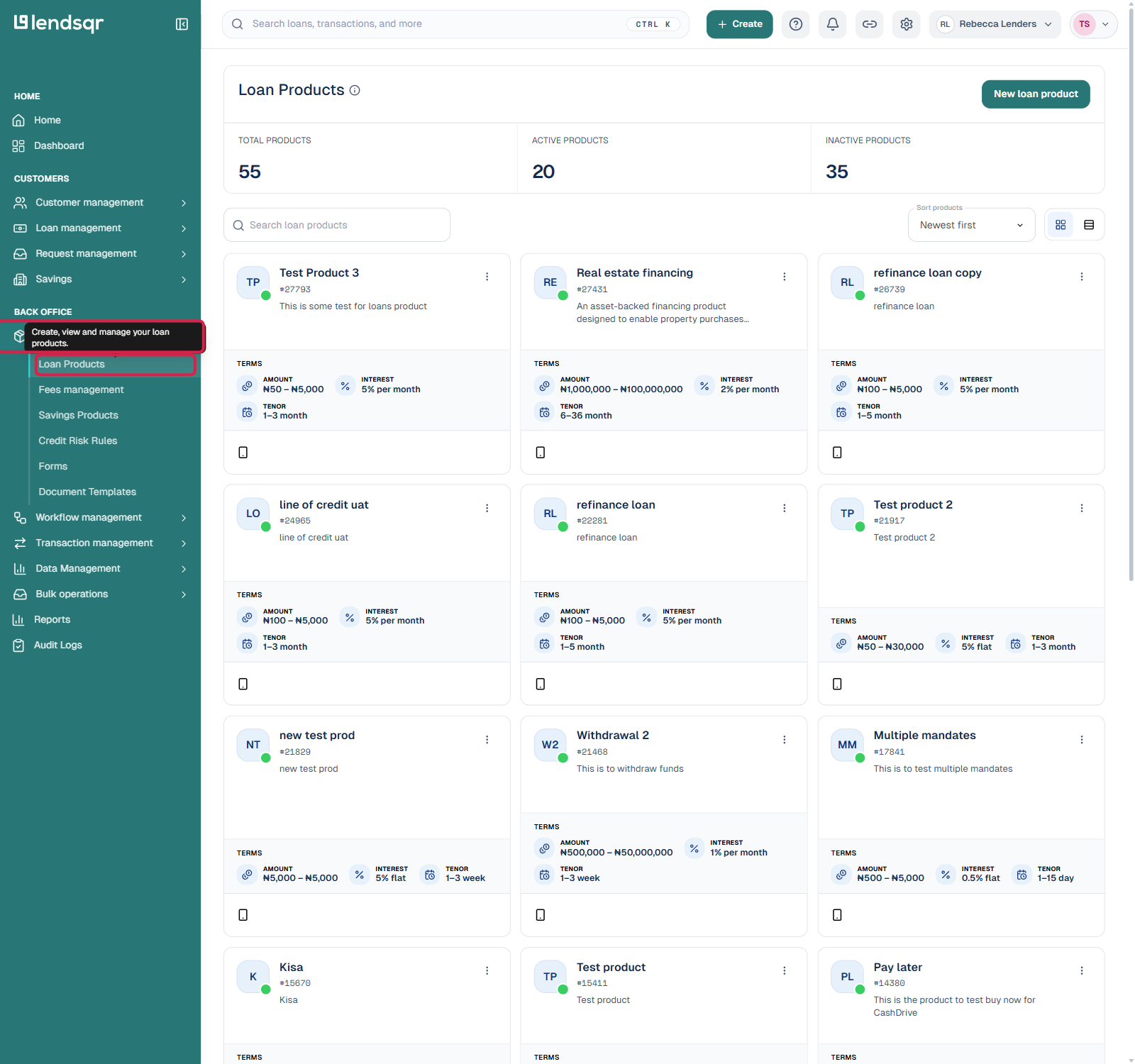
1. Login to the Admin Console 2. Click on “Loan Products” under “Product Management“
3. Create a new loan product, or open an existing one. Remember, it must disburse to wallet.
4. Click on the “Product Settings” tab on the “Product Details” page.
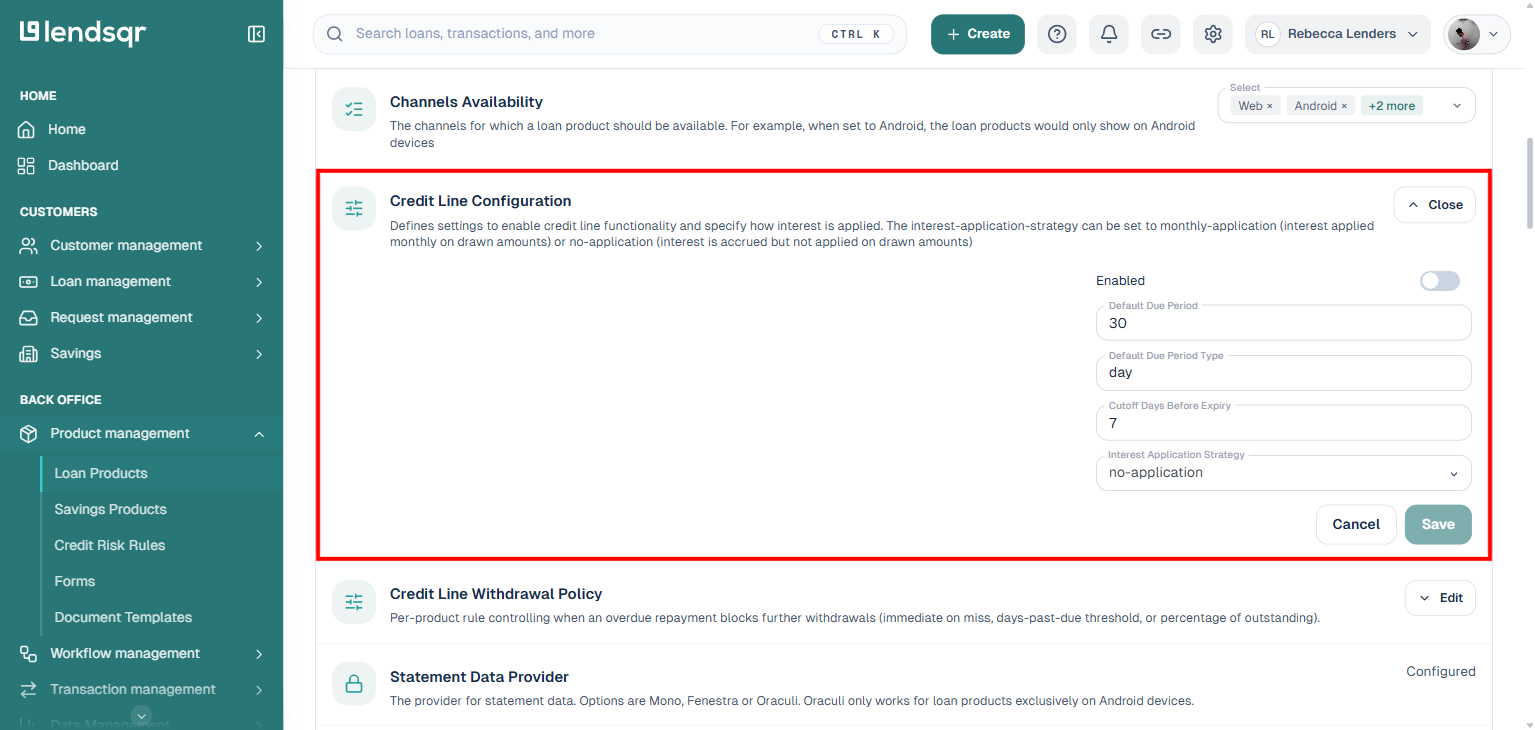
5. Find “Credit Line Configuration” and click its Edit button. This expands the setting in place. This setting is turned off by default.
6. Check the box marked “Enabled” to turn on the credit line for this product. The expanded form also shows Default Due Period, Default Due Period Type, and Cutoff Days Before Expiry, the same self-service cutoff field referenced under “Blocking withdrawals” below.
7. Choose your Interest Application Strategy. This decides when interest gets added to what the customer owes. You have two choices, explained in detail below.
8. Once you’ve selected your strategy, click Save.
That’s it. Your product is now set up as a Line of Credit.
Choosing your interest strategy
No matter which option you choose, Lendsqr works out interest every single day based on how much the customer has drawn. The strategy only decides when that interest gets added to the customer’s balance, not how it’s calculated.
Monthly application (monthly-application)
Interest gets added to the customer’s balance once a month, based on what they drew that month.
For example, a customer has a $10,000 limit but only draws $3,000 in October. Lendsqr works out interest on that $3,000 every day, then adds it all to their balance at the end of October. They are never charged interest on the full $10,000 limit, only on what they actually drew.
This option is easier for customers to follow because they get a clear monthly bill. We recommend it for most retail and small business lending.
No application (no-application)
Interest still builds up daily, but it is not added to the customer’s balance every month. Instead, it waits and gets added later, usually when the credit line is settled in full.
This works well for structured arrangements where the lender and customer have already agreed to settle interest at a later date. It suits customers who can handle a bigger interest bill at the end, rather than smaller monthly ones.
How repayments are applied
When a customer repays money, it does not all go to the same place. Lendsqr splits it across penalties, fees, interest, and principal, in that order, by default.
You can change this order for your product if your organization prefers to prioritize repayments differently. As soon as some of the principal is repaid, that amount becomes available for the customer to draw again.
Blocking withdrawals on a line of credit
You can stop customers from drawing new funds as their credit line nears its expiry date. You do this by setting a cutoff, measured in days before expiry.
For example, if you set a 7-day cutoff, a customer cannot start a new draw once their line is within 7 days of expiring. Their existing balance and repayments are not affected. This gives you a clean way to wind a credit line down before it expires or comes up for renewal. This is the Cutoff Days Before Expiry field inside Credit Line Configuration, shown above, so you can set or change it yourself without contacting support.
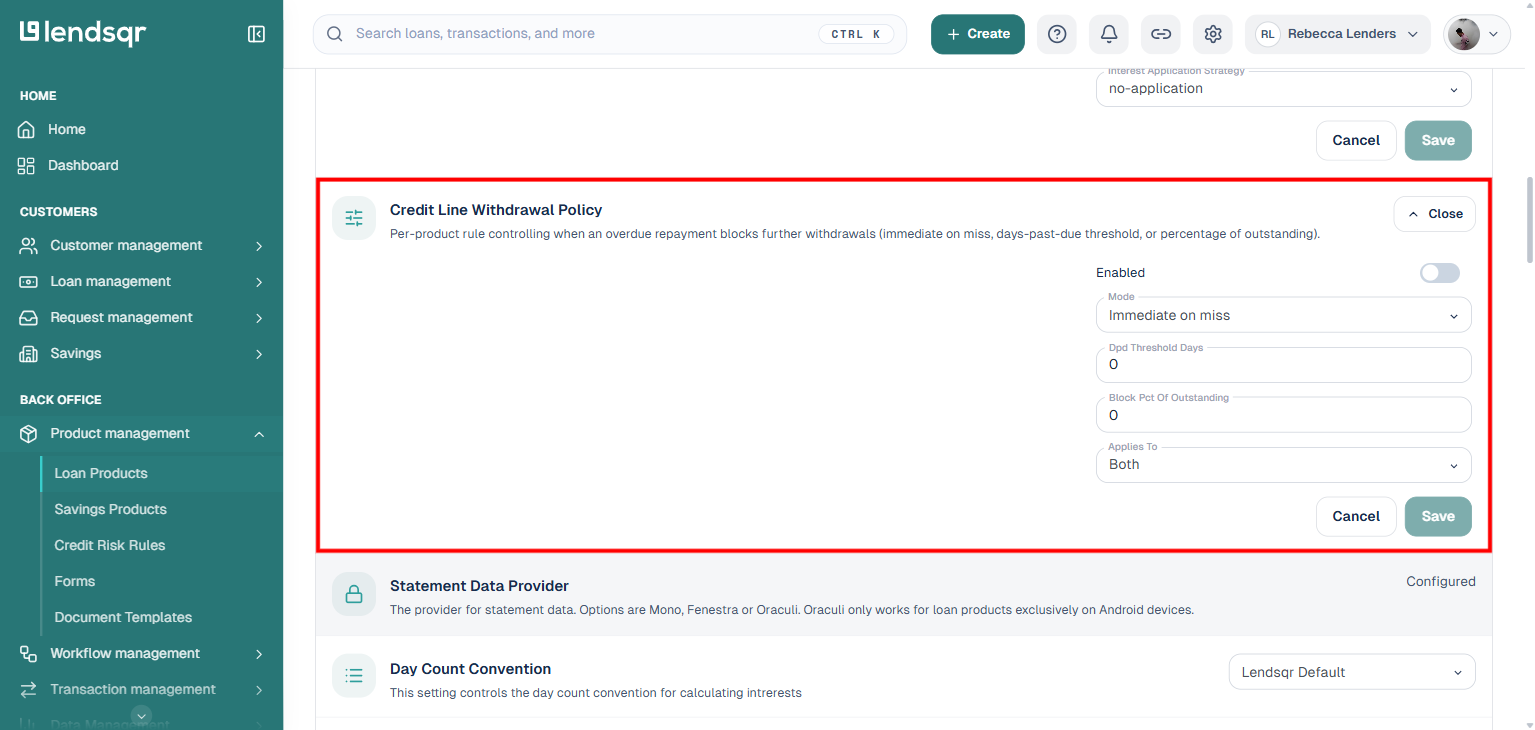
Separate from the expiry cutoff above, you can also stop a customer from drawing new funds if they fall behind on a repayment. This is the Credit Line Withdrawal Policy setting, and it works on its own, independent of the expiry cutoff.
Turn it on by checking Enabled, then choose a Mode to decide how strict the rule should be:
Immediate on miss blocks new withdrawals as soon as a repayment is missed, no matter how small or how recent.
Days past due threshold waits until the missed repayment has been overdue for a set number of days before blocking withdrawals. You set this number in the Dpd Threshold Days field.
Percentage of outstanding blocks withdrawals once the overdue amount reaches a set share of the customer’s outstanding balance. You set this share in the Block Pct Of Outstanding field.
The Applies To field decides what the block covers. It defaults to Both and can be set to cover either Wallet or Savings.
How it all works together
You do not need a separate system to run a line of credit. It works through the same loan product setup you already use, with the Credit Line Configuration turned on.
Once it is on, Lendsqr tracks each customer’s limit, what they have drawn, and their repayments in real time, using your existing wallet setup. Interest is worked out daily in the background. The repayment order and withdrawal cutoff give you extra control over how the product behaves. On their end, customers see their available limit on the web or mobile app and can draw funds directly, without submitting a new application. And since the line does not close just because the balance hits zero, customers can keep using it for as long as it stays open.
Troubleshooting
If something is not working as expected while setting this up, here are a few common issues and how to resolve them.
I can’t find the Credit Line Configuration setting: Check that the product’s “Disburse To” is set to “Wallet.” This setting only shows up for wallet-based products.
The Enabled checkbox is greyed out: You may not have admin access. Check your permissions, or contact Lendsqr support.
Customers can’t see the credit line option on the app: Make sure the product is active and published, and that Credit Line Configuration is enabled and saved.
A customer can’t draw funds even though they have credit left: Check if a withdrawal cutoff is set on the product, and whether their line is inside that cutoff window before expiry.
I chose the wrong interest strategy after going live: Talk to Lendsqr support before changing it. Switching strategies on a live product can affect balances and repayment schedules already in motion.
Frequently asked questions
Can I set different credit limits for different borrowers on the same product? Yes. Credit limits can be set at the individual borrower level within your loan product configuration. Contact your Lendsqr support contact for guidance on configuring customer-specific credit limits.
Can I convert an existing loan product to a line of credit? Yes. Open the existing product, navigate to Product Settings, locate Credit Line Configuration, and follow the same steps above to enable it. Confirm that the product disburses to wallet first.
Can a borrower exceed their credit limit? No. Lendsqr blocks draw requests that exceed the configured credit limit. Borrowers can only access funds up to the limit you set on the product.
Can I change the interest strategy after the product goes live? Making changes to the interest strategy after borrowers have active draws may affect existing repayment schedules. Review the impact carefully and contact Lendsqr support before making changes to a live product.
Does the line of credit work on both mobile and web apps? Yes. Once configured on the admin console, the line of credit product is available to borrowers through both the web app and mobile app. Borrowers can view their available balance and draw funds from either channel.