Access your Back Office at your fingertips.
Download the app now on Google Play Store.
Scan the QR code
You can also scan QR code with your phone to download the app.
Adding a repayment method while booking a loan
Updated
On this page
When you book a loan manually for a borrower, one of the most important decisions you make is how repayments will be collected. This is not a cosmetic setting. The repayment method you assign determines whether collections happen automatically on due dates or whether your team needs to chase the borrower manually every cycle.
Getting this right at the point of booking saves significant operational effort downstream. It also gives the borrower a clear, agreed repayment structure from day one.
This guide explains what repayment methods are, when to choose each one during manual loan booking, and how to configure them on the Lendsqr admin console.
What are the repayment methods in lending?
A repayment method is the channel through which a borrower’s loan installments reach the lender. In a traditional lending environment, borrowers physically walk in to make payments or transfer funds manually. Digital lending platforms like Lendsqr allow lenders to automate this process by linking a repayment method directly to the loan at the point of booking.
Lendsqr supports several repayment methods. These include direct debit mandates, debit cards, virtual accounts, and wallet-based collections. Each method works differently and suits different borrower profiles and lending products.
Direct debit lets the platform pull repayments automatically from the borrower’s bank account on scheduled dates. The borrower sets up a mandate once, and collections run without manual intervention on each due date. This is the most reliable method for reducing missed payments. Read more in Payments with direct debit.
Debit card collections charge the borrower’s saved card on repayment dates. This works well for borrowers who do not have a bank mandate but have a valid card on file. See Understanding debit card payments for loan repayment on Lendsqr for a full breakdown.
Virtual account payments let borrowers transfer funds into a dedicated account number that Lendsqr generates for each borrower. The system tracks inflows and applies them to the loan. Read Payments with virtual accounts for more detail.
The repayment method you choose during manual booking sets the default collection channel for that loan. Without one, Lendsqr cannot automate collections, and your team must follow up manually for every repayment cycle.
Why the repayment method choice matters operationally
Consider a loan officer booking a loan for a market trader. The borrower has no smartphone and is unlikely to use a card regularly. Assigning a card-based repayment method for this borrower increases the chance of missed collections. A direct debit mandate tied to their bank account gives the lender a more reliable collection path.
Now consider a salaried borrower with a verified debit card. That borrower may not have set up a direct debit mandate yet. Assigning card-based collection during booking means repayments can start immediately without waiting for a mandate setup.
The right repayment method matches the borrower’s financial behavior and the product’s collection needs. A mismatch creates failed transactions, manual follow-ups, and borrower frustration.
For lenders with high loan volumes, failed collections also affect reconciliation. Each failed attempt creates an unresolved entry that your finance team must investigate. Assigning the most reliable available method from the start reduces this workload significantly. See Improve your loan repayments with these common-sense tactics for broader guidance on reducing repayment failures.
Before you begin
Before adding a repayment method during manual loan booking, confirm the following:
Your loan product must have at least one repayment method enabled in its product attributes. If the product has no repayment methods configured, the option will not appear during booking. Configure this first under the product settings before proceeding to the booking steps below.
Part 1: Configure the repayment method on your loan product
Lendsqr ties available repayment methods to the loan product itself. This means you set which methods are available at the product level first, before the loan officer sees them during booking.
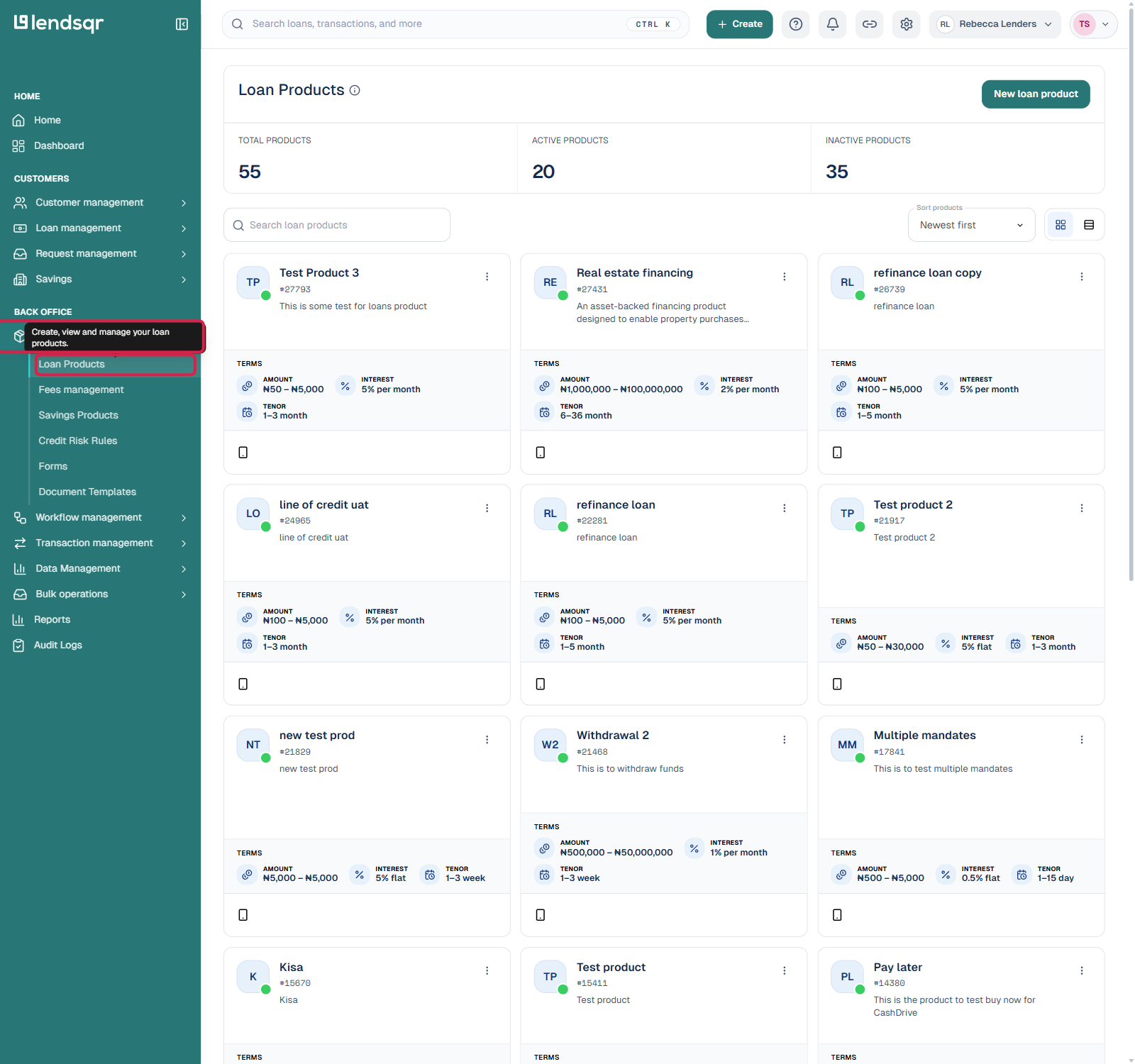
Log in to the Lendsqr Admin Console and navigate to “Product management” in the sidebar, then click “Loan Products”.
Click the loan product you want to configure, then click the “Product settings” tab.
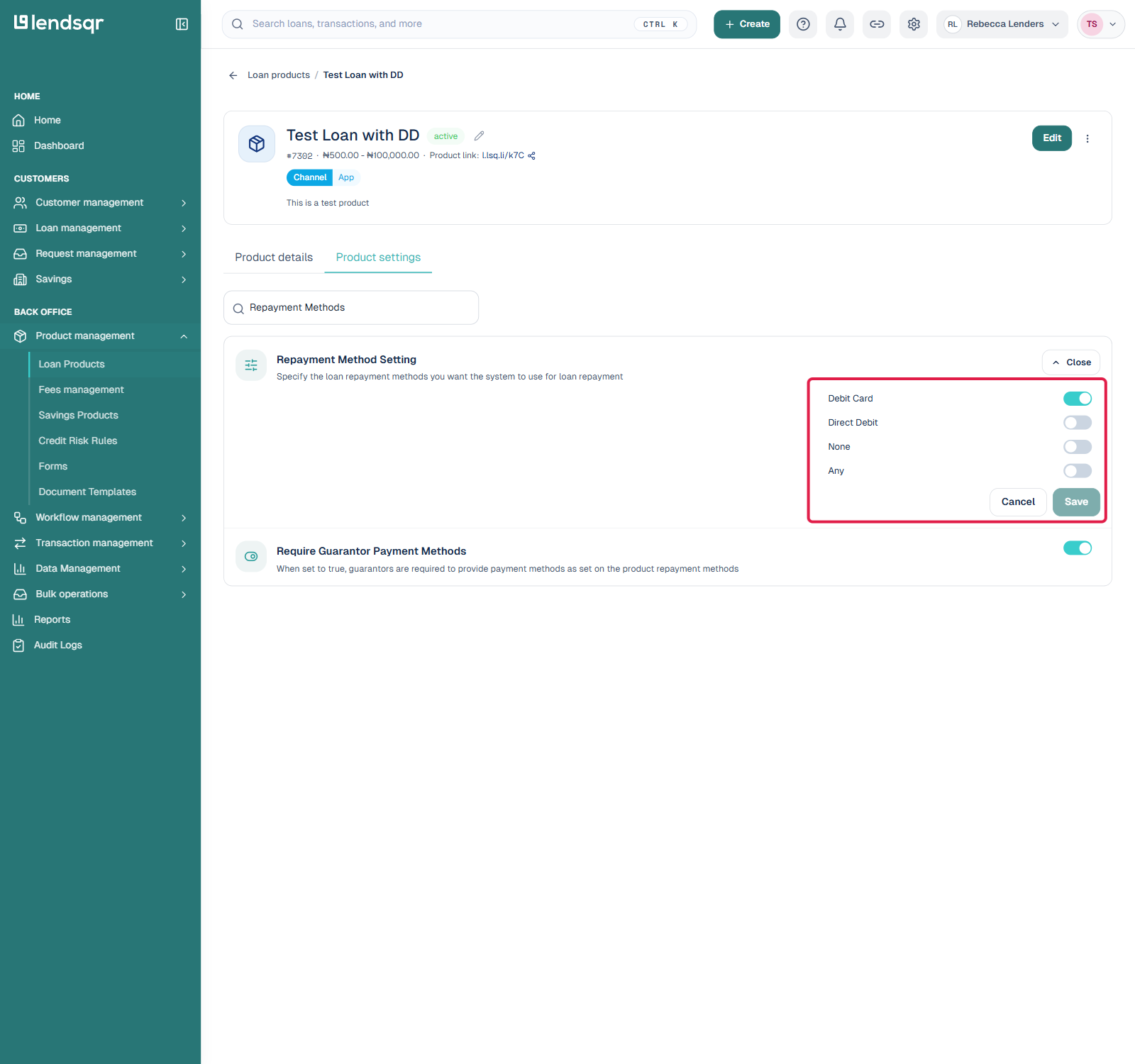
This opens a searchable list of individual settings rather than a single form. Type “Repayment Methods” into the search box to filter the list, then click “Repayment Method Setting” to expand it.
Switch on the methods you want to make available: Debit Card, Direct Debit, or leave it as None or Any depending on your policy. Then click Save.
The product now offers those repayment methods during manual loan booking.
Part 2: Add the repayment method while booking the loan
Once the product has repayment methods configured, follow these steps when booking the loan for a borrower.
Start the “Book a loan” quick action from the Home dashboard, or navigate to Loan management. Fill in the Loan offer step (product, amount, tenor) and click “Next: Customer”.
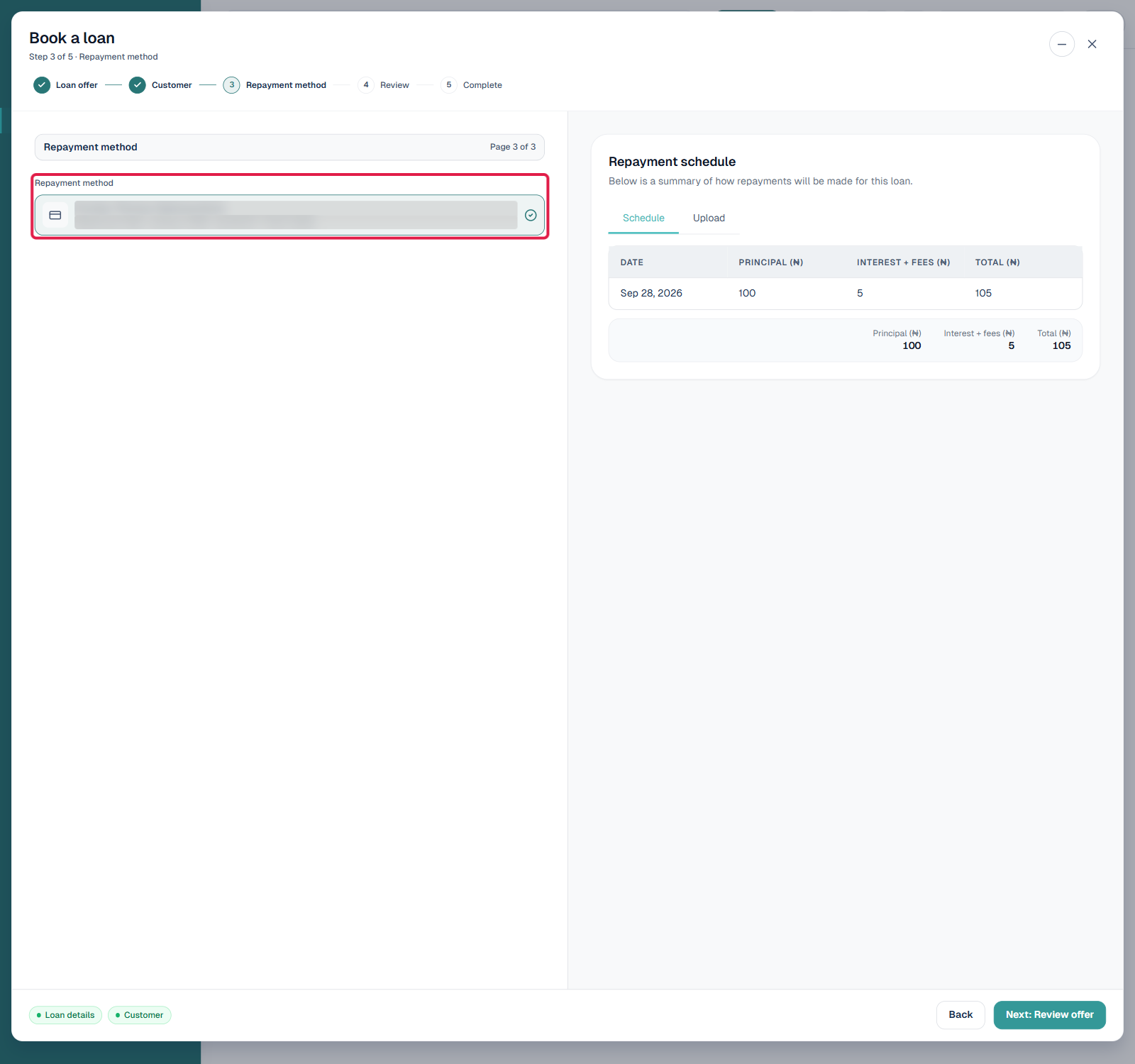
On the Customer step, use “Find or add a customer” to attach a borrower to the loan. Once a customer is selected, the wizard adds a new “Repayment method” step.
Click “Next: Repayment method”. This step lists the repayment methods already saved to that customer’s profile which match what you enabled on the loan product in Part 1. Select the one to use for this loan.
Click “Next: Review offer”, confirm the details, and complete the booking.
Lendsqr assigns the selected repayment method to the loan immediately. From the first repayment date, the platform attempts to collect through that channel.
Choosing the right repayment method: practical guidance
Use direct debit for borrowers with active bank mandates and predictable account balances. This gives you the highest level of automation and the lowest risk of missed collections. It works best for salary earners, traders with regular turnover, and repeat borrowers with a good repayment history. See Creating a direct debit mandate for setup steps.
Use debit card for borrowers who have a valid card saved on their profile but have not set up a direct debit mandate. Card collections are fast to activate and work well for short-term or first-time borrowers. See Receiving payments with debit cards for more detail.
Use virtual account for borrowers who prefer to transfer funds themselves, or in contexts where automated debits are not feasible. Virtual account payments require the borrower to initiate the transfer, so they carry a higher risk of missed payments than automatic methods. Your team should set up reminders for borrowers on this method. See Receiving payments with virtual accounts.
No repayment method is immune to failure. A card expires. A bank account runs low. A mandate gets deactivated. When collection fails, Lendsqr records the failed attempt in the transaction log. The loan balance does not reduce.
To go deeper on repayment methods and manual loan booking workflows, read Introduction to manual loan booking for the broader context of how manual booking works on Lendsqr.