Access your Back Office at your fingertips.
Download the app now on Google Play Store.
Scan the QR code
You can also scan QR code with your phone to download the app.
How to configure grace period on your loan product
Updated
On this page
Introduction
Sometimes customers need a little breathing room. With the grace period feature, you can give borrowers extra time before repayments begin or before penalties kick in. This flexibility makes your lending more empathetic and better aligned with real-life income cycles.
Not every borrower earns or receives money on the same schedule. Some rely on monthly salaries, others on seasonal harvests, and businesses often depend on cash flow that isn’t daily or predictable. By adding a grace period to your loan product, you make it easier for borrowers to stay on track, while also reducing defaults caused by short-term payment delays.
What is a grace period on a loan?
Imagine you are lending to a rice farmer in rural Ghana. Their harvest, and income, comes in October. If you disburse a loan in August and expect the first repayment in September, you are setting them up to default before they have even earned anything.
Consider a salaried employee paid at the end of the month. If their loan is disbursed mid-month, a grace period of 3 to 5 days ensures they can comfortably pay after their salary arrives, rather than scrambling to cover a repayment date that falls before payday.
Or consider a salaried worker who gets paid at the end of the month. A short grace period of 3 to 5 days ensures they can comfortably repay after payday, without penalties for being just a little late.
A grace period solves this. It is the number of repayment schedules after disbursement before the borrower’s first installment is due. During this window, the borrower owes nothing: no principal, no interest, no penalties.
On Lendsqr, a grace period is defined as the number of schedules (not calendar days) before repayments begin. This means the exact duration depends on your loan’s repayment frequency. A grace period of 1 schedule on a monthly repayment product equals 30 days of breathing room. The repayment schedule is shifted forward, and all subsequent installments are adjusted accordingly.
For example:
If the loan is disbursed on 1st January, with a monthly repayment cycle and a 1-schedule grace period:
No repayment is required in January.
The first installment falls due in February.
All other installments are pushed forward by one month.
This flexibility doesn’t just help borrowers. It strengthens trust, reduces complaints, and makes your loan product more competitive in the market.
Why lenders use grace periods
Grace periods are not just a borrower convenience. They are a lending strategy:
Reducing defaults caused by timing mismatches between loan disbursement and a borrower’s income date.
Increasing product competitiveness, especially for products targeting salaried workers, seasonal earners, or businesses with variable cash flow.
Strengthening borrower trust and reducing early-stage complaints about missed repayments.
Grace period types on Lendsqr
When configuring a grace period, Lendsqr gives you three options based on what the grace period applies to:
Principal: The borrower does not repay the loan principal during the grace period, but interest continues to accrue and must be paid.
Interest: The borrower does not pay interest during the grace period, but continues to repay the loan principal. Interest obligations are deferred until the grace period ends.
Principal + Interest: The borrower makes no payments at all during the grace period. Both principal and interest repayments are deferred until the grace period ends.
Choose the type based on your lending model and how you want to handle interest accrual for cash flow forecasting.
How to configure a grace period on your loan product
1. Login to the Admin Console 2. Click on “Loan Products” under “Product Management” in the left sidebar
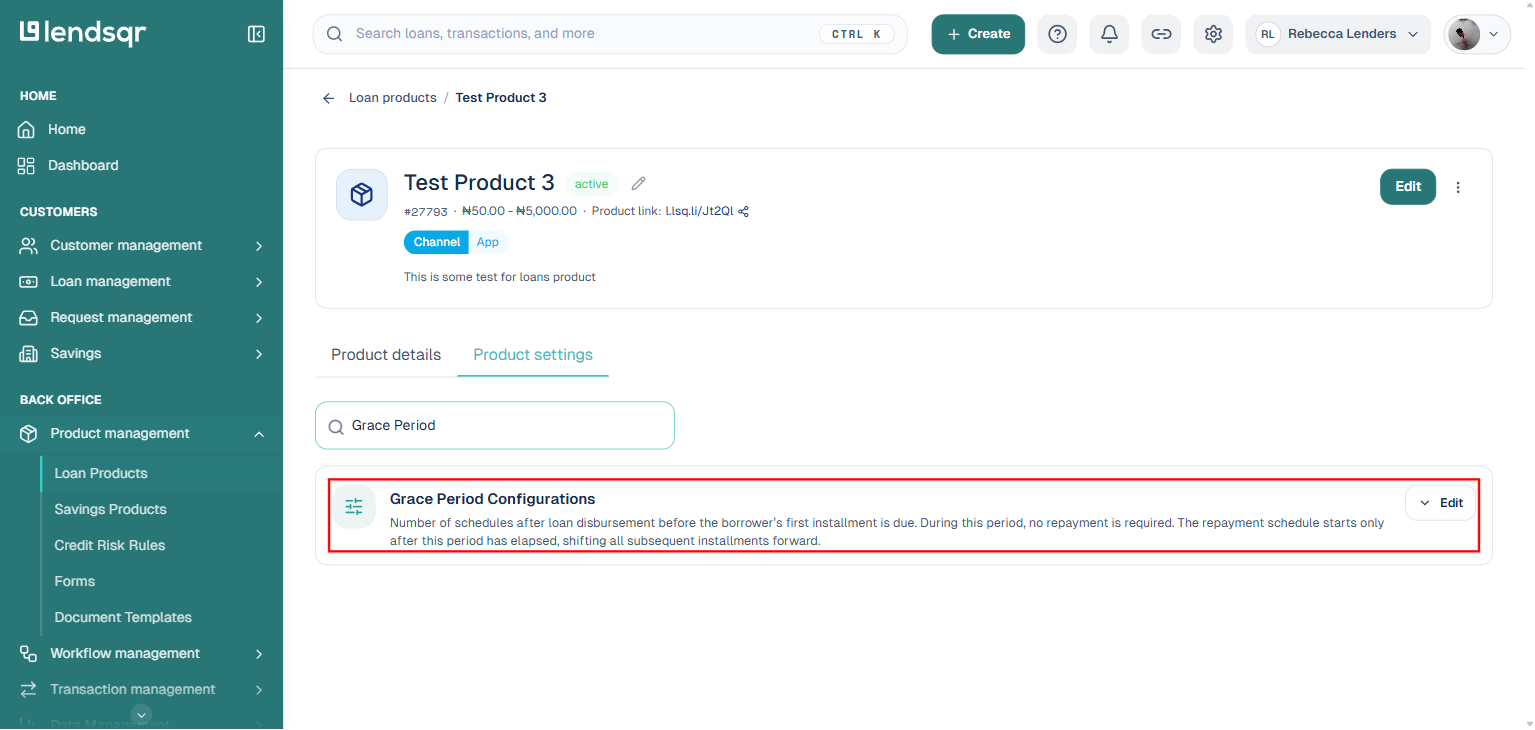
3. Create a loan product or open an existing one, then click on its “Product settings” tab. This tab lists every configurable attribute for the product as a single searchable list.
4. Type “Grace Period” into the “Search product settings” box to filter directly to the “Grace Period Configurations” setting.
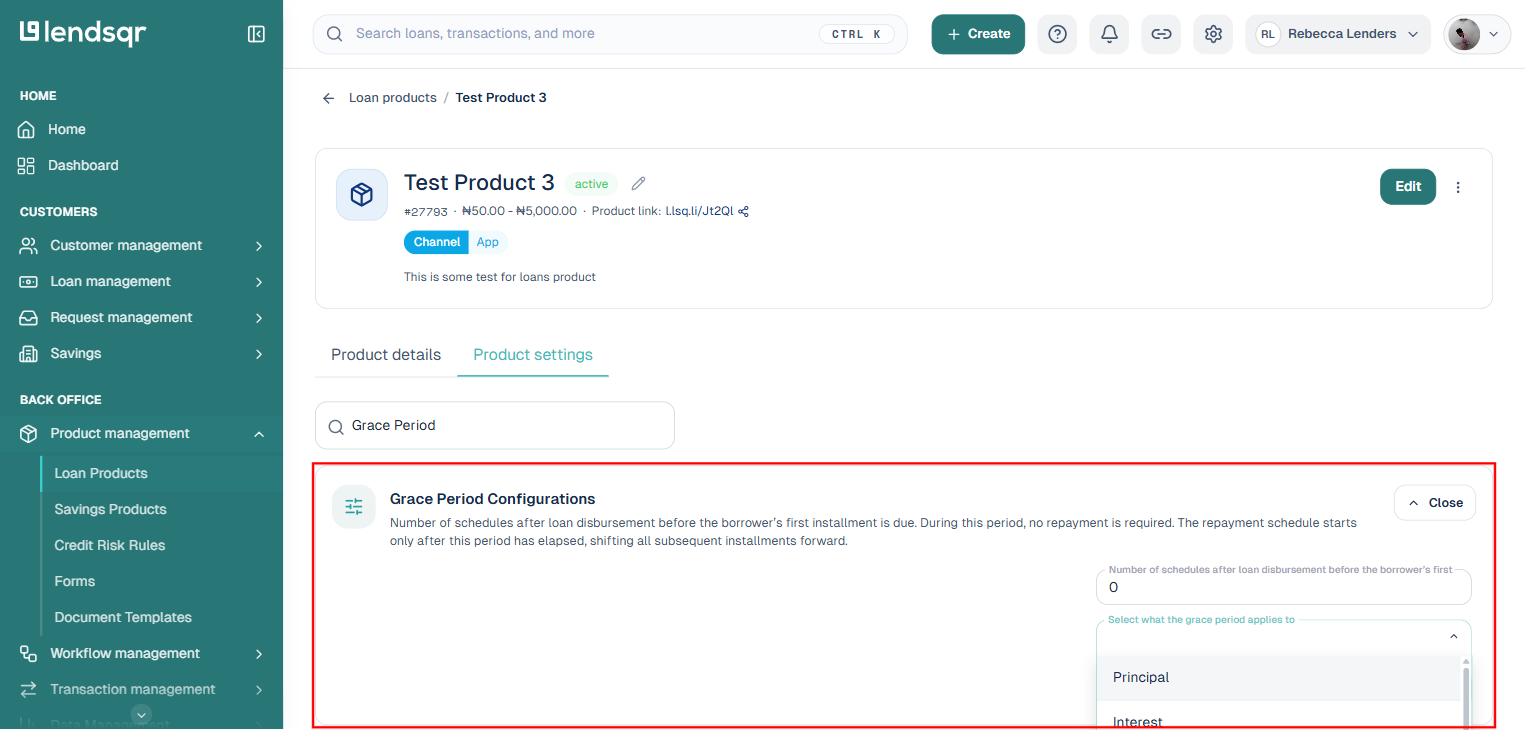
5. Click on the setting to expand it in place. There is no separate three-dot menu or Edit page, the fields appear directly below the setting.
6. To enable grace period configuration, enter values for:
the number of schedules to skip before the first installment is due; and
what the grace period applies to: Principal, Interest, or Principal + Interest.
7. Click “Save” to apply the changes to the loan product.
Changes to grace period settings only apply to loans disbursed after the update. Existing active loans are not affected
How long can a grace period be?
Lendsqr does not impose a maximum limit on the grace period. You can configure it to be as long as your lending strategy requires, whether that is a few days for a salary advance product or several months for an agricultural lending product with long harvest cycles.
However, keep in mind that longer grace periods delay your cash inflows and should be factored into your portfolio liquidity planning.
Frequently asked questions
Does the grace period apply to all borrowers on a product?
Yes. Once configured on a loan product, the grace period applies automatically to every borrower who takes a loan under that product. If you need different grace periods for different borrower segments, consider creating separate loan products with distinct configurations.
Can I set a grace period of zero?
Yes. Leaving the grace period at 0 means repayments begin immediately from the first scheduled date after disbursement. This is appropriate for products where borrowers have immediate income, such as a same-day salary advance repaid on payday.
What happens to interest during a principal + interest grace period?
Interest continues to accrue during the grace period, even when no payments are required. Depending on your interest calculation method, this accrued interest may be added to future repayment installments or settled in a lump sum at the end of the grace period. Review your loan product’s interest configuration to confirm the expected behavior.