Access your Back Office at your fingertips.
Download the app now on Google Play Store.
Scan the QR code
You can also scan QR code with your phone to download the app.
How to configure and customize loan offer letters in Lendsqr
Updated
On this page
When you approve a loan, the borrower needs a clear, professional document that outlines the exact terms, repayment schedule, and conditions. A well-designed offer letter builds trust, reduces misunderstandings, and creates a professional first impression.
Lendsqr makes it easy to configure and customize offer letters directly in the admin console. You can add your logo, company details, personalized borrower information, and specific loan terms so every letter looks consistent and branded.
This guide explains why offer letters matter in lending, when to use them, what you can customize, and how to configure them step by step in Lendsqr.
Why offer letters matter in lending
A professional offer letter serves several important purposes:
Builds trust by presenting clear and transparent loan terms
Reduces disputes by documenting exactly what the borrower is agreeing to
Improves borrower experience with a polished, branded document
Supports regulatory compliance by including required disclosures and disclaimers
Speeds up the disbursement process because borrowers understand their obligations upfront
Without a proper offer letter, lenders often face confusion, delayed sign-offs, or disputes later in the loan lifecycle.
When should you configure and use offer letters?
Configure your offer letter template once, then use it for every approved loan. You will typically generate and send offer letters:
Immediately after loan approval but before disbursement
During the final confirmation stage with the borrower
For every new loan, whether it is a salary advance, personal loan, or group facility
When updating terms for loan renewals or top-ups
For example, a salary advance lender in Nigeria can send a quick, branded offer letter via email or WhatsApp so the borrower can review payroll deduction terms and sign off rapidly. A microfinance institution might use customized offer letters for group loans to clearly list each member’s responsibilities and repayment schedule.
What you can customize in an offer letter
Lendsqr allows you to personalize the following elements:
Company logo and branding
Company name, address, and contact details
Borrower personal information and loan reference number
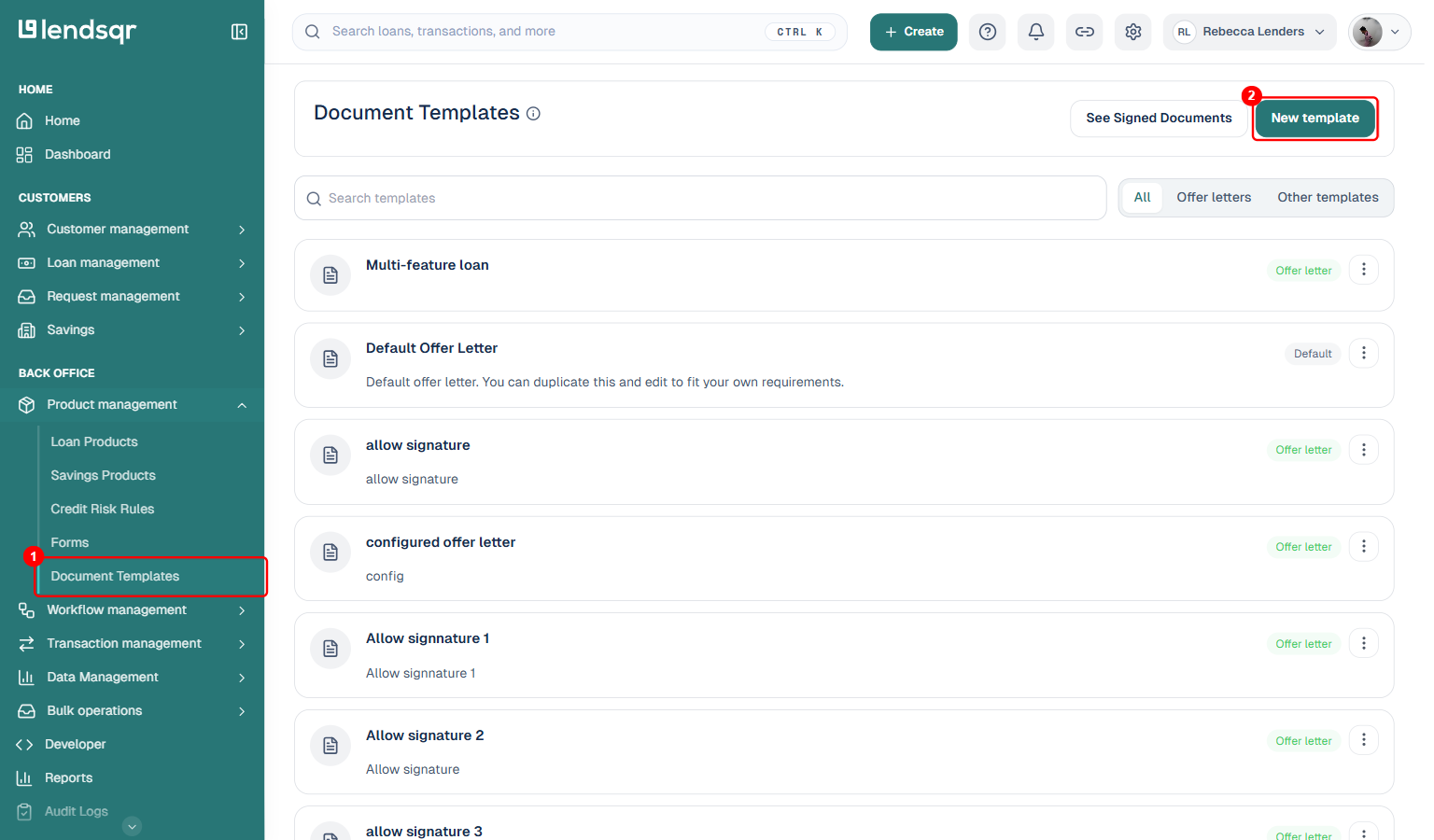
In the left navigation, expand Product management (under Back Office) and select Document Templates. This page lists every template you have created, with tabs to filter by All, Offer letters, or Other templates. Click New template at the top right.
3. Fill in the New document template modal
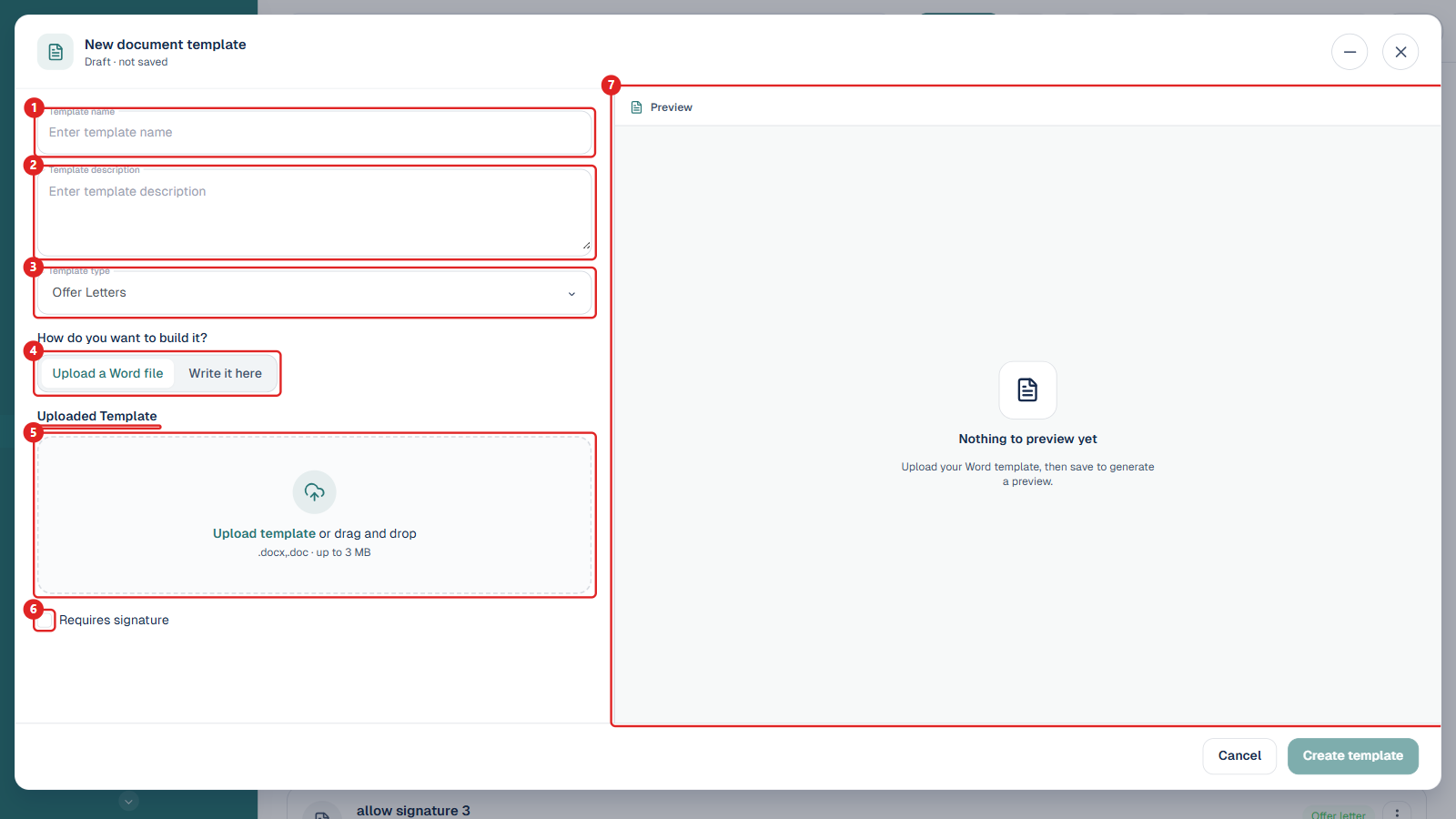
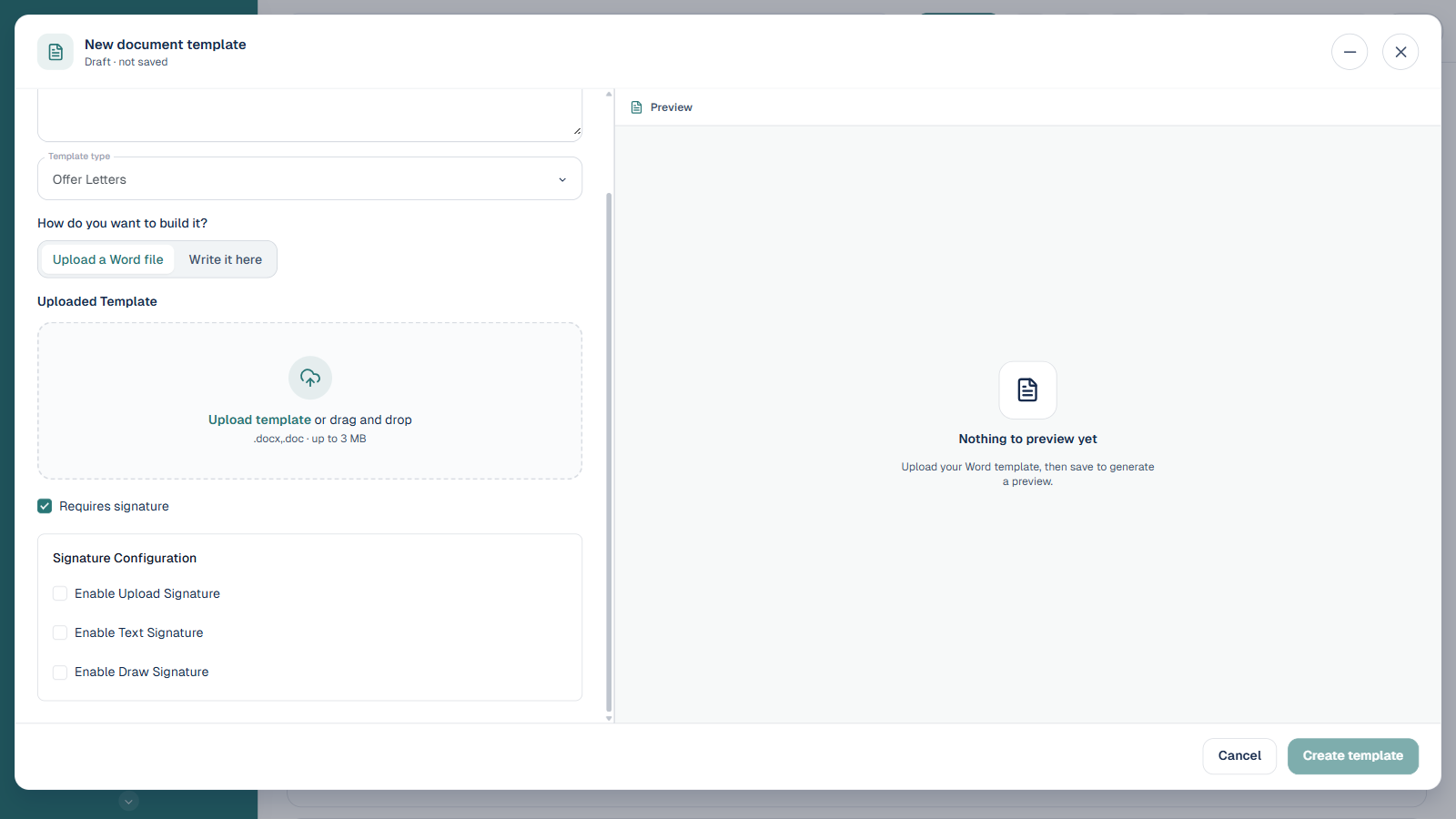
The New document template modal opens with a live preview on the right. Its fields are:
1. Template name. A clear label such as “Salary advance offer letter”. It appears in the template list and in the offer letter picker on a loan product.
2. Template description. An optional internal note describing what the template is for.
3. Template type. Choose Offer Letters for a borrower offer letter, or Other templates for any other customer document.
4. How do you want to build it? The build mode toggle, either Upload a Word file or Write it here (covered in the next step).
5. Uploaded Template. Shown when the build mode is Upload a Word file. Drag in or browse for a .docx or .doc file up to 3 MB.
6. Requires signature. Tick this if the borrower must sign the document. It reveals the Signature Configuration options.
7. Preview. The right pane. It renders the finished document once you upload a file or start writing.
4. Choose how to build the template
Option A: Upload a Word file. Keep the toggle on Upload a Word file and add your .docx or .doc file (up to 3 MB) in the Uploaded Template area. In the file, wrap merge fields in single curly braces, for example {borrower_name}, {loan_amount}, and {%signature_image} for an uploaded or drawn signature. The Preview generates after you save.
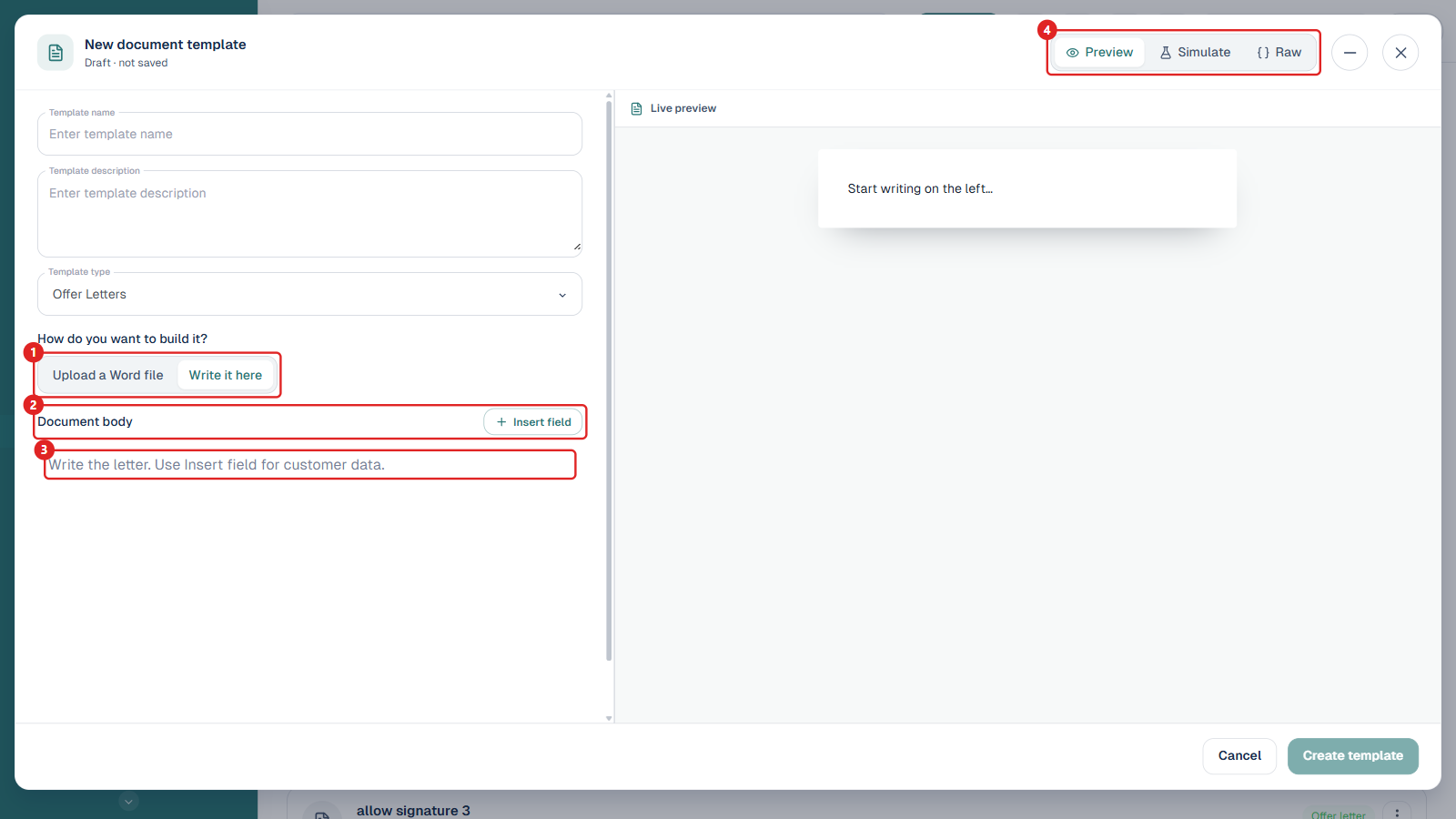
Option B: Write it here. Switch the toggle to Write it here to build the letter in an editable editor instead of uploading a file. The left pane changes to:
1. Build mode toggle. Switch back to Upload a Word file at any time before saving.
2. Document body. The section header, with the Insert field button on the right.
3. Editor. Type the body of the letter here.
4. Preview / Simulate / Raw. Tabs on the right pane. Preview updates live as you type, Simulate fills the merge fields with sample data so you can see a realistic letter, and Raw shows the underlying markup.
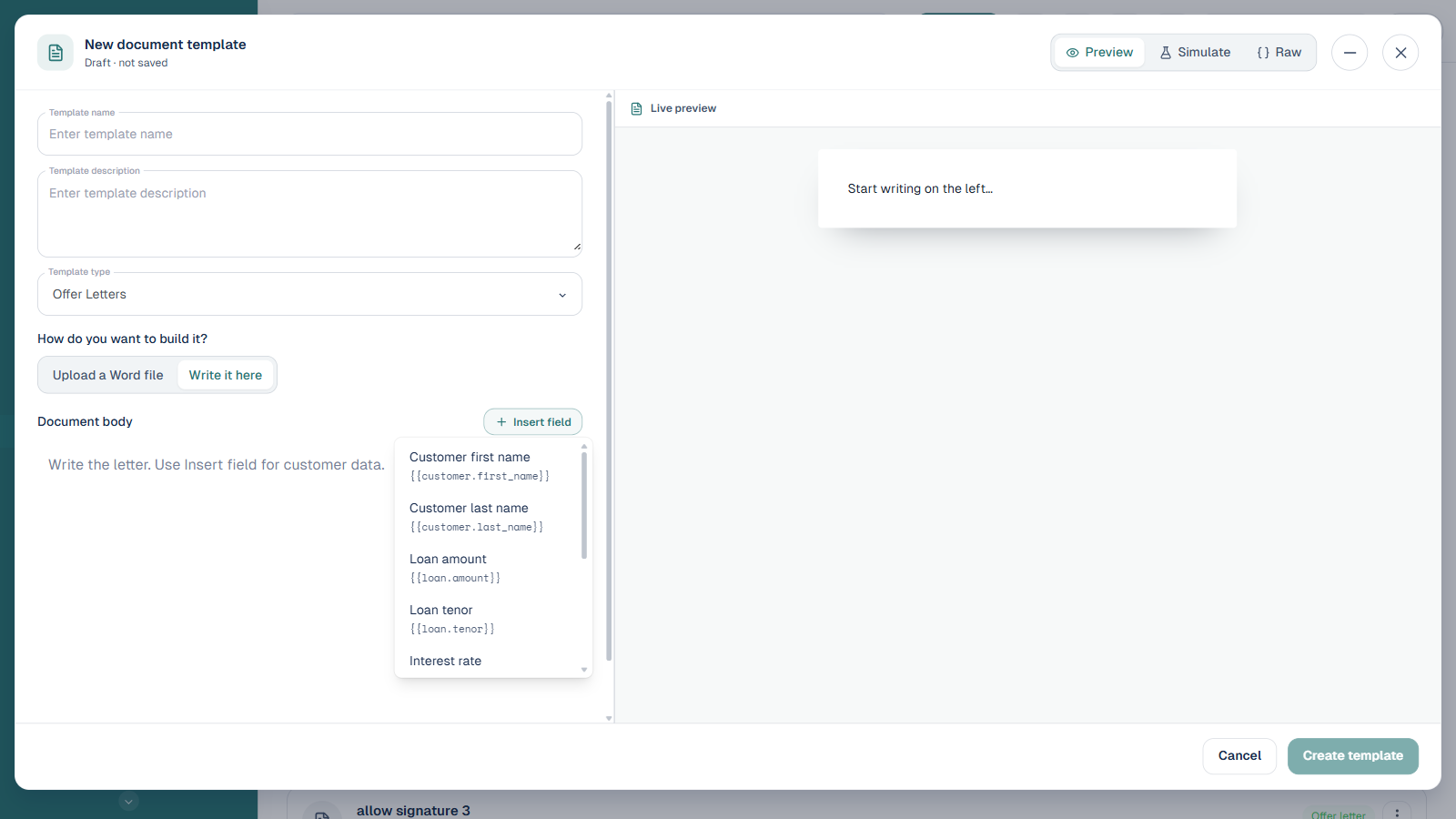
Adding fields. Click Insert field to drop a merge token into the letter at the cursor. The available fields are:
Customer first name: {{customer.first_name}}
Customer last name: {{customer.last_name}}
Loan amount: {{loan.amount}}
Loan tenor: {{loan.tenor}}
Interest rate: {{loan.interest_rate}}
First repayment: {{repayment.first_amount}}
First repayment date: {{repayment.first_date}}
Organisation name: {{org.name}}
Today’s date: {{date.today}}
5. Configure the signature requirement
If the document needs borrower acceptance, tick Requires signature. A Signature Configuration section appears where you can enable one or more signature methods:
Enable Upload Signature. The borrower uploads an image of their handwritten signature (JPG or PNG).
Enable Text Signature. The borrower types their full name exactly as on their ID; the typed name is their electronic signature. You can also set a Text signature label and Text signature description shown to the borrower.
Enable Draw Signature. The borrower draws their signature on screen with a mouse or touch.
NB: For an uploaded Word template, include the variables {borrower_name} for the text signature and {%signature_image} for the uploaded or drawn signature.
6. Save the template
Click Create template. It now appears in the Document Templates list and can be selected whenever you add an offer letter to a loan product.
Editing a template later. From the Document Templates list, open a template’s Document actions menu and choose Edit. You can change the name, description, and signature settings. The body of an uploaded Word template opens as a read-only preview with a Download button; to change the wording you upload a new file or rebuild it with Write it here. The default “Default Offer Letter” cannot be edited or deleted, but you can Duplicate it and edit the copy.
Configuring the offer letter for your loan product
1. Log in to the Admin Console
Open your web browser and log in to the Lendsqr admin console with your credentials.
2. Click on “Loan Products” under Product Management
From the main dashboard, go to Product Management and select Loan Products. This will display a list of all the loan products you have created.
3. Create or edit a loan product
To create a new loan product, click Create.
To edit an existing loan product, click the Edit button in the options menu for that product.
4. Add the offer letter to the Loan documents section
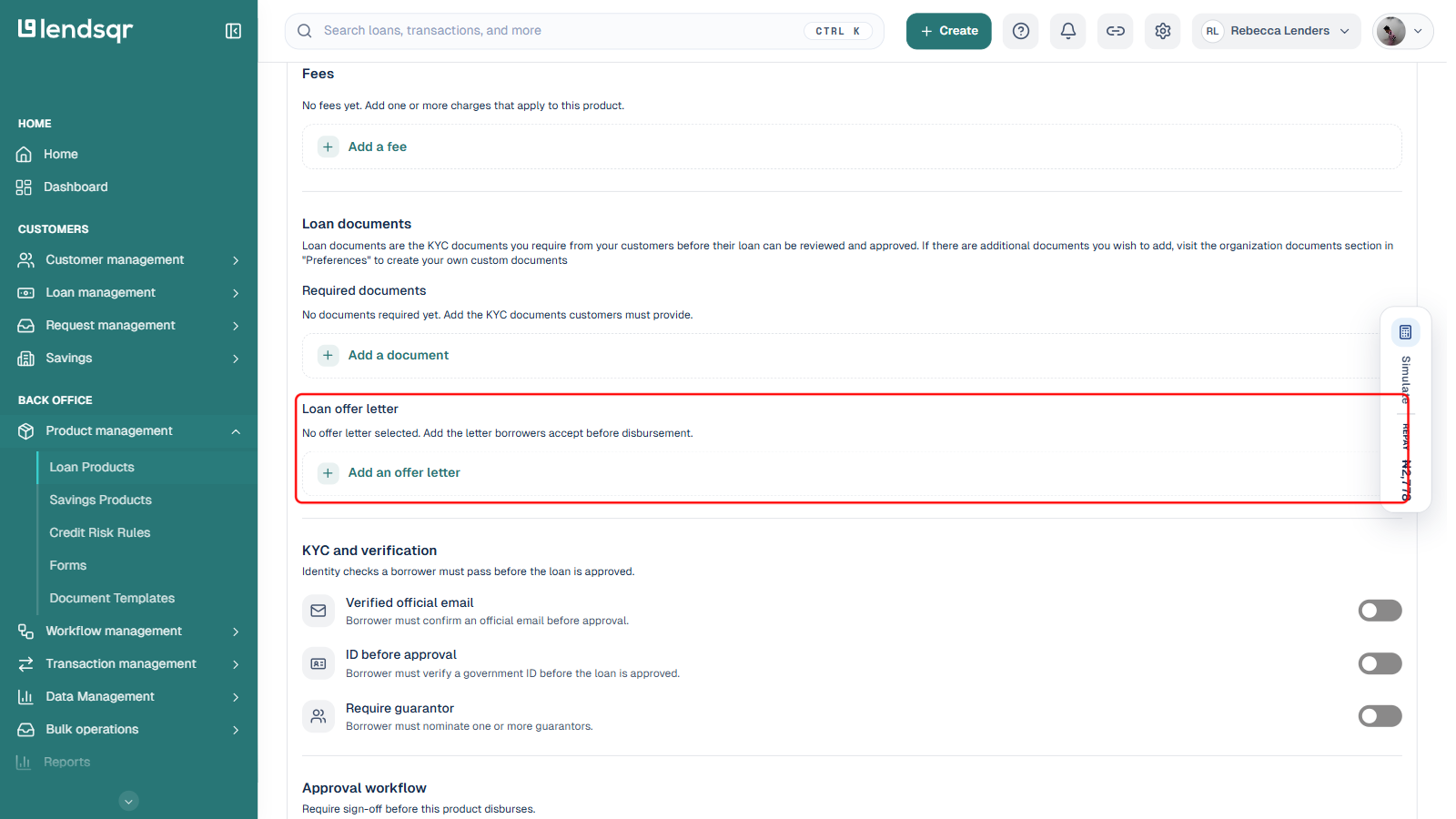
Scroll down to the Loan documents section on the loan product creation or edit page.
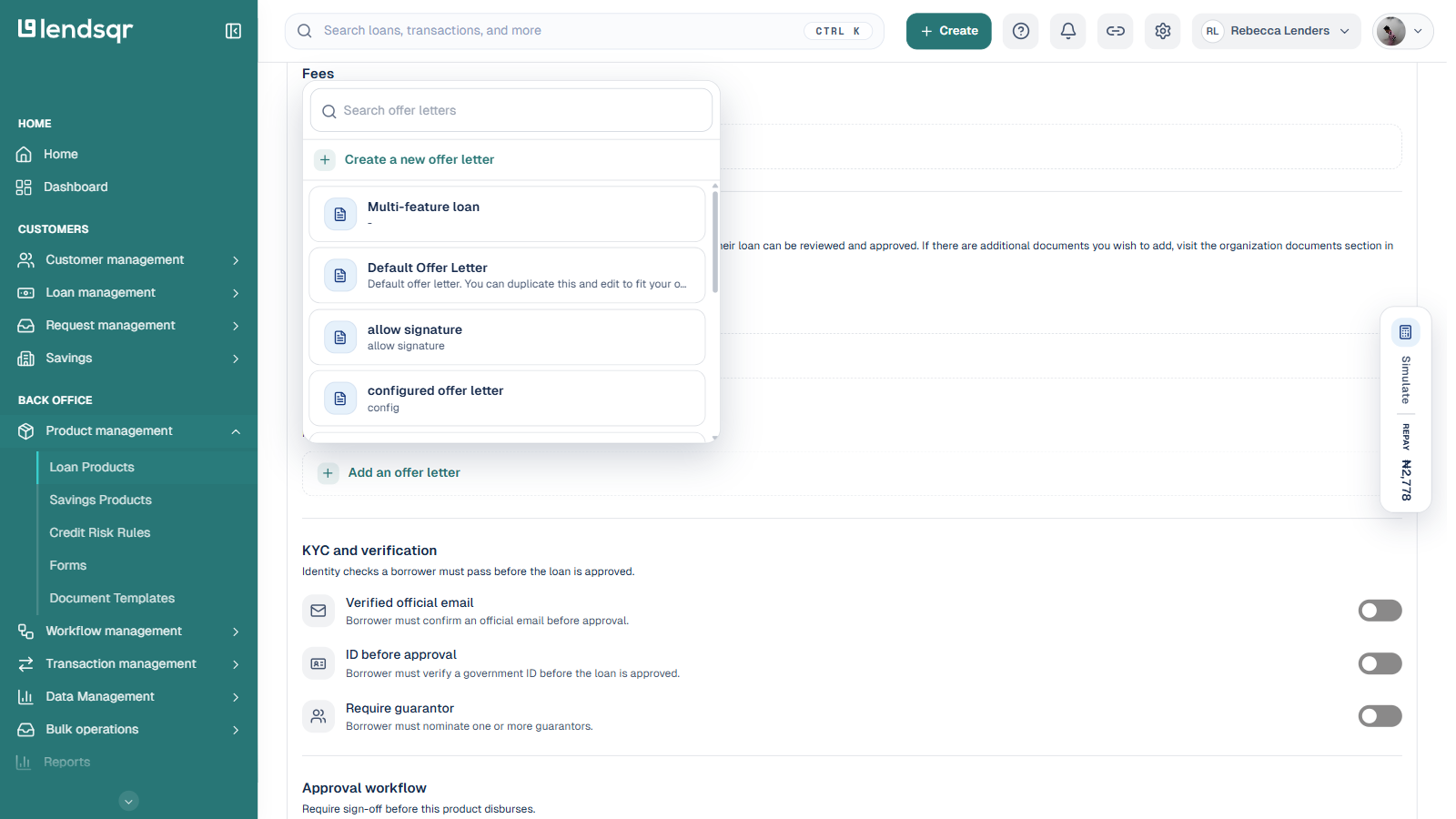
In the Loan offer letter sub-section, click Add an offer letter.
This opens a searchable picker. Search for and select an existing template from the list, or click Create a new offer letter at the top of the picker to build one without leaving this page.
5. Save your changes or create the loan product
After making the necessary configurations, click SaveChanges to apply the changes to the loan product or Create Loan Product.
What happens after configuration
Once saved, every approved loan in lendsqr will automatically generate a customized offer letter using your template. You can download, email, or share the PDF directly with the borrower from the loan details page.
The borrower receives a clear, branded document that they can review, print, or sign digitally. This streamlines the approval-to-disbursement workflow and creates a consistent experience for all your customers.
What this enables in your lending operations
With easy offer letter configuration in the lendsqr admin console, you can create professional, branded documents for every borrower. This helps you communicate clearly, build trust, reduce disputes, and streamline your lending process in one secure place.
Many lenders rely on this feature to maintain professionalism while saving time on manual document creation.
Next steps
Train your team on how to generate and send offer letters during the approval process.
Review and update your offer letter template whenever your branding or terms change.
Test the generated offer letter on a sample loan before rolling it out to all borrowers.
Combine offer letters with your customized borrower web app for a fully branded customer journey.