Access your Back Office at your fingertips.
Download the app now on Google Play Store.
Scan the QR code
You can also scan QR code with your phone to download the app.
How to modify a loan on the Lendsqr admin console
Updated
On this page
Introduction
A borrower loses their job mid-repayment. Another disputes a payment that was incorrectly recorded. A third completes their repayment ahead of schedule and needs the loan closed out immediately. Each situation calls for a different kind of intervention, and none of them fit neatly into the standard loan lifecycle.
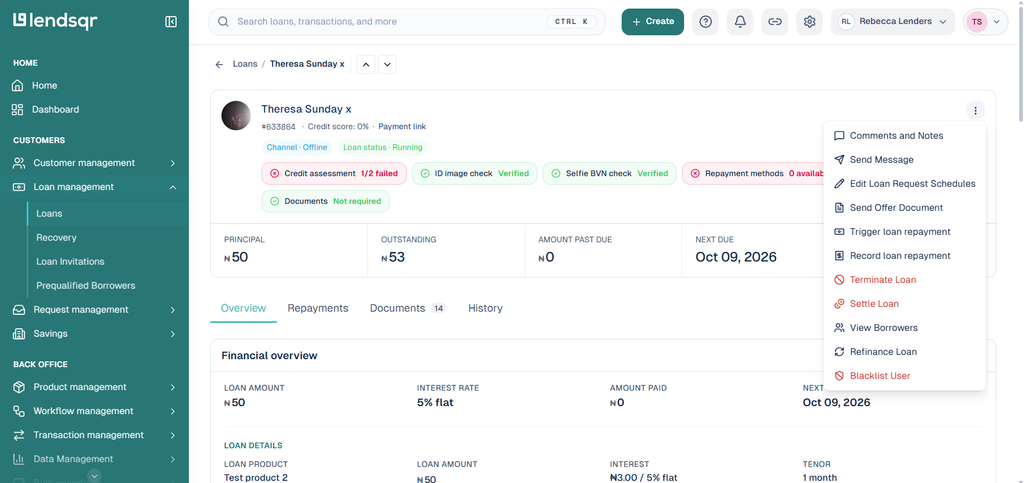
Loan modification gives you the tools to handle these situations directly from your dashboard. On the Lendsqr admin console, you can manually update a loan’s status to reflect what is actually happening with the borrower. You can terminate a loan, reverse a loan, or settle a loan, each option serving a distinct purpose depending on the circumstances.
This guide explains what each modification option does, when to use it, and how to carry it out on the admin console.
When loan modification is necessary
Loan modification is not a routine action. It is a deliberate intervention that changes the recorded state of a loan on the platform. You should initiate it only when circumstances genuinely call for a status change outside the normal repayment flow.
The most common situations that require loan modification include the following.
A borrower faces financial difficulty and can no longer meet their repayment obligations under the current terms. Rather than allowing the loan to move into default without intervention, the lender steps in to adjust the loan status in a way that reflects the new reality and protects both parties.
Both the lender and borrower agree on new terms that better suit the borrower’s current financial situation. In this case, modifying the loan status documents the outcome of that agreement on the platform.
A payment was recorded incorrectly and needs to be reversed to restore the accurate state of the loan. Leaving an incorrect payment on record creates reporting errors and affects the borrower’s repayment history unfairly.
A borrower pays off their loan in full before the scheduled end date, and the lender needs to close the loan immediately rather than waiting for the system to process the final instalment.
Understanding your modification options
Lendsqr gives you three loan modification options. Each one produces a different outcome. Choosing the wrong option for the situation creates records that do not reflect reality and may be difficult to reverse. Review each option carefully before proceeding.
Terminate loan
Terminating a loan removes the loan record from the platform entirely. Think of it as deleting the loan. Once you terminate a loan, it disappears from the borrower’s loan history as though it never existed.
Use this option when a loan was created in error, the loan record needs to be wiped, or when an internal process requires the loan to be removed from the system entirely.
Termination is not the same as closing a loan after repayment. It is not the appropriate option for a borrower who has finished paying or one who is struggling to repay. Use settlement for completed repayments and work with your credit team on a separate process for borrowers in difficulty.
Because termination removes the loan record permanently, treat it with caution. Confirm that you have the correct loan before proceeding. Document the reason for termination in the notes/comments before carrying out the action, since the platform will not retain a history of the terminated loan for reference afterwards.
Reverse loan
Reversing a loan undoes a specific transaction or payment recorded against the loan. Use this option when a payment was recorded incorrectly, when a disbursement was made in error, or when a transaction needs to be unwound to restore the accurate state of the loan.
Reversals are corrective actions. They do not change the borrower’s repayment obligations. Instead, they correct the record so that the loan history accurately reflects what actually happened.
Use this option carefully. A reversal changes the loan’s payment history and affects the borrower’s outstanding balance. Confirm the reason for the reversal and verify the specific transaction you need to unwind before proceeding.
Settle loan
Settling a loan marks it as fully repaid on the platform. Use this option when a borrower has paid off their loan in full, either through a lump sum payment outside the standard repayment schedule or through an early repayment arrangement agreed between the lender and borrower.
Settlement closes the loan cleanly. The platform records it as repaid in full, and the borrower’s obligations under that loan end. This is the appropriate option when the loan is genuinely complete, as opposed to termination, which closes a loan that has not been fully repaid.
How to modify a loan
You need an Admin or Super Admin role to modify loans on the Lendsqr admin console.
Kindly follow the steps below to modify or perform any of the above actions:
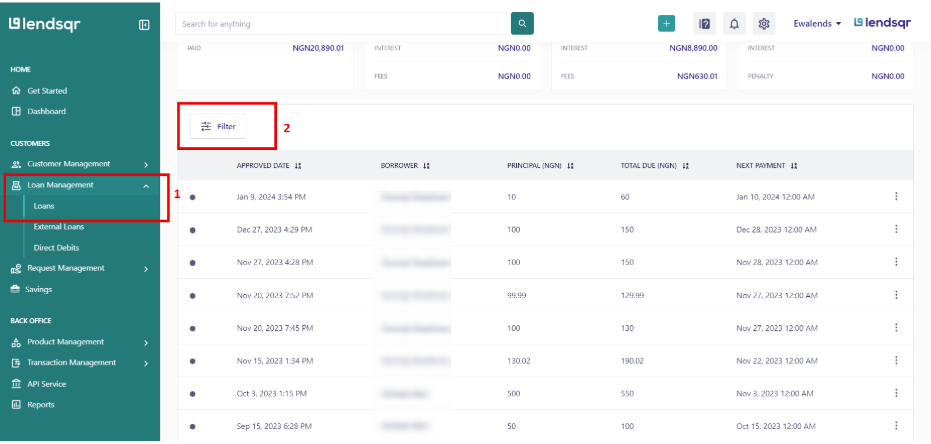
1. Navigate to Loans under Loans management module
2. Navigate to the user’s loan
3. Click on the three-dot icon beside the “Comments and Notes” button, and select the option that applies. Either “Terminate Loan“, “Reverse Loan“, or “Settle Loan”.
4. Review the details of the action in the prompt that appears.
5. Confirm the modification to apply the change.
What happens after each modification
Understanding the downstream effect of each modification helps you choose the right option and manage your portfolio accurately after the change.
After you terminate a loan, the record disappears from the platform entirely. The loan no longer appears in the borrower’s history or your active loan queue. Because the record is gone, ensure you have documented the reason for termination in your internal systems before confirming the action.
After you reverse a loan transaction, the specific payment or disbursement is unwound from the loan record. The borrower’s outstanding balance adjusts to reflect the reversal. The loan remains active and the borrower’s repayment obligations continue under the corrected record.
After you settle a loan, the loan closes as fully repaid. The borrower’s profile reflects a clean repayment record for that loan. The platform removes the loan from your active queue and updates your portfolio reporting accordingly.
Best practices for loan modification
Loan modification is a powerful tool. Used correctly, it keeps your portfolio data accurate and supports fair outcomes for borrowers. Used incorrectly, it creates reporting errors, compliance risks, and borrower disputes that are difficult to resolve after the fact.
Always document the reason for any modification before carrying it out. Whether you record this in the Comments and Notes section of the loan or in a separate internal system, a clear record of why the modification was made protects your organization in the event of a dispute or audit.
Only use the modification option that matches the actual situation. Settling a loan that has not been fully repaid distorts your portfolio data and gives the borrower an inaccurate repayment record. Terminating a loan that should be settled removes a record that should exist. Each option has a specific purpose; use it accordingly.
Confirm that the modification aligns with your internal credit policy before proceeding. Loan modifications that fall outside your policy should go through an approval process before anyone takes action on them on the platform. Avoid making modifications under pressure or without proper documentation.
Review your modification records regularly as part of your portfolio management process. A high volume of terminations or reversals in a short period may indicate a systemic issue with your loan products, your decision engine configuration, or your borrower communication process.
Troubleshooting
The three-dot icon is not visible on the loan page. Confirm that your role includes the permissions required to modify loans. If you have the correct role and the icon is still missing, contact your Super Admin or Lendsqr support for assistance.
The modification option I need is greyed out or unavailable. Some modification options may not be available depending on the current status of the loan. Check the loan’s current status and confirm which modifications are applicable at that stage.
I applied the wrong modification by mistake. Contact Lendsqr support immediately. The ability to reverse a modification depends on the type of action taken and how quickly you act after the error. Do not attempt any further modifications to the loan until you have spoken with support.
The loan status did not update after I confirmed the modification. Refresh the page and check the loan record again. If the status has not changed after refreshing, contact Lendsqr support and provide the details of the loan and the modification you attempted.
The modification is not reflecting in my portfolio reports. Allow a short period for the platform to process the update and refresh your reporting dashboard. If the change does not appear after a reasonable time, contact Lendsqr support with the loan details.