Access your Back Office at your fingertips.
Download the app now on Google Play Store.
Scan the QR code
You can also scan QR code with your phone to download the app.
Recording loan repayment from external sources
Updated
On this page
Recording a loan repayment from an external source on Lendsqr allows admins to capture repayments that happen outside the platform’s supported channels. This is useful when a borrower pays through a bank transfer, cash, collateral, or another method that does not flow automatically through the system. It also helps when a borrower is debited successfully, but the repayment does not immediately reflect in the wallet.
This feature keeps the loan record accurate by allowing the admin to manually post the repayment amount, update the schedule, and reflect the outstanding balance when applicable. If the repayment clears the full amount, the schedule can close out accordingly; if not, the remaining balance stays visible for follow-up.
Not every loan repayment happens through a system-supported channel. In real lending operations, borrowers may repay through bank transfer, cash, collateral, or another method that requires manual review before the repayment can be reflected in the system.
This feature is also useful when a borrower has already been debited but the amount does not appear in the wallet immediately. In that case, an admin can manually record the repayment so the loan balance and schedule reflect the payment correctly.
Why this matters
Accurate repayment recording is essential for keeping loan data clean and trustworthy. When repayments happen outside the platform, the loan record still needs to show what was paid, when it was paid, and how much remains outstanding.
This feature also reduces confusion for both the lender and the borrower. Instead of leaving a loan in an inaccurate state because the payment did not flow through an automated channel, the admin can update the loan record directly and keep the repayment history aligned with reality.
Steps to record repayment
Follow these steps to record a loan repayment from an external source in the Lendsqr admin console:
Before beginning these steps, confirm that your role has the external loan repayment permission enabled. Learn more here.
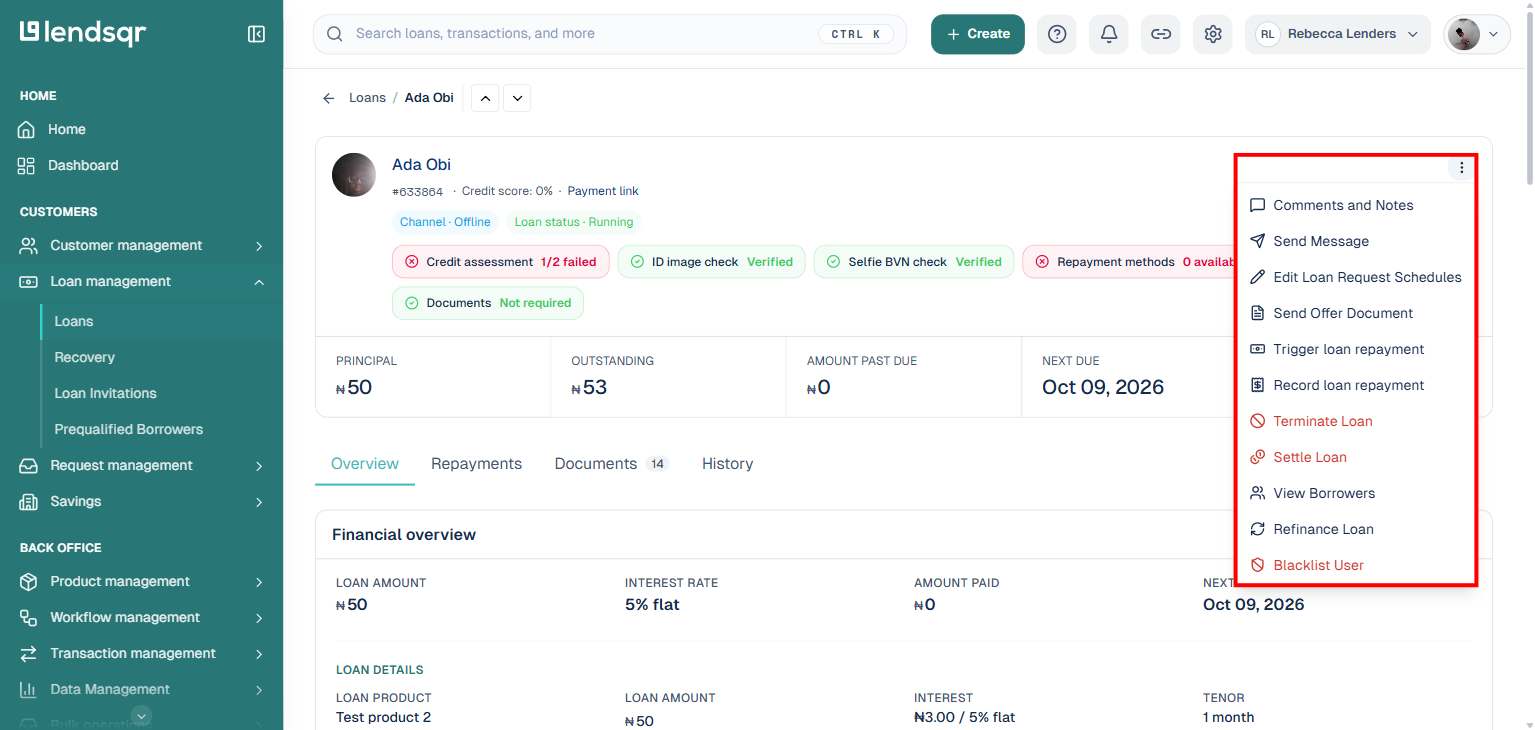
2. Open the options menu. On the loan’s details page, click More actions (the three dots) near the top of the page.
3. SelectRecord loan repayment. A panel will slide in from the right.
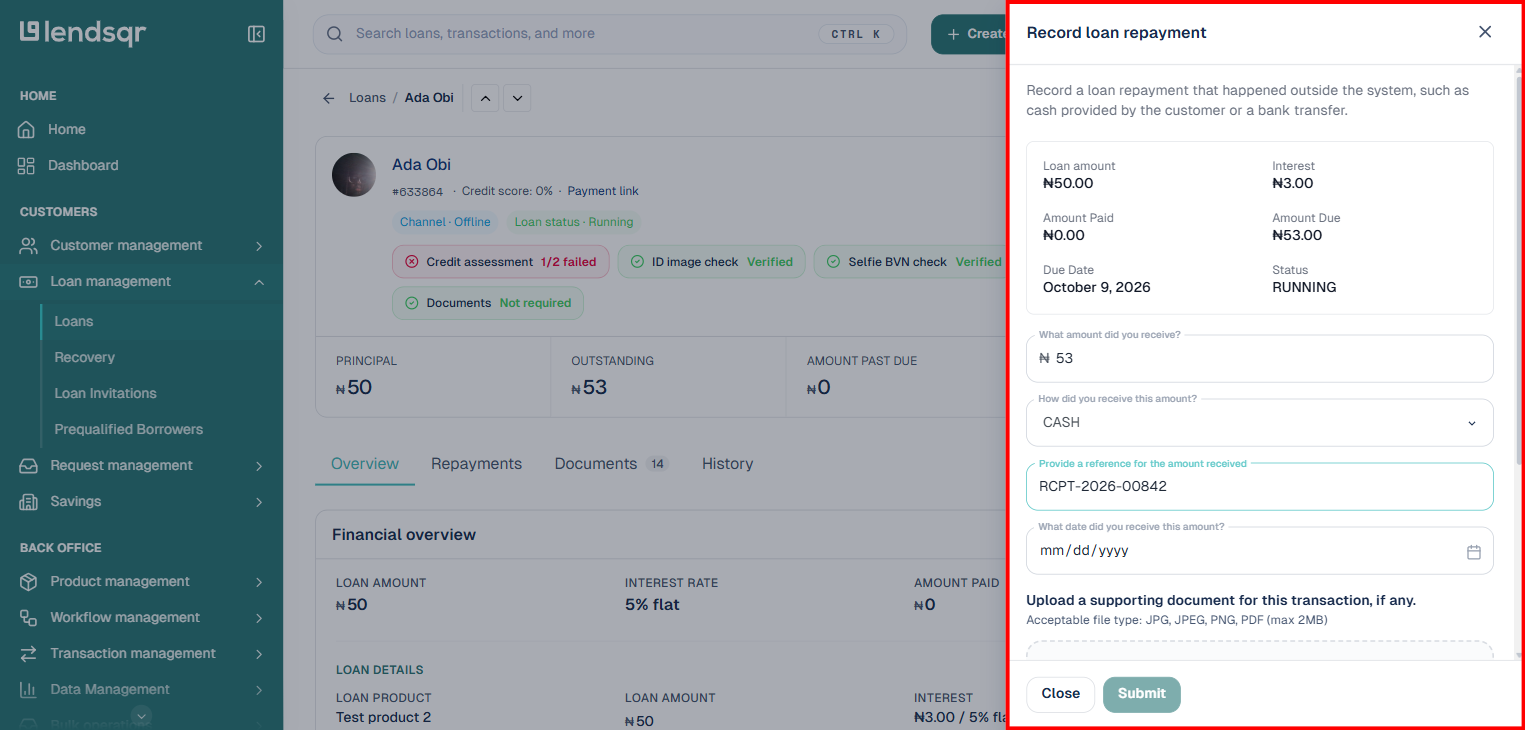
4. Enter the repayment details. The panel shows a summary of the loan (amount, interest, amount paid, amount due, due date, status) followed by the fields you need to fill in: the amount received, the channel it came through (Bank Transfer, Cash, Collateral, or Others), a reference for the amount received, the date it was received, an optional supporting document, and optional additional details.
5. ClickSubmit once all required fields are filled in.
6. Review the repayment details carefully. Make sure every value is correct before finalizing the action.
7. ClickConfirm to proceed.
8. Enter your 2FA key to authorize the repayment.
9. Complete the action. The repayment is recorded successfully once the confirmation is accepted.
Repayment details
When recording an external repayment, the modal includes the following fields:
Amount: What amount did you receive? Enter the total the borrower repaid externally.
Channel: How did you receive this amount? Choose Bank Transfer, Cash, Collateral, or Others.
Reference: Provide a reference for the amount received, such as a transaction ID or receipt number.
Date: What date did you receive this amount? Specify when the repayment occurred.
Supporting document: Upload a related document if available (JPG, JPEG, PNG or PDF, up to 2MB).
Additional details: Add context or any extra information that may help explain the repayment.
These fields help make the repayment traceable and easier to reconcile later. They also give the lender enough context to understand why the repayment was recorded manually.
What happens after submission
After the repayment is submitted and confirmed, the loan record updates to reflect the amount paid. If the repayment is partial, the outstanding balance remains visible. If the repayment covers the full amount, the loan schedule updates accordingly and the balance may be cleared.
This helps ensure that the loan repayment history remains accurate even when the payment did not pass through the system’s usual channels. It also supports better internal reporting because the loan record now includes the external repayment event.
Use the following best practices when recording repayments from external sources:
Verify the payment first. Confirm that the repayment actually happened before you record it.
Use the correct repayment method. Select the option that best matches the real payment channel.
Enter the exact transaction date. This helps keep the repayment timeline accurate.
Add a clear reference. Use a receipt number, bank reference, or another useful identifier whenever possible.
Upload supporting documents when available. Documents can help with verification and audit review.
Use notes for unusual cases. If the repayment was partial, delayed, or manually adjusted, explain that clearly.
Review the details before confirming. Once the repayment is posted, it affects the loan balance and schedule.
Protect your 2FA key. Only enter it when you are ready to authorize the action.
Use cases
This feature is useful in situations such as the following:
A borrower pays through a bank transfer that is not automatically linked to the wallet.
A borrower repays in cash and the payment needs to be manually reflected in the system.
A collateral-based repayment is accepted and must be recorded by an admin.
A debit was successful, but the wallet did not update in real time.
These are common examples of repayment events that require manual recording rather than automatic processing.
Common questions
Why would I record a repayment manually?
You would record a repayment manually when the payment happened outside the system’s supported channels or when the amount was successfully collected but not reflected automatically.
Can I attach proof of payment?
Yes. If you have a receipt, transfer record, or another supporting file, you can upload it in the supporting document field.
What if the repayment is only partial?
If the amount entered is less than the full balance, the schedule should continue to show the remaining outstanding amount.
Why is 2FA required?
2FA adds an extra layer of security before the repayment is finalized, which helps protect sensitive loan actions.
Conclusion
Recording loan repayment from external sources gives lenders a practical way to keep loan records accurate when repayments happen outside the usual automated channels. It ensures that cash payments, bank transfers, collateral-based settlements, and other manual repayment methods are properly reflected in the system, so the loan balance and repayment schedule remain up to date.
This feature is especially valuable when a borrower has already made a payment, but the amount has not yet appeared in the wallet or repayment history. By allowing admins to capture the repayment manually, the lender can avoid delays, reduce confusion, and maintain a clear record of the transaction for both operational review and future reconciliation.
In addition, this process supports better loan management by making it easier to track outstanding balances and confirm whether a repayment is partial or complete. That means the lender can move forward with confidence, knowing that the loan record reflects the borrower’s true repayment status and the next action on the loan can be handled correctly.