Access your Back Office at your fingertips.
Download the app now on Google Play Store.
Scan the QR code
You can also scan QR code with your phone to download the app.
Understanding how the Lendsqr web app works
Updated
On this page
Introduction
For digital lenders, having a loan management system is only one part of the equation. The other equally important part is giving borrowers an easy, accessible, and trustworthy way to interact with your lending business.
This is where your web app comes in.
When customers want to apply for a loan, upload documents, complete verification, make repayments, or manage their account, they need a place to do all of that seamlessly. Without a proper digital access point, lenders often struggle with slow onboarding, manual operations, high support volumes, and reduced borrower trust.
To solve this, Lendsqr provides every lender with a free web app that acts as the customer-facing side of their lending business. Think of it as your digital loan branch, available to borrowers at any time.
Whether your customers need personal loans, salary advances, car loans, home financing, SME loans, or emergency credit facilities, they can discover and apply for these offerings directly through your web app.
For lenders, this means you can automate large parts of the lending journey, reduce operational bottlenecks, and scale your business without depending heavily on manual intervention.
In this guide, you will learn how the Lendsqr web app works, how to access it, what configurations are required before borrowers can start applying for loans, and what users can do once they sign up.
The Lendsqr web app is a borrower-facing digital platform automatically provided to every lender when they sign up on the Lendsqr admin console.
Instead of building a lending portal from scratch, Lendsqr gives you an already functional web application that borrowers can use to interact with your lending business.
This web app acts as the primary touchpoint between lenders and borrowers. It is where users can:
Register and create accounts
Complete identity verification
Apply for loans
Upload KYC documentation
Receive approved loans
Transfer funds to their bank accounts
Repay loans
Manage their financial activities
This makes the lending process significantly easier for both lenders and borrowers.
For example, imagine a lender offering salary advances and personal loans. Instead of manually processing loan applications through emails, spreadsheets, or WhatsApp messages, borrowers simply visit the lender’s web app, apply for a loan, upload the required documentation, and wait for approval.
On the lender’s side, applications appear directly inside the admin console for review. This reduces operational friction while improving customer experience.
Why the web app matters for lenders
A web app is more than just a place for borrowers to apply for loans. It plays a major role in how efficiently your lending business operates.
Without a borrower-facing application system, lenders often encounter several challenges, including:
Slow borrower onboarding
High operational workload
Poor customer experience
Increased support requests
Delayed loan applications
Difficulty scaling operations
The web app helps eliminate many of these problems by allowing customers to complete major actions independently. Instead of relying on manual processes, borrowers can sign up, submit documents, and apply for loans themselves.
For lenders, this translates into:
Faster loan processing
Improved borrower experience
Better customer trust
Reduced manual work
Easier loan servicing
Higher operational efficiency
Most importantly, it enables lenders to scale more efficiently.
Whether you are serving 100 borrowers or 100,000 borrowers, the web app ensures customers can still access your lending products digitally.
How to access your web app
As a Lendsqr lender, your web app is automatically created when you sign up on the admin console.
This means you do not need to build a separate website before customers can start accessing your lending products.
Follow the steps below to locate your web app.
Step 1: Log in to your admin console
Start by signing into your Lendsqr admin console using your login credentials.
Once you are logged in, you will have access to your dashboard and lender settings.
Ensure you have the necessary permissions to access account-level settings.
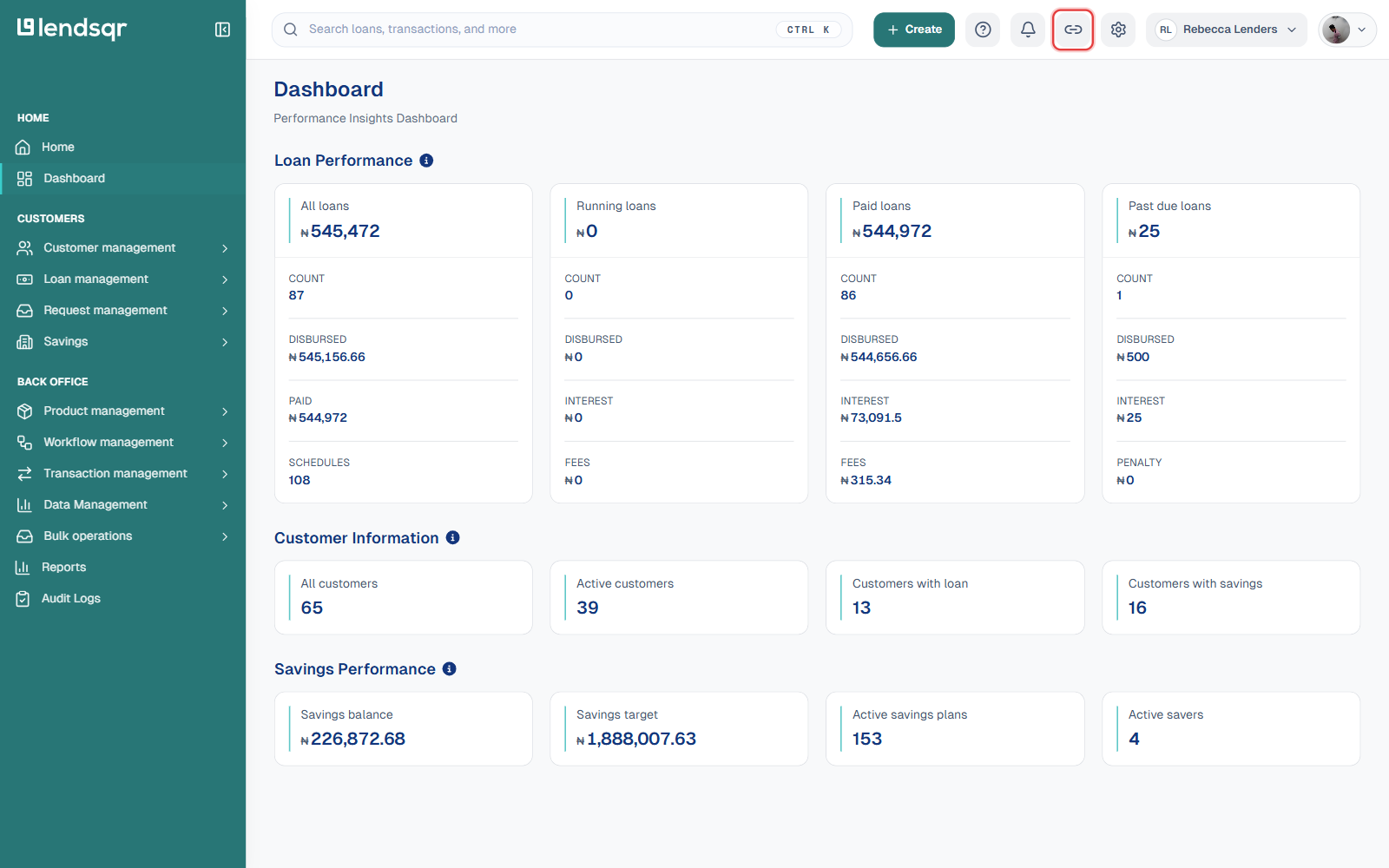
Step 2: Click the web app icon in the top navigation bar
In the top navigation bar of your admin console, click the link icon next to the notification bell.
Step 3: Open or share your web app link
Clicking the icon opens your dedicated web app directly in a new tab, at a URL unique to your business (for example, https://your-business-name.lsq.app). To share it with customers instead of opening it yourself, copy that URL straight from your browser’s address bar once the tab opens.
Many lenders also share this link through:
SMS campaigns
Social media
Referral campaigns
WhatsApp communication
Email newsletters
Customer support interactions
This makes it easier for borrowers to find and access your services.
Important configurations required before your web app can function properly
Although your web app is automatically created, there are several important configurations that should be completed before borrowers begin applying for loans.
Think of these as the operational systems working behind the scenes.
Without these configurations, borrowers may successfully sign up but struggle to complete applications or receive disbursements.
Set up your loan products
The first thing you need to do is create your loan products.
Loan products represent the actual financial offerings customers will see and apply for on your web app.
For example, your loan products may include:
Personal loans
Salary advances
SME financing
Vehicle loans
Home loans
Emergency loans
These products determine what borrowers can access and define critical lending terms such as:
Loan amounts
Interest rates
Repayment schedules
Eligibility criteria
Documentation requirements
Without loan products, borrowers may visit your web app but have nothing available to apply for.
Once users submit loan applications, lenders can review, approve, and disburse loans directly from the admin console.
Set up your credit risk rule for each loan product
After creating loan products, the next important step is configuring your credit risk rule. A credit risk rule determines how your system evaluates borrower eligibility. Think of it as the rulebook that powers your loan approval process.
Although Lendsqr provides a default credit risk rule, lenders who want greater control can create customized models based on their lending requirements.
For example, a lender may decide that borrowers must:
Meet specific income thresholds
Pass identity verification
Submit employment information
Complete KYC checks
Meet internal risk requirements
Different loan products can also have different credit risk rules. For instance, eligibility criteria for salary advances may differ from SME financing requirements. This flexibility helps lenders create smarter and more tailored lending systems.
Fund your disbursement account
One common misconception among new lenders is that approved loans are automatically paid out. However, loan disbursement depends on the availability of funds in your disbursement account. Every lender receives a unique disbursement account upon registration. This account is used to send approved loan amounts to borrowers.
If your disbursement account has insufficient funding:
Approved loans may remain pending
Borrowers may experience delays
Customer trust may reduce
Support complaints may increase
To avoid this, ensure your account is adequately funded before approving loans.
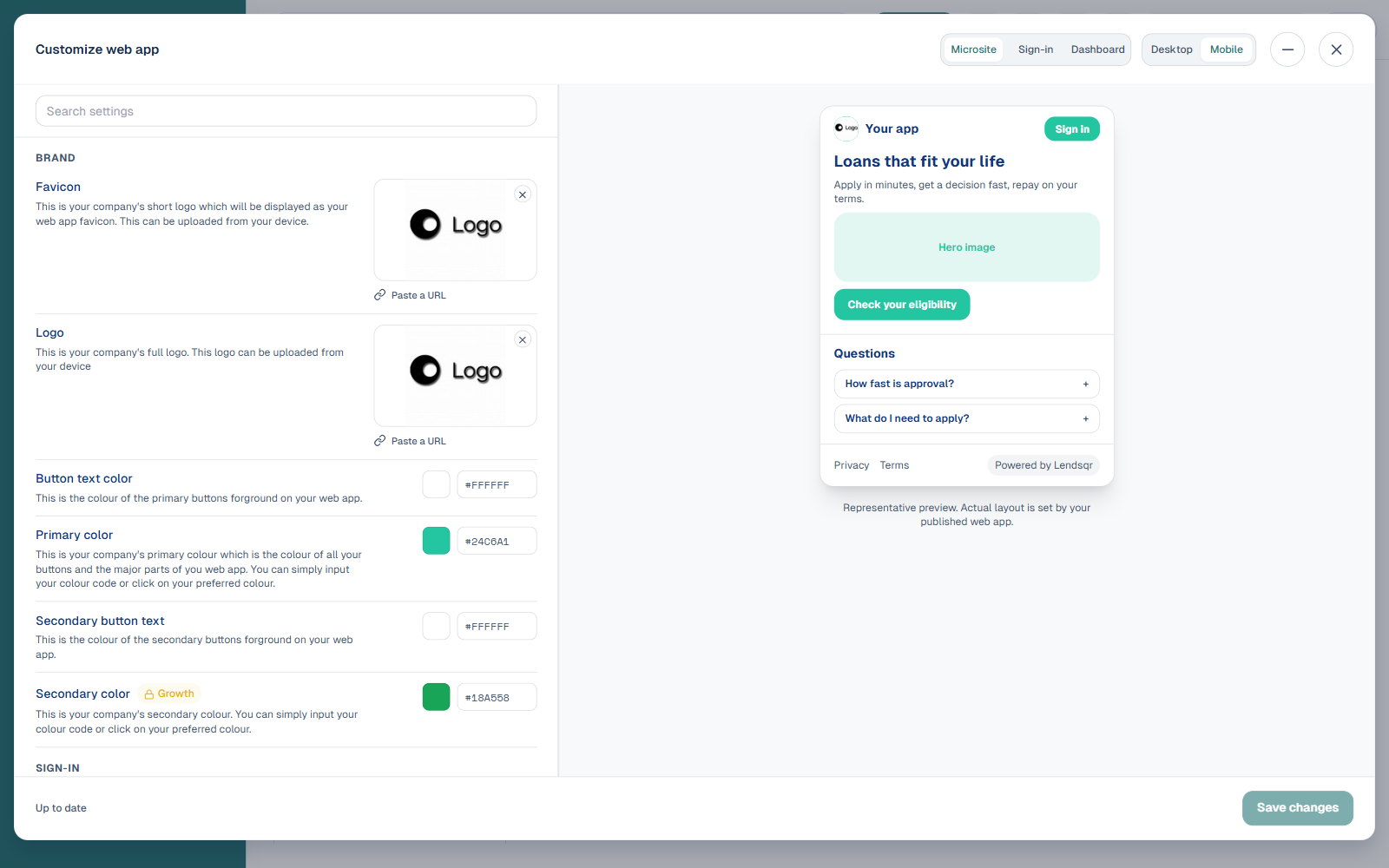
Customizing and personalizing your web app
Although customization is optional, it can significantly improve borrower trust and brand recognition. When borrowers interact with a professional-looking lending platform that reflects your brand, they are often more confident about using the service. For many borrowers, trust plays a major role in deciding whether to complete a loan application.
Update your logo
A good starting point is updating your company logo. This helps borrowers immediately recognize your platform and reinforces familiarity. Even small branding improvements can make your platform feel more credible.
You can also personalize the borrower experience further by changing:
Images
Colors
Text
Branding elements
This allows your web app to better reflect your company’s identity. For lenders operating in competitive markets, consistent branding can improve borrower trust and conversion rates.
Information users need to sign up on the web app
To create an account on your web app, users are required to provide certain personal and financial information. This information supports identity verification, compliance requirements, and loan eligibility assessments.
Typically, users will provide:
Phone number
BVN details
A selfie photograph
Bank details
A transaction PIN
The transaction PIN is created by the user and is used to authorize activities on the platform. All user information is securely stored and handled appropriately.
What users can do on your web app
Once borrowers successfully sign up, they can independently manage several lending activities without needing direct support from your operations team. This self-service functionality improves borrower convenience while reducing manual workload for lenders.
Users can:
View available loan offers
Upload KYC documentation
Apply for loans
Receive approved loans in their in-app wallet
Transfer money to their bank account
Repay loans through wallets or debit cards
This seamless experience makes it easier for borrowers to access financial services quickly.
Requirements for loan applications on the web app
Before borrowers can successfully apply for loans, they may need to provide additional information depending on your configuration.
These requirements can include:
Next of kin information
KYC documentation
Personal information
Education and employment details
Bank statement information where required
Borrowers will also need to link a debit card to support loan repayment.
When repayments become due, the linked card may be charged automatically.
There is a default ₦50 charge collected during card linking. Lenders are settled this amount after processor fees are deducted, depending on the processor used, such as Paystack or SeerBit. You may also configure your preferred amount.
Borrowers also pass through credit risk rule checks to determine loan eligibility.
What happens after a loan application is submitted?
Once a borrower successfully applies for a loan, the request appears on the Loan Request page within your admin console. From there, lenders can:
Review applications
Approve loans
Decline requests
Trigger disbursement
Once approved, the loan amount is credited to the borrower’s in-app wallet. Borrowers can then transfer funds to their linked bank account. When repayments become due, the borrower’s wallet or linked debit card may be charged automatically, although users can also make repayments manually through the web app.
Best practices for using your web app
Before sharing your web app publicly, go through the borrower journey yourself to ensure everything works as expected.
Always ensure loan products are fully configured before promoting your platform to customers.
Updating your logo and brand identity can improve borrower confidence and make your lending platform look more professional.
Review borrower application patterns regularly to identify friction points in onboarding or loan approval.
Frequently asked questions
Do I need to build a separate website to start lending?
No. Every lender automatically receives a dedicated web app after signing up on Lendsqr.
Can borrowers transfer money to their bank accounts?
Yes. Approved loans are credited to the borrower’s in-app wallet and can be transferred to linked bank accounts.
Can I customize my web app?
Yes. Lenders can personalize logos, branding, text, colors, and images.
What happens if my disbursement account is not funded?
Approved loans may not be disbursed successfully until funding becomes available.
Can users repay loans directly from the web app?
Yes. Borrowers can repay loans through their wallets or linked debit cards.
Need assistance?
At Lendsqr, support is available if you need help managing your lending operations or configuring your web app. You can contact the support team through: [email protected]
You can also use the in-app chat feature by clicking the chat icon at the bottom-right corner of the admin console.