Access your Back Office at your fingertips.
Download the app now on Google Play Store.
Scan the QR code
You can also scan QR code with your phone to download the app.
How to activate direct debit with NIBSS emandate
Updated
On this page
Collecting loan repayments manually is one of the biggest operational challenges for any lender. Chasing borrowers for payments, processing transfers one by one, and dealing with missed repayment dates all add friction to what should be a straightforward process. Direct debit solves this by allowing lenders to automatically collect repayments directly from a borrower’s bank account on the due date without the borrower needing to initiate anything.
The NIBSS eMandate is the electronic method for setting up this direct debit authorisation in Nigeria. It replaces the old paper-based process with a fully digital flow that borrowers can complete from their phone or computer.
This guide explains what the NIBSS eMandate is, how to configure it on the Lendsqr admin console, what the borrower needs to do to complete activation, and how to handle the most common failure scenarios.
What is the NIBSS eMandate?
NIBSS stands for Nigeria Inter-Bank Settlement System. It is the national switch that connects all banks and payment service providers within Nigeria. The NIBSS eMandate is an electronic mandate system built on this infrastructure that allows borrowers to authorise a direct debit on their bank account digitally, without filling out paper forms or visiting a bank branch.
When a borrower authorizes a NIBSS eMandate, they are giving their lender permission to debit a specified amount from their bank account on an agreed schedule for loan repayment purposes. The authorization is verified through a small test transfer from the borrower’s account, which confirms that the account is active, accessible, and belongs to the borrower.
The NIBSS eMandate is specifically designed for the Nigerian market and works with Nigerian bank accounts only. Lenders operating in other markets such as Kenya, Ghana, Rwanda, or Canada will need to use their local payment providers. Lendsqr handles custom integrations for international lenders on a case-by-case basis.
You want to automate loan repayment collection without manual follow-up
You are lending to borrowers who have Nigerian bank accounts
You want to offer borrowers a fast, paperless way to authorise repayments from their mobile or internet banking app
You are configuring a new loan product and want direct debit to be the default collection method for all borrowers on that product
If a borrower’s bank does not support transfers to Paystack-Titan which is the payment provider that processes the verification transfer, they will need to use the traditional direct debit method instead.
Before setting up the NIBSS eMandate, confirm the following:
For the lender:
Your loan product must have Direct Debit selected as the collection method. This is configured at the loan product level, not during individual loan approvals. See the setup steps below.
Your team member configuring the loan product must have the Loan Products permission on the admin console.
For the borrower:
The borrower must have a Nigerian bank account that supports transfers to Paystack-Titan
The borrower’s bank account must be linked to their BVN. The name on the account must match the name on their validated BVN. Accounts that do not match will be rejected during the mandate setup
The borrower must have a minimum balance of at least ₦150 in the account they want to link: ₦50 for the verification transfer and at least ₦100 remaining for the activation debit
The borrower must complete the ₦50 verification transfer within 7 days of the mandate being set up by the lender
How to activate direct debit with NIBSS e-Mandate
Step 1: Configure direct debit on your loan product
The NIBSS eMandate is activated at the loan product level. Once configured, all borrowers who apply for that product will automatically be required to set up and authorize a mandate as part of their loan application.
Log in to your Lendsqr admin console using your work email address and password.
On the left navigation pane, locate Back Office, expand “Product Management”, and select “Loan Products”.
Click on the specific loan product you want to configure, or create a new one if needed.
Scroll down to the “Product Settings” section on the loan product details page.
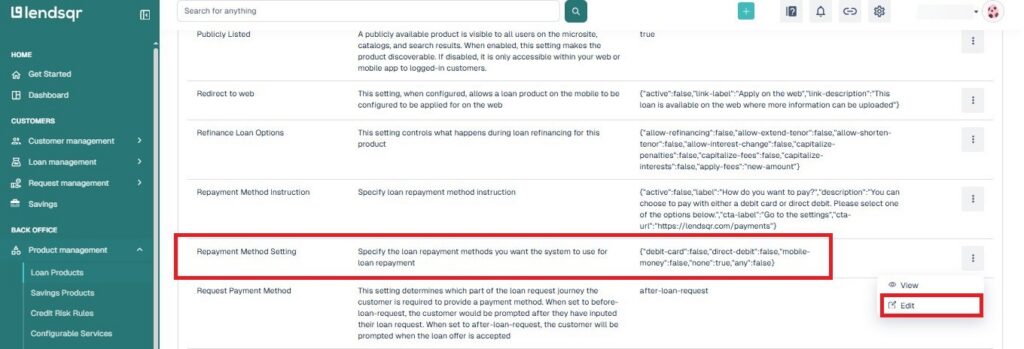
Select “Direct Debit” as the repayment method under Repayment method setting.
Save the product configuration.
Once saved, this setting applies automatically to all future loan applications submitted under that product. Borrowers will be prompted to set up their direct debit mandate during the application process
Step 2: The borrower completes the eMandate setup
Once a borrower applies for a loan product configured with direct debit, they will be prompted to set up their mandate. Here is what the borrower needs to do:
Send the ₦50 verification transfer
The borrower must send exactly ₦50 from the bank account they want to link to the following account:
Account number: 9880218357
Bank: Paystack-Titan
This transfer can be made via internet banking, mobile banking, or USSD. The ₦50 transfer serves as a verification step, it confirms that the borrower has access to the account and that it is active. The borrower must complete this transfer within 7 days of the mandate being initiated.
Important: Some banking mobile apps do not display Paystack-Titan as a listed bank. In this case, the borrower should use internet banking instead. A small number of banks such as SunTrust Bank do not support transfers to Paystack-Titan at all, and borrowers with these banks will need to use the traditional direct debit method.
The ₦100 activation debit
After the ₦50 transfer is received and verified, the system will automatically attempt to debit ₦100 from the same bank account. This is a standard activation step required to confirm that the mandate is functional and that the lender can successfully debit the account. The ₦100 is not a fee, it is a test debit that confirms the mandate is working correctly.
For this step to succeed, the borrower must ensure their account has a minimum balance of at least ₦100 after the ₦50 transfer has been sent.
Step 3: Activation confirmation
The mandate activation process typically completes within 2 hours of the ₦50 transfer being received. Once the mandate is successfully activated, the borrower receives an email confirming that their direct debit mandate has been approved.
If activation takes longer than 2 hours, the customer should contact [email protected] for assistance.
Understanding mandate statuses on the admin console
Lenders can monitor the status of a borrower’s mandate on the admin console. The following statuses may appear:
E-mandate Bank Approved The bank has approved the mandate but the final activation is still pending. This may mean the borrower sent the wrong amount, used the wrong account, or the system has not yet updated. Wait up to one hour for the status to update. If it does not change, confirm the transfer details with the borrower and ensure their account has at least ₦100 for the activation debit.
E-mandate Bank Rejected The bank has rejected the mandate. This typically happens when the borrower missed the 7-day window to send the ₦50 transfer, or sent it from an account that does not match their BVN. The borrower must recreate the mandate and send exactly ₦50 from the correct account within the new 7-day window.
E-mandate Biller Rejected The system was unable to deduct the ₦100 activation fee, or the mandate expired before activation was completed. The borrower must verify they have a minimum balance of ₦100 in their account and retry the process from the beginning.
Troubleshooting common issues
Paystack-Titan is not showing in the borrower’s mobile banking app This is a known limitation with some banking apps. Instruct the borrower to switch to internet banking to complete the ₦50 transfer. If internet banking also does not support the transfer, the borrower will need to use the traditional direct debit method instead.
The borrower’s mobile app does not process the transfer Some banks such as Ecobank may not support transfers to Paystack-Titan via their mobile app. Direct the borrower to use internet banking or USSD as an alternative. If neither works, switch to the traditional mandate process.
Error: “BVN tied to this account does not match your BVN” The borrower has attempted to link a bank account that is not registered under their BVN. Instruct the borrower to use a bank account that is directly linked to their BVN. The account name must match the name on their validated BVN exactly.
Error: “Invalid account” when adding a bank The account details entered by the borrower are incorrect, or the name verification service is temporarily experiencing downtime. Verify the account details with the borrower and ask them to try again. If the error persists, check whether the name verification service is currently down and try again later.
The ₦100 activation debit failed The borrower’s account balance dropped below ₦100 after the ₦50 transfer. The mandate status will show as “Biller Rejected”. Instruct the borrower to ensure their account has a minimum balance of ₦100 and retry the mandate creation process. If the debit continues to fail despite a sufficient balance, the borrower may need to link an account from a different bank.
Activation has taken longer than 2 hoursAdvise the borrower to contact [email protected] with their transfer confirmation details so the support team can investigate.
Things to note
The NIBSS eMandate is available for Nigerian bank accounts only
The borrower must send exactly ₦50, not more, not less, for the verification transfer to be recognized
The ₦50 transfer must be completed within 7 days of the mandate being initiated
The ₦100 activation debit is automatic and cannot be skipped
Some banking apps do not support transfers to Paystack-Titan, so internet banking is the recommended fallback
If a borrower’s bank does not support the eMandate process at all, they must use the traditional direct debit method