Access your Back Office at your fingertips.
Download the app now on Google Play Store.
Scan the QR code
You can also scan QR code with your phone to download the app.
How to refinance a loan on the admin console
Updated
On this page
Introduction
A borrower’s financial situation changes six months into a 12-month loan. They need additional capital to keep their business running, but cannot afford to pay off their current loan and start a new one. Requiring them to do so creates unnecessary friction and increases the risk that they walk away from your platform entirely.
Loan refinancing solves this. Instead of closing out an existing loan and opening a new one, refinancing lets you adjust the current loan directly. You can extend or shorten the repayment tenor, update the interest rate, add new capital, and roll unpaid fees or penalties into the new structure. The borrower gets restructured terms that fit their current situation. You retain the relationship and reduce the risk of default.
This guide covers two things. First, how to enable refinancing on a loan product. Second, how to refinance a specific loan directly from the admin console.
Enabling loan refinancing on a loan product
Before you can refinance any loan, you need to activate refinancing on the relevant loan product. This is a one-time configuration that unlocks refinancing for every loan created under that product going forward.
Step one: Open the loan product settings
Follow the guide here to locate your loan product settings and attributes. Once you are on the product page, click the “Product Settings” tab.
Step two: Locate the refinance loan options
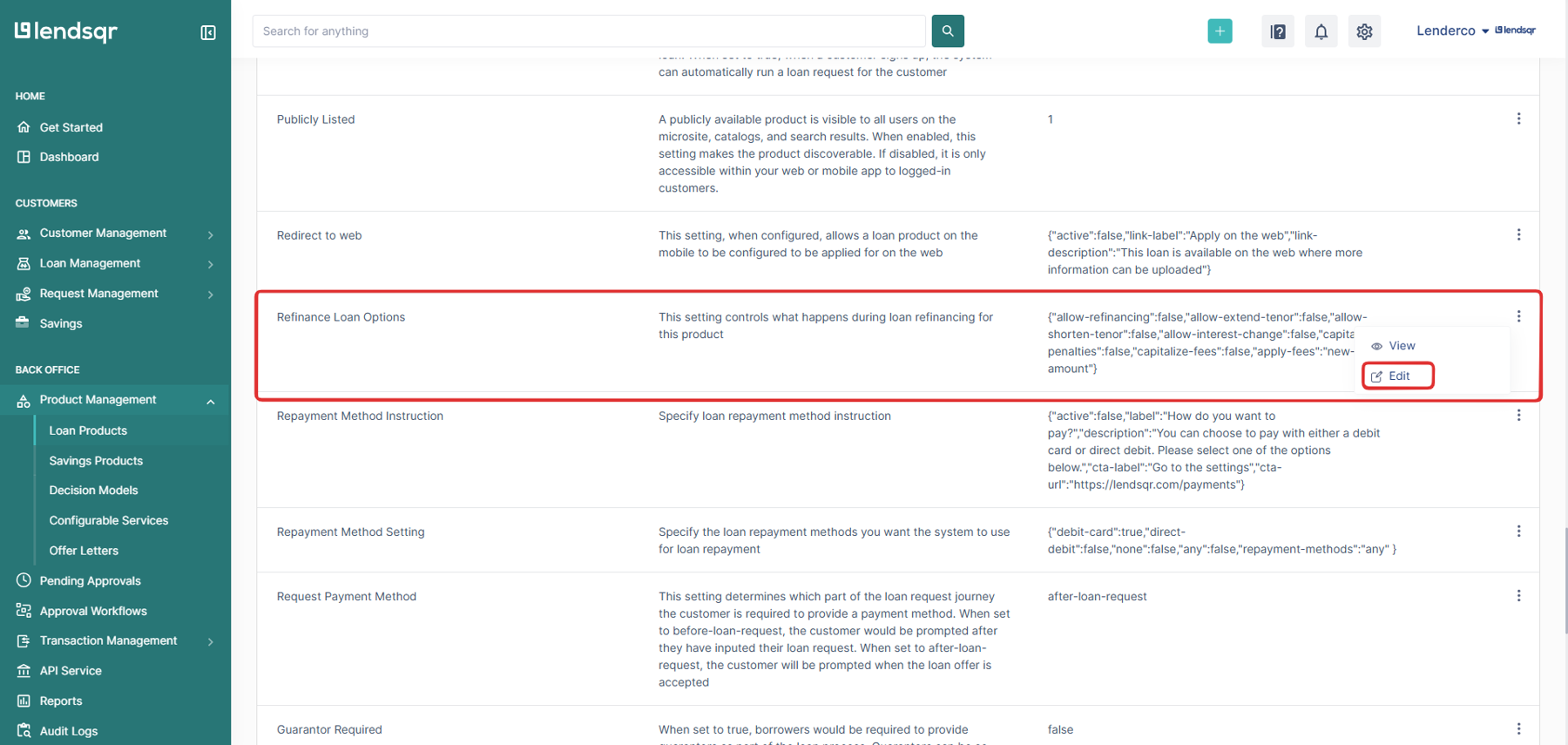
Scroll through the product settings until you find the “Refinance Loan” section. Click the more options icon beside the setting and select “Edit” to open the configuration modal.
Configuring your refinancing options
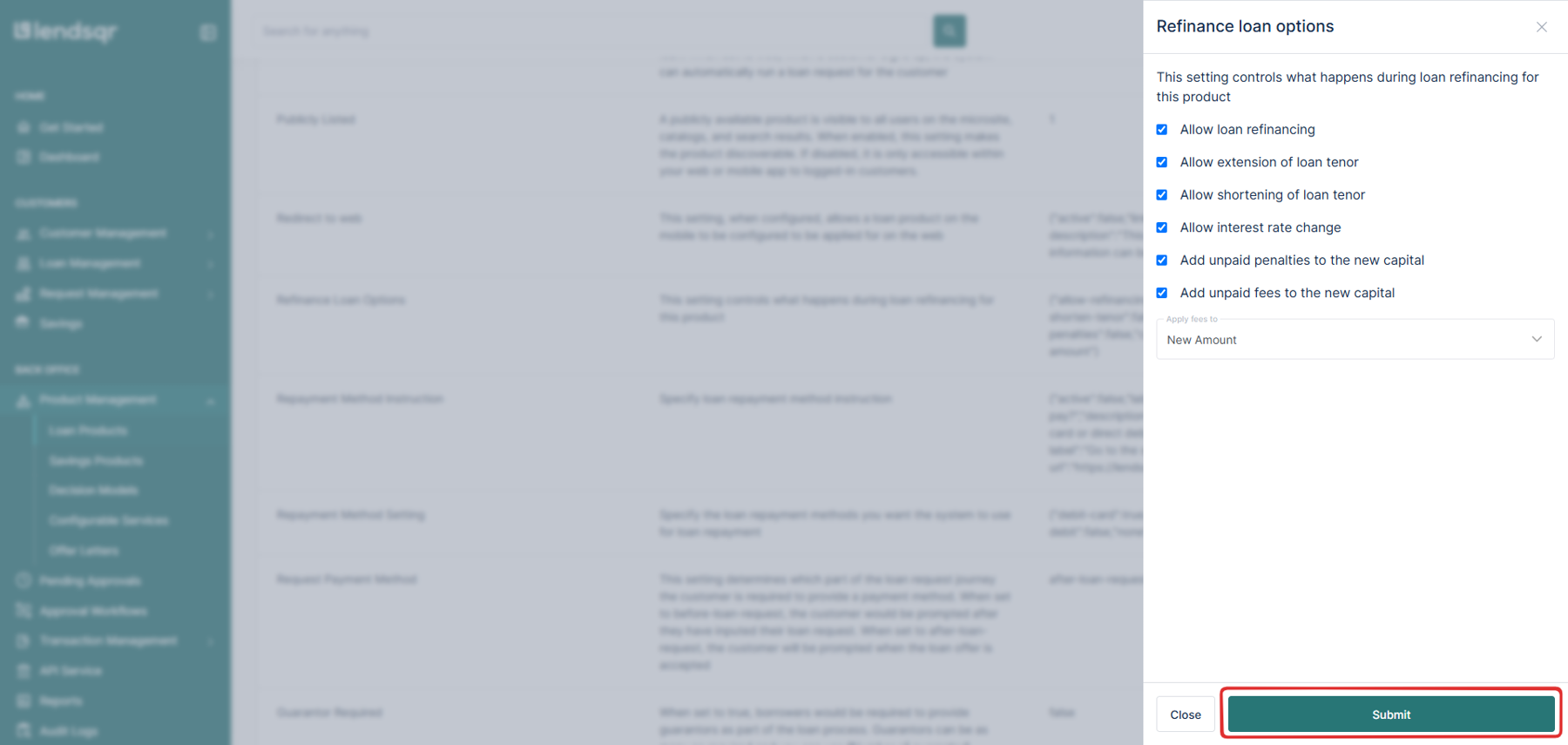
The modal displays a set of refinancing options. Each one controls a specific aspect of how refinancing works for loans under this product. Review each option carefully and select the ones that fit your lending model.
Allow loan refinancing
This is the master switch. Enable this option to activate refinancing for the product. Without it enabled, none of the options below will apply.
Allow extension of loan tenor
Enable this option to allow the repayment period to increase during refinancing. Use this when borrowers need more time to repay without increasing their monthly obligation. For example, a borrower on a 12-month loan can move to an 18-month tenor, reducing their monthly repayment amount.
Allow shortening of loan tenor
Enable this option to allow the repayment period to decrease during refinancing. Use this when a borrower wants to pay off their loan faster, perhaps because their income has increased and they want to reduce their total interest cost.
Allow interest rate change
Enable this option to allow the interest rate to update during refinancing. This gives you the flexibility to offer a lower rate to a borrower in difficulty or to adjust to current market rates when restructuring a long-running loan.
Add unpaid penalties to the new capital
Enable this option to roll outstanding late payment penalties into the refinanced loan’s principal. Instead of requiring the borrower to clear penalties upfront, the amount joins the new principal, and the borrower repays it over the new loan term.
Add unpaid fees to the new capital
Enable this option to roll outstanding fees, such as management fees or disbursement fees, into the refinanced loan’s principal. This spreads the cost over the new repayment term rather than requiring immediate payment.
Apply fees to: new amount or all amounts
This setting determines how fees are calculated during refinancing.
“New amount” applies fees only to the additional principal you add during refinancing. Use this when your fee policy applies only to new funds.
“All amount” applies fees to the total outstanding principal plus any additional principal. Use this when your fee policy applies to the full loan balance.
Step four: Save your configuration
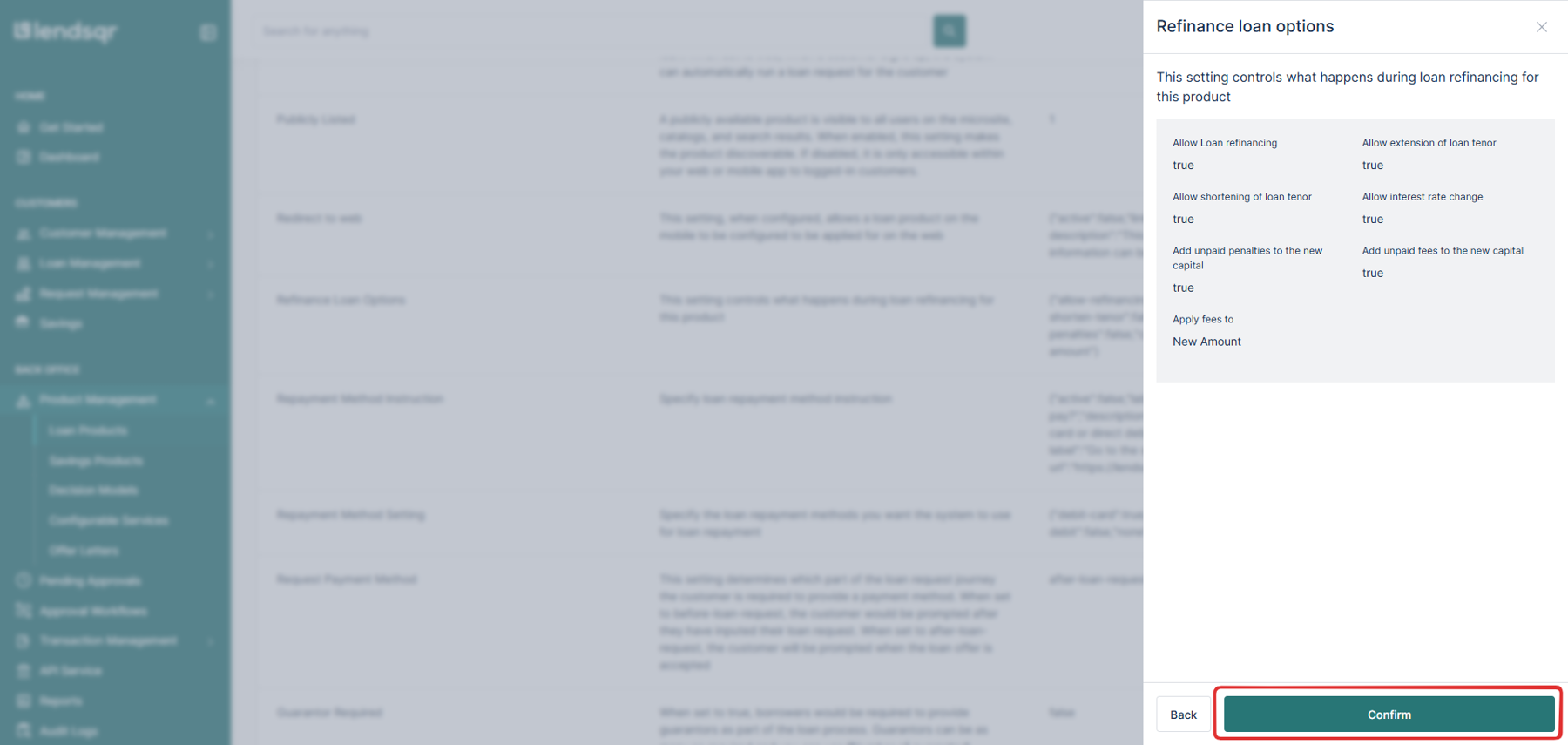
Once you have selected the options that fit your business model, click “Submit.” Review your selections in the confirmation screen, then click “Confirm” to save your configuration.
Refinancing is now active for this loan product. Every loan created under this product is now eligible for refinancing when the need arises.
Refinancing a specific loan
When a customer requests refinancing, or you need to restructure a loan:
Navigate to the loan you wish to refinance. You can follow the guide here to locate a loan.
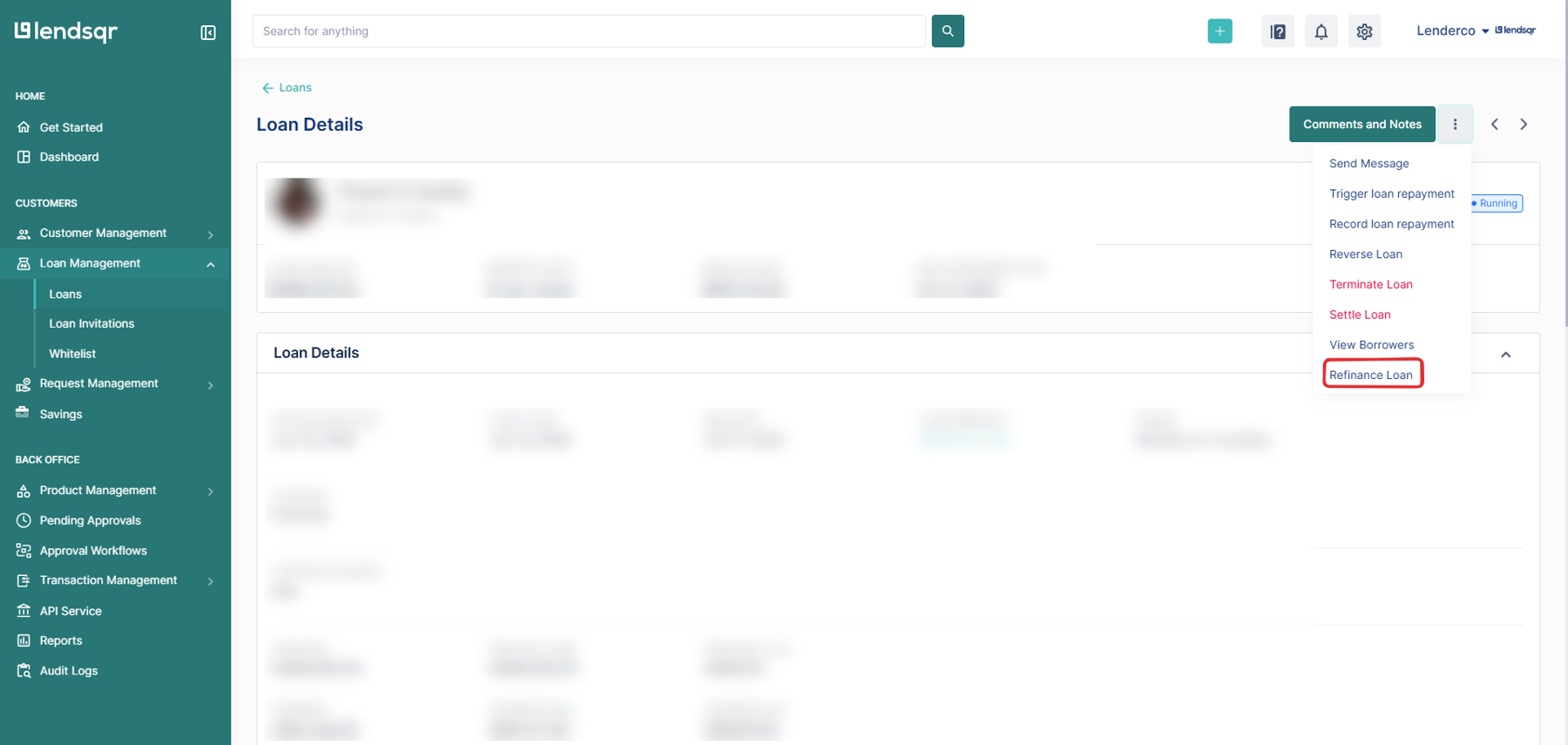
Click the more options icon (⋮) next to “Comments and Notes.”
Select “Refinance Loan.”
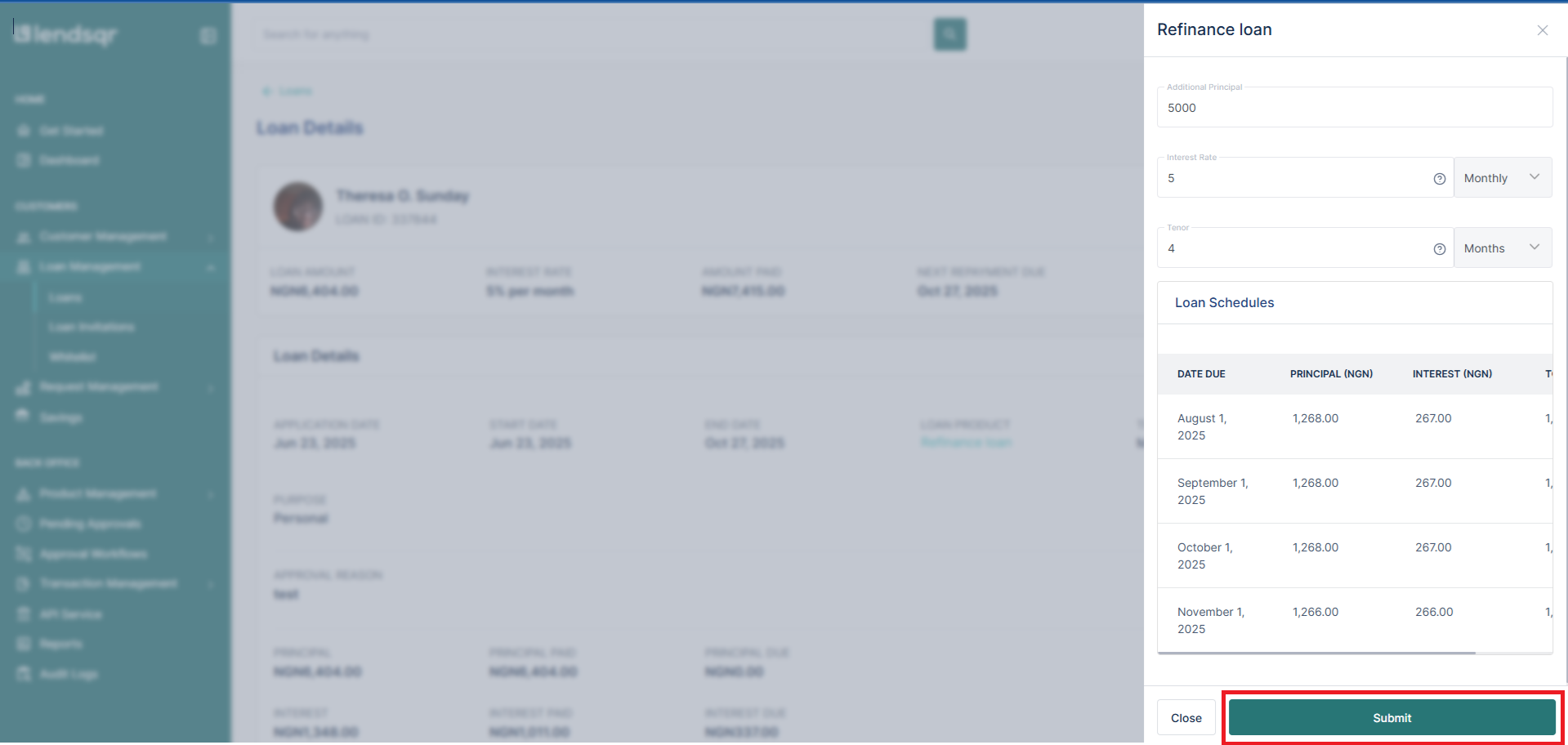
Enter the following details:
Additional Principal: Amount to add to the current principal (optional).
New Interest Rate: Updated interest rate for the refinanced loan (optional, if allowed).
New Tenor: New loan duration in months (either extended or reduced).
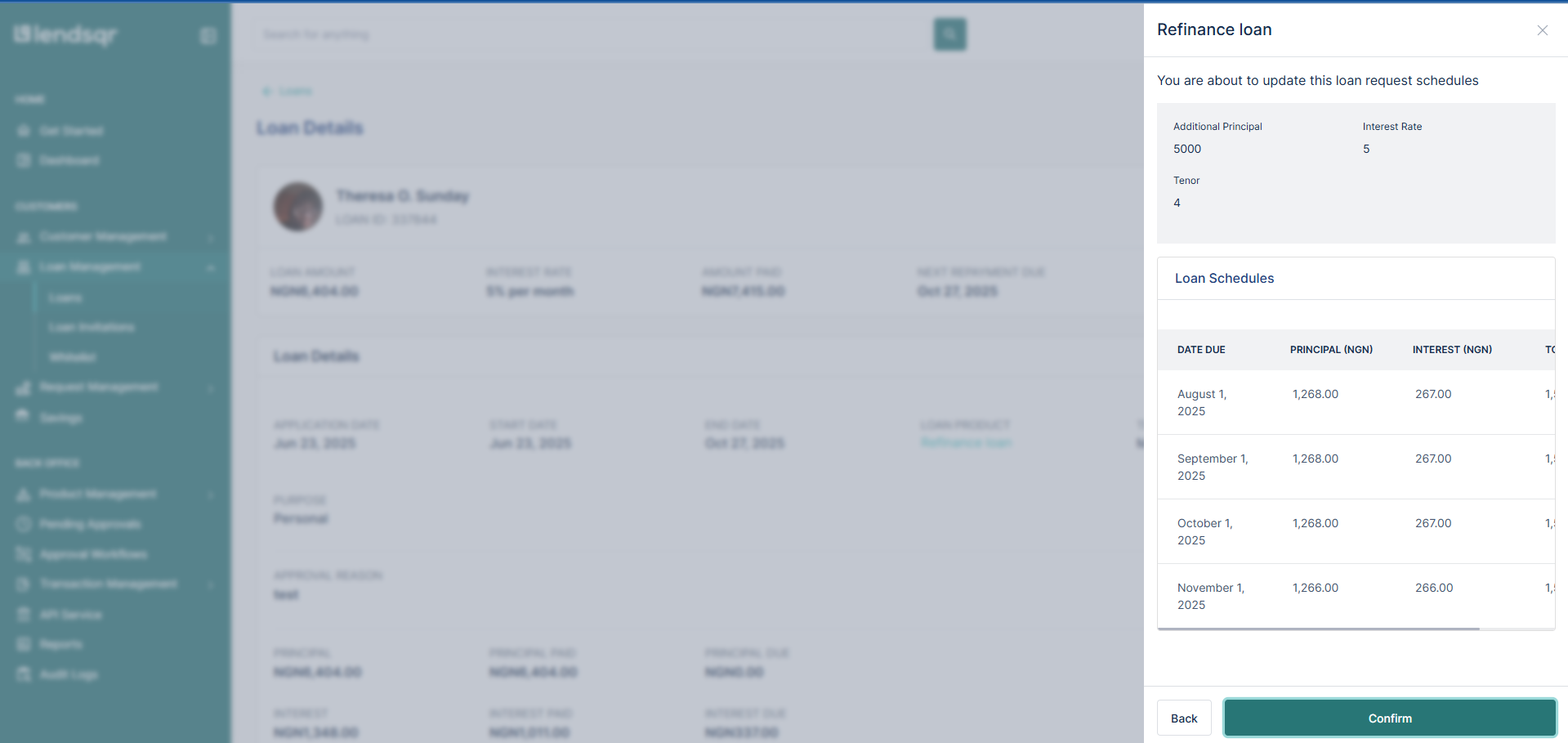
The system will automatically generate a new repayment schedule based on the updated details.
Click Submit, then Confirm after reviewing the refinancing summary.
What happens after refinancing?
Any additional principal is disbursed to the same destination as the original loan disbursement.
The customer receives an email notification confirming the refinancing.
If an offer letter was previously attached, a new offer letter with updated terms will be sent to the customer.
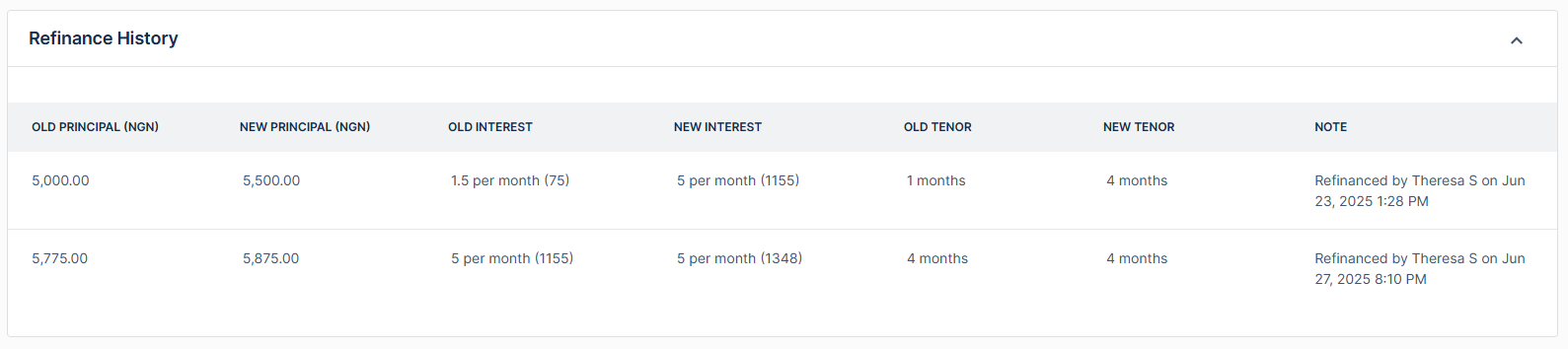
The loan’s detail page will display a “Refinance History” section for tracking and audit purposes.
When to use each refinancing option
Knowing which refinancing options to use in a given situation helps you restructure loans effectively without creating new problems.
Use tenor extension when a borrower is struggling with their current monthly repayment amount but has a stable income that can sustain payments over a longer period. Extending the tenor reduces the monthly obligation without changing the outstanding balance.
Use tenor shortening when a borrower wants to pay off their loan faster and has the financial capacity to support higher monthly payments. Shortening the tenor reduces the total interest the borrower pays over the life of the loan.
Use interest rate adjustment when you want to offer a more competitive rate to retain a borrower, when market rates have changed significantly since the original loan was issued, or when you are restructuring a distressed loan and need to reduce the repayment burden.
Use additional principal when the borrower needs new funds and has demonstrated the capacity to repay a higher balance. Adding capital through refinancing is faster and simpler than processing a new loan application and avoids disrupting the existing repayment relationship.
Use the unpaid penalties and fees rollover when a borrower has outstanding charges they cannot clear upfront. Rolling these into the new principal keeps the loan current and gives the borrower a realistic path to full repayment rather than forcing a default.
Best practices for loan refinancing
Refinancing is a restructuring tool, not a way to defer problems indefinitely. Use it with clear criteria and document every decision.
Always confirm that refinancing is in the borrower’s genuine interest before proceeding. A refinancing that extends the tenor significantly may reduce the monthly payment but substantially increase the total cost of the loan for the borrower. Be transparent about this trade-off.
Document the reason for every refinancing action in your internal records. The platform’s refinance history section tracks what changed, but your internal records should capture why the decision was made and who authorized it.
Confirm that the refinancing configuration on the loan product matches your current credit policy before carrying out a refinancing. If your policy has changed since the product was last configured, update the product settings first.
Review your refinancing activity regularly as part of your portfolio management process. A high volume of refinancing activity on a particular loan product may indicate that the original product terms are not well matched to your borrower base.