Access your Back Office at your fingertips.
Download the app now on Google Play Store.
Scan the QR code
You can also scan QR code with your phone to download the app.
Transferring money with your disbursement account
Updated
On this page
Your disbursement account is the financial engine behind every loan on your platform. When you approve a loan, the funds come from your disbursement account. When repayments arrive, they flow back into it through the settlement process. When your balance runs low, no new loans can go out until you top it up.
Understanding how to manage this account, when to fund it, and how to move money out of it when needed is one of the most operationally important things a lender does on Lendsqr.
This guide explains how the disbursement account fits into your lending operation, how to fund it, and how to make a transfer out of it.
How the disbursement account fits into your lending lifecycle
Every loan approval on Lendsqr draws from your disbursement account balance. If a borrower is approved for ₦150,000 and your disbursement account holds ₦80,000, the loan cannot be processed. Lendsqr checks the balance before executing a disbursement and blocks it if the balance falls short.
This means your disbursement account balance is effectively your lending capacity at any given moment. A well-funded account means you can approve and disburse loans without delay. A depleted account creates a bottleneck where approved loans sit waiting while your team arranges a top-up.
On the inflow side, repayments from borrowers settle back into your disbursement account after clearing through Lendsqr’s settlement cycle. This means a healthy repayment collection rate feeds your disbursement capacity, while poor collections drain it over time. For more on how this works, read how loan disbursement works and settlement and reconciliation.
What happens when your balance is too low
If a loan is approved but your disbursement account does not have enough funds to cover the amount, the disbursement fails. The loan stays approved, but the borrower does not receive their funds. They see the loan as approved in the app, but notice nothing has arrived in their wallet.
This creates a poor borrower experience and, in most cases, generates a support query. If the borrower applied urgently, for example, a salary advance ahead of a payment deadline, the delay can erode trust in your platform.
The practical solution is to treat the disbursement account balance as a critical operational metric, not a background detail. Your operations or finance lead should check it before high-volume disbursement periods and maintain a buffer above the expected daily disbursement value.
When to fund your disbursement account
The most common reason to fund the account is straightforward: you have more loans to disburse than your current balance can cover. But there are other situations worth anticipating.
Before a high-volume disbursement cycle: If you run payroll-linked products and a large batch of salary advances is due for disbursement on the same date, your balance needs to cover the full batch. Topping up before the disbursement date prevents delays.
After a disbursement account shortfall: If a loan fails to disburse because your balance is insufficient, the borrower may lose confidence in your platform. Monitoring your balance proactively and topping up before it approaches zero avoids this entirely.
As part of regular treasury management: Larger lenders treat disbursement account funding the way any finance team manages working capital: maintain a comfortable buffer above expected disbursements, and replenish on a regular schedule rather than reactively.
How to fund your disbursement account
Lendsqr assigns every lender a dedicated virtual account for receiving funds into the disbursement account. You transfer money into this virtual account from your own bank account, and the balance reflects in your disbursement account within a few minutes.
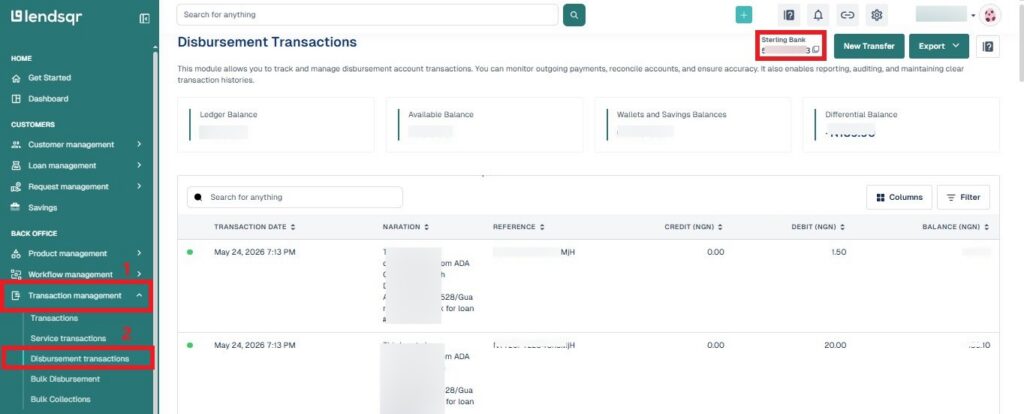
Log in to the Lendsqr admin console. In the left sidebar, navigate to Transaction Management under Back Office and click the Disbursement Transactions sub-tab.
Your dedicated virtual account number appears at the top right of the Disbursement Transactions page. Click to copy it.
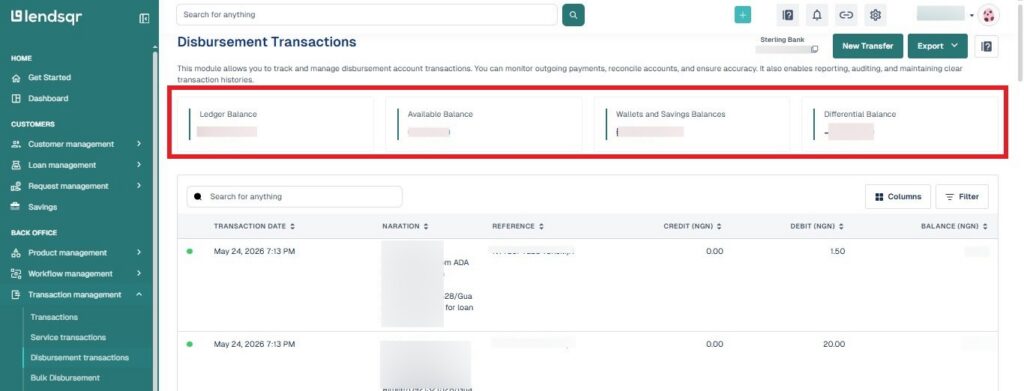
Transfer funds into that account number from your bank. The amount will be reflected in your disbursement balance within a few minutes of the transfer clearing. Please check the highlighted cards below to confirm. There is no minimum transfer amount. You can top up any amount at any time.
How to transfer money out of your disbursement account
There are situations where you may need to move money out of your disbursement account, for example, to rebalance funds across accounts, return capital to investors, or cover operational expenses from your lending float.
For security, only Super Admins can initiate a transfer out, and the Super Admin must have two-factor authentication (2FA) active on their account. These requirements prevent unauthorized withdrawals. Read how to set up your Two-Factor Authentication on Lendsqr if you need to enable 2FA first.
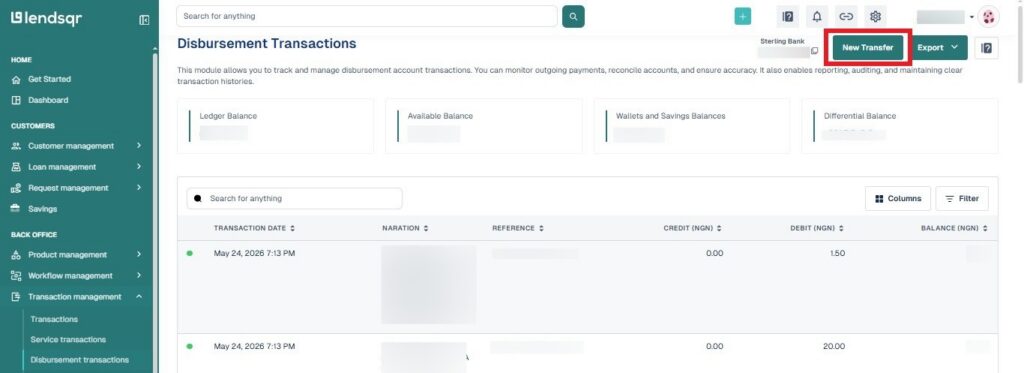
Once both conditions are met, the Transfer button becomes visible at the top right of the Disbursement Transactions page.
Go to the Disbursement Transactions page as described above. Click the New Transfer button in the top right.
Fill in the transfer details: a narration describing the purpose of the transfer, the destination account you want to send funds to, and the amount. Submit the form. The funds move from your disbursement account to the selected destination account.
Keeping your disbursement balance healthy
A few operational habits help prevent disbursement bottlenecks before they affect your borrowers.
Set a minimum balance alert if your team uses any monitoring tooling, so your finance team gets notified when the balance drops below a threshold. Review your upcoming disbursement pipeline regularly, particularly around end-of-month payroll cycles or campaign periods where application volumes spike.