Access your Back Office at your fingertips.
Download the app now on Google Play Store.
Scan the QR code
You can also scan QR code with your phone to download the app.
How to modify a credit risk rule on Lendsqr
Updated
On this page
Introduction
Your lending portfolio grows. You start seeing patterns in your defaults that your current credit checks are not catching. Or a regulator introduces a new requirement that your existing evaluation flow does not account for. Your credit risk rule needs to change, and it needs to change without breaking everything else that is working.
On Lendsqr, credit risk rules are the individual building blocks of your credit evaluation process. Each rule handles a specific check, such as Karma, Ecosystem, or Loci. Modifying a rule lets you adjust exactly how that check works without rebuilding your entire credit risk rule from scratch.
This guide explains what credit risk rules are, when to modify them, and how to make changes safely on the Lendsqr admin console.
What is a credit risk rule?
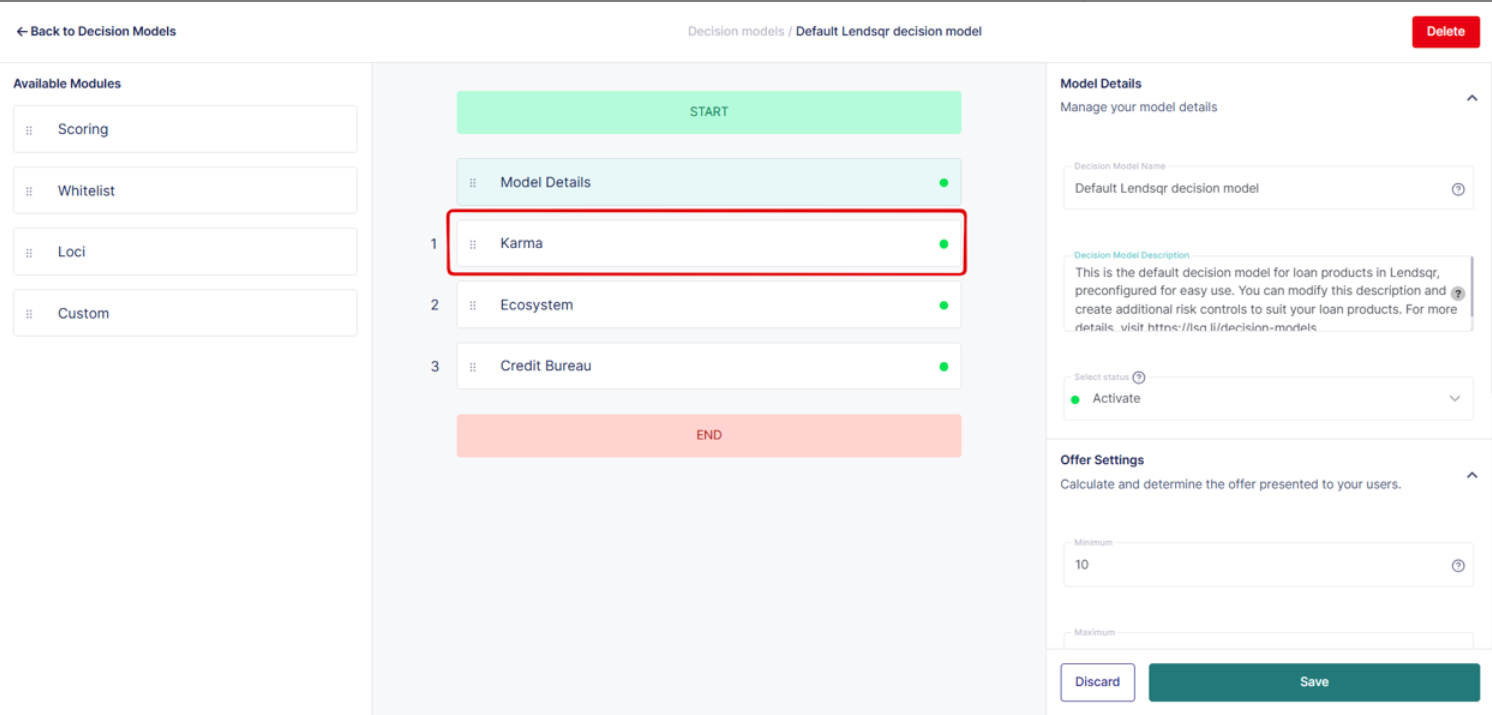
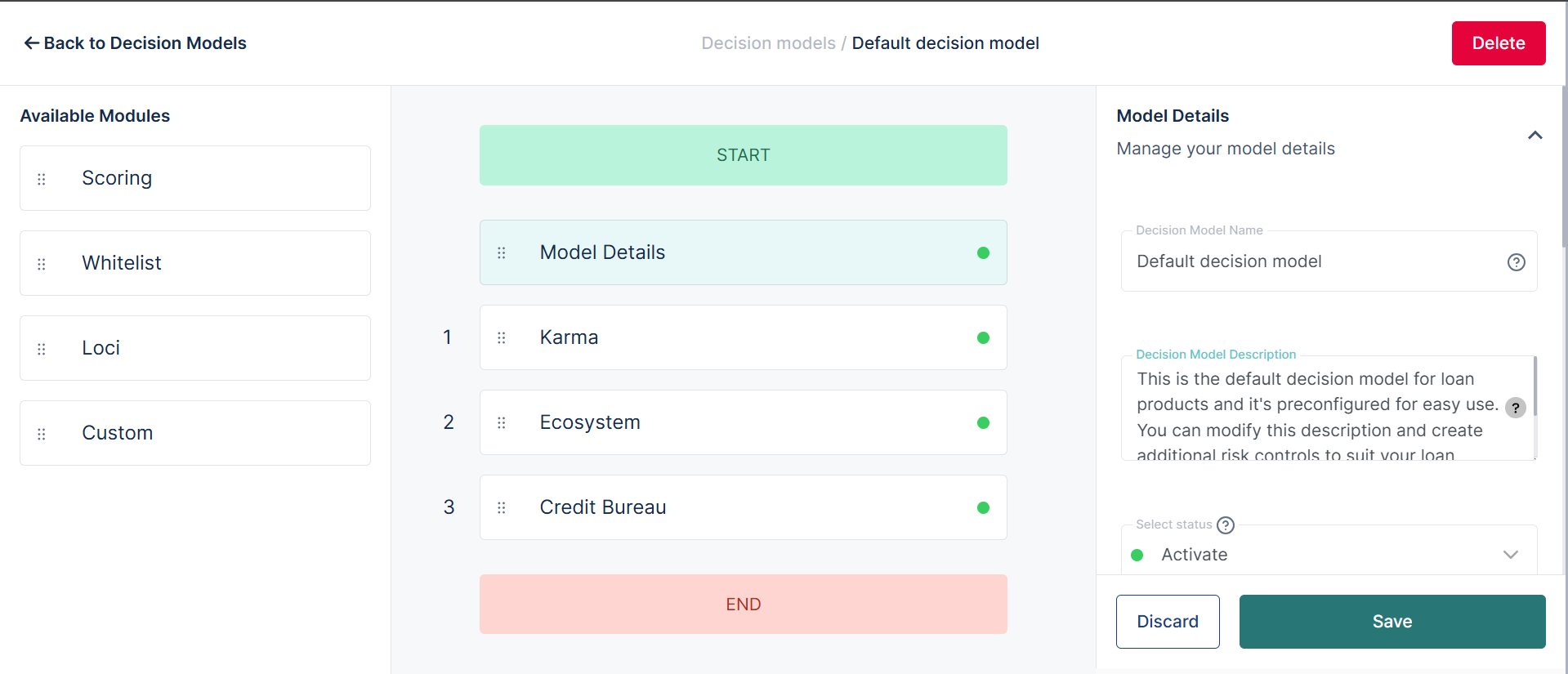
A credit risk rule on Lendsqr consists of individual modules. Each module represents a specific type of check or evaluation that runs when a borrower submits a loan application. Examples of modules include Karma, which checks the Lendsqr blacklist, Ecosystem, which evaluates borrower behavioral data, and Loci, which assesses location-based risk signals.
These modules run sequentially. If a borrower passes the first module, the process continues to the next. If they fail, the system either declines the application or routes it for manual review, depending on your configuration.
Modifying a module means adjusting the rules, thresholds, or fields within that specific check. You can tighten a rule to catch more risk, loosen it to reduce unnecessary declines, or remove a field that is no longer relevant to your credit policy.
When to modify a credit risk rule
Not every portfolio problem requires a new credit risk rule. Often, modifying an existing rule is the faster and more precise solution. Consider modifying a rule when any of the following apply.
Your current rules are too restrictive and are declining borrowers who should qualify. A specific rule is flagging too many legitimate applications as high risk. Your credit policy has changed, and the module thresholds no longer reflect your current risk appetite. A regulator requires you to add or remove specific data points from your evaluation process. You are expanding into a new borrower segment and need to adjust how a module weighs certain signals for that audience.
Modifying an existing rule preserves the rest of your credit risk rules. You only change what needs to change, which reduces the risk of unintended consequences across other parts of the evaluation flow.
You can easily modify or edit any of the credit risk rules used to implement your risk acceptance criteria or risk control. Examples include Karma, Ecosystem, Loci, etc.
How to modify a decision module
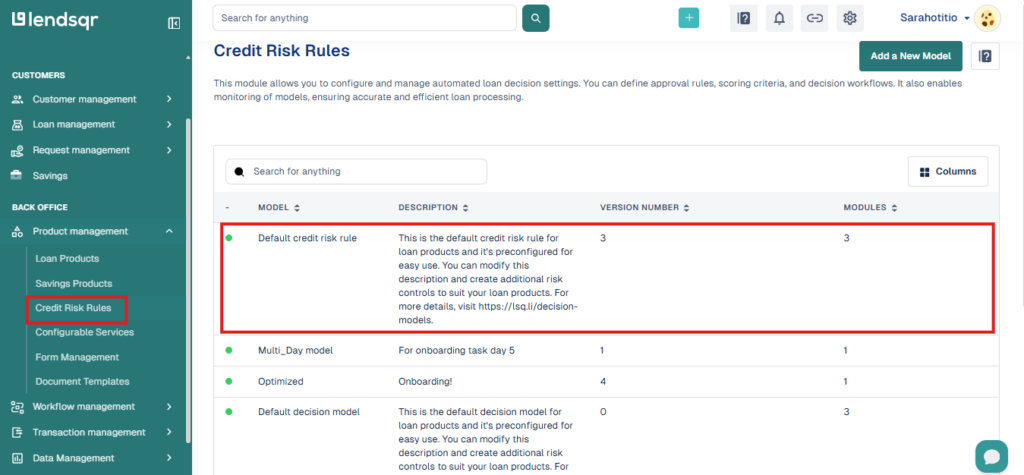
Navigate to the “Credit Risk Rules” tab under the Product Management grouping.
On the existing credit risk rule of your choice, click on the risk rule to edit it.
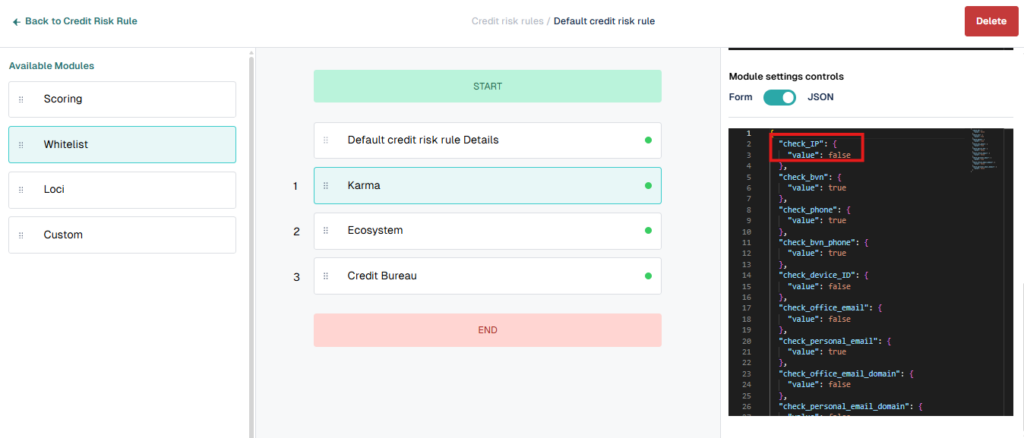
Make the changes to the settings.
You could also remove a field completely if required (e.g. removing the age field in the Karma module). Again ensure you save changes before proceeding to the next check.
Repeat this process for each module you need to update. Make one change at a time and save after each modification to keep track of what you have changed and to avoid losing work.
How to remove a field from a module
Sometimes a specific field within a module is no longer relevant to your credit policy. For example, you may decide to remove the age field from the Ecosystem module because your new borrower segment makes age-based filtering unnecessary.
To remove a field from a credit risk rule, follow the same steps above to open the rule in edit mode. Locate the specific field you want to remove within the module’s configuration. Delete the field from the JSON settings and save your changes before proceeding.
Removing a field is permanent within that configuration. Confirm that the field is genuinely no longer needed before deleting it. If you are unsure, duplicate the credit risk rule first and test the removal on the copy before applying it to your live model.
Understanding the JSON format in decision modules
Decision modules on Lendsqr are configured using JSON. JSON, which stands for JavaScript Object Notation, is a structured format that uses key-value pairs to define rules and parameters. Each setting within a module corresponds to a specific key in the JSON configuration, and changing that value changes how the module behaves during loan evaluation.
For lenders who are comfortable with JSON, modifying module settings directly gives you precise control over every aspect of the evaluation logic. You can adjust thresholds, add conditional rules, or remove parameters without affecting any other part of the model.
For lenders who are less familiar with JSON, the configuration can feel complex at first. The key principle is that every value you change affects how the system evaluates borrowers for that specific check. Change only what you understand, and test the updated model before linking it to a live loan product.
Testing your changes before going live
Modifying a credit risk rule on a live loan product carries risk. A misconfigured model can start approving borrowers who should not qualify or declining borrowers who should. Before applying any module changes to a live product, test the updated rule against a set of known borrower profiles to confirm the models behave as expected.
The safest approach is to duplicate your existing credit risk rule, make your changes on the copy, and test it thoroughly before swapping it in as the active rule for your loan product. This gives you a clean fallback if the modified version does not perform as intended.
Getting help with complex configurations
Because credit risk rules and their settings are currently implemented as JSON rules, they can be a little complex for the non-techy lenders. If you need help with designing and creating custom rules for your loans, please contact [email protected] for assistance.
Frequently asked questions
Can I modify a module on a live loan product? Yes, but proceed with caution. Changes to a module on a live product take effect immediately for new applications. Test your changes on a duplicate credit risk rule first and only swap in the modified version once you have confirmed it behaves correctly.
Do I need to update all loan products if I modify a module? No. Module changes only affect the credit risk rule they belong to. If multiple loan products use the same rule, the change applies to all of them. If each product has its own rule, you will need to make the change separately on each one.
Can I undo a rule change after saving? There is no automatic undo function. If you need to revert a change, you will need to manually restore the previous configuration. This is another reason to duplicate your rule before making significant changes.
What is the difference between modifying a module and modifying a credit risk rule? A credit risk rule is the full set of modules that make up your credit evaluation process. Modifying a module means changing the rules within one specific check, such as Karma or Ecosystem, without altering the overall risk rule structure or the order in which modules run.
Who can modify credit risk rules on Lendsqr? Users with admin-level access and the appropriate permissions can edit credit risk rules and their modules. If you do not see the edit option, check your role and permissions with your Super Admin.