Access your Back Office at your fingertips.
Download the app now on Google Play Store.
Scan the QR code
You can also scan QR code with your phone to download the app.
How to update or delete a prequalified borrower
Updated
On this page
Sometimes, a borrower who once qualified for a special loan offer no longer meets the criteria. Other times, their details may have changed and need to be updated to maintain access.
If prequalified borrowers’ records are not maintained properly, lenders risk offering the wrong terms to the wrong customers or blocking eligible borrowers from accessing products meant for them.
On Lendsqr, you can update or remove users from the list of prequalified borrowers directly from the admin console. This helps you keep your lending campaigns accurate, controlled, and aligned with your current credit strategy.
What does a prequalified borrower mean in lending?
A prequalified borrower is a customer who is allowed to access a specific loan product or offer.
Instead of making a loan product available to everyone, lenders use a list of prequalified borrowers to restrict access to selected users based on predefined criteria.
These users may include:
Employees of partner companies
Repeat borrowers with strong repayment history
Customers selected for promotional campaigns
Pre-vetted individuals approved by internal teams
For example, a lender may add the employees of a company for prequalification for payroll-backed loans. Only those employees can see and apply for that product.
Why updating and removing prequalified borrowers matters
Prequalification records are not static. Over time, customer eligibility can change.
If these changes are not reflected, it can create operational and risk issues.
Example scenario
A lender runs a promotional loan campaign for 500 returning customers. After three months, some of these customers miss repayments or become inactive.
If they remain on the list of prequalified borrowers, they may still access preferential loan terms that no longer match their risk profile.
In another case, a customer changes their phone number. If the prequalified borrower entry is not updated, they may lose access to the offer entirely.
Updating and removing users ensures that:
Only eligible customers retain access
Risk exposure is controlled
Campaigns remain accurate and effective
What happens when you remove a user from being a prequalified borrower?
Removing a user as a prequalified borrower has immediate implications.
The customer will:
Lose access to the specific loan product or offer tied to that prequalification
No longer see the product in their customer app
Be treated like a regular borrower for that product
This does not delete the customer from your system. It only removes their special access to that particular offer.
For example, if a borrower was prequalified for a low-interest loan, removing them means they can no longer apply for that product unless re-added later.
When to update a prequalified borrower entry
Updating prequalified borrowers is useful when customer details or offer terms need to change.
Common situations include:
Correcting phone number, email, or BVN
Adjusting loan limits or terms
Extending campaign eligibility
Fixing errors from initial data entry
Updating ensures that the customer remains eligible and can access the intended offer without disruption.
When to remove a prequalified borrower entry
You may need to remove users from the list of prequalified borrowers in several cases:
Customer no longer meets eligibility criteria
A campaign or promotion has ended
The customer has defaulted or shown poor repayment behavior
Duplicate or incorrect entries exist
The business relationship (such as an employer partnership) has ended
Regular cleanup helps keep your prequalified borrowers aligned with your current lending strategy.
How to update a prequalified borrower entry on Lendsqr
Log in to your Lendsqr admin console.
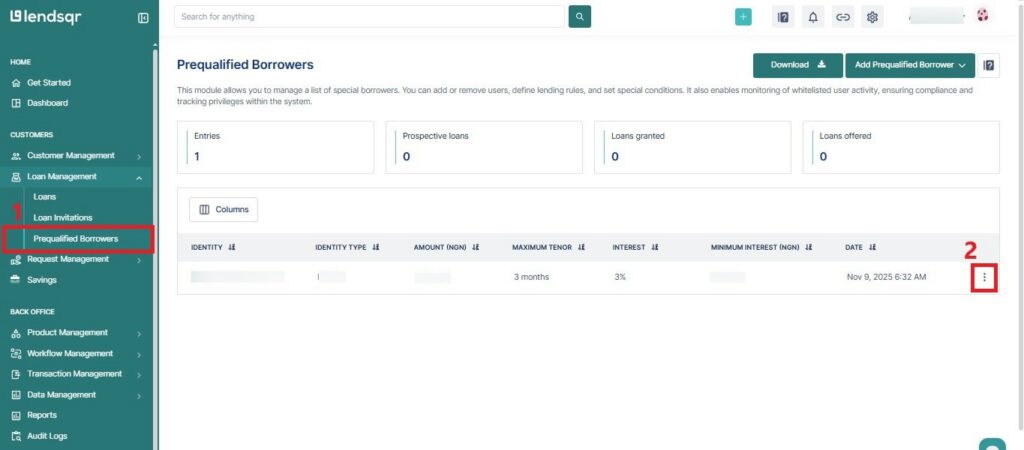
Navigate to the Prequalified Borrowers sub-tab, which is under the “Loan Management” tab.
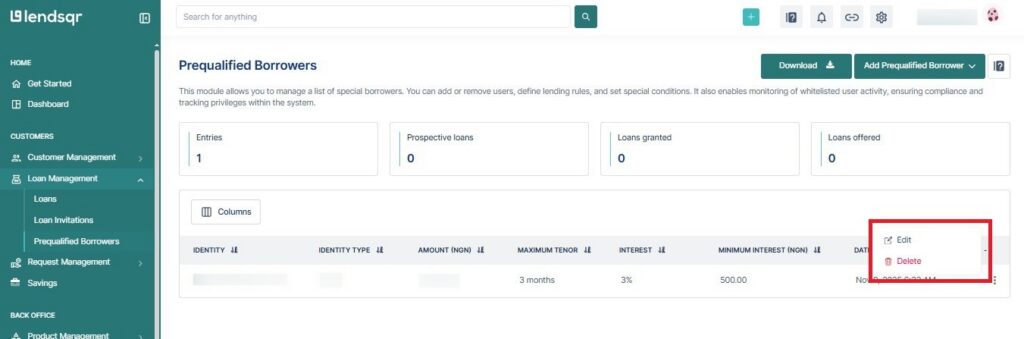
Search for the user and click on the “More options” icon.
Select either Edit or Delete depending on the case.
Update the required fields, such as contact details or loan limits, if you are editing the prequalified borrower entry.
If prequalified borrower records are not maintained properly, you stand a risk of experiencing the following as a lender:
Ineligible customers accessing restricted offers
Eligible customers are being blocked due to outdated data
Increased credit risk from misclassified borrowers
Confusion during customer onboarding
Reduced effectiveness of targeted campaigns
For example, leaving inactive users on a prequalified borrowers can dilute the performance of a campaign and make it harder to measure true engagement.
Best practices for managing prequalified borrower records
To keep your prequalified borrowers accurate and effective, you should do the following regularly:
Review prequalified borrower entries regularly
Remove users who no longer qualify
Update customer details when changes occur
Use reliable identifiers such as BVN where possible
Separate campaigns instead of combining all users into one list
Set timelines or expiry dates for promotional prequalified borrowers
Maintaining clean records improves both operational efficiency and lending performance.
How prequalification management affects your lending strategy
Prequalification management is more than an operational task. It directly impacts how you control risk and deliver targeted lending.
Well-maintained prequalified borrowers allow you to:
Offer better terms to trusted customers
Run focused campaigns with higher conversion rates
Reduce manual underwriting effort
Improve borrower retention
Poorly maintained prequalified borrowers, on the other hand, can lead to increased defaults and weaker campaign performance.
Updating and removing prequalified borrowers is essential for keeping your lending operations accurate and controlled. As borrower eligibility changes over time, your prequalified borrowers should reflect those changes to avoid unnecessary risk or missed opportunities.
With Lendsqr, you can easily manage prequalified borrowers from the admin console, ensuring that only the right customers have access to specific loan products.