Access your Back Office at your fingertips.
Download the app now on Google Play Store.
Scan the QR code
You can also scan QR code with your phone to download the app.
Managing failed transactions and repayment to users wallet
Updated
On this page
A failed transaction occurs when a payment is initiated, either a loan disbursement to a borrower or a repayment from a borrower, but does not complete successfully. The money may have left the sender’s account without reflecting in the recipient’s wallet, or the transaction may have stalled at the payment gateway and never processed at all.
Failed transactions on Lendsqr typically happen for one of the following reasons:
Network interruptions: A connectivity issue between the borrower’s bank, the payment gateway, and Lendsqr’s platform can cause a transaction to time out midway. The debit may go through on the bank’s end while the credit never reaches the wallet.
Payment gateway delays: Some payment processors experience processing delays, especially during high-traffic periods. A transaction can appear pending or failed on Lendsqr while still in the gateway’s queue.
Incorrect account details: If a disbursement is sent to an incorrect or inactive bank account, it will fail at the bank’s end and may not automatically reverse to the disbursement wallet.
Insufficient disbursement balance: If your disbursement account balance is lower than the loan amount at the time of processing, the disbursement will fail.
How to identify a failed transaction on the admin console
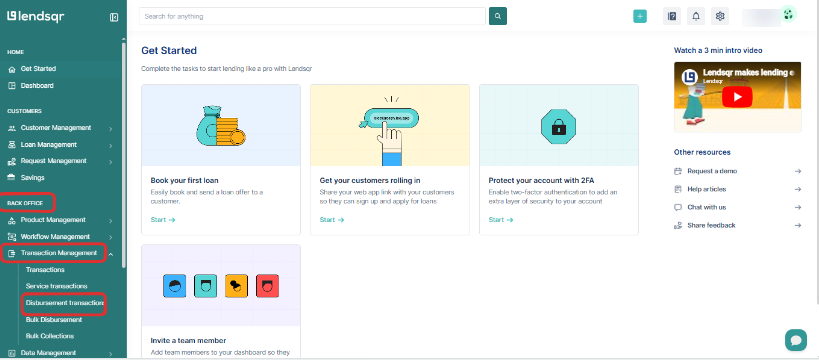
Before reaching out to the borrower or contacting support, check the transaction status on the admin console yourself. This allows you to confirm whether the failure is on Lendsqr’s end or the borrower’s bank.
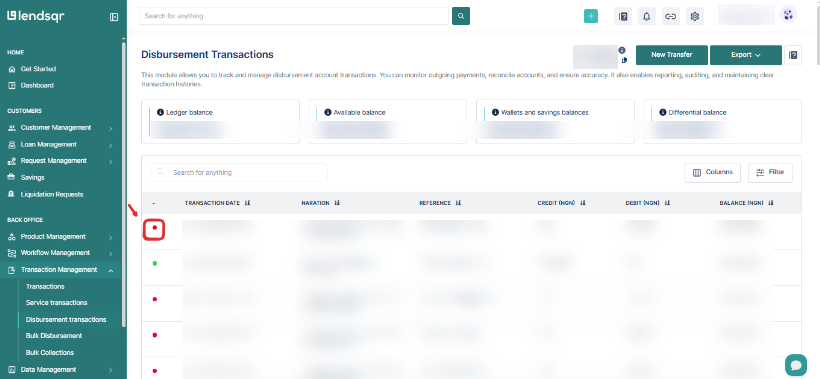
3. In the page that opens, there will be a list of transactions and colored dots at their left side, a green dot, implies a successful transaction, while a red dot indicates a failed transaction.
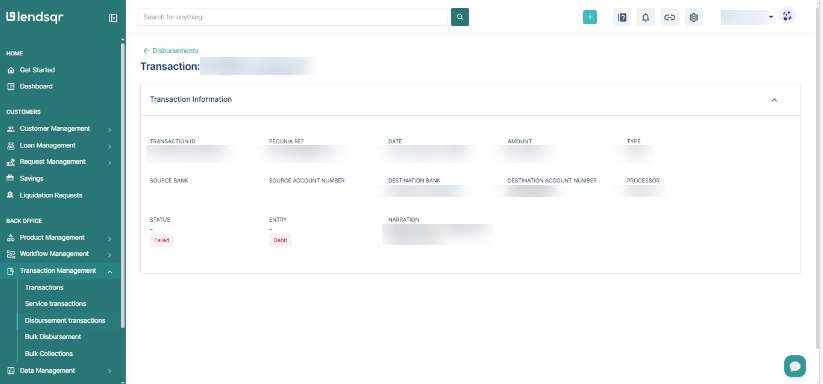
4. To see more details on the transaction, click on it. A page will come up with the transaction reference, date and time of the transaction, processor, amount, destination bank and account number, etc.
Information to collect from the borrower
Once you have confirmed there is a discrepancy, collect the following from the borrower before escalating to Lendsqr support. This information allows the support team to trace the transaction quickly on the backend:
The borrower’s registered phone number on the platform
The transaction reference number shown on the transaction details page
The payment channel used (bank transfer, card, direct debit, virtual account)
The exact amount debited from their account
The source account number and bank name used for the payment
The date and time of the transaction
A screenshot of their bank statement or debit alert showing the transaction as this confirms the debit happened and that it was not automatically reversed by their bank
Having all of this ready before contacting support significantly reduces back-and-forth and speeds up resolution.
How to escalate failed transactions
Once you have gathered all required information, escalate the issue to [email protected] with the details collected. Include your organization name and the borrower’s information so the support team can locate the transaction immediately.
What to expect after escalation: The support team will investigate the transaction on the backend, confirm whether the funds were received by the gateway, and either trigger a manual credit to the borrower’s wallet or advise on next steps. Resolution timelines vary depending on the payment channel involved, but most cases are resolved within one to two business days.
While the investigation is ongoing, communicate with the borrower that the issue has been escalated and provide a realistic timeframe. Avoid promising an immediate fix if the issue involves a third-party payment gateway, as resolution may depend on the bank or processor’s response time.
Handling false claims
In some cases, borrowers may claim a payment was made when it was not, or claim a larger amount than what was actually debited. Always request the bank statement or debit alert before escalating. If the bank statement does not show a debit matching the claimed amount and date, the transaction did not occur from the borrower’s account and does not require escalation.
Document all such interactions for your records. This protects your organization and maintains accountability in your loan management process.
If the transaction is showing as failed on the console, proceed to gather information for escalation. If it is showing as successful on the console but the borrower says their wallet has not been updated, this is a reconciliation issue that requires backend review.