Introduction
Loan schedules don’t always stay exactly as originally planned. A borrower may make a repayment directly to your bank account outside of the platform, a payment date may need to shift because of a public holiday, or a lender may agree to restructure a borrower’s repayment terms following financial hardship. In each of these situations, the loan schedule recorded on Lendsqr needs to be updated to reflect reality.
Consider these two scenarios:
Scenario 1: A borrower walks into an agent’s office and pays two months of arrears in cash. The lender records the cash receipt offline but the Lendsqr system still shows those repayments as outstanding. The lender needs to update the loan schedule to reflect that Principal Paid and the outstanding balance have changed.
Scenario 2: A lender reviews a borrower who is struggling and agrees to extend the loan tenor by two months, reducing the monthly instalment. The original disbursement schedule no longer applies. The admin needs to update the schedule to match the new agreed terms before the next repayment is due. Lendsqr allows admins to update a loan schedule both before and after a loan has been approved. This guide covers how to do that, what each field in the update modal means, and what to watch out for when editing an active loan.
What is a loan schedule?
A loan schedule — sometimes called a repayment schedule or amortisation schedule — is the table that shows exactly when each repayment is due, how much is due, and how that amount breaks down between principal and interest. It is the contract between the lender and borrower that governs when money flows and in what amounts.
On Lendsqr, the loan schedule is generated automatically when a loan is created, based on the product’s configured terms. Each row in the schedule typically includes:
- Due date: The date the repayment is expected
- Principal amount due: The portion of the original loan principal being repaid in that instalment
- Interest amount due: The interest charged for that period
- Due: The combined amount the borrower must pay
- Paid: The amount the borrower has paid
When would a lender need to update a loan schedule?
There are several common situations where updating a loan schedule becomes necessary:
- Recording external payments. A borrower repays via bank transfer, cash, or a channel not integrated with Lendsqr. The platform has no visibility of this payment until the admin records it manually.
- Loan restructuring. The lender and borrower agree to revised repayment terms, such as a reduced instalment, an extended tenor, or a temporary payment holiday, after disbursement.
- Correcting setup errors. The original schedule was generated with incorrect dates or amounts due to a configuration mistake that needs to be fixed before the first repayment falls due.
- Pre-approval adjustments. An admin reviews a loan request and decides to adjust the repayment structure before approving, based on a conversation with the borrower.
Read further: How to restructure loans and work with struggling borrowers
Updating a schedule before versus after loan approval
Loan schedule updates can be made at two different stages of a loan’s life, and it is important to understand the difference:
Before loan approval
When a loan is still pending approval, the schedule is a proposal rather than a live contract. Updating it at this stage is lower-risk because no repayments have been collected yet and the borrower has not yet received any funds. At this stage, the update typically involves adjusting the repayment dates, tenor, or instalment amounts to reflect a revised offer before the loan is disbursed.
After loan approval and disbursement
Once a loan has been approved and funds disbursed, updates to the schedule carry more operational weight. Changes here directly affect what the borrower owes and when. This stage is typically used to record external payments, restructure terms, or correct discrepancies between the system and the actual repayment history.
How to update a loan schedule on the Lendsqr admin console
Follow the steps below to update a loan schedule from the admin console.
- Log in to your Lendsqr admin console.
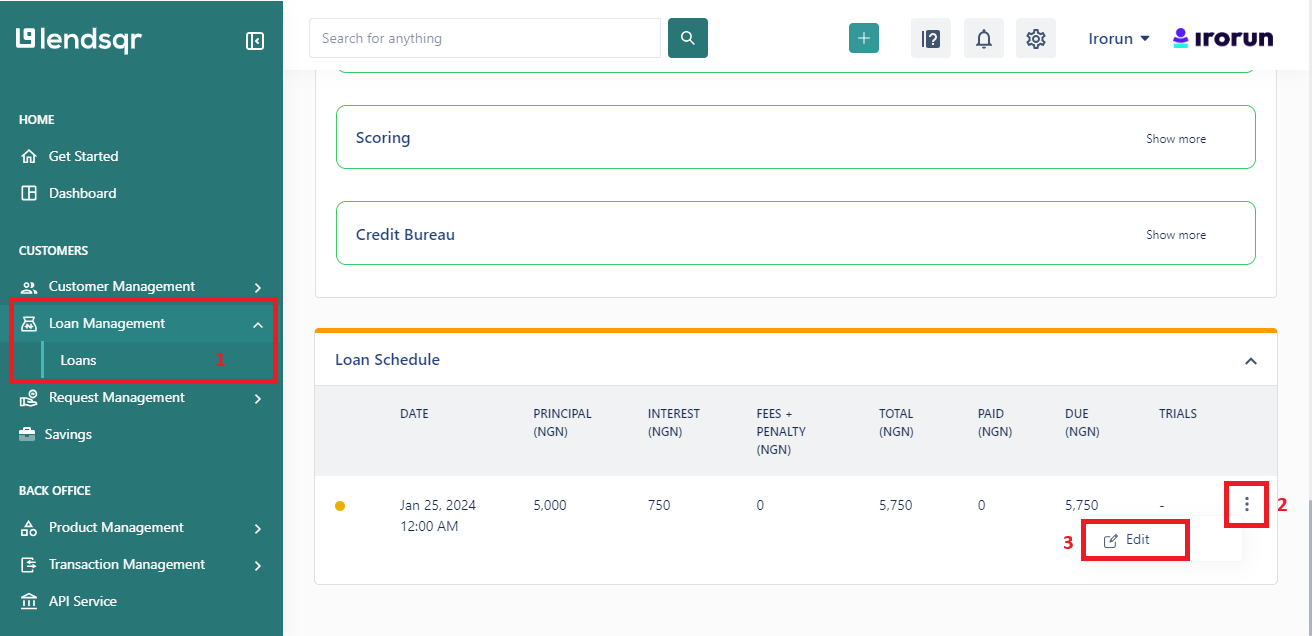
- Locate the borrower’s loan. Navigate to “Loans” in the side navigation, search for the loan using the borrower’s name, phone number, or loan reference, and click on the loan to open it. See: How to locate a user’s loan
- On the loan detail page, scroll down to the “Loan Schedule” section. This displays the current repayment table.
- Click the options icon next to the schedule row you want to edit. A dropdown menu will appear with an option to “Edit“.
- Click “Edit“. The Update Loan Schedule side modal will open, pre-filled with the current values for that row.
- Update the relevant fields in the modal (see field descriptions below). Then click “Submit” to save the change


Understanding the fields in the Update Loan Schedule modal
When the Update Loan Schedule modal opens, you will see a number of fields. Here is what each one controls:
- Due date: shifts the repayment deadline for that instalment row
- Principal due: The original principal amount scheduled for this instalment.
- Interest due: The interest component for this period.
- Principal paid: The amount of principal that has already been paid against this instalment, including payments made outside the platform. Entering a value here allows you to record external repayments and reduce the outstanding balance accordingly.
- Fees paid: Any fees associated with this instalment that have already been collected outside the platform. e.g., processing fees, penalty fees, etc.
- Interest paid: The amount of interest that has already been paid against this instalment.
What to check before updating a loan schedule
Before making changes to a live loan’s schedule, consider the following:
- Audit trail. Changes to loan schedules are typically logged. If your organisation uses approval workflows, confirm whether a schedule update requires sign-off from a second admin before taking effect.
- Impact on outstanding balance. Entering a Principal Paid value will reduce the remaining balance on the loan. Double-check the amount before submitting to avoid under- or over-recording a payment.
- Direct debit mandates. If the borrower has an active direct debit mandate, changing the due date or instalment amount may affect the next debit attempt. Confirm the mandate is updated accordingly after a schedule change.
- Borrower communication. If the schedule change affects the borrower’s repayment obligations, ensure they are notified, either through the platform or via your support team.
Related features on the Lendsqr admin console
Updating a loan schedule is part of a broader set of loan management actions on Lendsqr. You may also need:
- How to modify the schedule of a loan request: For adjusting the schedule at the loan request stage, before disbursement.
- How to modify a loan on the Lendsqr admin console: For broader changes to an active loan beyond the repayment schedule.
- Recording loan repayment from external sources: An alternative or complementary approach when recording payments made outside the platform.