Access your Back Office at your fingertips.
Download the app now on Google Play Store.
Scan the QR code
You can also scan QR code with your phone to download the app.
How to create a savings product
Updated
On this page
Introduction
Your customers want to save, but they need structure to do it consistently. Some want to lock away funds for a fixed period and earn returns at the end. Others want a disciplined, recurring savings plan that keeps their money protected until a specific goal is reached. A well-configured savings product gives your customers the framework they need while keeping your lending operation in control of the terms.
On the Lendsqr admin console, you can create savings products that define exactly how your customers save, how long they save for, and what they earn in return. This guide walks you through the full setup process, from understanding the form fields to publishing your product and avoiding common configuration mistakes.
Before you begin
You need admin-level access with product management permissions to create savings products on the Lendsqr admin console. If you do not see Savings Products under Product management in the left navigation, check your role and permissions with your Super Admin before proceeding.
Prepare the following details before you open the form:
The savings type you want to offer: Regular Savings, Fixed Deposit, or Recurring Deposit.
The minimum and maximum savings amount you will accept from customers.
The tenor range for the product.
The interest rate you will pay customers on their savings, and any penalty charge or withholding tax that applies.
The specific offerings you want to present to customers within this product.
Having these details ready before you start reduces the chance of incomplete configurations and makes the setup process significantly faster.
Understanding savings types
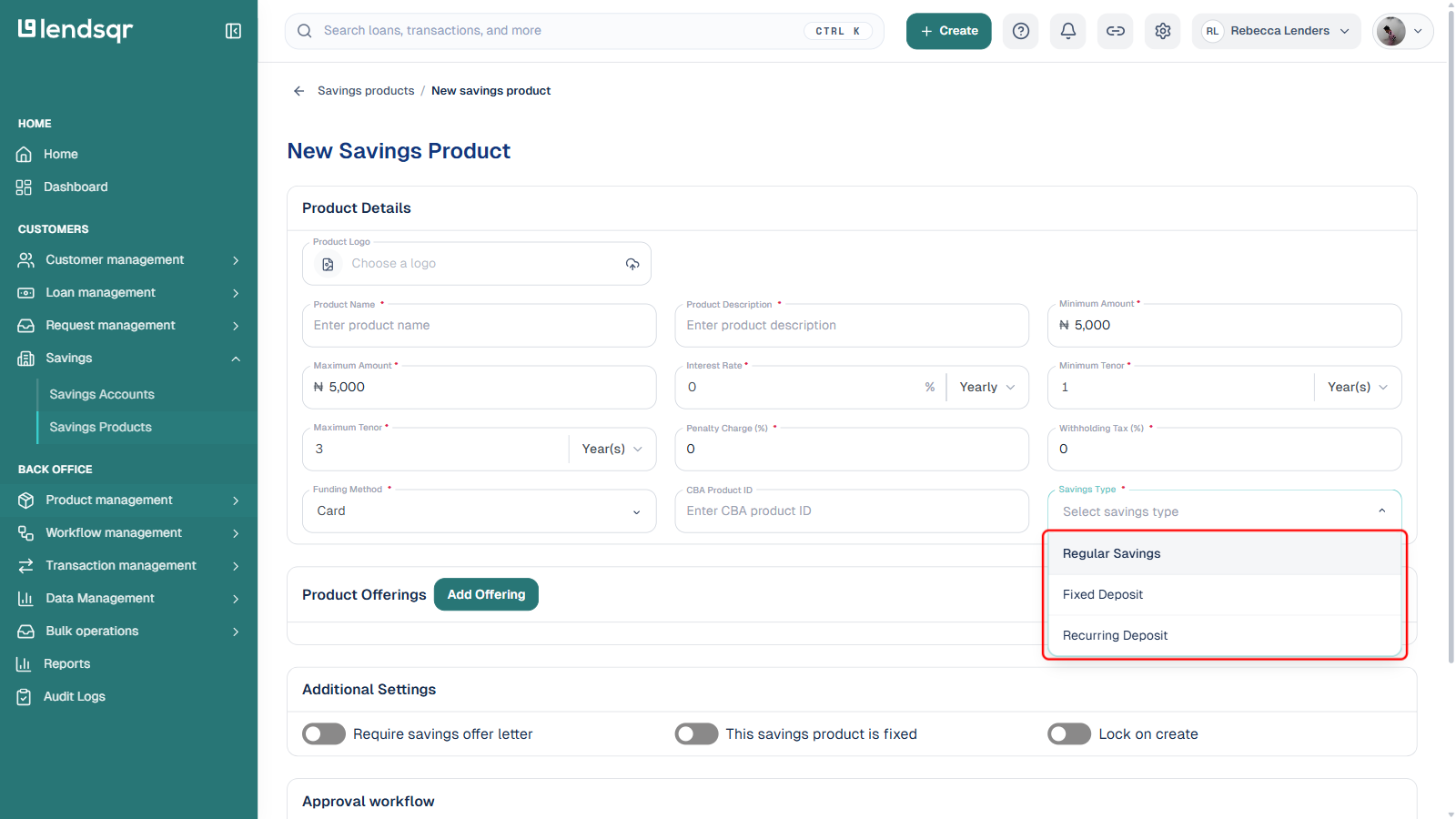
The Savings Type field on the product form offers three options. Each follows different rules for how customers fund the plan and how interest builds up. Choosing the wrong type creates a product that does not behave the way your customers expect.
Regular Savings
A flexible savings plan customers can fund and, depending on how you configure the product, withdraw from without being locked to a single fixed maturity date. This suits everyday savers who want a safe place to keep money while still earning interest.
Fixed Deposit
The customer commits a specific amount upfront and cannot access it until the tenor expires. The product pays a return at maturity based on the interest rate you configure.
Toggle on This savings product is fixed in the Additional Settings section to enforce this lock-in behaviour, and set the Penalty Charge (%) field to define what a customer forfeits if they withdraw before maturity.
This product type suits customers who want a guaranteed return and can commit funds for a fixed period. It suits lenders who want to deploy funds predictably and manage liquidity with confidence.
Recurring Deposit
Rather than one upfront deposit, customers contribute to the plan over time toward a target amount or goal. This encourages regular saving behaviour rather than single lump-sum deposits, and interest accrues progressively as the customer saves.
This product type suits customers saving toward a specific goal, such as school fees, a business investment, or a major purchase. It suits lenders who want to build consistent saving habits among their customer base.
Understanding the form fields
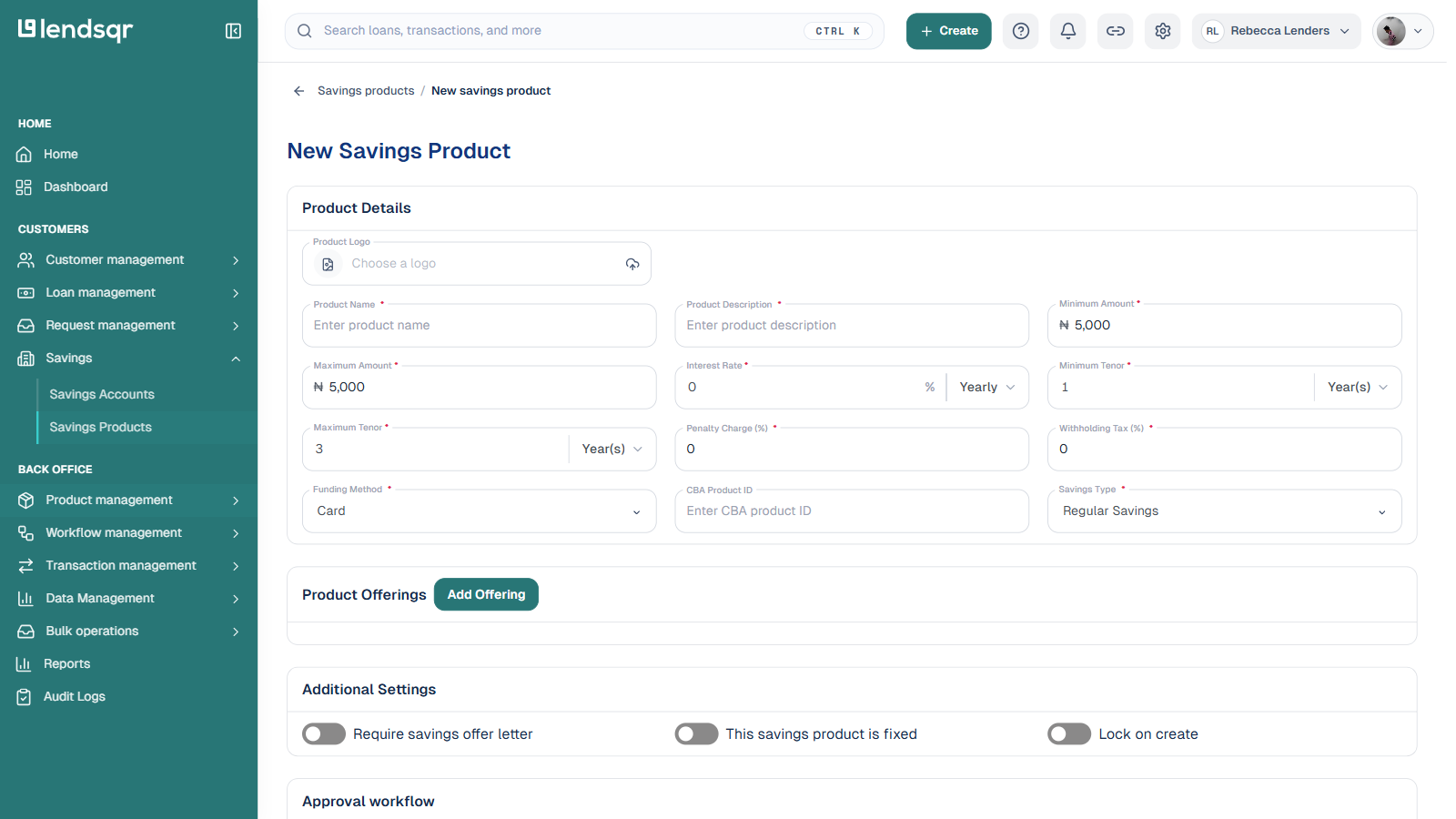
The savings product form has four sections: Product Details, Product Offerings, Additional Settings, and Approval workflow. Understanding what each field does prevents misconfiguration and saves time during setup.
Product Details section
This is the first section you fill in. It defines the core parameters of your savings product. Every offering you configure later must stay within the bounds you set here.
Product Name and Product Description
The name and description of your savings product as they appear to customers on your web app. Use a name that communicates the product’s purpose and tenor clearly. For example, “90-Day Fixed Deposit” tells a customer exactly what they are signing up for. “Savings Plan A” does not.
Minimum Amount and Maximum Amount
These set the lowest and highest amount a customer can save under this product. Set the minimum based on your target customer’s realistic savings capacity. For instance, if most of your customers save between NGN 5,000 and NGN 50,000 per month, a minimum of NGN 500,000 will exclude the majority of your audience before they even begin. Set the maximum in line with your liquidity management strategy and any applicable regulatory limits on deposit-taking.
Minimum Tenor and Maximum Tenor
These define the duration range of the savings product, entered alongside a period unit (Days, Months, or Years).
Interest Rate, Penalty Charge (%), and Withholding Tax (%)
The Interest Rate is the return you pay customers on their savings balance, entered as a percentage against a period (for example, Yearly). The Penalty Charge applies if a customer withdraws early from a fixed plan. Withholding Tax lets you configure any tax deducted from interest earned, if applicable in your market.
Funding Method
How customers fund this savings product, such as by card.
CBA Product ID
An optional identifier linking this product to a core banking application product, for lenders who integrate with one.
Savings Type
Select Regular Savings, Fixed Deposit, or Recurring Deposit. See “Understanding savings types” above before making this selection, since it is required and shapes how the rest of the product behaves.
Product Offerings section
Once you complete the product details, click Add Offering to configure the specific savings options your customers select when they sign up. Offerings function as packages within your savings product, each with its own label, description, amount, and tenor. All offering parameters must stay within the bounds you set in the Product Details section.
Additional Settings section
Three toggles control optional behaviour for this product:
Require savings offer letter: when turned on, reveals an offer letter template picker. Customers must accept this offer letter before their plan is created.
This savings product is fixed: locks the plan to its configured tenor, relevant for Fixed Deposit products.
Lock on create: prevents further edits to certain terms once the plan has been created.
Approval workflow section
Optionally attach an approval workflow to require sign-off before this product’s plans can be activated.
Quick setup checklist
Use this checklist before clicking Create to confirm your product is fully configured:
Product name entered and clearly communicates the product purpose
Minimum and maximum amount set in the correct currency unit, maximum above minimum
Minimum and maximum tenor set with the correct period unit
Interest rate, penalty charge, and withholding tax entered as percentages
Funding method selected
Savings Type selected: Regular Savings, Fixed Deposit, or Recurring Deposit
At least one offering configured with label, principal, tenor, and tenor type
All offering parameters fall within the product detail bounds
Additional Settings reviewed (offer letter requirement, fixed toggle, lock on create)
Full configuration reviewed before clicking Create
How to create a savings product
As an admin, a savings product can be created with the right permissions on Lendsqr’s admin console in just a few steps:
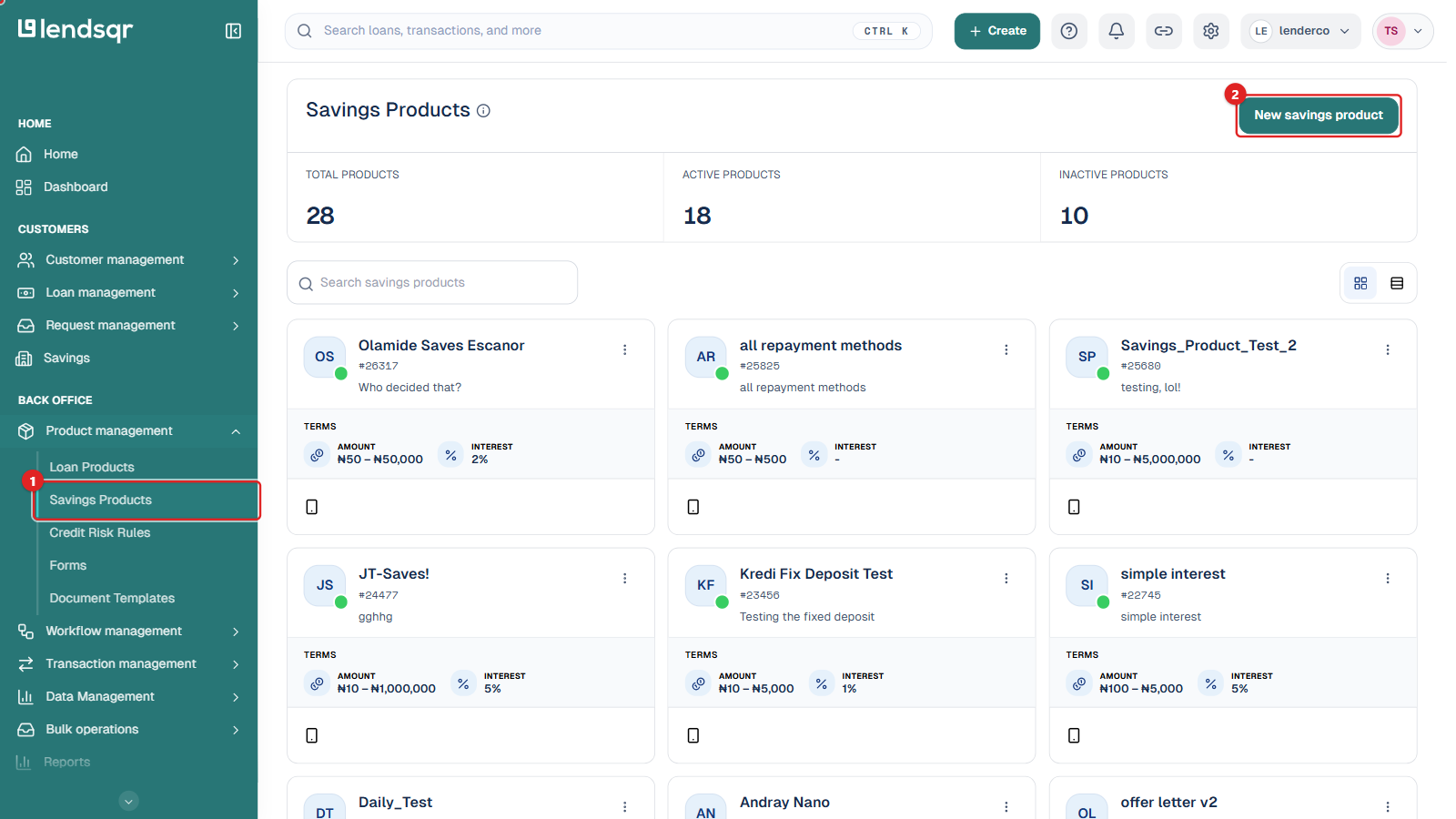
On the left navigation, under Back Office, expand Product management and select Savings Products.
Click New savings product at the top right of the page to open the setup form.
Fill in the Product Details section to set the name, description, amount range, tenor range, interest rate, penalty charge, withholding tax, funding method, and Savings Type.
Click Add Offering in the Product Offerings section to define the savings options your users will see. These must stay within the bounds of the product details you set earlier.
In Additional Settings, toggle on any of Require savings offer letter, This savings product is fixed, or Lock on create that apply.
Optionally attach an Approval workflow.
Once you’re done filling out the form, click the Create button to publish the product.
Why savings product configuration matters
A poorly configured savings product creates problems on both sides. Customers who sign up for a product with unclear terms lose trust when their expectations are not met. Lenders who misconfigure interest rates or tenor parameters face operational and financial consequences that are difficult to unwind after customers have already enrolled.
Taking time to configure your savings product correctly from the start protects your customers’ experience and your organization’s financial position. Test your product internally before promoting it to your customer base. Confirm that the offerings display correctly on your web app and that the terms are clearly communicated at every stage of the signup flow.
UX considerations
How you present your savings product to customers shapes whether they enrol and whether they stay. A few principles to keep in mind.
Use product names and offering labels that reflect your customers’ goals, not internal product codes. “Save for School Fees” resonates more than “Savings Plan B.”
Write offering descriptions that speak to outcomes. Tell customers what they will earn or achieve by the end of the tenor. “Save NGN 50,000 over 6 months and earn NGN 5,000 in interest” is more compelling than “6-month savings plan at 10% per annum.”
Set amount ranges that reflect your actual customer base. If most of your customers save between NGN 5,000 and NGN 100,000, configuring a minimum of NGN 500,000 will exclude the majority of your target audience.
Limit the number of offerings to what is genuinely distinct. Three to five well-defined offerings are easier for customers to navigate than ten options with marginal differences between them.