Access your Back Office at your fingertips.
Download the app now on Google Play Store.
Scan the QR code
You can also scan QR code with your phone to download the app.
Steps on how to edit a mandate schedule easily
Updated
On this page
A borrower is scheduled to be debited ₦50,000 on the 15th, but reaches out requesting an extension to the 25th.
Or your team discovers that a repayment amount was entered incorrectly.
Instead of creating a new mandate, you can simply edit the existing mandate schedule to reflect the correct repayment terms.
What is a mandate schedule?
A mandate schedule defines when and how much will be debited from a borrower’s account under a direct debit mandate.
It controls:
The amount to be debited
The due date of the debit
The status of the repayment (paid or cancelled)
Mandates are critical in lending because they allow lenders to automatically collect repayments and reduce missed payments.
When a borrower authorizes direct debit as a repayment method, the system creates a mandate, a formal permission for Lendsqr to debit their bank account on scheduled dates. The mandate schedule is the timetable attached to that mandate: it lists every planned debit date and the amount to collect on each date.
When should you edit a mandate schedule?
There are situations where this schedule needs to be updated after it is created:
Loan restructuring — A borrower’s repayment terms have been renegotiated and the schedule needs to reflect the new dates or amounts.
Date corrections — A schedule was created with an incorrect start date or payment frequency.
Salary date changes — A salaried borrower has changed pay dates and needs the debit schedule adjusted to match.
Editing the schedule ensures your repayment system stays accurate and aligned with real-world changes.
How editing a mandate schedule works
When you edit a mandate schedule:
The system updates the repayment details
Future debits follow the new configuration
The borrower’s repayment plan reflects the changes
This allows lenders to maintain flexibility without recreating mandates from scratch.
Real-world examples
Example 1: Rescheduling a repayment
A borrower cannot meet the original due date:
Original date → 10th
Updated date → 20th
You edit the schedule → system debits on the new date.
Example 2: Correcting an incorrect amount
A repayment was mistakenly set to ₦100,000 instead of ₦10,000:
You update the amount
Prevents over-debiting the borrower
Example 3: Cancelling a scheduled debit
A borrower has already paid manually:
You update the status to cancelled
Prevents duplicate debit
How to edit a mandate schedule
Follow these steps on the Admin Console:
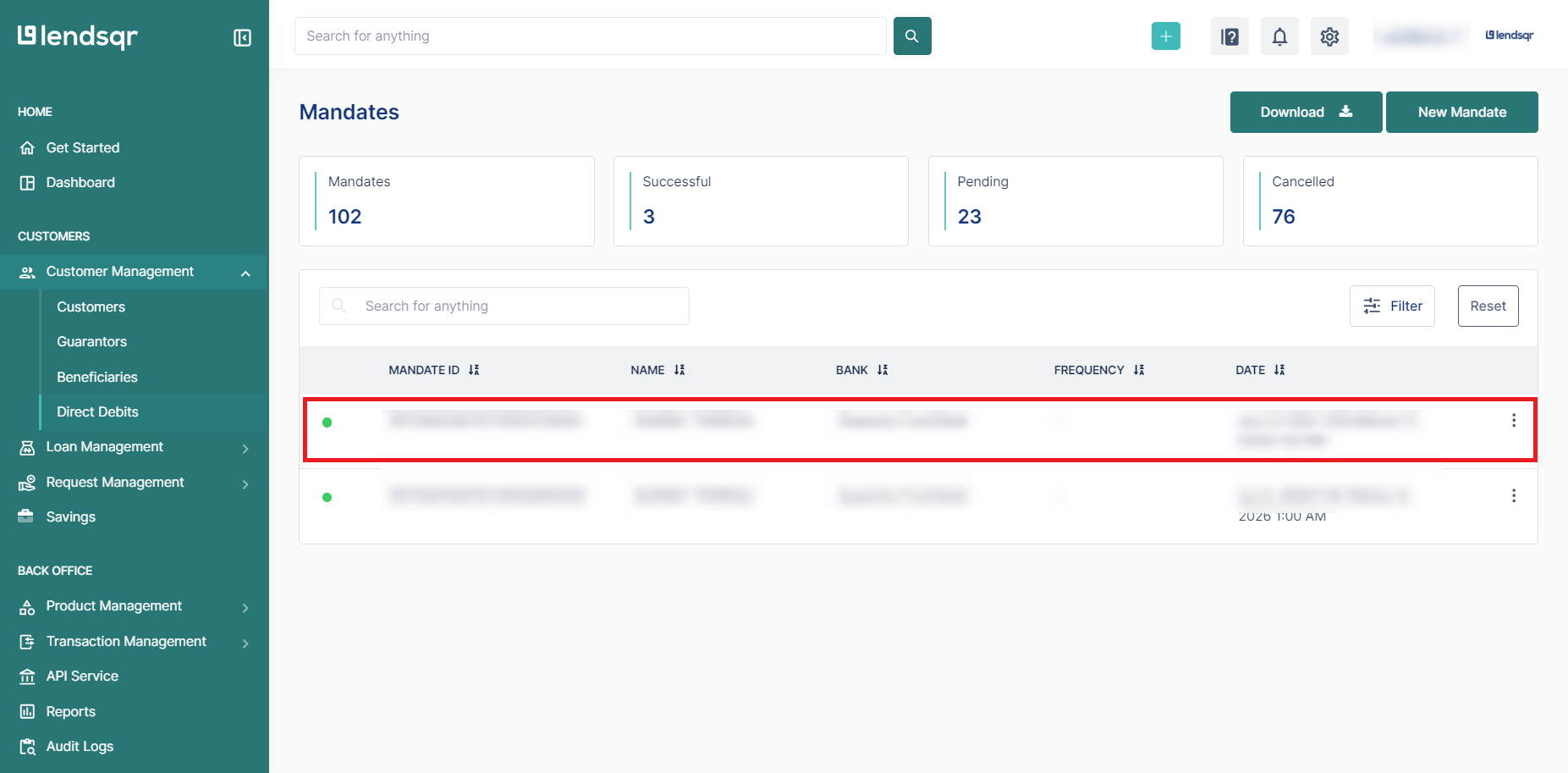
Log in to your Lendsqr admin console and Navigate to Customer Management
Click on Direct Debits and select the specific mandate you want to edit
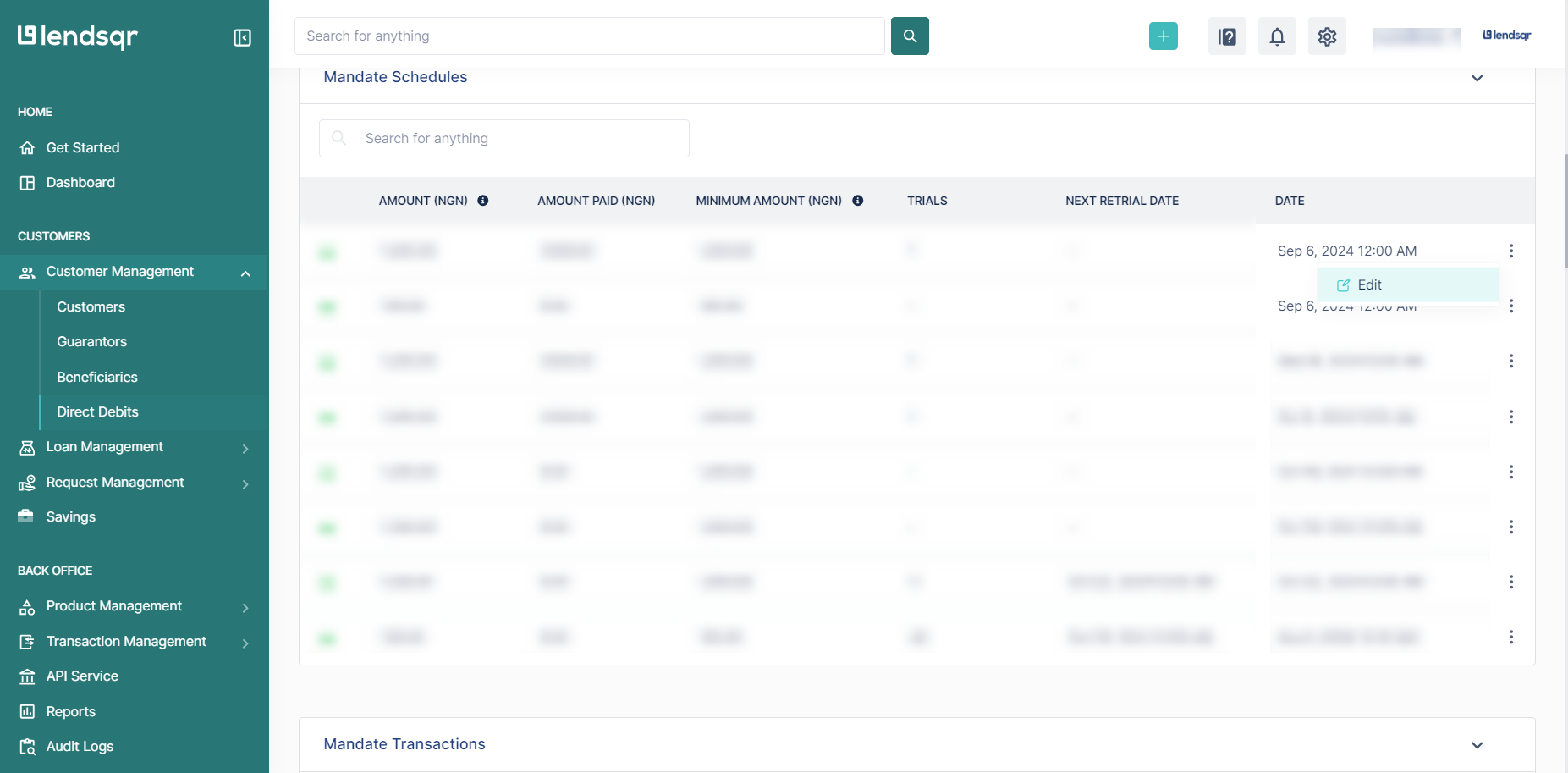
Scroll down to the Schedule card and click on the options button, then select the “Edit” option and view the modal
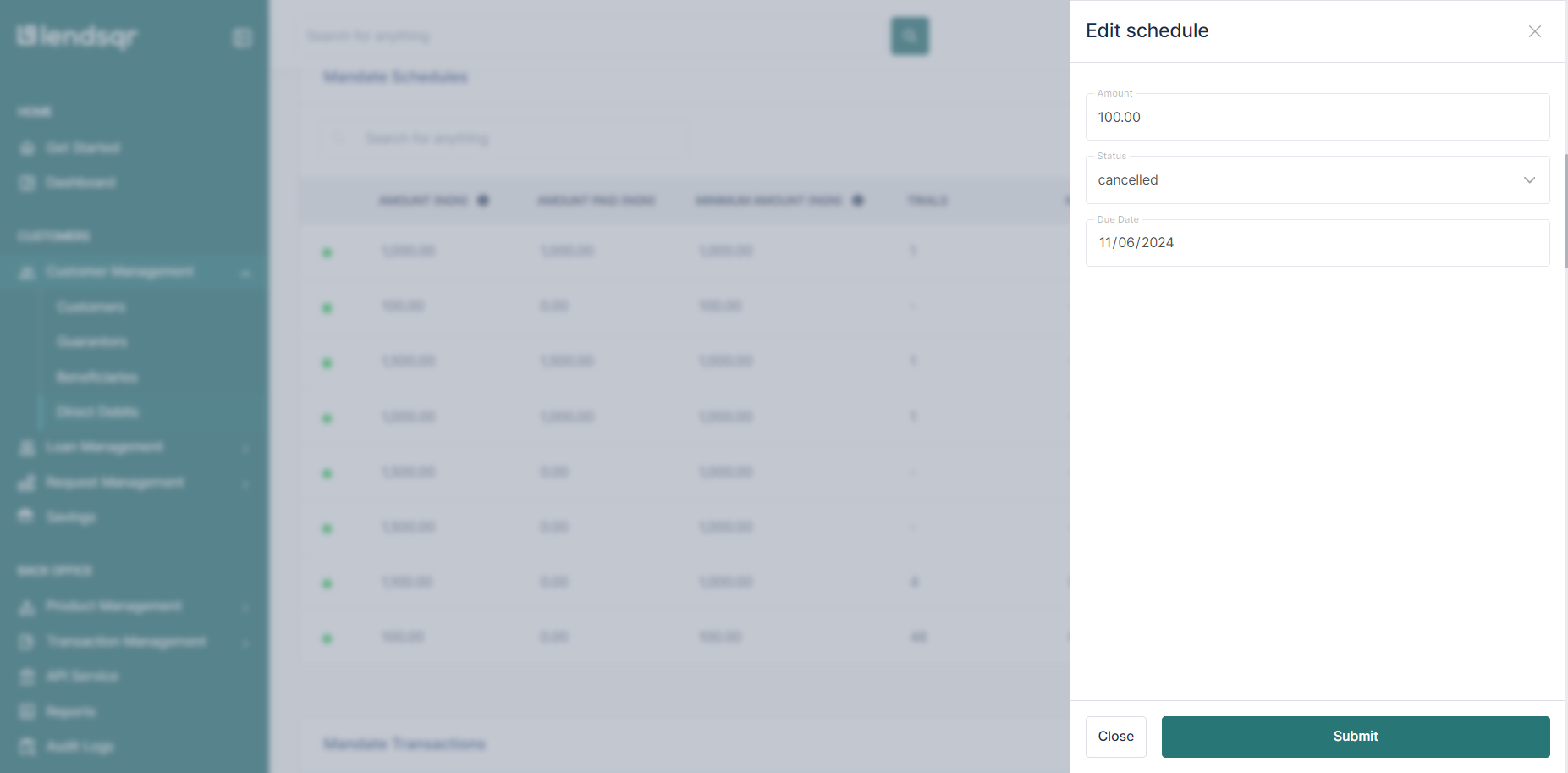
Update any of the following fields: Status → Paid or Cancelled Amount → Adjust repayment value Due Date → Change repayment timing
Click on Submit to save your changes
You can only edit schedules that already exist within a mandate.
Important: Editing a mandate schedule affects future debit attempts only. Any debits already processed under the previous schedule are not reversed. Confirm with the borrower before making changes that affect their expected payment dates.
What happens after you edit the schedule
The updated schedule takes effect immediately. The next automated debit attempt will follow the new dates and amounts. The borrower’s mandate history will show the change, and the loan repayment timeline may update to reflect the modified schedule.
If the edit significantly extends the loan tenor, ensure this is reflected in the loan agreement or offer letter to maintain compliance with your lending policies.
Frequently asked questions
Can I edit a schedule after a debit has already failed?
Yes. If a debit attempt fails for example, due to insufficient funds in the borrower’s account you can edit the schedule to retry on a different date without canceling the entire mandate. This is preferable to deactivating and recreating the mandate.
Can the borrower edit their own mandate schedule?
No. Mandate schedule edits are admin-only actions. Borrowers cannot modify their own debit schedules from the web app. They would need to contact your support team to request a change.
What is the difference between editing a schedule and canceling a mandate?
Editing a schedule adjusts the timing or amounts of future debits while keeping the mandate active. Canceling a mandate terminates the debit authorization entirely. Only cancel a mandate if the borrower has fully repaid or if the mandate needs to be replaced with a new one.