Access your Back Office at your fingertips.
Download the app now on Google Play Store.
Scan the QR code
You can also scan QR code with your phone to download the app.
Who is an account manager in lending and how to assign the role in Lendsqr
Updated
On this page
Introduction: Who handles borrower relationships in your lending business?
In a digital lending operation, someone needs to stay close to borrowers by following up on repayments, reviewing loan requests, answering questions, and keeping relationships positive. That person is typically called an account manager.
An account manager focuses on day-to-day borrower management without needing full access to sensitive settings such as loan product configuration or user permissions. This role helps your lending business run smoothly while protecting security.
Assigning the account manager role in Lendsqr gives team members the exact access they need. It prevents operational delays, such as team members constantly asking admins for help, and reduces risk by limiting what they can change.
This guide explains the account manager role, why it matters for growing lenders, and how to assign it quickly in the Lendsqr admin console.
What is the account manager role?
An account manager is the team member responsible for managing relationships with borrowers, monitoring loan performance, and handling day-to-day issues.
Typical responsibilities include:
Following up with borrowers who missed repayments
Reviewing and approving loan applications
Downloading statements and reports for clients
Handling borrower inquiries and maintaining good customer relationships
The role provides targeted access inside Lendsqr without granting full admin rights that could allow changes to critical system settings.
Why lenders assign account manager roles
As your lending business grows beyond one or two people, you need to divide tasks efficiently. Dedicated account managers help scale collections, improve customer retention, and speed up loan servicing without exposing the entire platform.
When to assign this role:
When your team expands and multiple people handle borrower interactions
When you want to avoid bottlenecks, for example only one admin can approve loans or view reports
In larger operations managing hundreds of active borrowers
Small lender versus growing operation example:
A solo lender or small team might handle everything themselves. But once you have several staff members, assigning the account manager role lets specialists focus on borrower relationships while admins retain control over system configuration and compliance. This setup supports secure team collaboration in the Lendsqr admin console.
How to assign the account manager role
1. Log in to your Lendsqr admin console
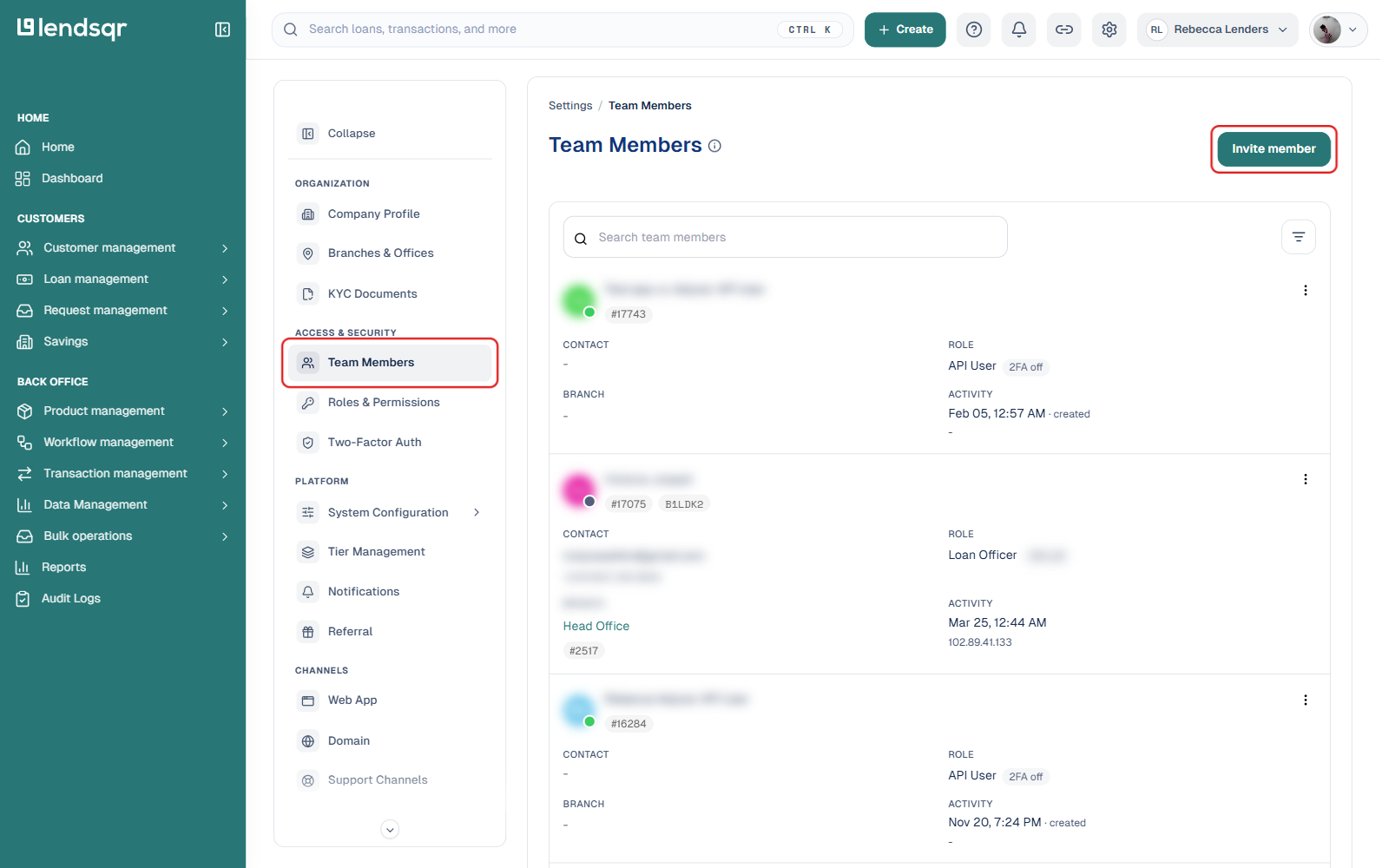
2. Click the Settings (gear) icon in the top navigation, then under “Access & Security”, select “Team Members”
3. Click the “Invite member” button
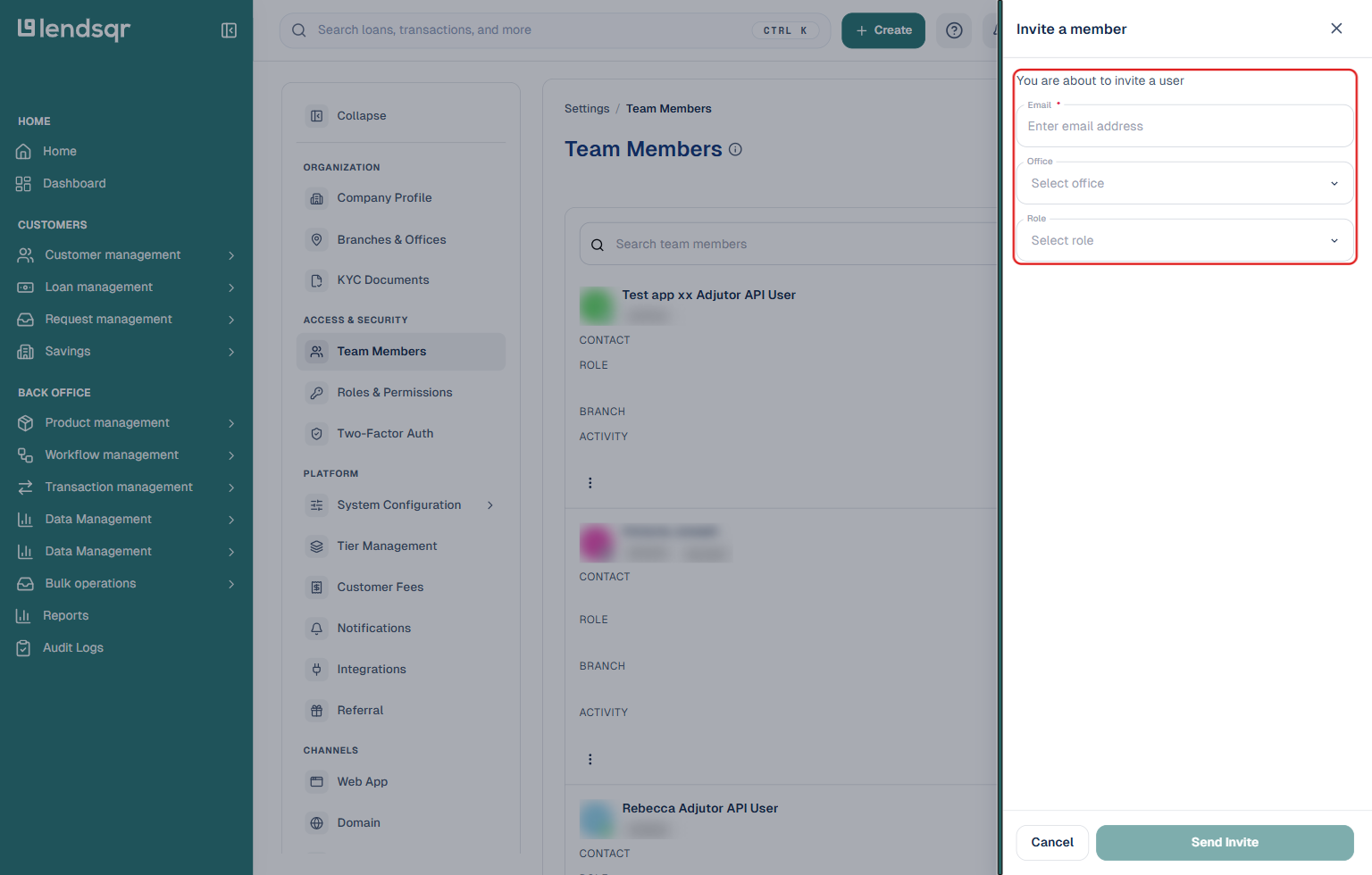
4. Enter the team member’s email address, select their office, and choose “Account Manager” under the Role field
5. Click “Send Invite”
The new member will receive an email invitation. Once they accept the invite, they will have the account manager role.
How to make an existing team member an account manager
1. Log in to your Lendsqr admin console
2. Click the Settings (gear) icon, then under “Access & Security”, select “Team Members”
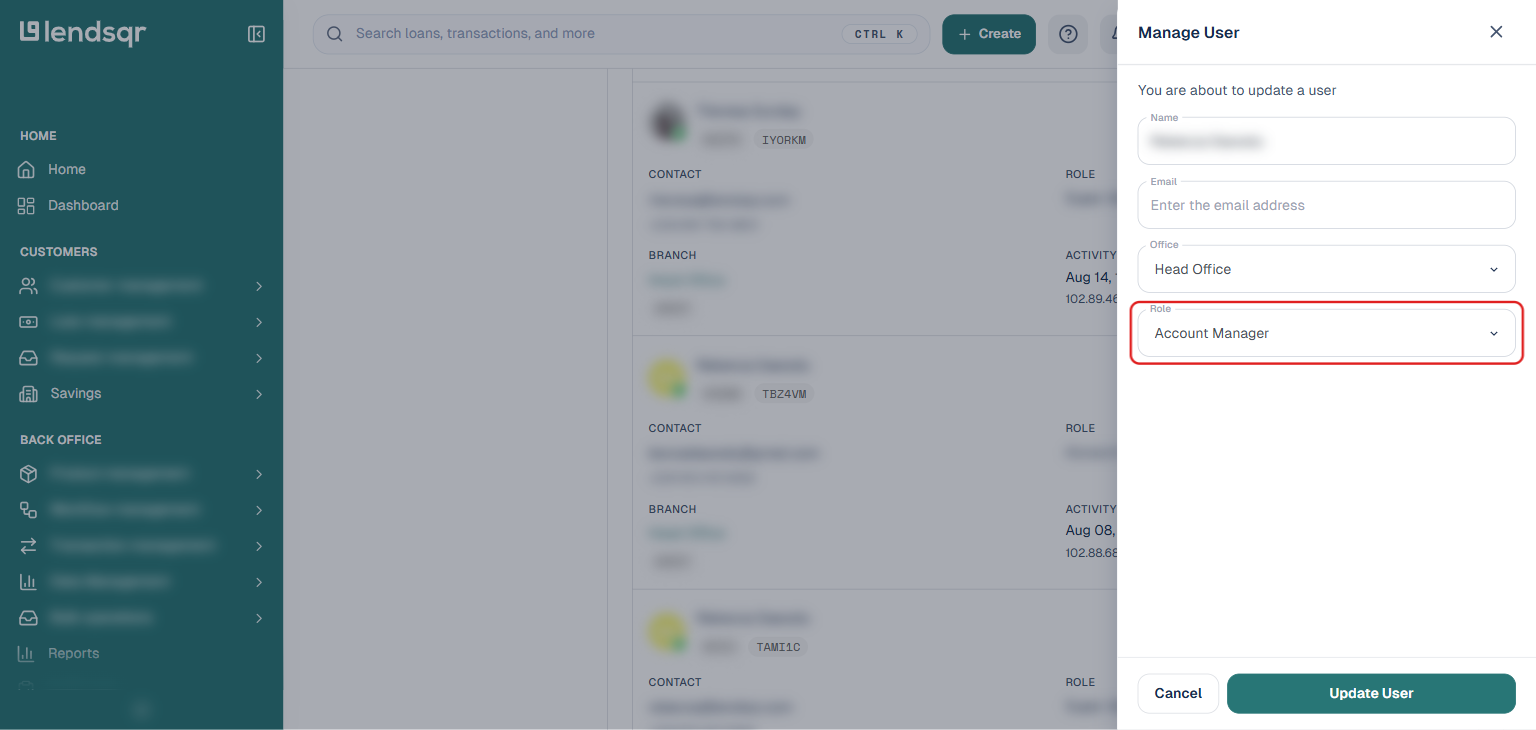
3. Click the three-dot menu on the team member’s row and select “Manage User“
4. In the panel that opens, click the “Role” field and select “Account Manager”
5. Click the “Update User” button to save
The team member’s role will update immediately.
Quick tip
You can assign the account manager role to multiple people if you have more than one team handling borrower accounts. Each person will get the same level of access.
What this enables in your lending workflow
Once assigned, your account manager can work directly in the Lendsqr admin console to monitor loans, manage repayments, handle collections, and support borrowers, all while you maintain oversight and security.
This role fits naturally into the lending workflow: origination and approval, disbursement, ongoing management and collections, and repayment tracking. It helps your team deliver better service and keep borrowers happy without compromising platform controls.
Many lenders use this flexible role system in Lendsqr to grow their operations securely and efficiently. Lendsqr makes it simple to give team members the exact permissions they need.
Next steps
Invite or update team members as your lending business scales.
Combine the account manager role with other permissions, such as branch or office assignment, for even more precise access.
Test the role with a sample workflow to ensure everything works as expected.
Ready to strengthen your lending team? Use the Lendsqr admin console to assign roles quickly and give your staff the right tools to support borrowers effectively.