Access your Back Office at your fingertips.
Download the app now on Google Play Store.
Scan the QR code
You can also scan QR code with your phone to download the app.
Configuring your oraculi credit risk rules settings
Updated
On this page
Every loan application on your Lendsqr platform passes through credit risk rules before it is approved or declined. Credit risk rules are the set of rules and criteria that determine whether a borrower is eligible for a loan and Oraculi is the engine that executes it.
A well-configured credit risk rule means that good borrowers are approved quickly and consistently, risky applications are declined automatically, and your team spends less time on manual reviews. A poorly configured one can decline good borrowers, approve bad ones, or cause system errors that disrupt your entire lending operation.
This guide explains what credit risk rules are, how to create and configure one on the Lendsqr admin console, what each available module does, how to sequence them correctly, and how they work together in a real loan application scenario.
What are credit risk rules?
Credit risk rules refer to a set of predefined rules and criteria that Oraculi uses to evaluate a loan application automatically. When a borrower applies for a loan, Oraculi runs their information through the modules you have configured, in the sequence you have defined, and produces a decision: approve, decline, or offer.
Each lender can create multiple credit risk rules with different risk criteria and assign them to different loan products. For example, you might have a stricter model for larger, unsecured loans and a more permissive model for small, short-term products aimed at returning borrowers.
Credit risk rules are configured entirely in JSON. This gives you a high degree of flexibility and precision but also means that mistakes in the configuration can have real consequences such as declining good borrowers, approving bad ones, or causing system errors. Always review your JSON carefully before saving.
Key terms
Module — a single check or assessment within your credit risk rule, such as a credit bureau check or a karma blacklist check.
Sequence — the order in which modules are executed. Lower numbers run first.
Required — when set to true, Oraculi must successfully execute this module to process the loan decision. When set to false, the module is included in the model but is not mandatory for a decision to be reached.
Continue on failure — when set to false, if a borrower fails this module the evaluation stops immediately and the loan is declined. When set to true, the evaluation continues to the next module even if the borrower fails this one.
Offer on success — used in the Whitelist module. When set to true, if the borrower is whitelisted the system immediately presents a loan offer and skips all remaining modules.
Decision settings — the JSON object where you define the rules and sequences for your modules.
Offer settings — the JSON object where you define the minimum and maximum loan amounts to offer a borrower who passes all modules.
Before you start
Roles and permissions Configuring credit risk rules requires a specific permission. Credit risk rules permission is a separate group from the Loan Products permission and must be explicitly granted to a team member before they can create or edit credit risk rules. To review or update permissions, navigate to Settings and select “Roles and Permissions”.
Plan your model before writing JSON Before opening the admin console, decide on the following:
Which modules you want to include and in what order
Which modules should be required versus optional
Whether each module should continue on failure or stop the evaluation
The minimum and maximum loan amounts for your offer settings
Having this planned in advance will make the configuration process faster and reduce the risk of errors.
Types of credit risk rules
This section gives you a clear view of the available credit risk rule modules so you can better understand how your lending decisions are currently being handled.
The available credit risk rule settings (aka modules or services) are as follows:
Module
Description
Karma
Status: REQUIRED. Typically and advisably the first module in the sequence. Checks against the Karma engine. If a user is flagged, they are deemed ineligible. Fields that are checked include BVN, email, phone number etc.
Configuration: continue_on_failure should be false for this module.
Status: OPTIONAL. This checks if the user has been whitelisted; if so, the whitelist offer is immediately presented and all other checks are bypassed. continue_on_failure is always true as most users will not be whitelisted.
Status: REQUIRED. The ecosystem module is another Lendsqr internal check. It checks a user against various fields from all organisations housed on the Lendsqr ecosystem. Typical fields checked include past-due loans, running loans, delayed payments, age etc. continue_on_failure should be false. Note: user data is not shared across organisations.
{ "id": 5, "version_id": 4, "decision_model_id": 1, "decision_type": "ecosystem", "setting": { "age": { "type": "integer", "description": "Age of the borrower", "minimum": 23, "maximum": 55 }, "unique_phone_numbers": { "type": "integer", "description": "Number of unique phones", "minimum": 0, "maximum": 2 }, "lenders": { "type": "integer", "description": "Lendsqr Apps that user has signed up to", "minimum": 0, "maximum": 5 } } }
Scoring
Status: REQUIRED. A subjective service that rates user attributes and collates them into a credit score. Fields rated include age, gender, marital status, employment, location, etc. continue_on_failure is typically false.
Status: OPTIONAL (External Provider). Data is sourced from one of the three Credit Bureaus in Nigeria (CRC, CreditRegistry, First Central), TransUnion. Fields checked: past-due loans, loan history, active loans, etc. Recommended to set continue_on_failure to false.
For fields such as id, version_id, decision_model_id, decision_type and setting please note that these are auto-generated and do not require modification. You can only tweak the values of the different variables checked within the settings.
These modules now appear as a visual palette in the rule builder rather than as raw JSON keys: Karma (Karma blacklist), Whitelist, Ecosystem, Scoring (Scorecard), Credit Bureau, and Loci (Loci velocity), plus a new Custom check module for conditions specific to your business. The JSON structure and fields described above are still what’s stored behind each module, and remain editable directly if you prefer working in JSON. See the step-by-step below.
Step-by-step: how to create a credit risk rule
Step 1 — Navigate to credit risk rules
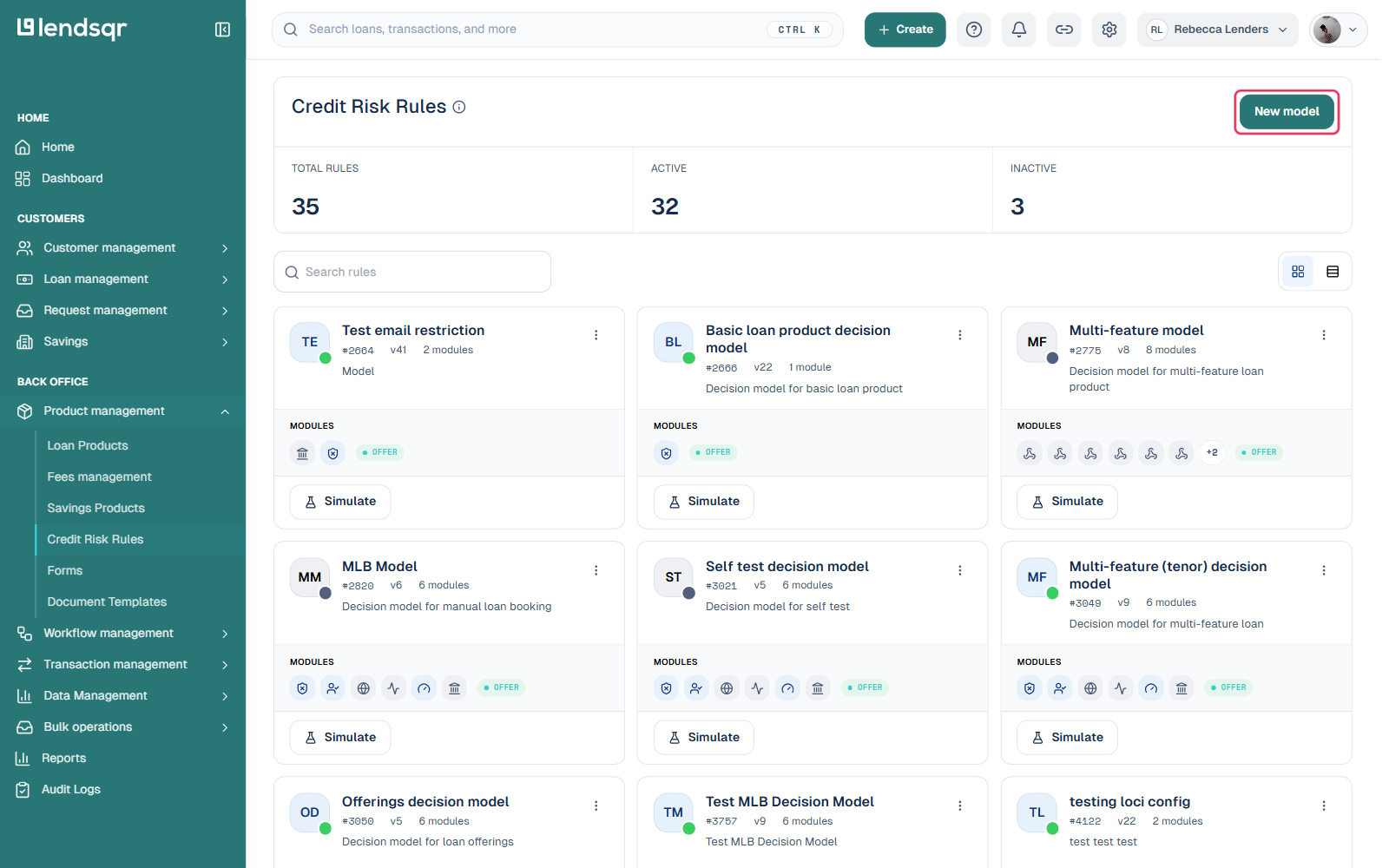
Log in to your Lendsqr admin console. On the left navigation pane, scroll down to Back Office, click on “Product Management”, and select “credit risk rules”. This will open the Credit risk rule page where all your existing models are listed.
Step 2 — Create a new credit risk rule
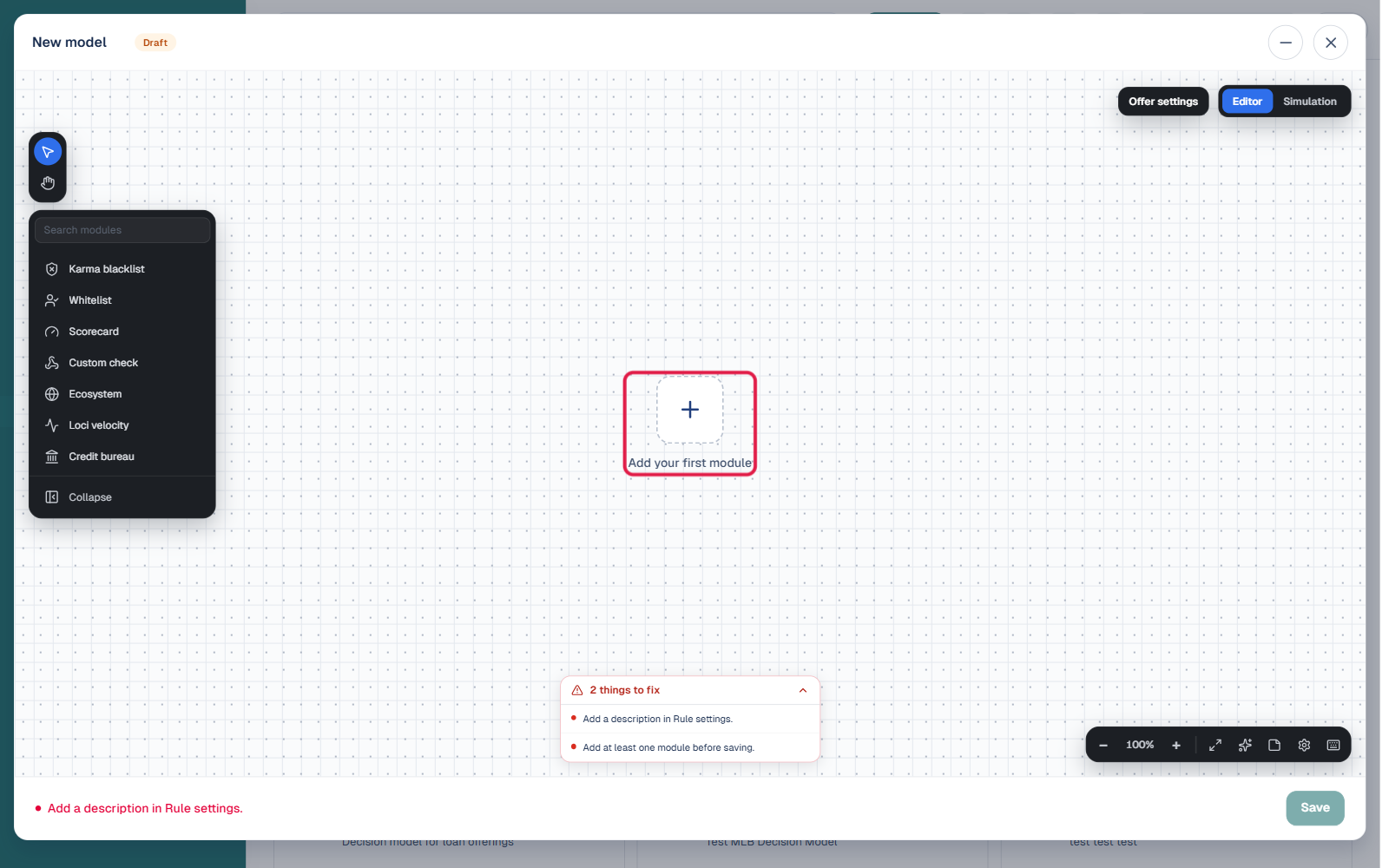
Click the “New model” button to open the rule builder, a visual canvas where you construct your rule by dragging modules from a rail on the left onto an empty canvas (“Add your first module”).
Step 3 — Add and configure modules on the canvas
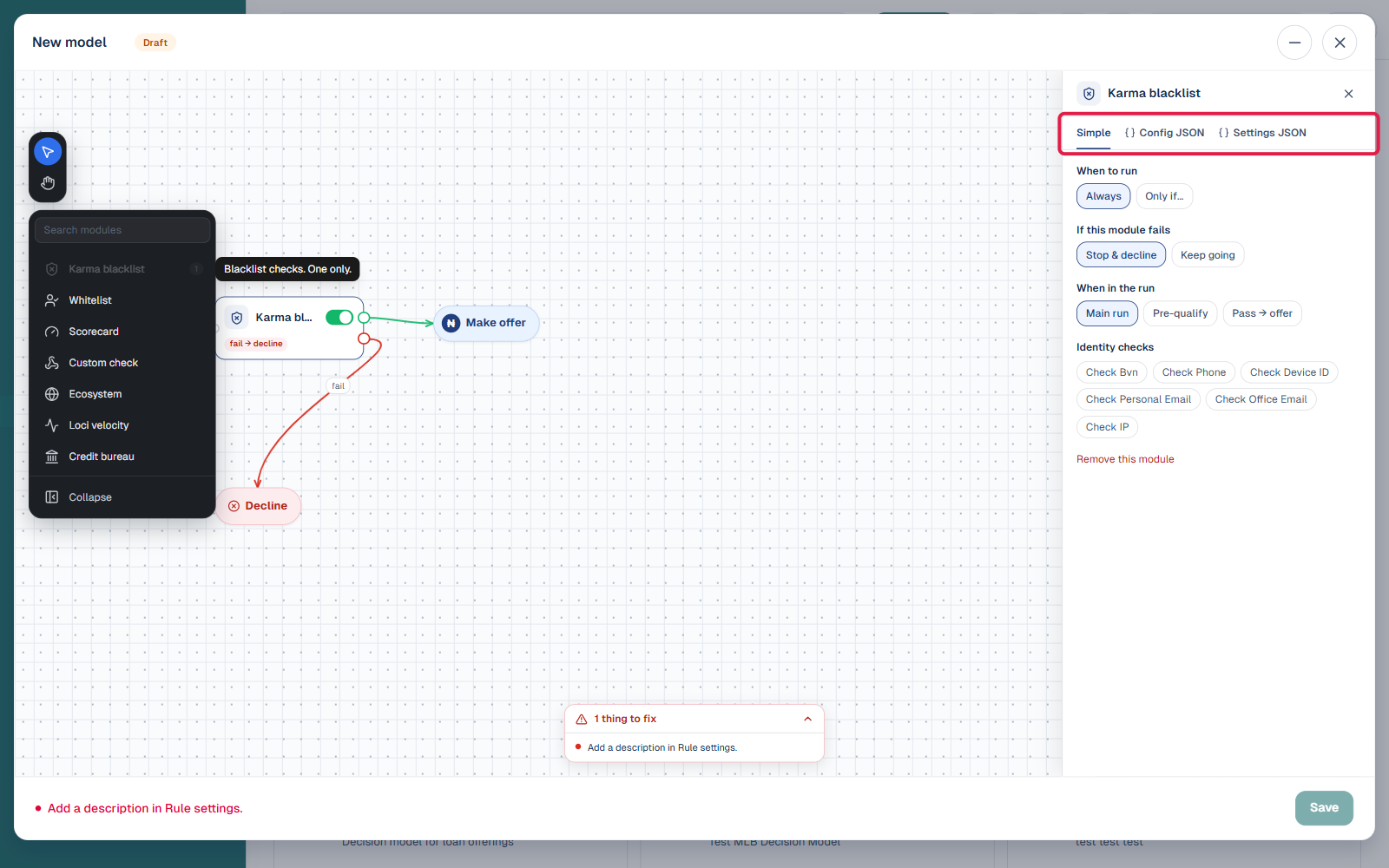
Click a module from the rail (Karma blacklist, Whitelist, Scorecard, Custom check, Ecosystem, Loci velocity, or Credit bureau) to drop it onto the canvas. Each module added this way automatically wires up “fail” and “offer” branches on the canvas, so you can see the decision flow visually instead of writing sequence numbers. Click a module on the canvas to open its configuration panel on the right, where you set “When to run” (Always or Only if a condition is met), “If this module fails” (Stop & decline or Keep going, equivalent to the old continue_on_failure), and “When in the run” it applies (Main run, Pre-qualify, or Pass → offer). Add as many modules as your rule needs, in the order you want them evaluated.
Step 4 — Switch to JSON if you need it
Each module’s configuration panel has three tabs: Simple (the toggle-based form shown by default), Config JSON, and Settings JSON. If you’re more comfortable working directly in JSON, or need a field the Simple tab doesn’t expose, switch to either JSON tab and edit the object directly using the module reference above. Offer settings (the minimum and maximum loan amounts for borrowers who pass) are configured separately via the “Offer settings” button above the canvas, for example:
{
  "amount": {
    "min": 5000,
    "max": 100000
  }
}
Step 5 — Save the credit risk rule
The builder flags anything still missing (for example, “Add a description in Rule settings”) in a checklist at the bottom of the canvas; the “Save” button stays disabled until these are resolved. Once resolved, click “Save”. The credit risk rule will now appear on the Credit Risk Rules page and can be assigned to a loan product.
Step 6 — Link the credit risk rules to a loan product
Navigate to Back Office, expand “Product Management”, and select “Loan Products”. Open the loan product you want to link the model to, scroll down to the “Credit risk rule” section, and select the credit risk rule you just created. Save the product.
Real-world example: how modules work together in a loan application
A borrower applies for a ₦50,000 personal loan on a product configured with the following credit risk rule sequence: Karma (sequence 1), Whitelist (sequence 2), Ecosystem (sequence 3), Scoring (sequence 4), Credit Bureau (sequence 5).
Here is how Oraculi processes the application:
Karma check (sequence 1) — Oraculi checks the borrower’s BVN, email, and phone number against the Karma blacklist. The borrower is not flagged. Continue on failure is false, so if they had been flagged, the evaluation would have stopped here and the loan would have been declined. They pass and the evaluation moves to sequence 2.
Whitelist check (sequence 2) — Oraculi checks whether the borrower has been manually prequalified by the lender. They have not been whitelisted. Continue on failure is true, so the evaluation continues to sequence 3.
Ecosystem check (sequence 3) — Oraculi checks the borrower against the Lendsqr ecosystem data, including past due loans, running loans, and delayed payments from across all lenders on the platform. The borrower has no past due loans and only one running loan within the acceptable maximum. They pass and the evaluation continues to sequence 4.
Scoring check (sequence 4) — Oraculi calculates a credit score based on the borrower’s age, gender, employment status, location, and other configured attributes. The borrower scores 68 out of 100, which exceeds the configured minimum of 50. They pass and the evaluation continues to sequence 5.
Credit bureau check (sequence 5) — Oraculi queries the CRC Credit Bureau and retrieves the borrower’s loan history, active loans, and past due records. The borrower has two previous loans with no defaults and zero past due loans, which is within the configured acceptable range. They pass all checks.
Outcome: The borrower has passed all required modules. Oraculi presents a loan offer for ₦50,000 based on the offer settings configured in the model.
Important notes on JSON configuration
The fields id, version_id, decision_model_id, and decision_type in the sample payloads are auto-generated by the system. You do not need to enter these manually — only the values within the setting object need to be configured by you.
Mistakes in your JSON — such as missing brackets, incorrect field names, or invalid values can cause the credit risk rule to fail silently, decline good borrowers, or approve bad ones. Always validate your JSON before saving.
None of the modules are compulsory as a platform rule. You decide which modules to mark as required within your own configuration based on your risk appetite.
The credit risk rules option is not visible in the navigation Confirm that your role includes the credit risk rules permission. This is a separate permission from Loan Products and must be explicitly granted. Navigate to Settings and select “Roles and Permissions” to check.
The credit risk rules is declining all borrowers Review your JSON configuration carefully. Common causes include a minimum score set too high in the Scoring module, a maximum of zero set in the past due loans field of the Credit Bureau module when most borrowers have at least one historical entry, or a continue on failure set to false on a module that frequently returns no data.
Thecredit risk rules is not appearing in the loan product dropdown Confirm that the credit risk rule was saved successfully on the Credit risk rules page. If it appears there but not in the loan product dropdown, try refreshing the page.
A borrower passed all checks but did not receive an offer Check your offer settings JSON to confirm the minimum and maximum loan amounts are correctly configured. If the offer settings are missing or contain an error, Oraculi may complete the decision without generating an offer.
Frequently asked questions
What is Oraculi? Oraculi is Lendsqr’s automated credit scoring and decision engine. It executes the rules and criteria defined in your credit risk rule to evaluate loan applications automatically.
Can I create more than one credit risk rules? Yes. You can create multiple credit risk rules with different risk criteria and assign them to different loan products. This allows you to apply stricter rules to higher-risk products and more permissive rules to lower-risk ones.
Are any modules compulsory? No. None of the Oraculi modules are compulsory as a platform rule. You configure which modules to include and whether each one is required within your own model.
What does continue on failure mean? When continue on failure is set to false, a borrower who fails that module is immediately declined and no further checks are run. When set to true, the evaluation continues to the next module even if the borrower fails.
Who can configure credit risk rules? Only team members with the credit risk rules permission can create or edit credit risk rule. This is separate from the Loan Products permission and must be explicitly granted by a system administrator.
How do I link a credit risk rules to a loan product?Navigate to the loan product on the admin console, scroll down to the credit risk rules section, and select the credit risk rule you want to link. Save the product to apply the change.
Want to learn more about how our credit risk rules works? Click here.