Access your Back Office at your fingertips.
Download the app now on Google Play Store.
Scan the QR code
You can also scan QR code with your phone to download the app.
How to approve or decline refinance requests
Updated
On this page
Introduction
When a borrower submits a refinancing request on your platform, it lands in the admin console for your review. As the lender, you decide whether to approve or decline the request based on the borrower’s repayment history, current loan status, and your organization’s lending policies.
Refinancing allows a borrower to modify the terms of an existing active loan without closing it and taking out a new one entirely. Common refinancing scenarios include extending the loan tenor to reduce monthly repayment pressure, adjusting the repayment schedule due to a change in income, or adding new capital to an existing facility. For lenders, refinancing is a tool for managing credit risk proactively it is often better to restructure a loan for a borrower showing early signs of repayment difficulty than to let it fall into default.
On Lendsqr, refinancing requests are initiated by the borrower or by an admin on their behalf, and are then routed to an authorized lender team member for a decision.
On the Lendsqr platform, you can easily approve or decline refinance requests directly from the Admin Console. Refinancing requests are initiated by the borrower or by an admin on their behalf, and are then routed to an authorized lender team member for a decision.
Who can approve or decline refinance requests
Not every team member on the Lendsqr admin console can take action on refinance requests. This action requires appropriate loan management permissions. If you open a pending refinance request under Loan Requests and do not see the Approve or Reject buttons, your current role may not have the necessary permissions. Contact your organization admin to review your access level.
What to review before making a decision
Before approving or declining a refinance request, consider the following:
Repayment history: Has the borrower been making repayments on time, or are there missed or late payments? A borrower with a consistent repayment record is generally a lower risk for refinancing approval.
Reason for the request: If the borrower or your loan officer has provided a reason for the refinancing, review it carefully. A genuine change in financial circumstances such as a job change or medical expense is a stronger basis for approval than a pattern of repeated restructuring.
Outstanding balance and revised terms: Review the new loan schedule that will be generated if you approve. Ensure the revised term and repayment amounts align with your organization’s lending policy and the borrower’s demonstrated repayment capacity.
Loan product eligibility: Confirm that the loan product the borrower is on supports refinancing and that the revised terms fall within the product’s configured limits.
Taking a few minutes to review these factors before acting reduces the risk of approving a refinance that leads to a deeper default later.
Steps to approve or decline a refinance request
Every refinance, whether initiated by a borrower through the web or mobile app, or by an admin from a loan’s Refinance Loan action, creates a loan request that sits in a pending state until an authorized team member reviews it. Here is how to find and act on one:
1. Log into the Admin Console and, from the left sidebar, go to Loan management, then Loans.
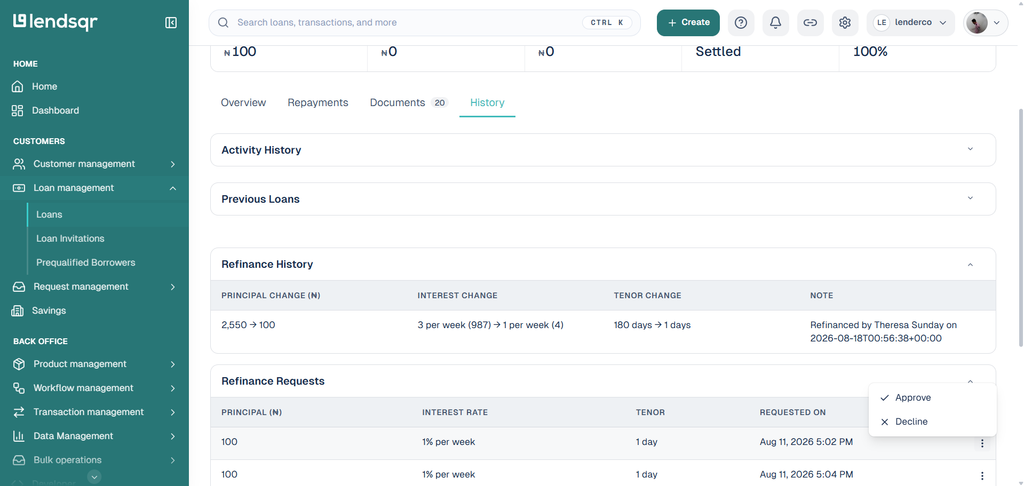
2. On the Loans page, Refinance requests appear on the history tab. Navigate to the history tab and scroll down to Refinance requests.
3. Click on the Actions icon (three dot) to approve or decline.
What happens after you approve
Once a refinance request is approved, the loan’s repayment schedule is updated immediately to reflect the new terms. The borrower will see the revised schedule in their borrower app, including any changes to repayment dates, amounts, or loan tenor. The original loan record is retained for audit purposes, and the refinancing action is logged in the loan’s activity history.
If applicable, any fees associated with the refinancing will be applied automatically at this point.
What happens after you decline
When a refinance request is declined (by clicking Reject), the existing loan terms remain unchanged. The borrower continues on their original repayment schedule. It is good practice to communicate the reason for the decline to the borrower through your support channel so they understand what steps they can take such as making a payment to reduce the outstanding balance before reapplying, or contacting their account manager for guidance.
Declined requests are also logged in the loan’s activity history, which means the action is visible in your audit trail for compliance and review purposes.