Access your Back Office at your fingertips.
Download the app now on Google Play Store.
Scan the QR code
You can also scan QR code with your phone to download the app.
Adding a custom scoring module to your credit risk rule
Updated
On this page
Most lenders rely on the data that comes in through their application form: BVN details, income information, and bank statements. But some of the most useful signals about a borrower’s creditworthiness exist outside your platform entirely, sitting in credit bureaus, alternative data providers, or your own proprietary scoring systems.
Lendsqr’s custom scoring module lets you bring that external data into your loan decision process. Instead of making approval decisions based only on what is already inside Lendsqr, you can connect to any external API that returns a score and use that score as part of your credit risk rule.
This article explains what custom scoring is, when to use it, and how to configure it in the Lendsqr admin console.
What custom scoring means in practice
When a borrower applies for a loan, Lendsqr runs them through a credit risk rule. That model is a set of checks run in sequence: verify identity, check for fraud flags, assess affordability, and so on. Each check either passes or fails, and the combined outcome determines whether the loan gets approved.
A custom scoring module adds one more check to that sequence: it sends a request to an external service you specify, receives a score in return, and passes or fails the applicant based on whether their score meets a minimum threshold you set.
The external service could be anything with an API endpoint. Common examples include credit bureaus that return a formal credit score, alternative data providers that score borrowers based on mobile money history or utility payments, or an internal scoring model your organization built and hosted separately.
The practical result is that you can bring the same borrower intelligence you trust elsewhere directly into your automated loan decisions on Lendsqr.
How the module works technically
The custom scoring module sends an HTTP request to an endpoint you define. The request can be a simple GET call, a GET with query parameters carrying borrower details like BVN or loan amount, or a POST request with a JSON body containing the data your scoring service needs.
Your scoring service receives the request, runs its logic, and returns a score. Lendsqr checks whether the returned score meets the minimum threshold you configured. If it does, the module passes and the decision process continues to the next check. If it does not, the module fails and the application stops or continues depending on how you configured the failure behaviour.
You can also control where in the decision sequence the custom check runs. Placing it early filters out low-scoring applicants before running more expensive checks downstream. Placing it later means it only runs on applicants who have already passed your other criteria.
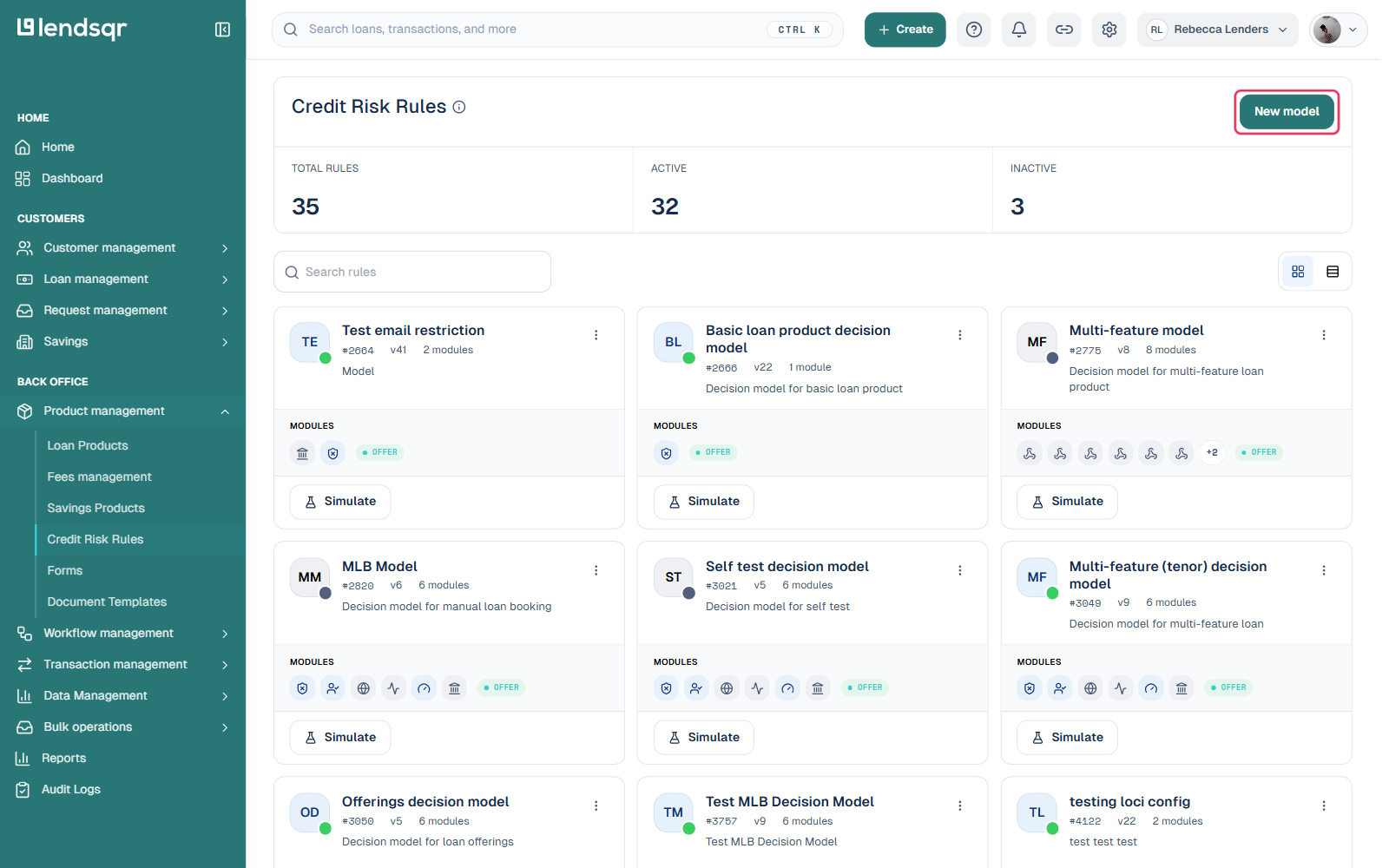
Navigate to “Credit Risk Rules” under the “Product Management” tab in the sidebar.
To create a new credit risk rule, click “New model”. To update an existing one, click its card in the list. Either way, this opens the rule in a visual, node-based canvas builder.
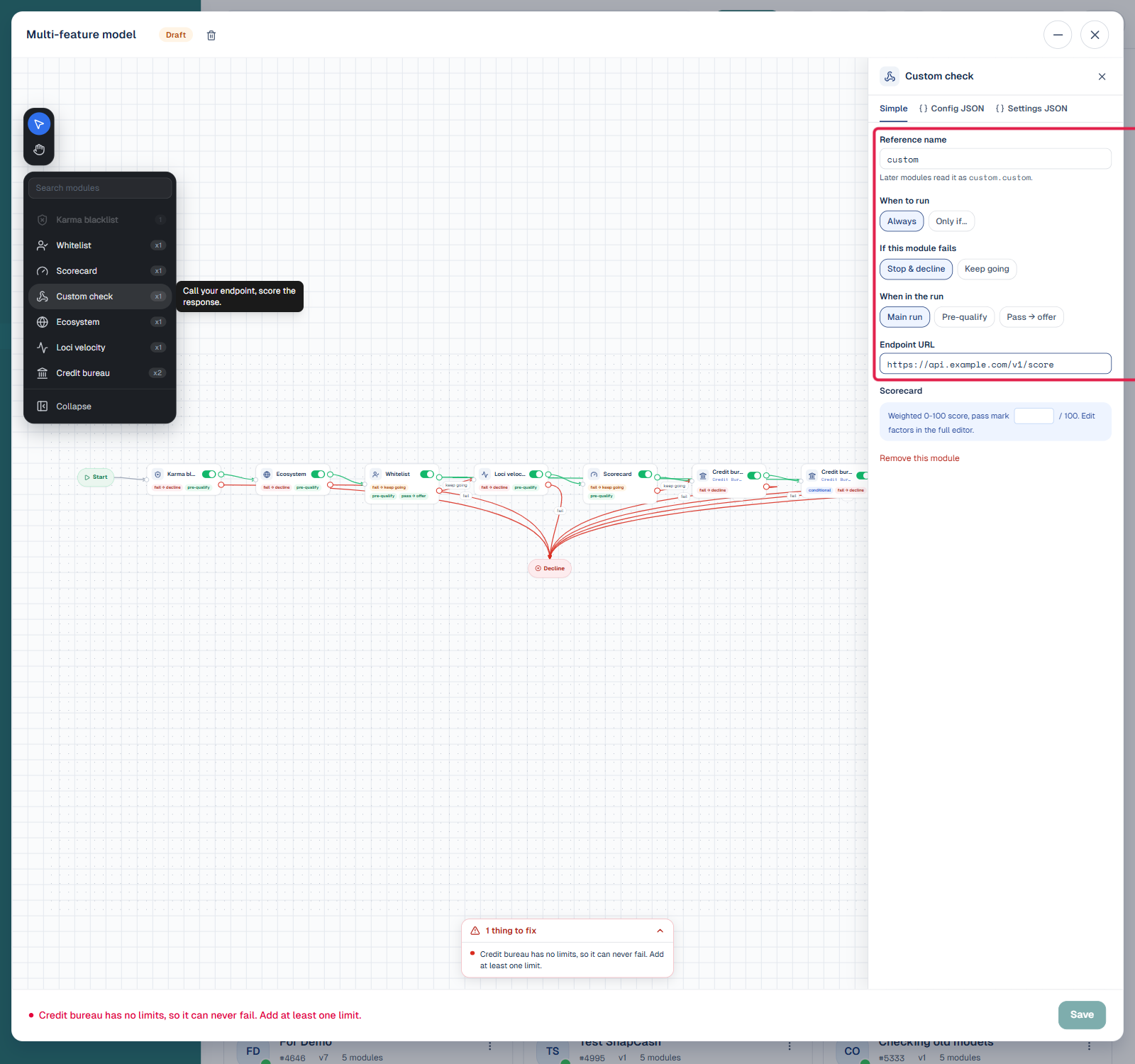
From the modules rail on the left of the canvas, click “Custom check” to add it as a new node. This opens its configuration panel on the right, with Simple, Config JSON, and Settings JSON tabs.
On the Simple tab, fill in the module’s settings: a Reference name other modules can read from, When to run (always, or only under a condition), what happens if this module fails (stop and decline, or keep going), when in the run it executes (main run, pre-qualify, or pass-to-offer), the Endpoint URL to call, and the Scorecard pass mark out of 100.
For more advanced configuration, that is, custom headers, an API key, or a request body, switch to the Config JSON or Settings JSON tab, which expose the same module as a raw JSON object. Changes sync automatically as you type, there is no separate submit step within the panel.
Once you’re happy with the module, click the credit risk rule’s own Save button (bottom-right of the builder) to persist the change to the model.
Reference: fields in the Config JSON and Settings JSON tabs
The Simple tab covers the fields most lenders need, but the Config JSON and Settings JSON tabs expose the module as raw JSON for more advanced configuration. Note that run order is now controlled visually, by how modules connect to each other on the canvas, rather than by a “sequence” number in the JSON.
#
Variable
Description
1
required
Type: boolean (true or false) Description: This setting shows whether the module is mandatory for the decision process. If set to true, the module must run successfully. If set to false, it can be skipped without affecting the overall decision flow.
2
sequence
Type: integer Description: This setting defines the module’s execution order in the credit risk rule. A lower number runs it earlier in the sequence, helping determine the order in which modules or rules are applied.
3
continue_on_failure
Type: boolean (true or false) Description: This setting decides if the process continues when the module fails.
4
pre_offer
Type: boolean (true or false) Description: This setting specifies whether the module runs before generating a loan offer.
5
identifier
Type: string (URL) Description: This is a unique identifier for the custom scoring module. It is used to reference the module in the system and logs. The identifier must be unique across all modules.
6
host
Type: string (URL) Description: This is the endpoint URL where the scoring logic or API is hosted.
7
method
Type: string (HTTP method, e.g., "get", "post") Description: This setting specifies the HTTP method used when calling the host URL.
8
minimum
Type: integer Description: This sets the minimum score a customer must achieve to pass this module’s requirements.
9
headers
Type: string Description: This is the authentication key or bearer token needed to call the host.
10
query
Type: object (optional) Description: Key-value pairs sent as query parameters
11
body
Type: object (optional) Description: Key-value pairs sent as query parameters for POST requests.
To learn more about how credit risk rules work on Lendsqr, read the guide on what are credit risk rules. For broader thinking on building credit assessment systems for your borrowers, visit the Lendsqr blog.