Access your Back Office at your fingertips.
Download the app now on Google Play Store.
Scan the QR code
You can also scan QR code with your phone to download the app.
How can I cancel my subscription
Updated
On this page
A lender may need to cancel their current subscription for various reasons, such as if they are temporarily pausing operations or shutting down their lending business entirely. For instance, if a microfinance operator decides to merge with another organization, they may no longer require their account plan. In such a case, canceling the subscription helps avoid unnecessary charges for a service they no longer intend to use.
Who can cancel a subscription?
Not every team member on the Lendsqr admin console has permission to cancel a subscription. This action is restricted to the Organization Owner or a user with Super Admin privileges. If you navigate to Settings → Billings and do not see the Cancel Plan option, your current role does not have this permission. Contact your organization’s admin to proceed.
Before you cancel
If you’re considering cancellation because your current plan feels too expensive or no longer fits your loan volume, you may not need to cancel entirely. Lendsqr offers multiple subscription tiers, and downgrading to a lower plan may better suit your current needs while keeping your account fully active.
For example, if you are running a smaller loan book than when you first subscribed, a lower-tier plan may cover your current operations at a reduced cost. You would retain access to the platform and your borrower data without any disruption.
If you are pausing operations temporarily, note that your data and configuration are preserved even on the free tier, so you can resubscribe later without losing your setup. Loan products, borrower records, credit risk rules, and organization settings remain intact.
How to cancel your subscription
Log in to your Lendsqr admin console
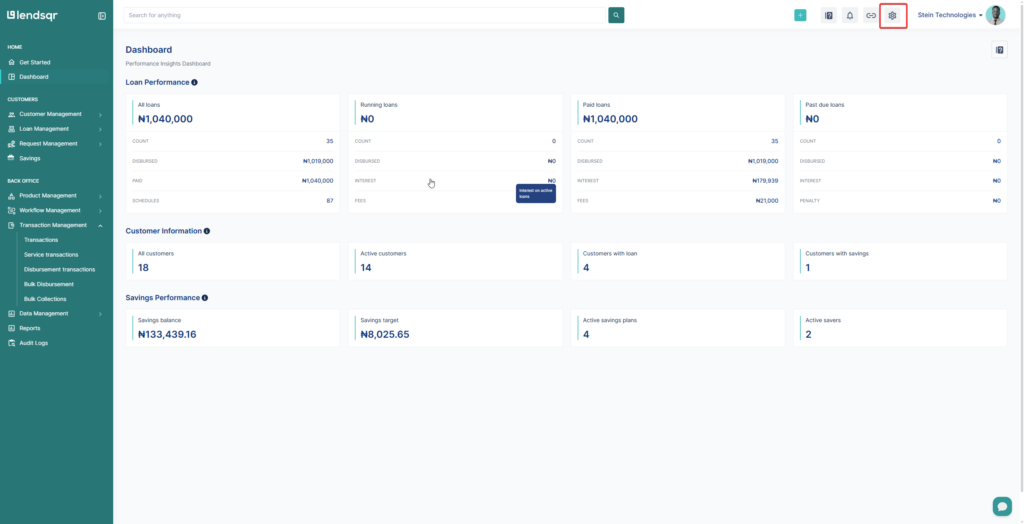
Go to Settings
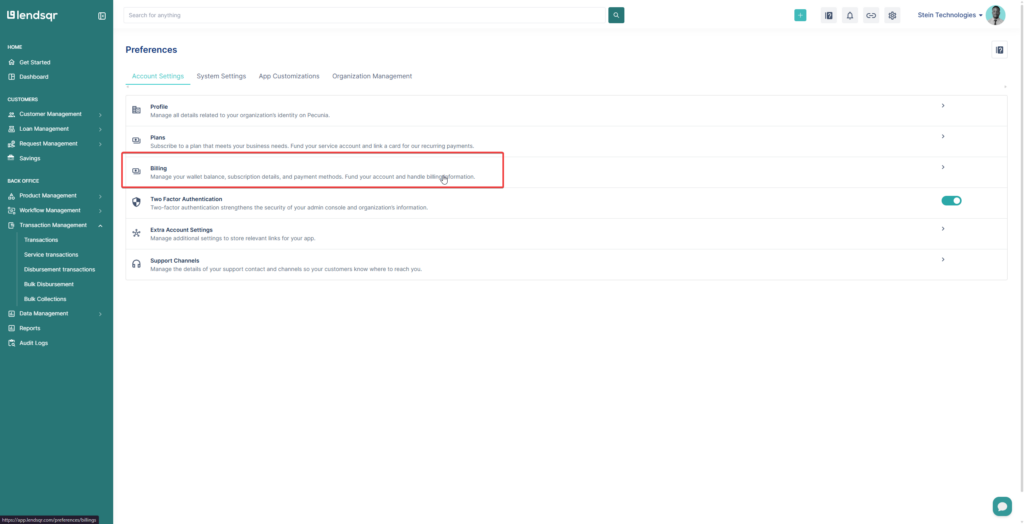
Click on Billing
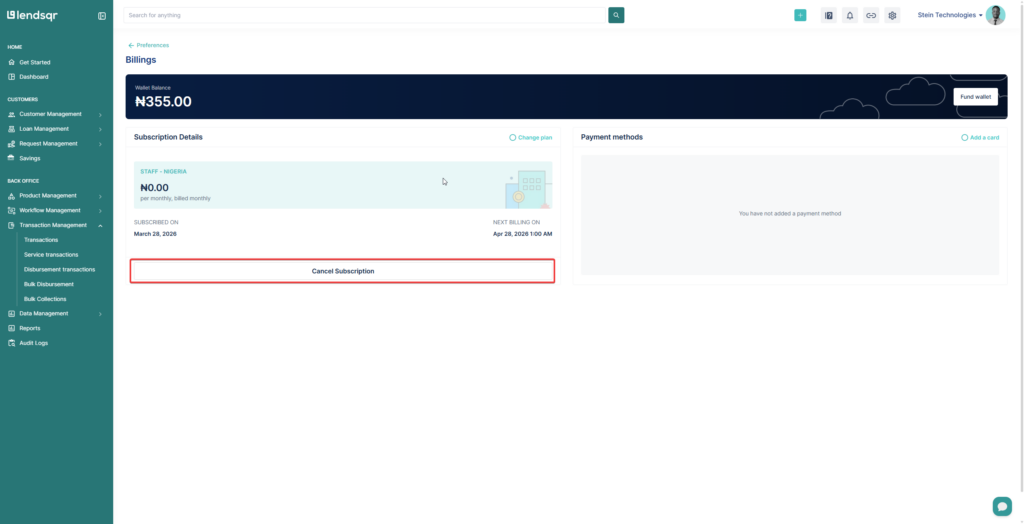
Click on Cancel Subscription and follow the on-screen prompts to complete your cancellataion.
What happens after you cancel:
Cancellation does not take effect immediately. Here is what you can expect once the process is complete:
Your paid plan remains active until the end of your current billing period. You will not be charged again after cancellation.
At the end of the billing period, your account is automatically downgraded to the free plan.
Premium features tied to your paid plan will no longer be available once the downgrade takes effect.
Your borrower data, loan history, and organization settings are fully retained. Nothing is deleted. You will still be able to view records and manage existing borrowers on the free tier.
Active loans are not affected. Borrowers with ongoing loans can still make repayments and access their loan details through your platform. Cancellation only affects your admin console plan — not the underlying loan data or active borrower accounts.
New loan disbursements may be restricted if your free tier limits are exceeded after the downgrade. Review the free plan limits before your billing period ends to plan accordingly.
This means you can continue using all your paid features for the remainder of the period you have already paid for, giving you time to make any necessary adjustments before the downgrade takes effect.
Changed your mind?
If you cancel unintentionally or decide to resume your subscription before the billing cycle ends, you can resubscribe at any time. Navigate to Settings → Billings and select a plan to reactivate. Your previous organization configuration, loan products, and borrower data will all still be in place.
Frequently asked questions about cancellation
Will I get a refund if I cancel before my billing period ends? Lendsqr does not issue prorated refunds for unused time on a billing period. Once a period is paid for, it runs to completion. Your access remains active until the period ends.
Can I export my data before canceling? Yes. It is recommended that you export any reports or data you may need before downgrading, particularly if you rely on premium reporting features that will not be available on the free tier. See: How can I export my data?
What if I have outstanding charges or fees at the time of cancellation? Any charges already billed remain due. Cancellation stops future billing but does not waive existing obligations on your account.