Access your Back Office at your fingertips.
Download the app now on Google Play Store.
Scan the QR code
You can also scan QR code with your phone to download the app.
What are the payment methods on Lendsqr?
Updated
On this page
A borrower gets approved for a loan. The funds hit their wallet. Two weeks later, repayment is due. What happens next depends entirely on the payment method your loan product is configured to use.
If the method does not match how your borrowers manage their money, collections become a problem. Borrowers miss payments not because they cannot afford to repay, but because the repayment process creates friction they were not prepared for. The result is avoidable defaults, strained borrower relationships, and a collections team chasing payments that a better-configured system would have captured automatically.
On the Repayment Method Setting of a loan product, Lendsqr gives lenders three collection channels to choose from: debit card, direct debit, and mobile money, plus “None” and “Any” as convenience options. This article explains how each channel works, when to use it, and how to configure the repayment method on your loan product.
Why your repayment method choice matters
The payment method on a loan product is not just a technical setting. It is a collection strategy decision.
A lender offering salary advance loans to urban workers needs a fast, low-friction method that collects automatically when payday arrives. For higher-value business loans, something harder for borrowers to cancel is the better fit. When borrowers are more comfortable with bank transfers than digital cards, the right method aligns with that behavior.
Getting this wrong increases default risk, adds collections overhead to your team, and creates unnecessary friction for borrowers. Getting it right means the system collects most repayments automatically and your team focuses only on genuine exceptions.
Card payments
Card payments are the default repayment method for all Lendsqr lenders. During the loan application process, borrowers link a debit card. When a repayment falls due, the platform’s automated collection engine charges the card directly.
How borrowers experience it: The borrower adds their card once during onboarding. Repayments are made automatically on the scheduled date, with no further action required from them. Most borrowers find this straightforward, especially those accustomed to subscription services that operate similarly.
Best for: Short-term, lower-value consumer loans where speed of setup matters and borrowers are digitally active. Card payments are fast to activate and have no delay between loan approval and repayment readiness.
The limitation: Borrowers can block or deactivate a card through their bank at any time. A borrower in financial difficulty often does this early, which can disrupt automatic collections and require manual follow-up from your team. For higher-value loans, consider pairing card payments with direct debit to give your collection engine a second channel.
Direct debit lets borrowers authorize your platform to collect repayments directly from their bank account on scheduled dates. The authorization uses a mandate, which is a formal agreement between borrower and lender specifying the collection amount and duration.
On Lendsqr, direct debit is powered primarily by NIBSS.
Through NIBSS: The process is fully digital. After providing bank details, the borrower receives a link to authorize the mandate electronically using their signature. This requires no bank visit on the part of the customer.
How borrowers experience it: Direct debit feels more like a standing instruction than an active payment. Repayments leave the account automatically on the scheduled date without the borrower needing to do anything after the mandate is active.
Best for: Higher-value loans, salary-backed products, and any situation where repayment reliability is critical. A direct debit mandate is significantly harder for borrowers to cancel than a card block. Disabling it requires deliberate action at the bank level, making it a more durable collection mechanism.
The limitation: Mandate activation can take a few hours to 48 hours, depending on the provider and the borrower’s bank. For borrowers who need funds urgently, this setup time can feel like a barrier during the application process.
Mobile money is the third channel available on the Repayment Method Setting, alongside debit card and direct debit. It lets the collection engine deduct the scheduled repayment from a borrower’s mobile money wallet rather than a bank-linked card or account.
Best for: Borrower segments where mobile money is the primary way people hold and move funds, which varies significantly by market.
A product is not limited to one channel. In addition to selecting one or more of Debit Card, Direct Debit, and Mobile Money, the setting also offers None (no automated repayment collection configured) and Any (accept repayment through whichever of the enabled channels the borrower has available).
How to configure the repayment method on a loan product
The repayment method is set at the loan product level in the admin console. Each loan product can have its own configured method. Here are the steps for configuring the repayment method on your loan product:
Log in to the Lendsqr admin console. Navigate to “Product management” in the left sidebar and select “Loan Products“.
Find the loan product you want to configure, click it to open it, then click “Edit“. On the edit page, switch to the “Product settings” tab.
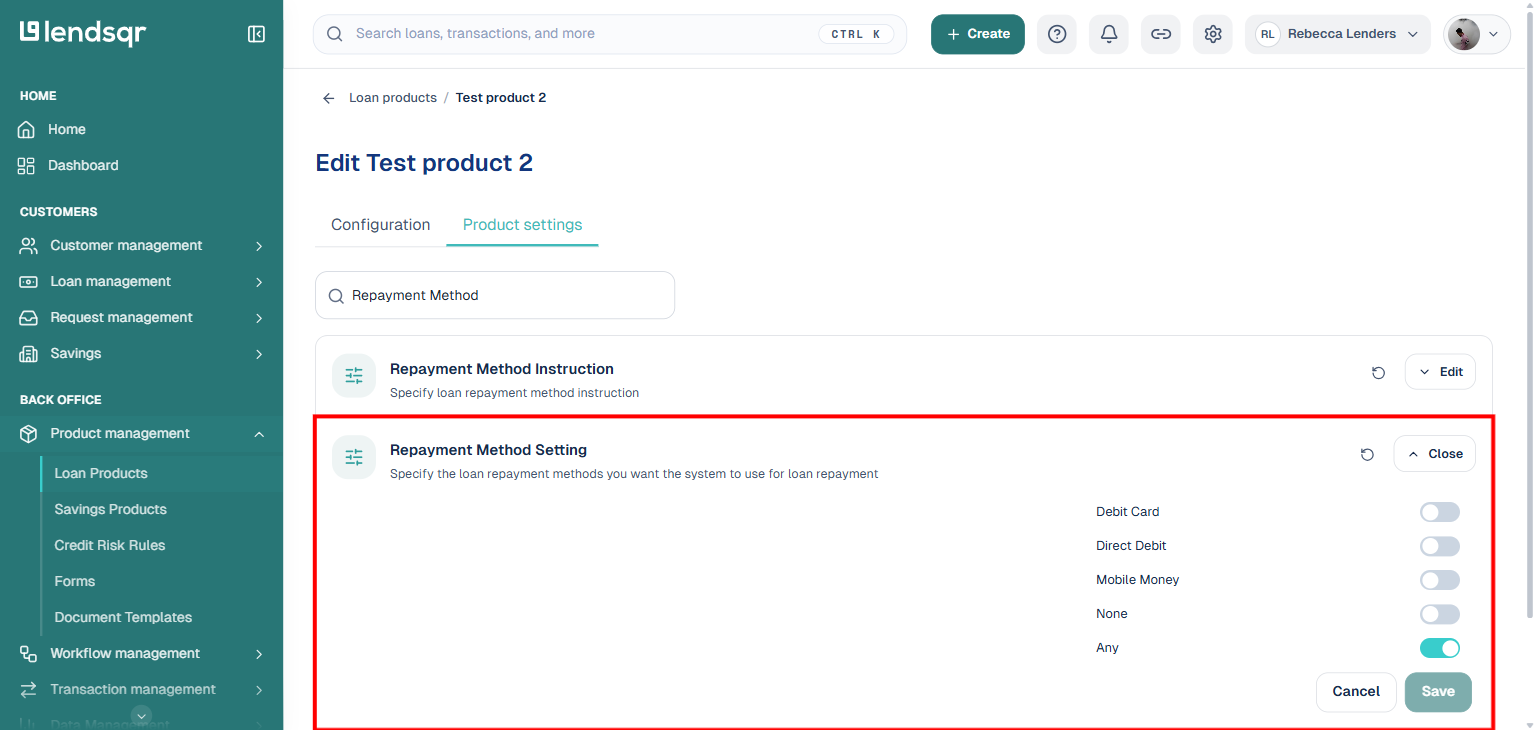
Use the search box to find “Repayment Method“. This surfaces “Repayment Method Instruction” (a text instruction shown to the borrower) and “Repayment Method Setting” (the actual channel selection).
Click “Edit” next to “Repayment Method Setting” to expand it, then toggle on any combination of Debit Card, Direct Debit, and Mobile Money, or choose None or Any instead. Click “Save“.
The change applies to all new loans created under this product from that point forward. Existing active loans continue to use whatever method was in place when they were issued.
Choosing the right method for your loan products
Card payments work best for short-term, lower-value consumer loans where speed and simplicity matter and borrowers are digitally active.
Direct debit is the stronger choice for higher-value loans, salary-backed products, or any situation where repayment reliability is critical. Many lenders configure both card payments and direct debit on higher-value products to give the collection engine two channels to use.
Mobile money suits borrower segments where that is the dominant way people hold and move funds. You can also enable more than one channel on the same product, or select “Any” to accept whichever channel the borrower has set up, rather than restricting to a single method.
Can I enable more than one payment method on the same loan product? Yes. The Repayment Method Setting lets you toggle on any combination of Debit Card, Direct Debit, and Mobile Money, or select “Any” to accept whichever channel is available and active on the borrower’s profile.
Is direct debit available for lenders outside Nigeria? Direct debit via NIBSS and Remita is currently available for Nigerian lenders. For lenders in other markets, contact Lendsqr support to understand which collection providers are available in your region.
What happens if a borrower’s mobile money or account balance is insufficient on the repayment date? If the balance is below the repayment amount on the due date, the automatic deduction will not complete. Your collections team will need to follow up with the borrower to ensure funds are available before the next collection attempt.
How do I set direct debit as the repayment method for a loan product? Open the loan product’s edit page, switch to Product settings, search for “Repayment Method”, and toggle on Direct Debit in the Repayment Method Setting. For a step-by-step guide, see: How to set direct debit as a loan repayment method.