Access your Back Office at your fingertips.
Download the app now on Google Play Store.
Scan the QR code
You can also scan QR code with your phone to download the app.
How to allow only users from specific locations on your platform
Updated
On this page
Digital lending has evolved significantly beyond simply meeting borrowers’ credit needs. Modern lending platforms must now address increasingly sophisticated risks posed by fraudsters, account manipulators, and individuals attempting to exploit weaknesses in lending systems. As digital finance expands, lenders face growing pressure to protect their platforms without creating unnecessary friction for legitimate borrowers.
At the center of this challenge is the need for stronger operational control. Lenders require tools that allow them to define where services are available, monitor suspicious behavior, and reduce exposure to high-risk lending environments. Within the Lendsqr ecosystem, one such capability is location-based access control, commonly referred to as geofencing.
Lendsqr prioritizes security and operational safety by equipping lenders with configurable platform controls that support smarter lending decisions. Among these controls is the location setting available on the admin console, which allows lenders to restrict access to lending services based on geographic regions. This functionality gives lenders the flexibility to determine where they want to operate while reducing risks associated with unfamiliar or unsupported markets.
For lenders seeking to improve compliance, strengthen fraud prevention, or maintain tighter control over their customer base, configuring location settings is an important operational safeguard.
Location settings in Lendsqr enable lenders to define where users can access lending products based on geography. Rather than making lending services universally available, lenders can selectively permit or deny access from certain regions depending on business priorities, legal obligations, operational readiness, or risk tolerance.
This feature functions as a geofencing mechanism. Geofencing refers to the practice of establishing virtual geographic boundaries that determine whether a user is eligible to access specific services. In the context of digital lending, this means borrowers located in approved regions can proceed with onboarding and loan applications, while users outside approved regions may encounter restrictions.
For example, a lender operating exclusively in Lagos and Abuja may choose to restrict access from other states until expansion plans are finalized. Similarly, a lender serving multiple countries may temporarily exclude regions experiencing elevated fraud activity or regulatory uncertainty.
The flexibility of this configuration means lenders maintain full control over where services are available. Rather than applying blanket restrictions, organizations can tailor lending access to suit business goals and operational realities.
Why location restrictions matter in lending operations
Location restrictions play a meaningful role in reducing lending risks. Digital lending platforms frequently encounter cases where malicious users attempt to create fake accounts, exploit identity loopholes, or manipulate onboarding processes from unsupported jurisdictions. Without proper restrictions, lenders may unintentionally expose themselves to unnecessary financial and compliance risks.
Geofencing provides an additional layer of protection by ensuring that lending services remain available only within authorized locations. This becomes particularly useful when lenders have established partnerships, legal approvals, or collections infrastructure in specific regions but not others.
Operational efficiency also improves when lenders limit activity to areas where they have adequate market knowledge. Lending in familiar regions allows teams to better understand borrower behavior, repayment patterns, and regional economic conditions. These insights often contribute to stronger underwriting decisions and healthier loan portfolios.
There is also a customer experience advantage. Restricting access prevents users from unsupported locations from beginning application processes they ultimately cannot complete. This reduces frustration and creates clearer expectations about service availability.
In regulated markets, geographic restrictions can further help organizations align with jurisdictional requirements. Some financial regulations vary significantly across countries or states, making location-based access an important compliance consideration.
How geofencing works within the Lendsqr platform
The geofencing capability within Lendsqr is configurable through the admin console. Rather than requiring technical implementation or engineering support, lenders can directly manage location restrictions through system settings.
Once configured, the platform checks user location information against the lender’s approved geographic settings. Depending on how restrictions are defined, users in approved locations may proceed normally, while users outside permitted regions may be prevented from completing key activities such as onboarding or loan applications.
This configurable approach gives lenders the freedom to adapt quickly as business needs evolve. A lender entering a new market can simply update settings to include additional locations, while a lender responding to fraud concerns can temporarily restrict high-risk regions.
Because lending operations often change rapidly, having location settings that can be adjusted without complex deployment processes provides an important operational advantage.
How to configure location settings in Lendsqr
Setting up location restrictions within Lendsqr is designed to be straightforward. Lenders can configure preferred user locations directly from the admin console in just a few steps.
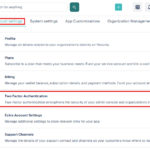
Step 1: Access the settings menu
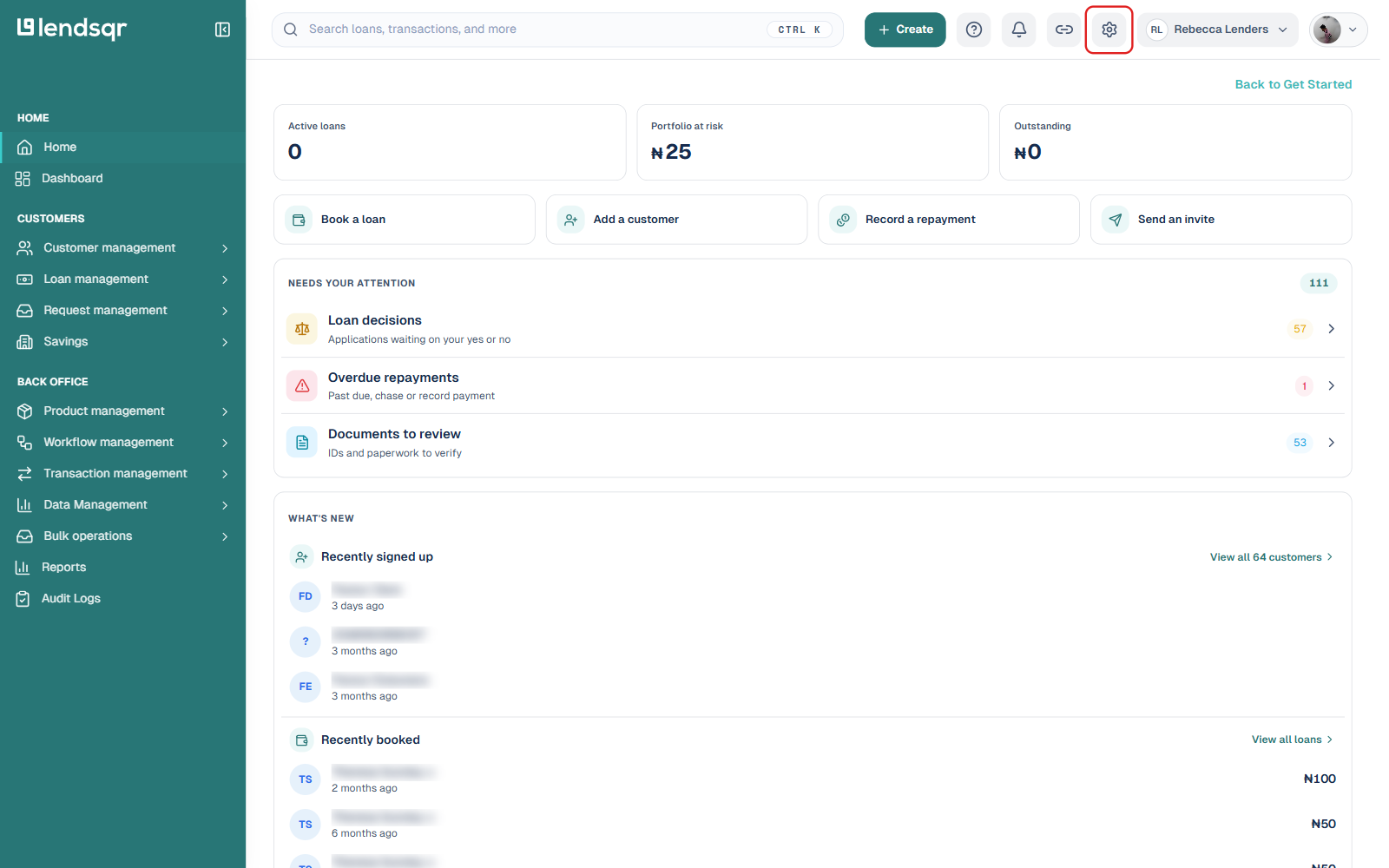
Begin by logging into the Lendsqr admin console. Once logged in, locate the Settings icon (the gear icon) positioned at the top right-hand corner of the interface, next to the link icon and your business name.
Before making changes, it is important to confirm that you have the necessary administrative permissions. Without appropriate access rights, some configuration options may not be visible.
Step 2: Open Security under System Configuration
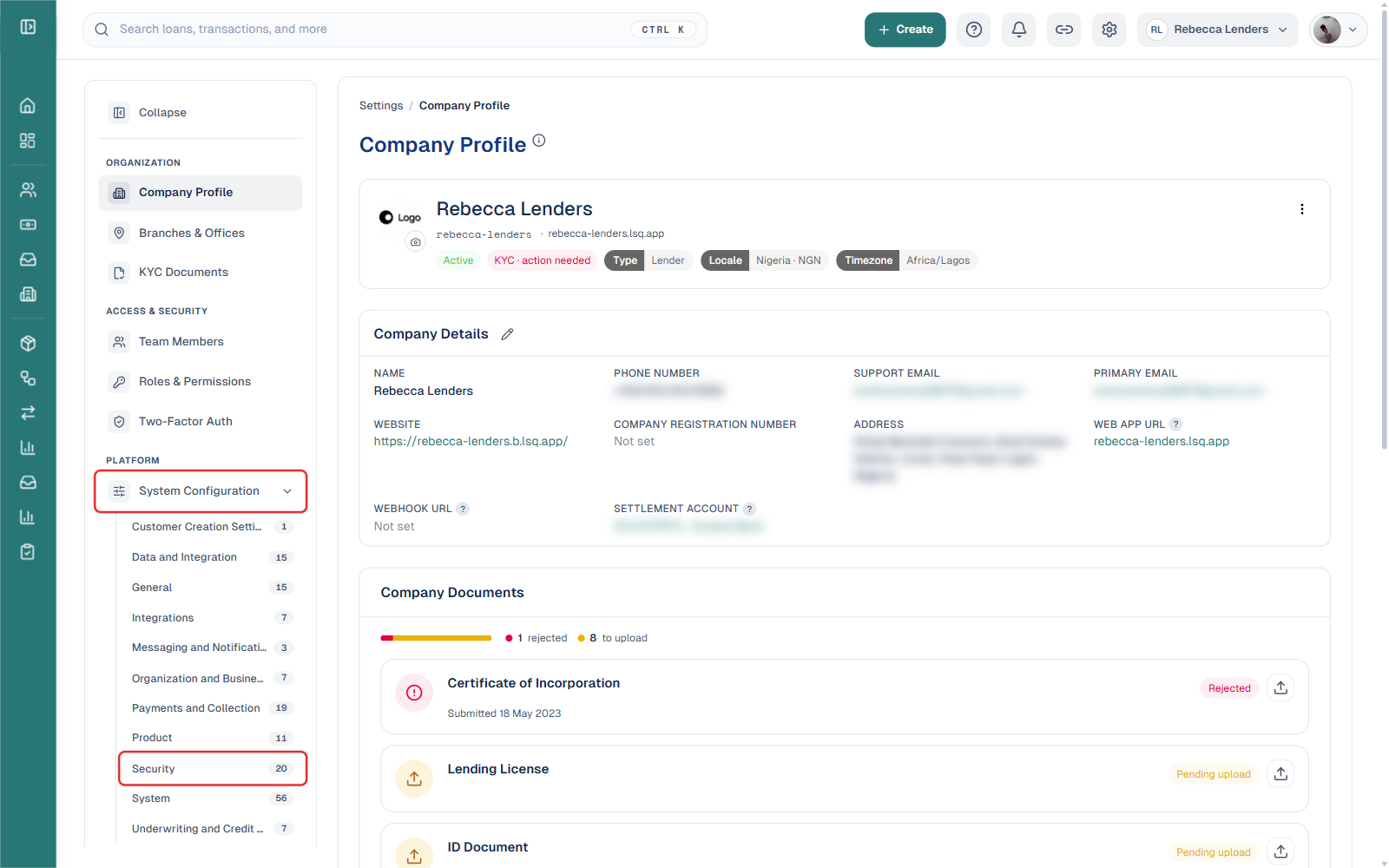
Under the PLATFORM section of the settings sidebar, click System Configuration to expand it, then select Security from the list of configuration categories.
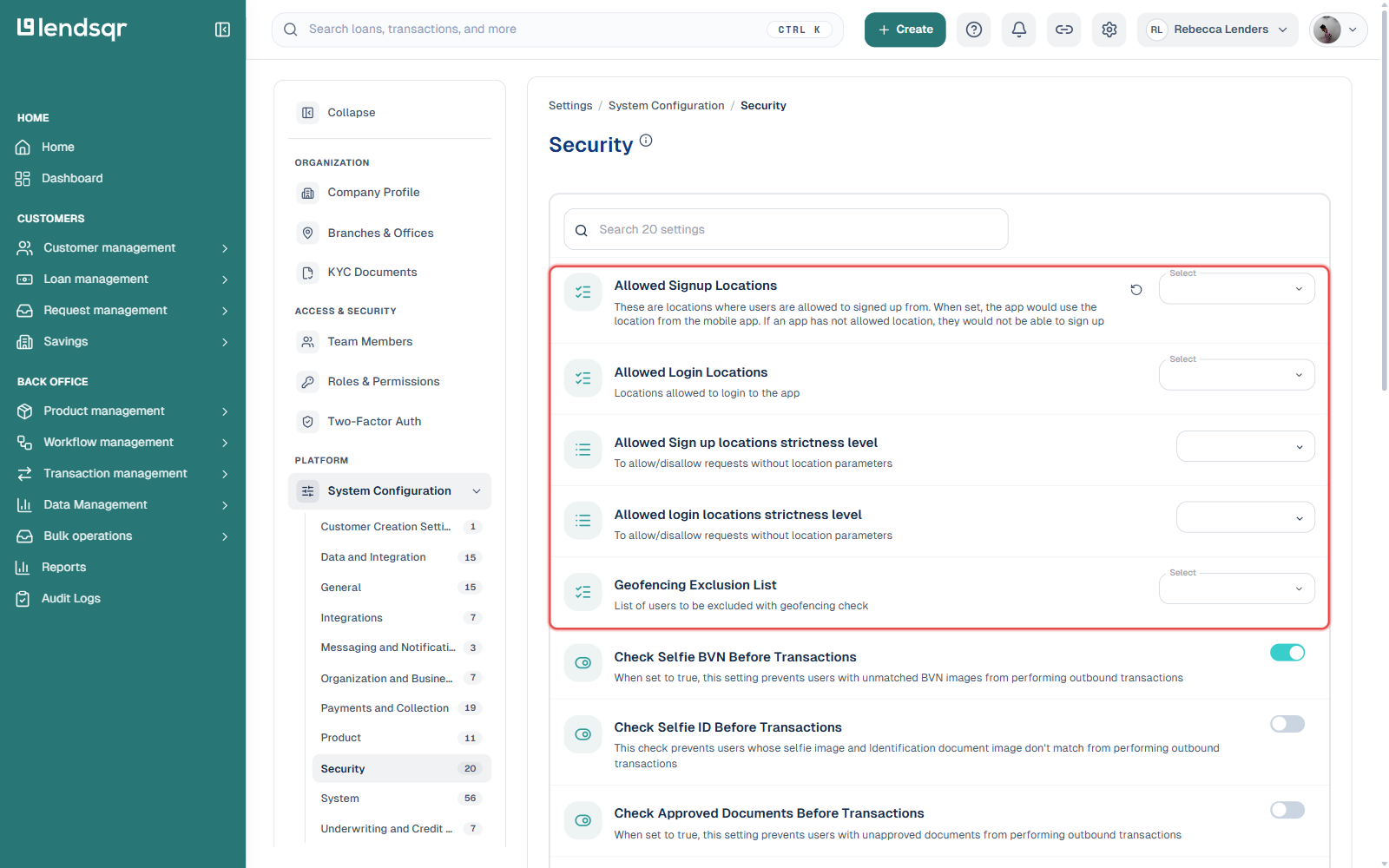
This category contains 20 security-related settings covering location restrictions as well as identity checks like selfie-BVN and selfie-ID matching before transactions.
Step 3: Locate the location settings
Near the top of the Security page, you’ll find four related settings: Allowed Signup Locations and Allowed Login Locations (each a checklist of locations, using the app’s device location), their corresponding strictness level settings (which control whether requests without location data are allowed or blocked), and a Geofencing Exclusion List for specific users who should bypass the geofencing check entirely.
Step 4: Configure location restrictions
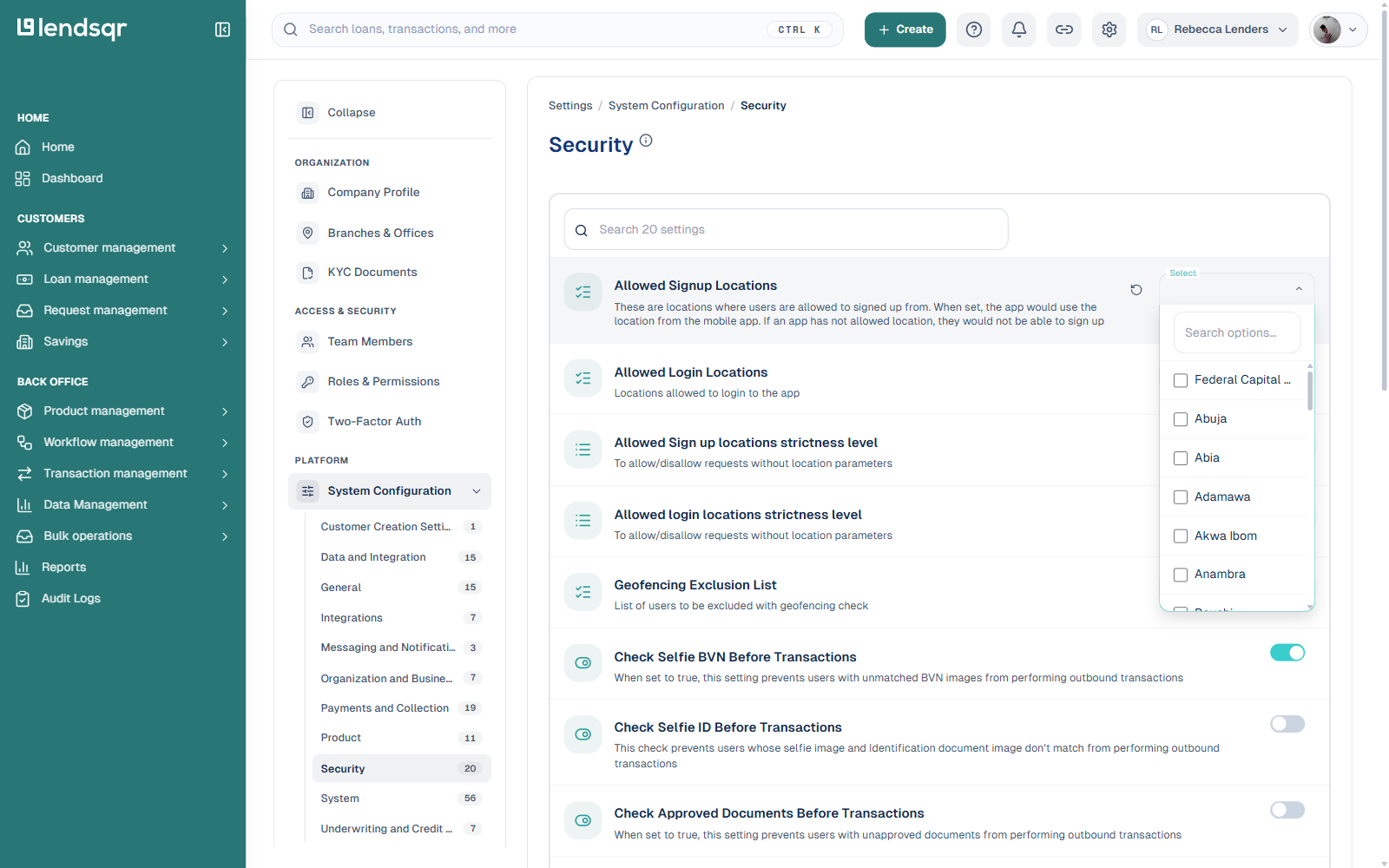
Click Select on Allowed Signup Locations (or Allowed Login Locations) to open a checklist of Nigerian states. Check the states you want to allow, or use the search box to find a specific one, then confirm your selection.
Before saving updates, review selected locations carefully to ensure they reflect current business objectives. Incorrect restrictions may unintentionally block legitimate borrowers or expose the platform to unnecessary risks.
Common mistakes to avoid when configuring location settings
Although configuring geofencing is relatively simple, lenders sometimes make avoidable mistakes that reduce effectiveness.
One common issue is applying restrictions without first evaluating business readiness. For instance, restricting too many locations may unintentionally limit customer acquisition opportunities in viable markets. On the other hand, leaving access open in unfamiliar regions may increase fraud exposure.
Another mistake involves failing to regularly review location settings. Market conditions, regulatory requirements, and fraud patterns can change over time. A configuration that worked effectively six months ago may no longer align with present business realities.
Lenders should also avoid making location decisions without operational alignment. Restricting a location may affect marketing efforts, customer support workflows, or repayment infrastructure. Internal teams should remain informed about major geographic policy changes to avoid operational confusion.
Finally, administrators should verify updates before implementation. Even small configuration errors can have significant effects on customer access and lending performance.
Best practices for managing location restrictions
The most effective lenders approach geofencing as part of a broader risk management strategy rather than a standalone security feature.
Organizations should periodically assess which locations generate healthy repayment outcomes and which regions consistently present elevated risks. This allows lending policies to evolve based on actual performance data rather than assumptions.
It is also useful to combine location settings with other platform controls. Geographic restrictions work best when paired with identity verification, fraud detection systems, behavioral monitoring, and strong credit risk rules.
Lenders should document the rationale behind major location decisions. Maintaining clear records helps teams understand why restrictions were introduced and supports continuity when operational leadership changes.
Regular reviews are equally important. Quarterly evaluations of location performance can help organizations identify opportunities for expansion while proactively managing risks.
As lending becomes increasingly digital, operational control is no longer optional. Features such as geofencing allow lenders to balance accessibility with security, enabling them to grow responsibly while protecting both their platforms and legitimate borrowers.
For lenders using Lendsqr, configuring location settings offers a practical and flexible way to manage geographic exposure. By carefully selecting approved regions, reviewing settings regularly, and aligning configurations with business goals, lenders can build safer, more efficient lending operations that remain adaptable as market conditions evolve.