Access your Back Office at your fingertips.
Download the app now on Google Play Store.
Scan the QR code
You can also scan QR code with your phone to download the app.
What happens when my subscription is due for renewal?
Updated
On this page
Once you upgrade to a paid plan on Lendsqr, your subscription renewal is fully automated. You don’t need to manually renew each billing cycle; the system handles it for you so your access to premium features stays uninterrupted.
This article explains how the renewal process works, what happens when your balance is insufficient, how to cancel or upgrade, and what to expect at each stage.
How automatic renewal works
Lendsqr subscriptions run on a fixed billing cycle tied to the date you first upgraded to a paid plan. When your renewal date arrives, the system automatically attempts to deduct the subscription fee from your Prepaid Service balance.
If your balance covers the full amount, the renewal completes instantly and your subscription continues for another billing period with no action required on your part.
Timing: Renewal attempts happen on the same date each billing cycle, corresponding to your original upgrade date. For example, if you upgraded on the 5th of a given month, your renewal will be attempted on the 5th of each subsequent month.
Notifications and reminders
Before your renewal date, Lendsqr sends reminder notifications to alert you that a charge is upcoming. These notifications give you time to:
Top up your Prepaid Service balance if it is running low
Review your current plan and decide whether to upgrade or cancel
Take any other action before the automatic deduction occurs
Check your registered email address for these reminders. It is good practice to ensure your Prepaid Service balance has enough funds ahead of your renewal date to avoid service disruption.
What happens if your balance is insufficient
If your Prepaid Service balance does not cover the full subscription fee at the time of renewal, your account will reflect a negative balance for the outstanding amount.
What this means in practice:
A real-world example (using Naira as a Nigerian lender would see it; your own account is billed in your own local currency): suppose your monthly plan costs ₦10,000 and your Prepaid Service balance is ₦4,000 on your renewal date. The system attempts the charge, your balance drops to -₦6,000, and your account enters a negative balance state.
While your account is in a negative balance:
Your subscription technically remains active during a short grace period
You will receive notifications prompting you to top up your balance
If the balance is not restored within the grace period, your account will be downgraded to the free plan
Once you top up your Prepaid Service balance to clear the negative amount, your subscription will be restored automatically.
Grace period
After a failed renewal due to insufficient funds, your account enters a grace period before any downgrade takes effect. During this window, you can top up your Prepaid Service balance and resolve the negative balance without losing access to premium features.
If the grace period expires without a successful payment, your account is automatically downgraded to the free plan and you will lose access to all premium features and benefits.
How to top up your prepaid service balance
To avoid disruption, keep your Prepaid Service balance funded ahead of your renewal date. How you top up depends on where your organisation is registered.
Nigerian lenders
Nigerian lenders have two ways to fund their balance:
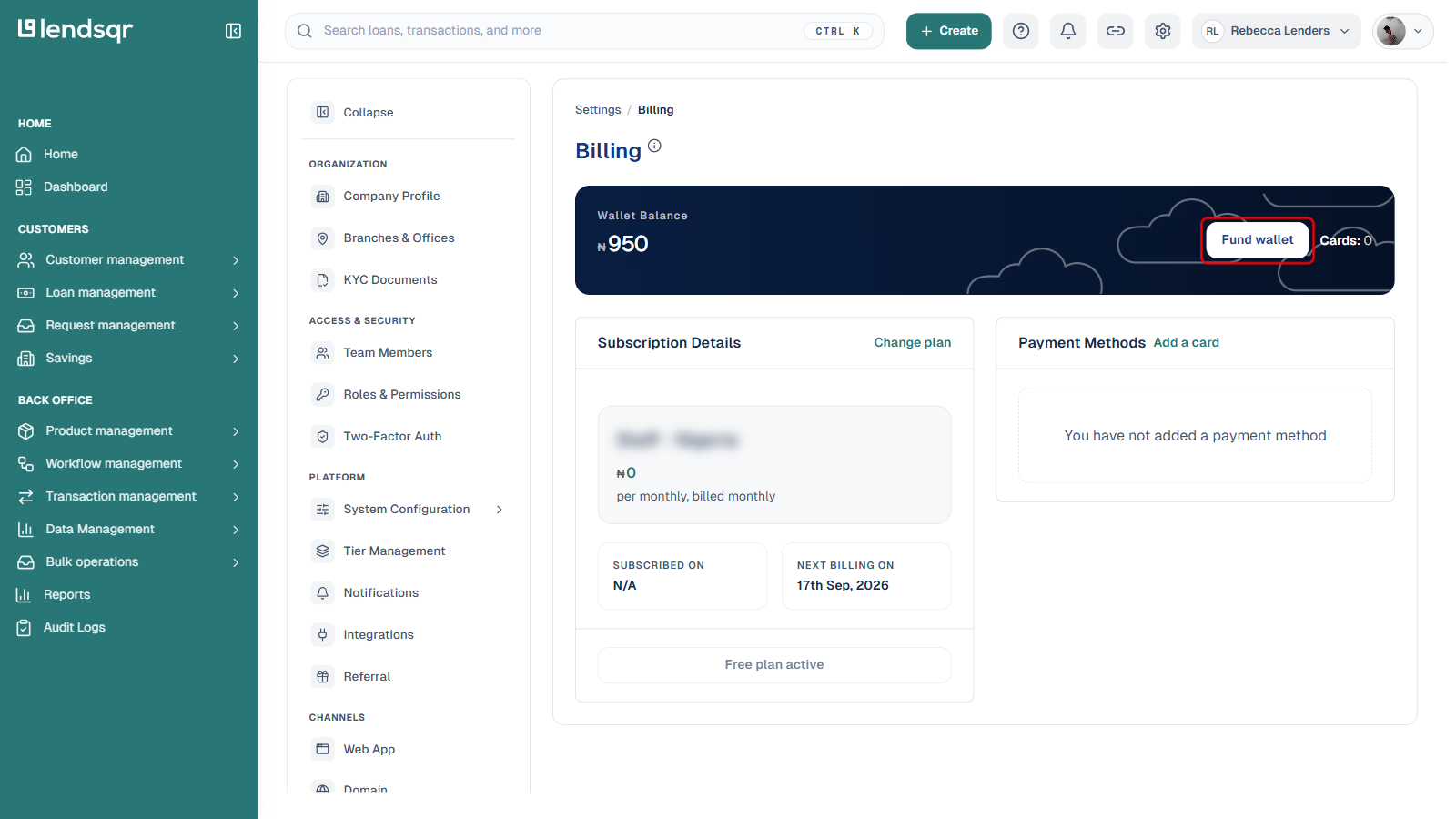
Option 1: Card payment from Billing. Go to Settings > SUBSCRIPTION > Billing and click Fund wallet on the Wallet Balance card, then enter the amount and pay with a debit card.
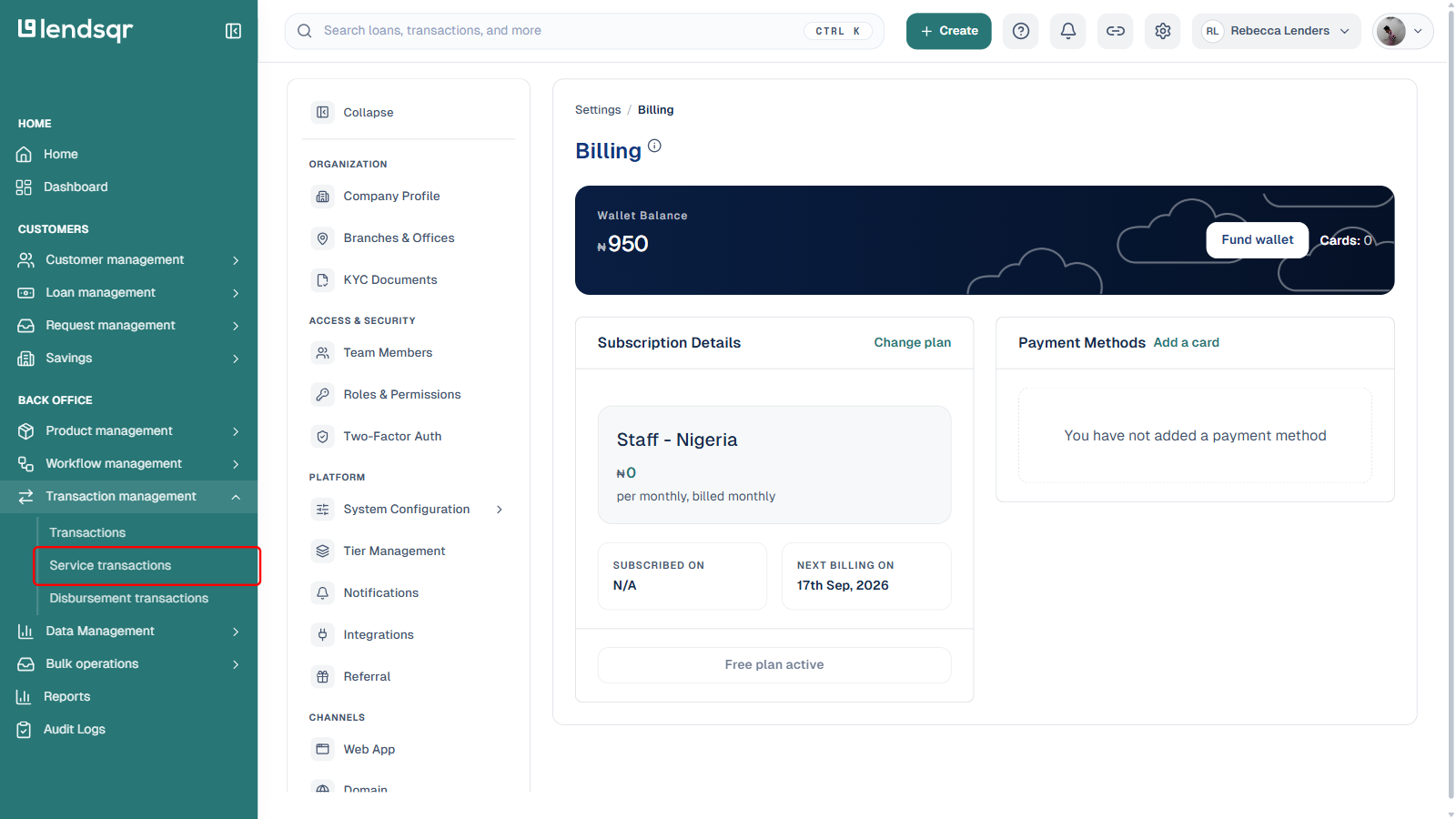
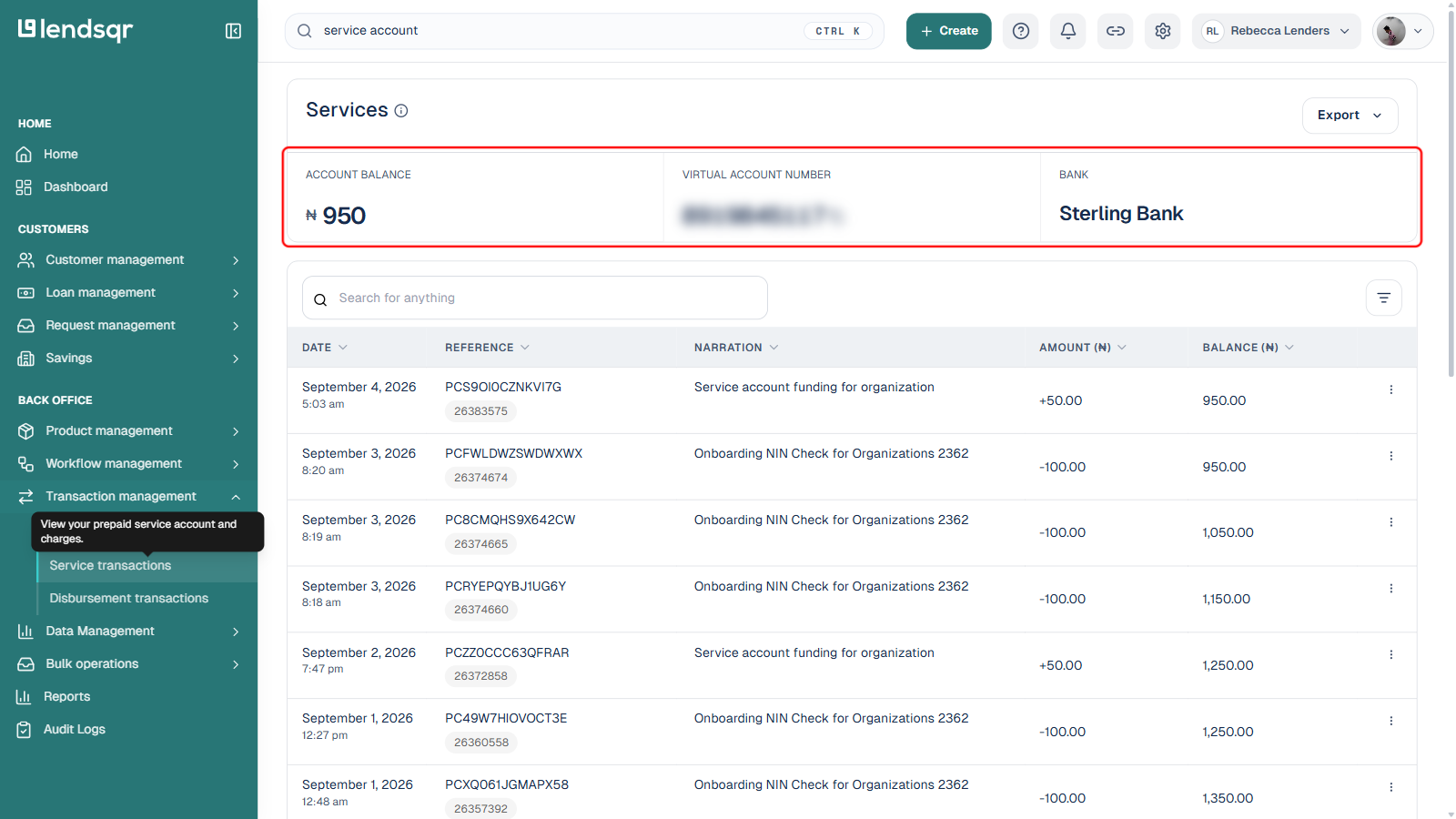
Option 2: Bank transfer to your virtual account. Go to Transaction management > Service transactions in the side menu. This page shows your Account Balance, a dedicated Virtual Account Number, and the Bank it sits with. Transfer the amount you want to add directly to that account number.
With either option, your balance updates automatically once the funds are received, and any outstanding negative balance is cleared as soon as the balance covers it.
International lenders
Self-service subscription top-up (card or virtual account) is not currently supported for lenders registered outside Nigeria. If your organisation is international, contact the Lendsqr growth team ([email protected]) to arrange subscription payment support for your account.
How to cancel your subscription
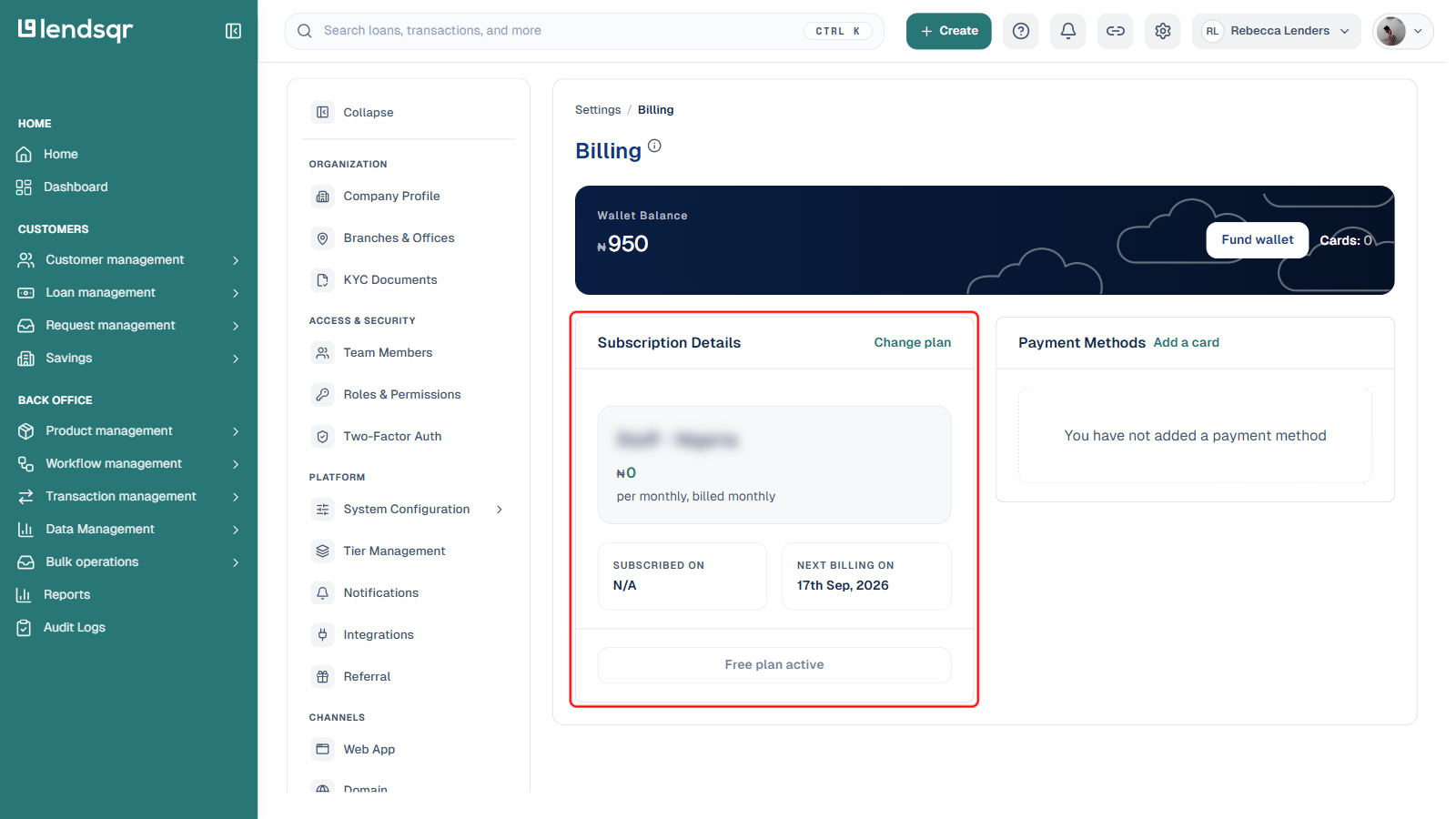
On the Billing page (Settings > SUBSCRIPTION > Billing), the Subscription Details card shows your current plan alongside a Change plan link. A dedicated “Cancel Subscription” button was not present here on the account checked while writing this article, which was on the Free plan at the time (accounts on a paid plan may see this option; this has not been confirmed either way).
If you don’t see a direct cancel option on a paid plan, the safest way to effectively cancel is to stop your subscription from renewing: let your Prepaid Service balance run below the amount needed for the next renewal, or downgrade to the Free plan via Change plan. Either way, your current paid access continues until the end of the billing period you’ve already paid for, and your account then moves to the Free plan automatically, following the same grace-period behavior described above. If your organization needs an immediate cancellation confirmed by support, contact [email protected].
What happens after you cancel:
Your account remains on the paid plan until the end of your current billing period. You will not be charged again.
When the billing period ends, your account is automatically downgraded to the free plan.
You will lose access to all premium features and any data or configurations specific to the paid plan may become inaccessible.
Cancellation does not trigger an immediate downgrade, so you can continue to use your paid features for the remainder of the period you have already paid for.
Summary: what to expect at each stage
Situation
What Happens
Balance is sufficient on renewal date
Subscription auto-renews, no action needed
Balance is insufficient on renewal date
Account enters negative balance, grace period begins
Grace period passes with no top-up
Account downgraded to free plan
You top up during grace period
Subscription restored, negative balance cleared
You cancel before renewal
Paid access continues until end of billing period, then downgrade