Access your Back Office at your fingertips.
Download the app now on Google Play Store.
Scan the QR code
You can also scan QR code with your phone to download the app.
Receiving payments with NIBSS direct debit
Updated
On this page
NIBSS direct debit is one of the most reliable repayment methods on Lendsqr. Instead of relying on a borrower to manually transfer funds or keep a debit card active, direct debit authorizes your platform to pull repayments directly from the borrower’s bank account on scheduled dates. This article explains how it works, when to use it, and what to expect when a mandate is pending or delayed.
NIBSS direct debit is available to all lenders on paid plans. It is not available on the free plan. Find out the Nigerian banks supported by NIBSS here.
When to choose NIBSS direct debit over other payment methods
NIBSS direct debit is not right for every loan product. Understanding where it fits helps you configure the right repayment method for each product.
Choose direct debit when your loan amounts are typically above ₦5,000. The transaction fees for NIBSS direct debit make it cost-ineffective below this threshold. Direct debit also suits longer-tenure loans where automated recurring collection matters more than onboarding speed.
Choose card payments instead when you want the fastest possible onboarding, your borrowers are digitally active and comfortable with card charging, and your loan amounts are modest. Card charging requires no mandate activation period.
Choose virtual accounts instead when your borrowers prefer to manage their own repayments through bank transfers and are comfortable with a manual collection process.
The key operational advantage of direct debit is durability. A debit card can be blocked by the borrower in seconds. A NIBSS mandate requires deliberate action at the bank level to cancel, making it significantly harder for borrowers to disrupt repayment once activated. For higher-value, longer-tenure loans, this matters.
Setting up your NIBSS direct debit
Enabling NIBSS direct debit on Lendsqr takes two configuration steps. Both must be completed before direct debit becomes available as a repayment method on your loan products.
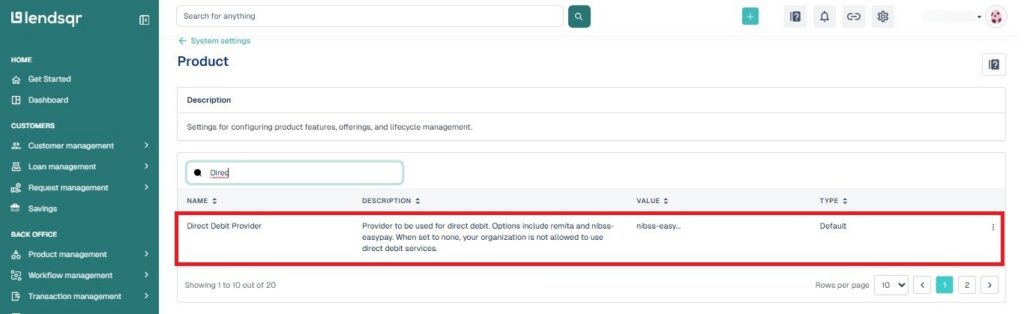
Set NIBSS as your global direct debit provider: Log in to the Lendsqr admin console and navigate to the “Preferences” tab. Locate the direct debit provider setting and configure it to NIBSS direct debit. This tells Lendsqr which direct debit infrastructure to route mandates through.
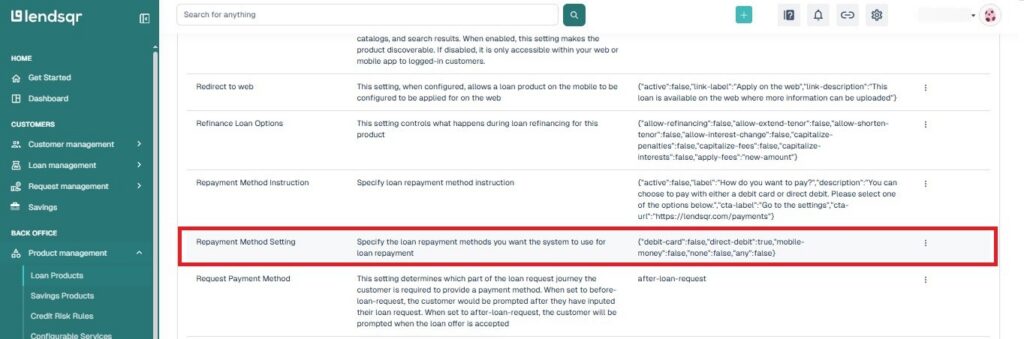
Set direct debit as the repayment method on your loan product: Navigate to “Product Management” in the left sidebar and select “Loan Products.” Open the loan product you want to configure and go to its Product Settings. Locate “Repayment Method Setting,” click the “More Options” icon, and select “Edit.” Choose direct debit as the repayment method and click “Submit.”
Because you set NIBSS as your direct debit provider in your settings, it will now appear as the available option when you select direct debit at the product configuration level. Borrowers applying for loans under this product will go through the NIBSS mandate process as part of their application.
How the mandate process works from start to finish
A mandate is the formal authorization that allows your platform to debit a borrower’s bank account. Here is what happens at each stage:
The borrower signs the mandate during the loan application: When a borrower applies for a loan on your platform and direct debit is the required repayment method, they sign a mandate as part of the application process. On the web app, borrowers sign directly on a signature pad or upload a scanned signature. Mobile app borrowers receive an email with a link to a webpage where they complete the same process.
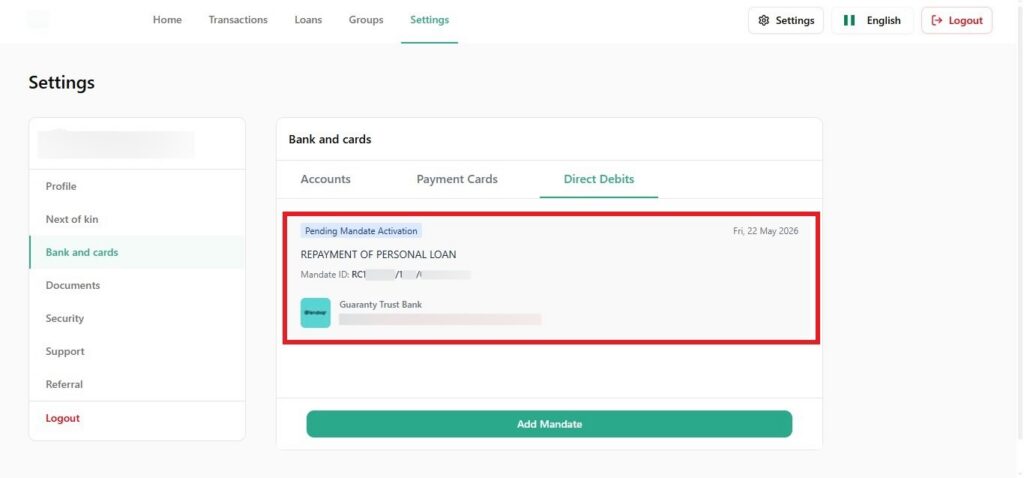
The mandate goes to the bank for activation: Once signed and submitted, Lendsqr automatically routes the mandate to the borrower’s bank for review. The loan sits in “Pending mandate approval” status until the bank acts on it. At this stage, neither approval nor rejection of the loan application is possible. The mandate must leave the ‘Pending Mandate Activation’ status.
The bank reviews and either activates or declines: Banks review mandates against their internal records. Most banks confirm the mandate by calling the borrower directly. Others compare the signature on the mandate to the one on file for that account. Most banks complete this within 24 to 72 hours. Any mandate unresolved after two weeks is automatically deleted by the Lendsqr system.
The loan moves to lender review: Once the bank activates the mandate, the borrower’s account is available for automated debit. The loan application moves from pending to awaiting lender approval, and your team can proceed with the normal review and disbursement process.
Repayments run automatically: After disbursement, Lendsqr attempts to collect each repayment from the borrower’s bank account on the scheduled date. The system first tries the borrower’s debit card if one is linked. If the card charge fails or the card is unavailable, the system switches to the direct debit mandate. This layered approach gives your collection process two channels to work with.
A practical scenario
A borrower applies for a ₦250,000 business loan on your platform. During the application, she signs a direct debit mandate authorizing repayments from her GTBank account. Lendsqr routes the mandate to GTBank automatically. Two days later, a GTBank officer calls her to confirm the authorization. She confirms. GTBank activates the mandate and sends the approval back to Lendsqr.
Your loan officer sees the application move out of “Pending mandate approval” and approves the loan. Funds hit the borrower’s wallet. Each month, Lendsqr debits the scheduled repayment from her GTBank account without any action needed from your team or the borrower.
Common reasons mandates are declined
Banks decline mandates for specific reasons, and understanding these helps you guide borrowers before they apply.
The account is dormant: A bank account that has not been used for an extended period cannot support a direct debit mandate. The borrower needs to reactivate the account at their branch before trying again. From a risk perspective, a borrower linking a dormant account is also worth a closer look.
The bank cannot reach the borrower: Most banks try to call the borrower to confirm the mandate. If the borrower does not pick up or cannot be reached, the bank will decline. Advise borrowers to expect a call from their bank and to respond promptly.
The signature does not match: Banks compare the signature on the mandate to the one they hold on file. A significant mismatch leads to a decline. Borrowers should sign as close to their formal bank signature as possible.
What to do when a mandate is taking too long
Most banks process mandates within 24 to 72 hours. If a mandate remains pending after this window, your team or the borrower should take action.
Advise the borrower to contact their account officer or relationship manager at their bank and ask them to follow up on the pending mandate. When doing so, the borrower must provide the mandate reference number. This reference appears in the format RC0000000/0000/0000000000 and is visible in the borrower’s loan application details on Lendsqr.
Different banks manage mandates in different ways. Some handle them centrally, while others process them at the branch level. The borrower’s bank will confirm which route to use.
Frequently asked questions
Question
Response
Why are users not able to add their bank accounts for direct debit?
Some users are not able to add their bank accounts for automated loan repayment because those banks don’t support NIBSS’s direct debit system. At this moment, here are the banks supported by NIBSS for direct debit.
Does direct debit stop debit card charges from users?
No, direct debit does not stop debit card charges instead, the system first attempts repayment via the borrower’s debit card, and only switches to direct debit if the card payment fails or is insufficient, giving lenders a more robust, multi-method loan collection process.
Why would a past-due loan repayment not be debited?
A past-due loan may not be debited due to insufficient funds in the borrower’s account or other account-related issues. The borrower should ensure their account has enough balance to cover the repayment amount. You can also reach out to our support team at [email protected] for more help on this.
Why is my customer seeing a higher amount on a mandate?
The higher amount on the mandate is a buffer to cover potential penalties, extra interest, or fees in case of late repayment. Lenders can configure this as either a fixed amount or a multiplier on the original mandate.
Can a borrower reuse a mandate for a new loan?
Yes, borrowers can reuse an existing mandate for a new loan, eliminating the need to set up a new one each time and making the process faster for both returning borrowers and lenders, as long as the mandate’s due date can accommodate the entire loan schedule.