Access your Back Office at your fingertips.
Download the app now on Google Play Store.
Scan the QR code
You can also scan QR code with your phone to download the app.
How expense and transaction request approvals work
Updated
On this page
Every lending business has operational costs. Your team pays vendors, settles service charges from payment providers, handles office running costs, and manages internal disbursements across departments. Without a structured process for reviewing and approving these transactions, money leaves your organization without proper oversight, and when an auditor or regulator comes asking, the records are incomplete.
Lendsqr’s expense and transaction request approval workflow gives lenders a controlled, auditable way to handle internal financial transactions. Before any funds leave the organization, a request is formally submitted, reviewed by a designated approver, and only executed after authorization. As a result, every expense has a clear paper trail from the moment it is raised to the moment it is processed.
This guide explains why expense controls matter specifically for lenders, how the workflow operates inside Lendsqr, and how the records it creates support your financial reporting and audit readiness.
Why expense controls matter more in lending
Lending businesses operate with significant financial complexity. On one side, you are managing borrower funds, repayments, and disbursements. On the other side, you are running an organization with its own operational costs. When those two flows are not clearly separated and controlled, things go wrong.
Consider a lender using multiple payment infrastructure providers. Every month, the business receives service fee deductions from these providers, covering transaction processing, mandate activation, and API usage costs. Without a structured review process, a finance team member might process a vendor payment twice, or an unauthorized withdrawal might slip through during a busy period. Beyond the immediate financial loss, these errors create discrepancies in reconciliation reports that can be difficult to explain during a compliance review.
Furthermore, regulatory bodies in many jurisdictions expect lending institutions to maintain documented controls over internal financial transactions. A clear, enforceable approval workflow is part of meeting that expectation. Internally, it also protects lenders from unauthorized spending, keeps operational budgets in check, and ensures that anyone processing a payment has been deliberately granted the authority to do so.
In short, expense controls are not just about catching fraud. They are about building a financially disciplined organization that can scale confidently.
How expense records support audits, reconciliation, and reporting
Every action taken within the expense approval workflow is permanently logged in Lendsqr. This logging is not optional or incidental. It is a core part of how the system maintains accountability.
From a reporting perspective, lenders can use the expense records to track operational spending over time, compare actual expenditure against budget, and identify patterns in vendor payments or recurring charges. For example, a finance manager reviewing monthly operational costs can pull the full history of approved expense requests and match them against bank statements to confirm that every outgoing payment was properly authorized before processing.
From an audit perspective, the complete event log means that every request has a documented chain of custody. Auditors can see who initiated each transaction, what documentation was attached, who reviewed it, and what decision was made. This level of visibility is precisely what regulatory audits require, and having it built into the platform removes the need to reconstruct records manually after the fact.
In addition, because approvers cannot alter the original request before approving it, there is no ambiguity about what was requested versus what was approved. The record is clean, consistent, and tamper-resistant.
Why lenders need this workflow
Financial institutions often have multiple staff members initiating expenses and disbursements across departments or branches. Without a structured approval process, transactions can be processed inconsistently or outside the platform, increasing the risk of errors or misuse.
With this workflow, every expense and transaction request:
Is formally captured in Lendsqr
Follows a structured approval process
Is executed only after final authorization
Leaves a full audit trail, including submission, approval, and decline events
This ensures internal funds are handled securely and consistently, giving lenders confidence in their operational controls and compliance.
How it works
Lendsqr supports only the approval-based mode of processing for expense transactions:
Approval-based transactions: When an approval workflow is active, requests are held until reviewed and approved. Funds are only disbursed after final authorization
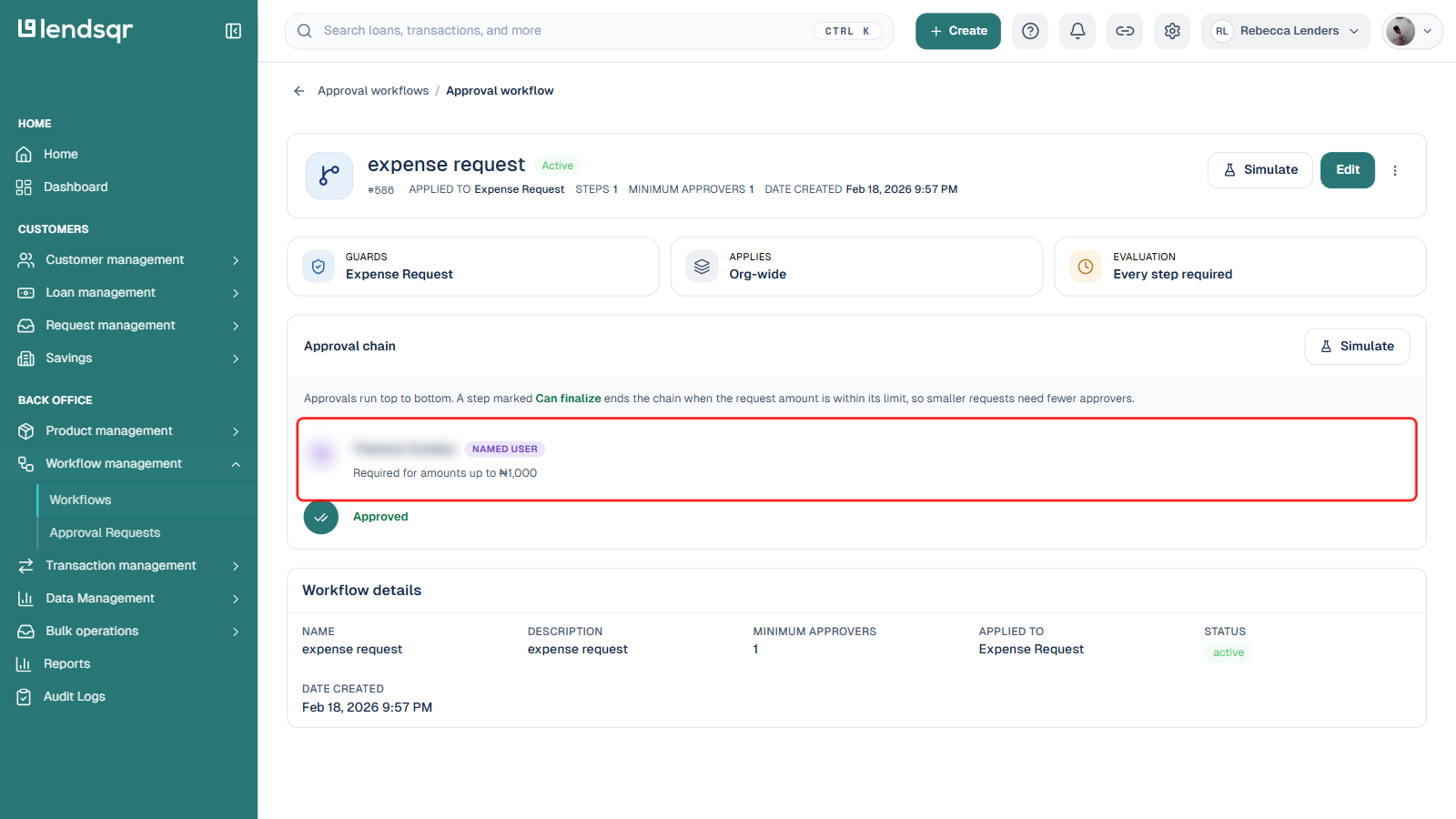
An approval workflow is a chain of one or more designated approvers configured for a specific request type, such as Expense Request. Each step in the chain can be limited to a maximum amount, so smaller requests may need fewer approvers than larger ones. You can review or change an organization’s active expense request workflow from Workflow management > Workflows.
In the example above, the expense request workflow applies org-wide, requires a minimum of one approver, and its single approval step (boxed above) is required for amounts up to 1,000. For details on building or editing a chain like this, see How to create an approval workflow.
Submitting an expense or transaction request
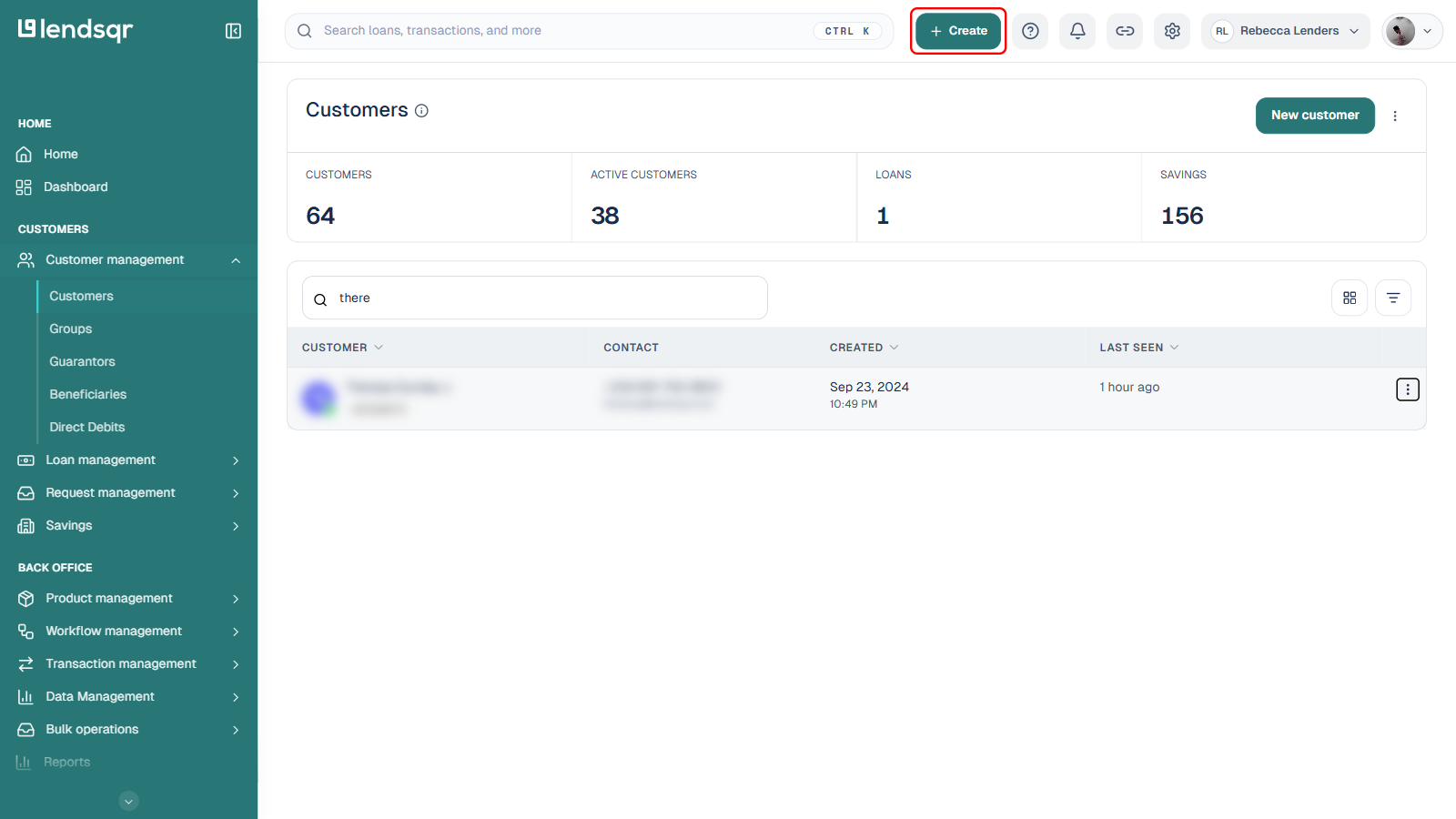
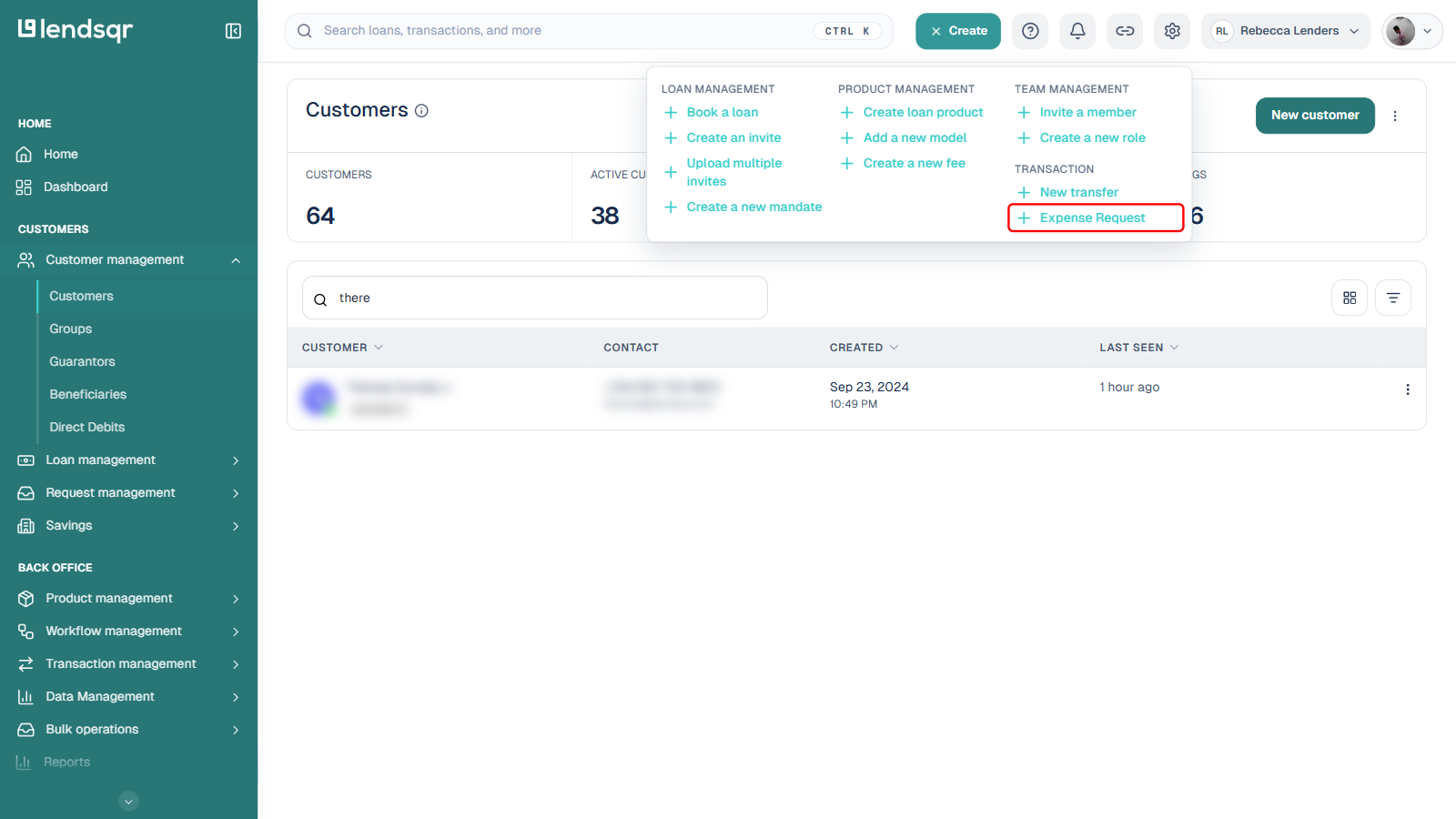
Authorized staff or admins can create an expense or transaction request from the + Create quick actions menu in the top navigation bar:
Click the + Create button in the top navigation bar.
In the menu that opens, select Expense Request under the Transaction section.
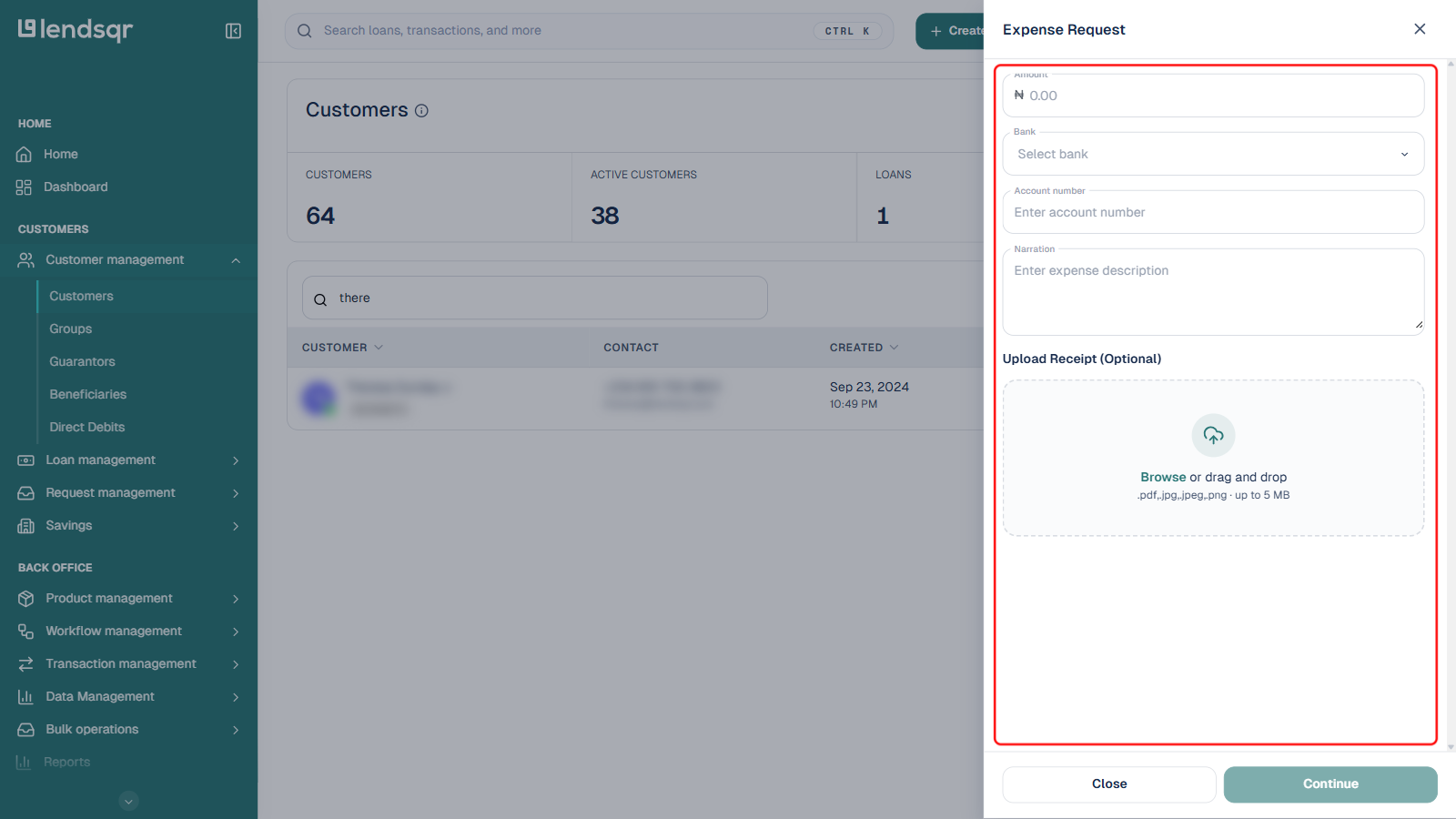
This opens a side panel where you provide:
Transaction details: amount, destination bank, destination account number, and narration
Supporting documentation, such as a receipt (optional, accepts .pdf, .jpg, .jpeg, or .png files up to 5 MB)
The Continue button at the bottom of the panel stays disabled until the required fields (Amount, Bank, Account number, and Narration) are filled in.
For enhanced security, two conditions must be met before a request can be submitted:
Two-Factor authentication (2FA) must be enabled on the admin’s account
An expense request approval workflow must be configured for the organization
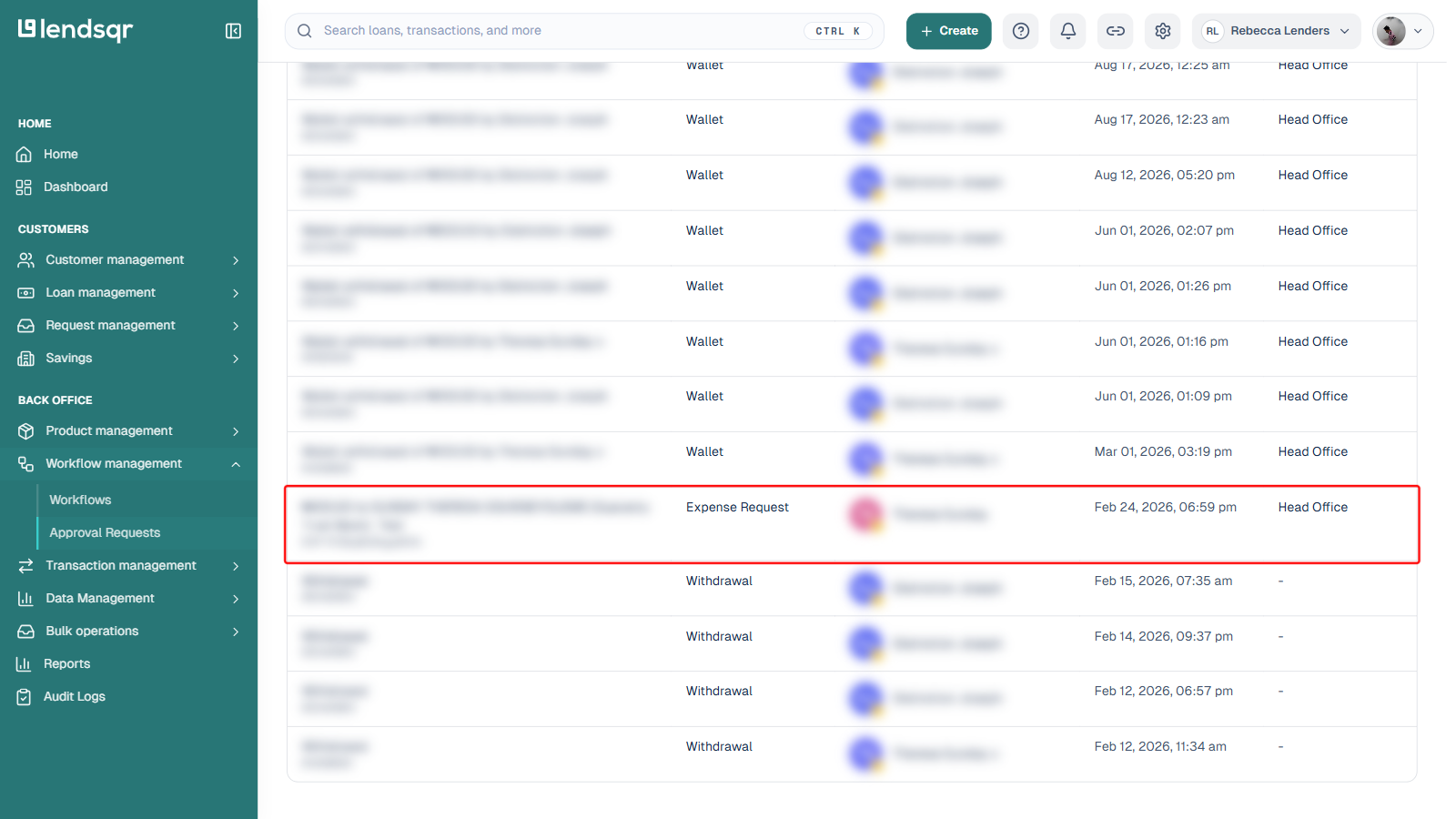
Staff members confirm the request using an OTP. Upon submission, the request is logged as a submission event and routed to the designated approver(s). It then appears in Workflow management > Approval Requests with a status of Pending, alongside other request types the platform routes through the same approvals module, such as Wallet and Withdrawal requests.
Review and approval
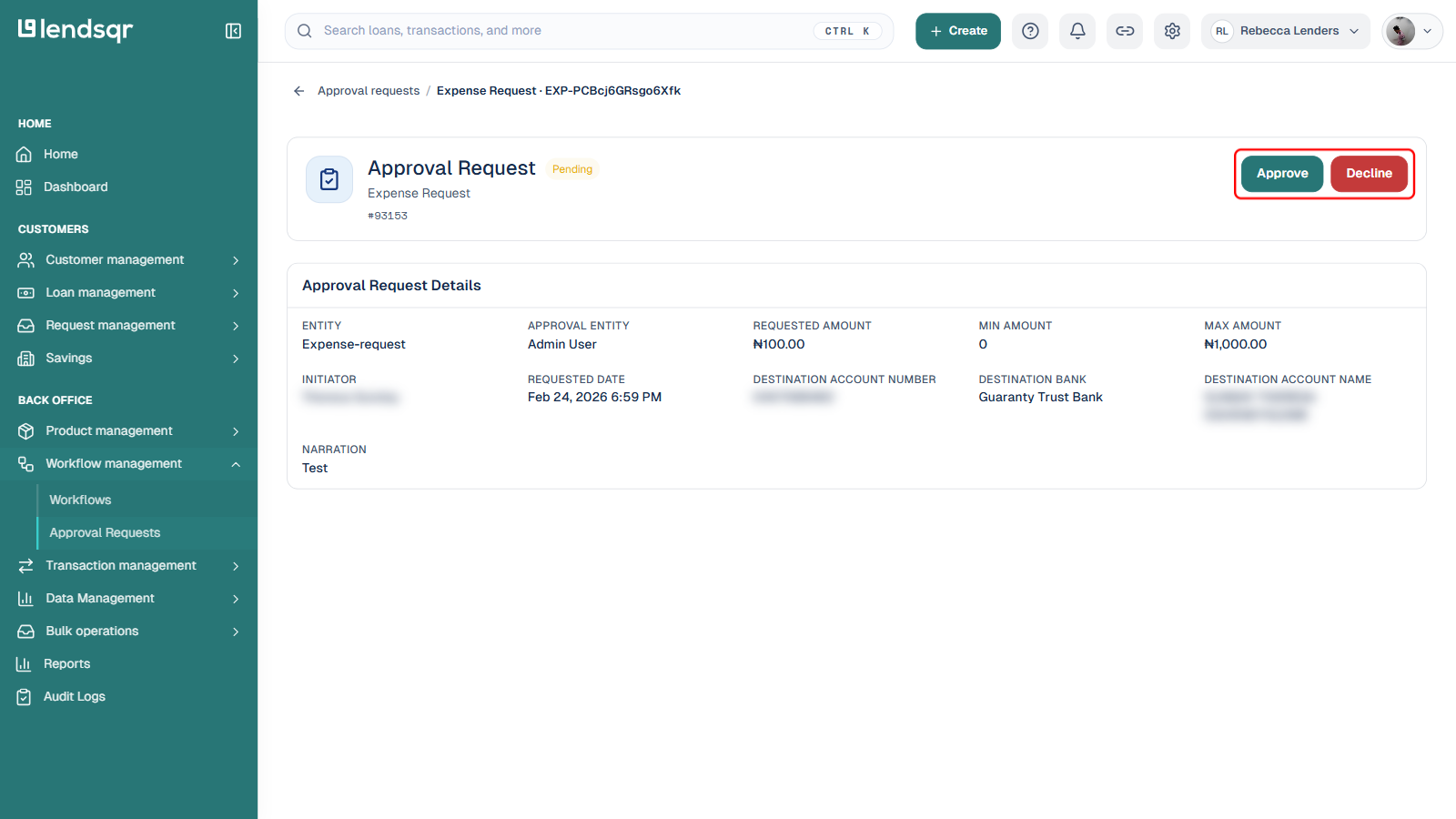
Designated approvers review pending requests from Workflow management > Approval Requests. Clicking a request opens its detail page, which shows the requested amount alongside the step’s minimum and maximum amount, the initiator, the requested date, the destination account number, bank, and name, and the narration provided at submission.
From this page, the approver takes action using the boxed Approve and Decline buttons shown above:
Approval: Approved requests are processed automatically, and the approval action is logged
Decline: Declined requests are rejected, and the decline action, along with any comments, is logged
Approvers cannot modify the original request, ensuring the integrity of the workflow. Every action, submission, approval, or decline, is recorded to provide a clear and complete audit trail.
What the full event log captures
For every expense or transaction request processed through the workflow, Lendsqr records the following:
Who submitted the request and when
The amount, destination, and narration provided
Any supporting documents attached to the submission
Whether the request was approved or declined
Who made that decision and when
The final status and execution timestamp if approved
This information is always accessible from the admin console, making it straightforward to pull records for internal reviews, financial reconciliation, or regulatory inquiries.