How to modify a decision module on Lendsqr

Introduction

Your lending portfolio grows. You start seeing patterns in your defaults that your current credit checks are not catching. Or a regulator introduces a new requirement that your existing evaluation flow does not account for. Your decision model needs to change, and it needs to change without breaking everything else that is working.

On Lendsqr, decision modules are the individual building blocks of your credit evaluation process. Each module handles a specific check, such as Karma, Ecosystem, or Loci. Modifying a module lets you adjust exactly how that check works without rebuilding your entire decision model from scratch.

This guide explains what decision modules are, when to modify them, and how to make changes safely on the Lendsqr admin console.

What is a decision module?

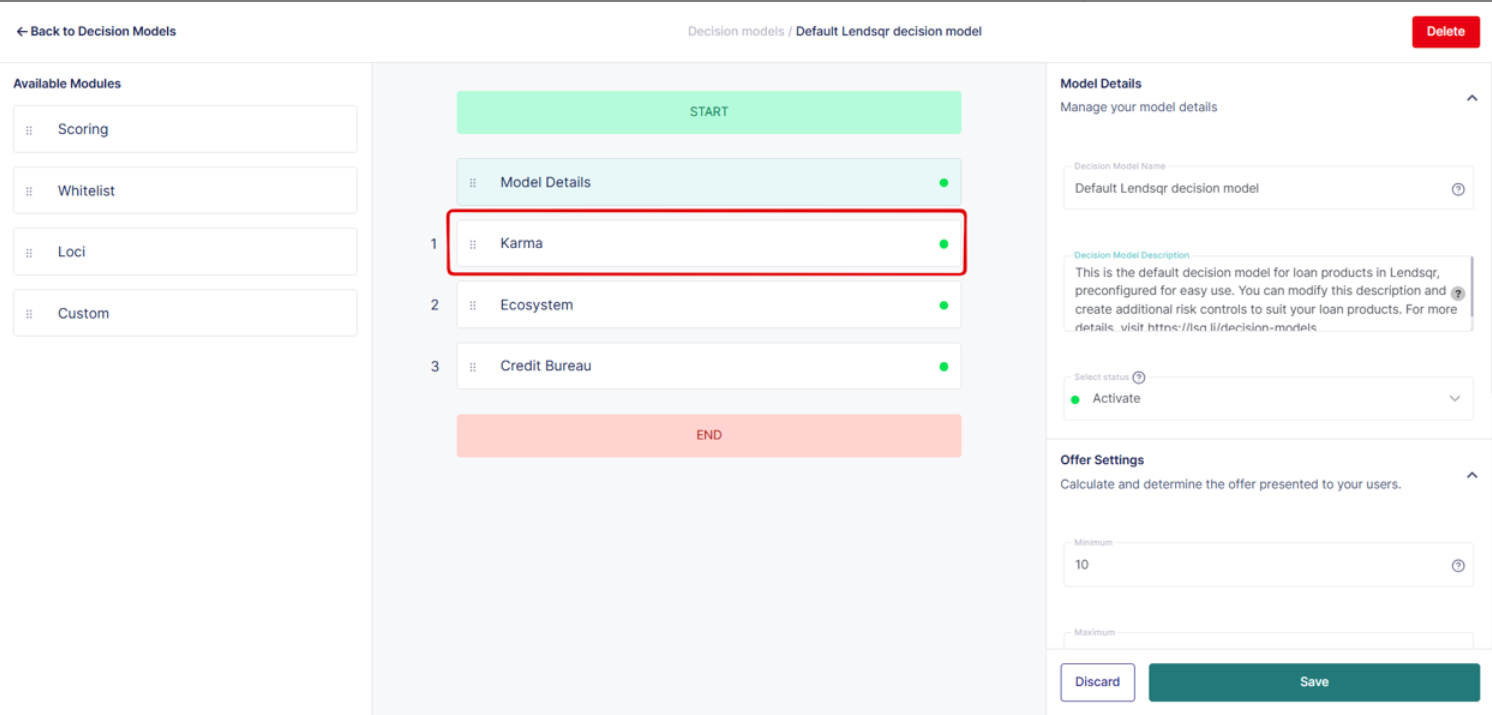
A decision model on Lendsqr is made up of individual modules. Each module represents a specific type of check or evaluation that runs when a borrower submits a loan application. Examples of modules include Karma, which checks the Lendsqr blacklist, Ecosystem, which evaluates borrower behavioral data, and Loci, which assesses location-based risk signals.

These modules run sequentially. If a borrower passes the first module, the process continues to the next. If they fail, the system either declines the application or routes it for manual review, depending on your configuration.

Modifying a module means adjusting the rules, thresholds, or fields within that specific check. You can tighten a rule to catch more risk, loosen it to reduce unnecessary declines, or remove a field that is no longer relevant to your credit policy.

To understand how decision models work more broadly, see: What are decision models?

When to modify a decision module

Not every portfolio problem requires a new decision model. Often, modifying an existing module is the faster and more precise solution. Consider modifying a module when any of the following apply.

Your current rules are too restrictive and are declining borrowers who should qualify. A specific module is flagging too many legitimate applications as high risk. Your credit policy has changed, and the module thresholds no longer reflect your current risk appetite. A regulator requires you to add or remove specific data points from your evaluation process. You are expanding into a new borrower segment and need to adjust how a module weighs certain signals for that audience.

Modifying an existing module preserves the rest of your model structure. You only change what needs to change, which reduces the risk of unintended consequences across other parts of the evaluation flow.

You can easily modify or edit any of the decision models used to implement your risk acceptance criteria or risk control. Examples include Karma, Ecosystem, Loci, etc. 

How to modify a decision module

  1. Navigate to the “Decision Models” tab under the Product Management grouping.
  2. On the existing model of your choice, click on the options button (represented by the 3-dots) and select “Edit”.
  3. Make the changes to the settings.
  4. You could also remove a field completely if required (e.g. removing the age field in the ecosystem module). Again ensure you save changes before proceeding to the next check.

Repeat this process for each module you need to update. Make one change at a time and save after each modification to keep track of what you have changed and to avoid losing work.

How to remove a field from a module

Sometimes a specific field within a module is no longer relevant to your credit policy. For example, you may decide to remove the age field from the Ecosystem module because your new borrower segment makes age-based filtering unnecessary.

To remove a field from a module, follow the same steps above to open the module in edit mode. Locate the specific field you want to remove within the module’s configuration. Delete the field from the JSON settings and save your changes before proceeding.

Removing a field is permanent within that configuration. Confirm that the field is genuinely no longer needed before deleting it. If you are unsure, duplicate the decision model first and test the removal on the copy before applying it to your live model.

Understanding the JSON format in decision modules

Decision modules on Lendsqr are configured using JSON. JSON, which stands for JavaScript Object Notation, is a structured format that uses key-value pairs to define rules and parameters. Each setting within a module corresponds to a specific key in the JSON configuration, and changing that value changes how the module behaves during loan evaluation.

For lenders who are comfortable with JSON, modifying module settings directly gives you precise control over every aspect of the evaluation logic. You can adjust thresholds, add conditional rules, or remove parameters without affecting any other part of the model.

For lenders who are less familiar with JSON, the configuration can feel complex at first. The key principle is that every value you change affects how the system evaluates borrowers for that specific check. Change only what you understand, and test the updated model before linking it to a live loan product.

Testing your changes before going live

Modifying a decision module on a live loan product carries risk. A misconfigured rule can start approving borrowers who should not qualify or declining borrowers who should. Before applying any module changes to a live product, test the updated model against a set of known borrower profiles to confirm the rules behave as expected.

The safest approach is to duplicate your existing decision model, make your changes on the copy, and test it thoroughly before swapping it in as the active model for your loan product. This gives you a clean fallback if the modified version does not perform as intended.

Getting help with complex configurations

Because decision models and their settings are currently implemented as JSON rules, they can be a little complex for the non-techy lenders. If you need help with designing and creating custom rules for your loans, please contact support@lendsqr.com for assistance.


Frequently asked questions

Can I modify a module on a live loan product? Yes, but proceed with caution. Changes to a module on a live product take effect immediately for new applications. Test your changes on a duplicate model first and only swap in the modified version once you have confirmed it behaves correctly.

Do I need to update all loan products if I modify a module? No. Module changes only affect the decision model they belong to. If multiple loan products use the same model, the change applies to all of them. If each product has its own model, you will need to make the change separately on each one.

Can I undo a module change after saving? There is no automatic undo function. If you need to revert a change, you will need to manually restore the previous configuration. This is another reason to duplicate your model before making significant changes.

What is the difference between modifying a module and modifying a decision model? A decision model is the full set of modules that make up your credit evaluation process. Modifying a module means changing the rules within one specific check, such as Karma or Ecosystem, without altering the overall model structure or the order in which modules run.

Who can modify decision modules on Lendsqr? Users with admin-level access and the appropriate permissions can edit decision models and their modules. If you do not see the edit option, check your role and permissions with your Super Admin.

Was this page helpful?