Access your Back Office at your fingertips.
Download the app now on Google Play Store.
Scan the QR code
You can also scan QR code with your phone to download the app.
Understanding interest day count convention configuration for loan products
Updated
On this page
Introduction
Imagine two lenders offering the exact same loan (same principal, same interest rate, same repayment period) but their borrowers end up with different monthly repayment amounts. This is not an error. It often comes down to one quiet setting: how each platform counts days when calculating interest. A lender offering a 30-day loan in February will accrue different interest depending on whether the system treats February as 28 days or as a fixed 30-day month. These small differences compound across a large loan portfolio and can cause significant reconciliation headaches when a platform’s calculations don’t match those of an external core banking system.
The interest day count convention setting in Lendsqr gives lenders control over exactly this calculation, ensuring that loan schedules are accurate, predictable, and consistent with whatever standard your institution or accounting system follows.
What is a day count convention
A day count convention is a rule that defines how a system counts the number of days between two dates when calculating interest. It determines the fraction of a year’s interest that applies to any given repayment period. Because different financial systems use different conventions, the same loan configured in two different systems can produce slightly different repayment amounts, neither wrong, just based on a different counting rule.
In practical terms, the convention affects the denominator in the interest calculation. For example, if your system treats a year as 360 days rather than 365, each day carries a slightly higher interest weight. Over a long loan tenor or across a large portfolio, these differences become meaningful.
Why Lendsqr supports configurable day count conventions
Lenders on Lendsqr operate across different markets and with different internal accounting requirements. Some institutions follow international standards used in corporate lending, while others align with local banking norms or integrate with external core banking software that uses a specific convention. By allowing each loan product to be configured with its own day count convention, Lendsqr ensures that your repayment schedules, interest accrual, and financial reporting remain consistent with whatever standard your business demands.
This is especially important for lenders who reconcile loan data between Lendsqr and another system. A mismatch in day count convention is one of the most common sources of reconciliation discrepancies, and resolving it at the product configuration level prevents those discrepancies from arising in the first place.
Available day count convention options
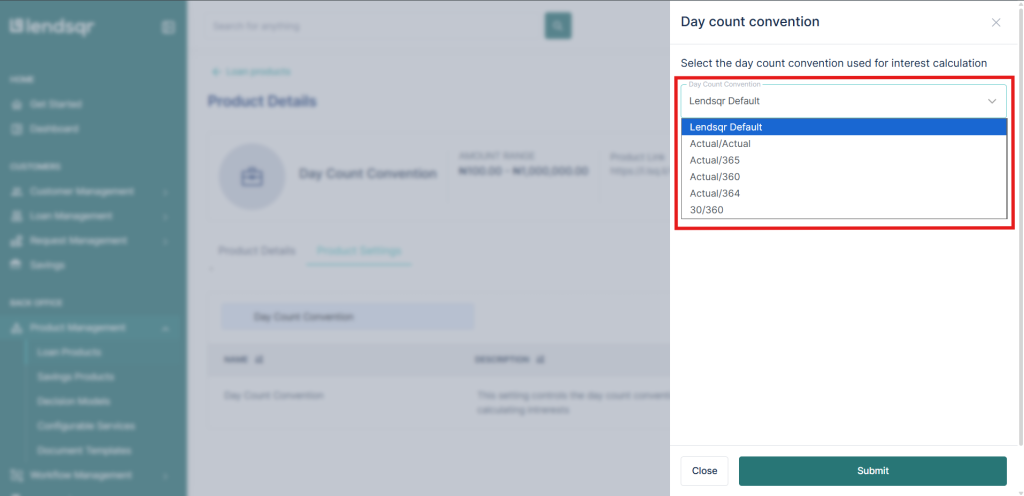
Lendsqr supports six day count conventions, each suited to different lending models and accounting standards.
Convention
Description
Lendsqr Default
Lendsqr’s standard interest calculation logic, applied across the platform by default.
Actual / Actual
Interest is calculated using the exact number of days in the period and the actual number of days in the year.
Actual / 365
Interest is calculated using the exact number of days elapsed, divided by 365 days in the year.
Actual / 364
Interest is calculated using the exact number of days elapsed, divided by 364 days in the year.
Actual / 360
Interest is calculated using the exact number of days elapsed, divided by 360 days in the year.
30 / 360
Each month is treated as having 30 days, with 360 days assumed in a year.
The actual/actual convention is common in government bond markets and produces the most precise calculation because it accounts for leap years. The actual/360 and actual/365 conventions are widely used in commercial and consumer lending. The 30/360 convention simplifies calculations by standardising all months, which makes it easier to reconcile schedules manually and is popular in mortgage and structured finance products.
If you are unsure which convention your external system uses, check with your core banking vendor or finance team before configuring this setting.
How to configure the day count convention on a loan product
To configure a day count convention for a loan product, follow these steps:
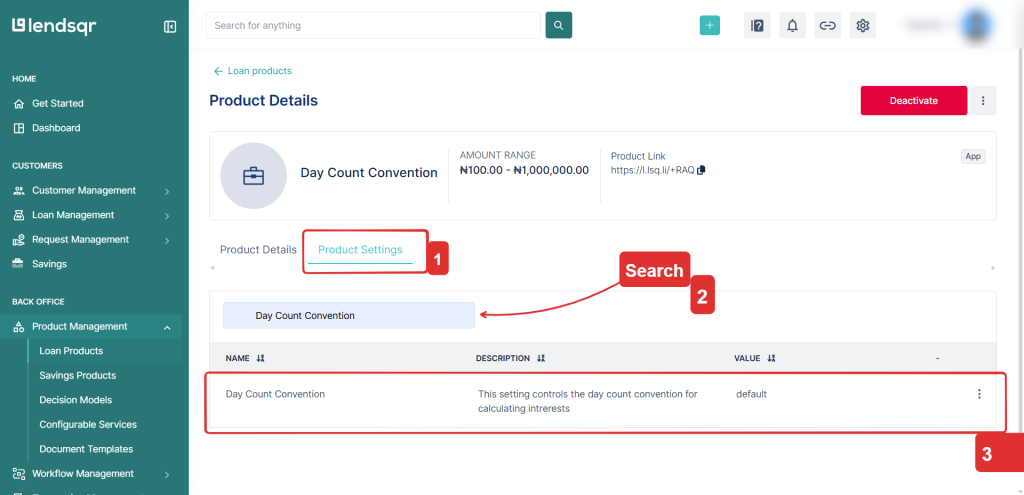
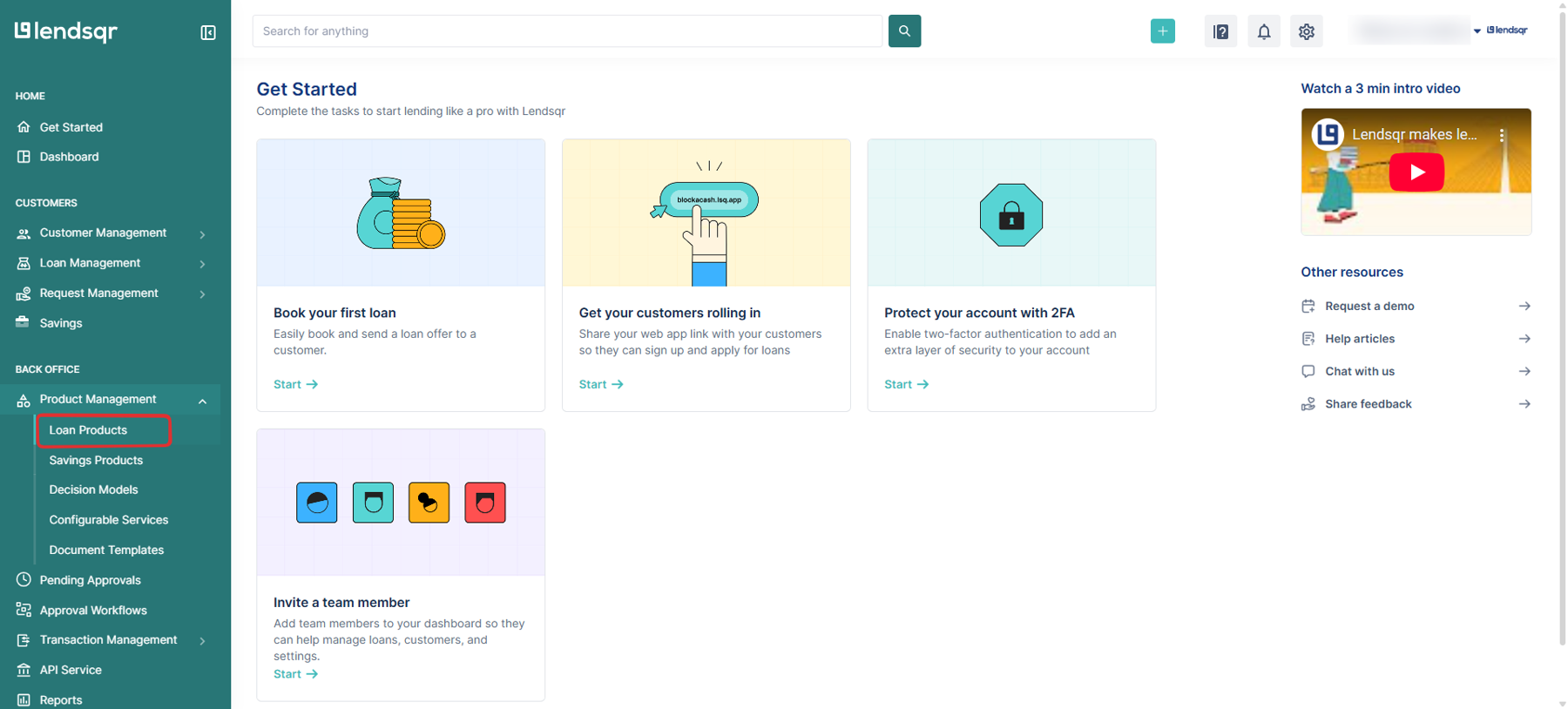
Log in to your Lendsqr admin console and navigate to Back office, then Product management, and select Loan products
Open the specific loan product you want to configure and go to Product settings
Scroll through the settings or search for Day Count Convention.
Select your preferred option from the dropdown menu.
The updated convention will apply to new loan schedules generated from that point forward. Existing active loans are not affected by the change.
Which repayment models support this setting
Day count convention configuration is not available for loans using the equal monthly instalment repayment model. It applies only to loans configured with the straight line or reducing balance repayment models. If your loan product uses equal monthly instalments, the day count convention setting will have no effect and does not need to be configured.
Common errors and what to do
If your loan schedules are generating interest amounts that don’t match what your finance team or core banking system expects, the first thing to check is whether the day count conventions are aligned. The Lendsqr default convention may not match what your external system uses, and switching to actual/365 or 30/360 is often all that is needed to bring them into agreement.
If you change the convention on an active loan product and notice that new loan schedules look different from previous ones, this is expected behaviour. The convention only applies to schedules generated after the change is saved.
If the day count convention dropdown is not available on your loan product settings page, confirm that your product is using the straight line or reducing balance repayment model. Products using equal monthly instalments do not expose this setting.
Best practices
Confirm your day count convention with your finance or accounting team before configuring it, especially if you reconcile loan data with an external system
Apply the same convention consistently across loan products that belong to the same product category, to avoid confusion during reporting
Document the convention used for each loan product in your internal records, so that future configuration changes are made with full context
If you manage loan products in multiple currencies or for borrowers in different countries, be aware that different markets may have different standard conventions, so align each product accordingly