Access your Back Office at your fingertips.
Download the app now on Google Play Store.
Scan the QR code
You can also scan QR code with your phone to download the app.
Understanding mandate statuses
Updated
On this page
When a borrower sets up a direct debit mandate on your platform, that mandate does not become active immediately. It moves through a series of statuses before Lendsqr can use it to collect repayments. Each status tells you exactly where the mandate stands and what your team or the borrower needs to do next.
Knowing what these statuses mean helps you resolve collection delays faster, reduce failed repayments, and give borrowers clear answers when they contact your support team.
This guide explains each mandate status, what triggers it, how it affects repayment collection, and what action to take when you see it.
What is a direct debit mandate?
A direct debit mandate is a borrower’s formal authorization for your platform to debit their bank account for loan repayments. The borrower creates the mandate once. After it becomes active, Lendsqr uses it to collect scheduled repayments without requiring the borrower to initiate each payment manually.
For the mandate to work, it must first complete an activation process. During activation, Lendsqr verifies that the borrower’s account can support debits. This is where the different statuses come in. To understand the full mandate lifecycle from creation to activation, see Creating a direct debit mandate and Payments with direct debit.
The mandate statuses on Lendsqr
Pending
A mandate enters the pending status after the borrower transfers the N50 activation fee to the designated bank account and Lendsqr receives the payment. The system then attempts to debit the borrower’s account a N100 confirmation charge to verify that the account can support automatic debits.
While the mandate is pending, Lendsqr has not yet confirmed the account as debitable. The system continues attempting the N100 debit until it succeeds. Each failed attempt generates a transaction record with a failure reason you can review.
What does this mean for repayment collection?
A pending mandate is not yet active. Lendsqr cannot use it to collect loan repayments. If a repayment date falls while the mandate is still pending, the system will not attempt a debit through that mandate.
What to do
Check the transaction records under the mandate for the failure reason. Common causes include the borrower placing restrictions on their account or having insufficient funds to cover the N100 charge.
Successful
A mandate reaches successful status when Lendsqr completes the activation process. The N100 confirmation debit goes through, the mandate record updates, and the system marks the mandate as active.
What this means for repayment collection: Lendsqr can now use this mandate to debit the borrower’s account on scheduled repayment dates. Collections run automatically without further input from the borrower or your team.
What to do: No action is required. Allow at least one hour after the activation transaction succeeds before expecting the mandate to appear as fully active. To confirm the mandate status from the admin console, see Status of a mandate: how to confirm from the admin console.
Cancelled
A mandate enters cancelled status when a team member on the Lendsqr admin console explicitly cancels it. Borrowers cannot cancel mandates themselves from the web app. Only team members with the appropriate permissions can take this action.
What this means for repayment collection: A cancelled mandate is permanently inactive. Lendsqr will not attempt any further debits through it. The borrower must create and activate a new mandate before automatic collections can resume.
What to do: If the cancellation was intentional, ensure the borrower sets up a replacement mandate if repayments need to continue. If the cancellation was made in error, the borrower must go through the full setup process again. See Creating a direct debit mandate for the setup steps.
How transaction failure reasons help you resolve pending mandates
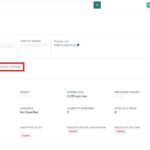
When a mandate stays in pending status, Lendsqr records each failed activation attempt as a transaction. You can open each transaction to see the failure reason under the Meta section. Two common reasons appear frequently.
Do not honor means the borrower’s bank declined the debit. This can happen when the borrower has placed restrictions on their account or when the bank is temporarily unable to process transactions. Wait for a notification email from dd.lendsqr.com before contacting the borrower. Ask them to check with their bank and lift any restrictions before the next retry.
Insufficient funds means the borrower’s account did not have enough funds to cover the N100 confirmation charge. Contact the borrower and ask them to fund their account so the next activation attempt can succeed.
How the transaction colours help you track mandate activation at a glance
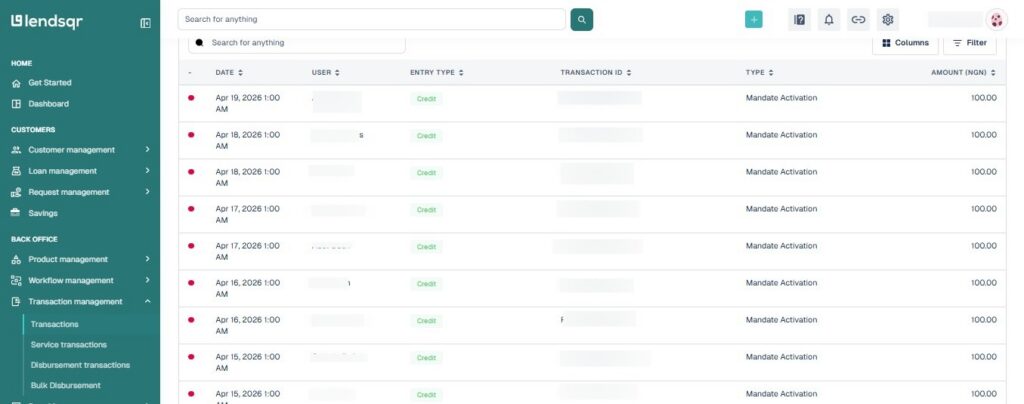
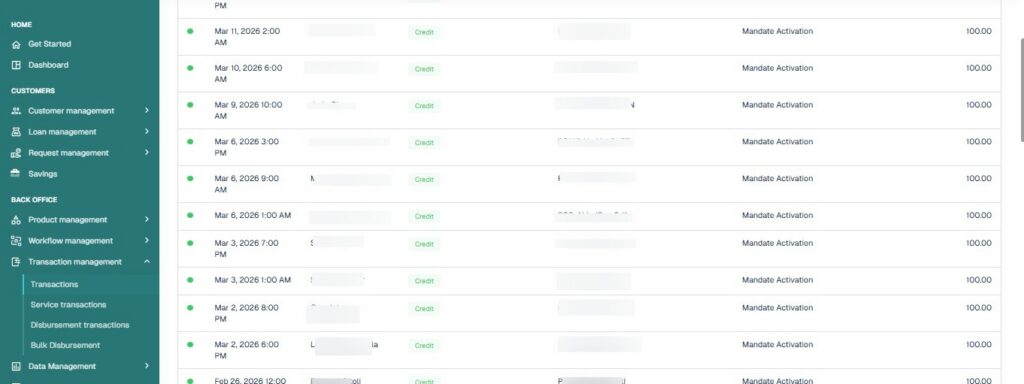
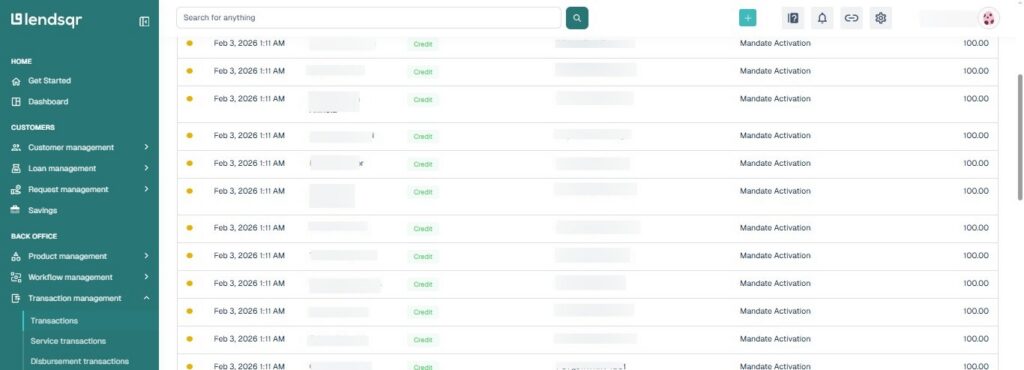
Lendsqr uses colour coding in the Transactions view to help you read the mandate activation status quickly.
Transactions with a red hue are failed activation attempts. Open them to read the failure reason and determine next steps.
Transactions with a green hue confirm a successful activation attempt. The mandate is active or will become active within the hour.
Transactions with an orange hue are pending. The system has queued the activation attempt but has not yet triggered it. Check back after a short time for an update.
Practical scenarios showing how mandate statuses affect your operations
Scenario 1: A borrower’s repayment date arrives but no debit occurs
You check the borrower’s mandate and find it is still in pending status. Lendsqr cannot collect through a pending mandate. You open the mandate’s transaction history and find a “Do not honour” failure on the activation attempt.
You contact the borrower, they resolve the bank restriction, and the system successfully completes the activation debit on the next retry. The mandate becomes active. For future repayment dates, Lendsqr collects automatically. In the meantime, you can record the missed repayment manually if the borrower pays through another channel. See Recording loan repayment from external sources.
Scenario 2: A borrower says they completed the mandate setup, but collections are not running
You check the mandate and find it shows a successful status. Lendsqr activated it correctly. The issue lies elsewhere, perhaps in the repayment schedule or loan status. You confirm the loan is active and the repayment dates are correctly set. See Understanding loan statuses and How to trigger debits on a mandate for next steps.
Scenario 3: A borrower contacts your team after a team member cancels their mandate
The mandate now shows a cancelled status. Collections through it have stopped permanently. You explain to the borrower that they need to create a new mandate. You guide them through the setup process. Once the new mandate completes activation and reaches a successful status, collections resume on the next scheduled date. To require mandate creation as part of onboarding so this does not happen to new borrowers, see How to require direct debit mandate creation during user onboarding.
Scenario 4: A lender wants to temporarily pause collections without losing the mandate
A borrower requests a repayment pause due to short-term financial difficulty. You do not want to cancel the mandate permanently. Instead, you deactivate it. The mandate remains on the borrower’s profile. When the pause period ends, you reactivate it and collections resume without the borrower needing to go through setup again. See How to deactivate a direct debit mandate for the full steps.
How to view mandate activation transactions
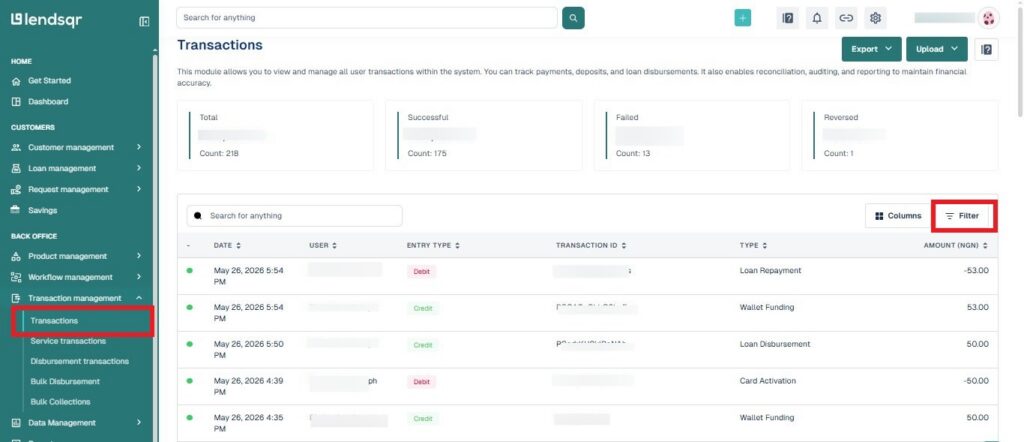
Log in to the Lendsqr admin console and navigate to Transactions in the side navigation panel.
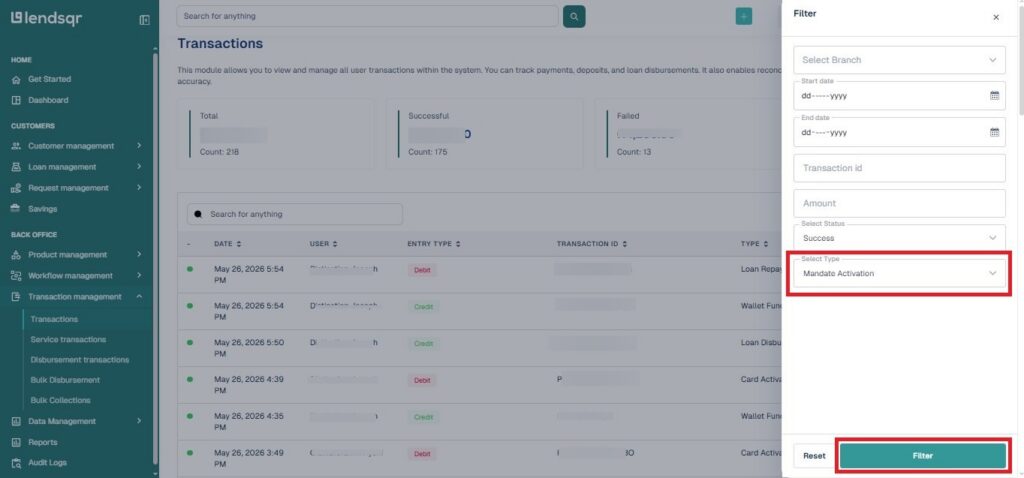
Click the Filter button and select Mandate Activation to show only transactions related to mandate setup.
Click on any transaction row to see the full detail, including the Meta section, which shows the failure reason for failed attempts.