Access your Back Office at your fingertips.
Download the app now on Google Play Store.
Scan the QR code
You can also scan QR code with your phone to download the app.
Enabling strict membership for your groups
Updated
On this page
Introduction
Group savings and loan guarantees have long helped financial communities grow together. They promote accountability, build trust, and drive shared progress. With the Groups feature on Lendsqr, lenders can organize users into groups for collective saving or for guaranteeing each other’s loans. This makes it easier to manage trust and ensure that everyone advances together.
But not every group stays healthy on its own. Members leave, circumstances change, and unverified participants can introduce risk into what should be a trusted circle. That is where strict membership comes in.
Strict membership gives you direct control over who stays in a group. It ensures that only approved members remain active, enforces tighter participation rules, and keeps your group structure secure. This guide explains when to use it, what it affects operationally, and how to enable it on the Lendsqr admin console.
What is strict membership?
Strict membership is a group-level setting that restricts participation to only verified and approved members. When you enable it, the system enforces tighter controls over who can remain in the group and who can join going forward.
Without strict membership, groups operate with more open participation rules. Members can join or remain in a group without explicit approval at each stage. This works well in informal or low-risk group structures where trust is already established between members.
With strict membership enabled, every member’s presence in the group is subject to your approval criteria. This reduces the risk of unverified or high-risk members guaranteeing loans they cannot support, which protects other group members and your overall portfolio.
Strict membership is not necessary for every group. The right time to enable it depends on the structure of your lending operation and the risk profile of your borrower base.
When to enable strict membership
Formal savings and loan groups. If your organization runs structured group lending programs where members guarantee each other’s loans, strict membership protects the group from defaulters. One unverified member taking on a guarantee they cannot honour affects every other member in the group. Strict membership prevents this by ensuring only approved members hold guarantor positions.
High-value loan groups. When group members are guaranteeing loans above a certain threshold, the stakes are higher. Strict membership gives you tighter control over group composition before any large disbursements go out.
Regulated lending environments. Some regulatory frameworks require lenders to maintain verifiable records of group membership and participation. Enabling strict membership supports this by enforcing documented approval at the group level.
Groups with a history of defaults or membership disputes. If a particular group has experienced defaults linked to unverified members or disputes over who belongs in the group, enabling strict membership creates a clear boundary going forward. It signals to existing members that participation is earned and maintained, not assumed.
New group structures being piloted. When launching a new group lending product, starting with strict membership gives you more control during the pilot phase. You can loosen the rules later once you have a clearer picture of how the group behaves.
What happens operationally when you enable strict membership
Understanding the operational effects of this setting is important before you apply it. Enabling strict membership does not automatically remove existing members from the group. Members who are already part of the group at the time you enable the setting remain active. The restriction applies to membership going forward, not retroactively.
Here is what changes after you enable strict membership:
New join requests. Any new request to join the group goes through an explicit approval process. Members cannot simply add themselves or be added without passing your verification criteria.
Pending membership requests. Any join requests that were pending at the time you enabled strict membership will be subject to the new rules. Review all pending requests after enabling the setting to confirm that each one meets your approval criteria before accepting.
Loan guarantees. Members in a strict membership group who serve as loan guarantors are held to a higher standard of verification. This protects other group members from being exposed to guarantees backed by unqualified participants.
Group integrity over time. As members leave or become inactive, strict membership ensures that replacements go through the same approval process. The group does not fill gaps automatically. Each new member requires deliberate action from your team.
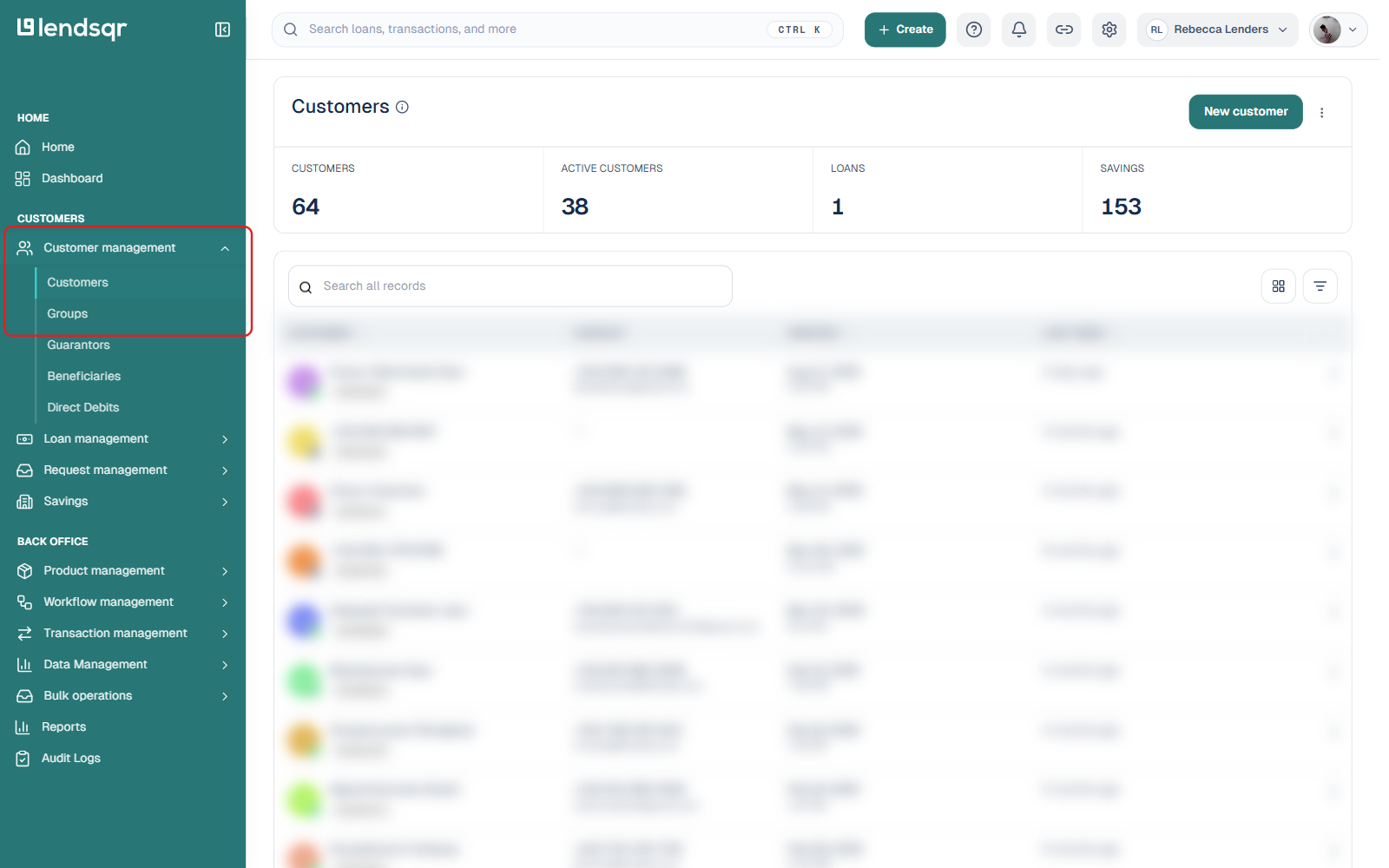
From the sidebar, click “Customer management”, then select “Groups” from the submenu that expands.
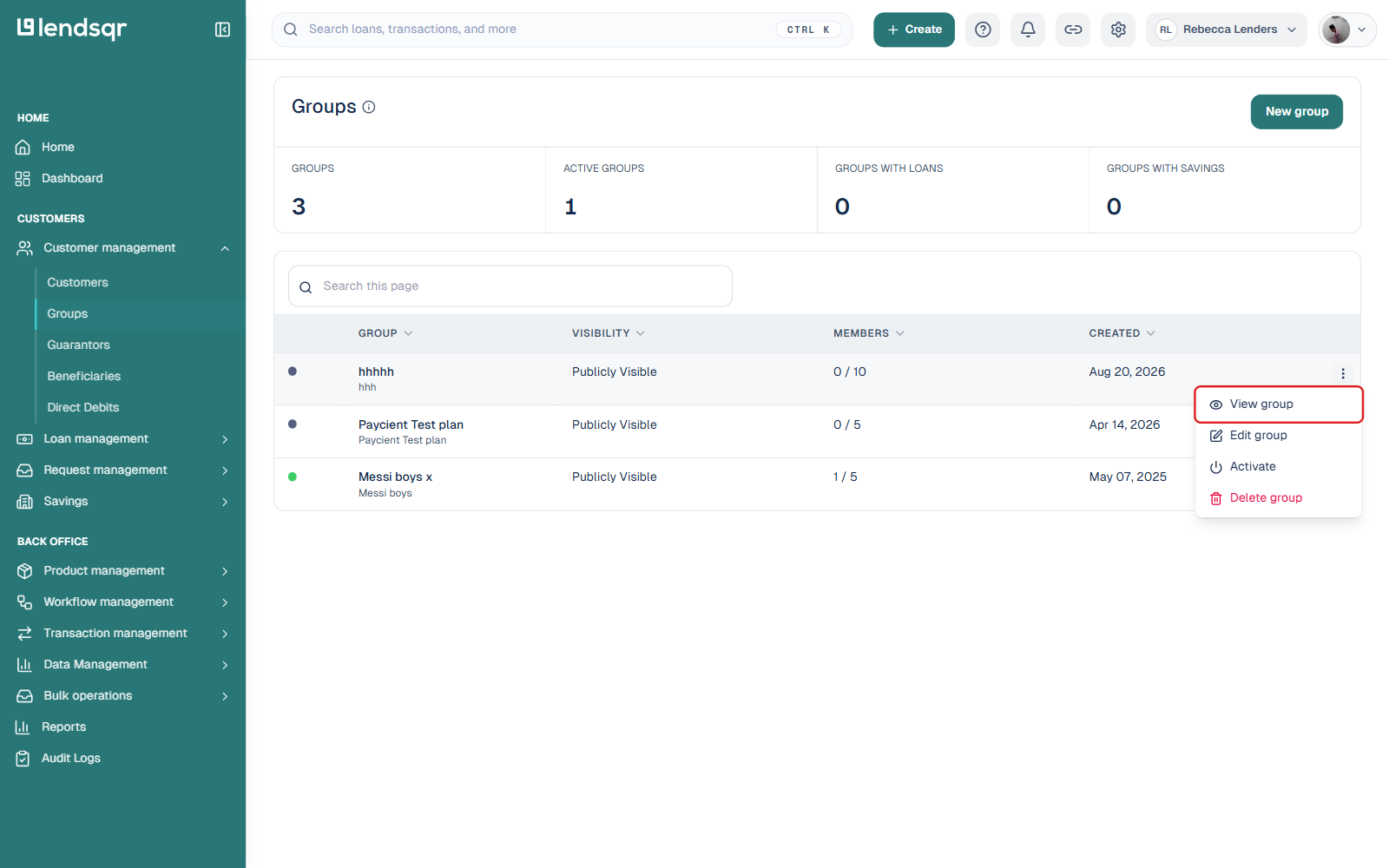
Locate the group you want to update, click the three-dot menu icon beside it, and choose “View group”.
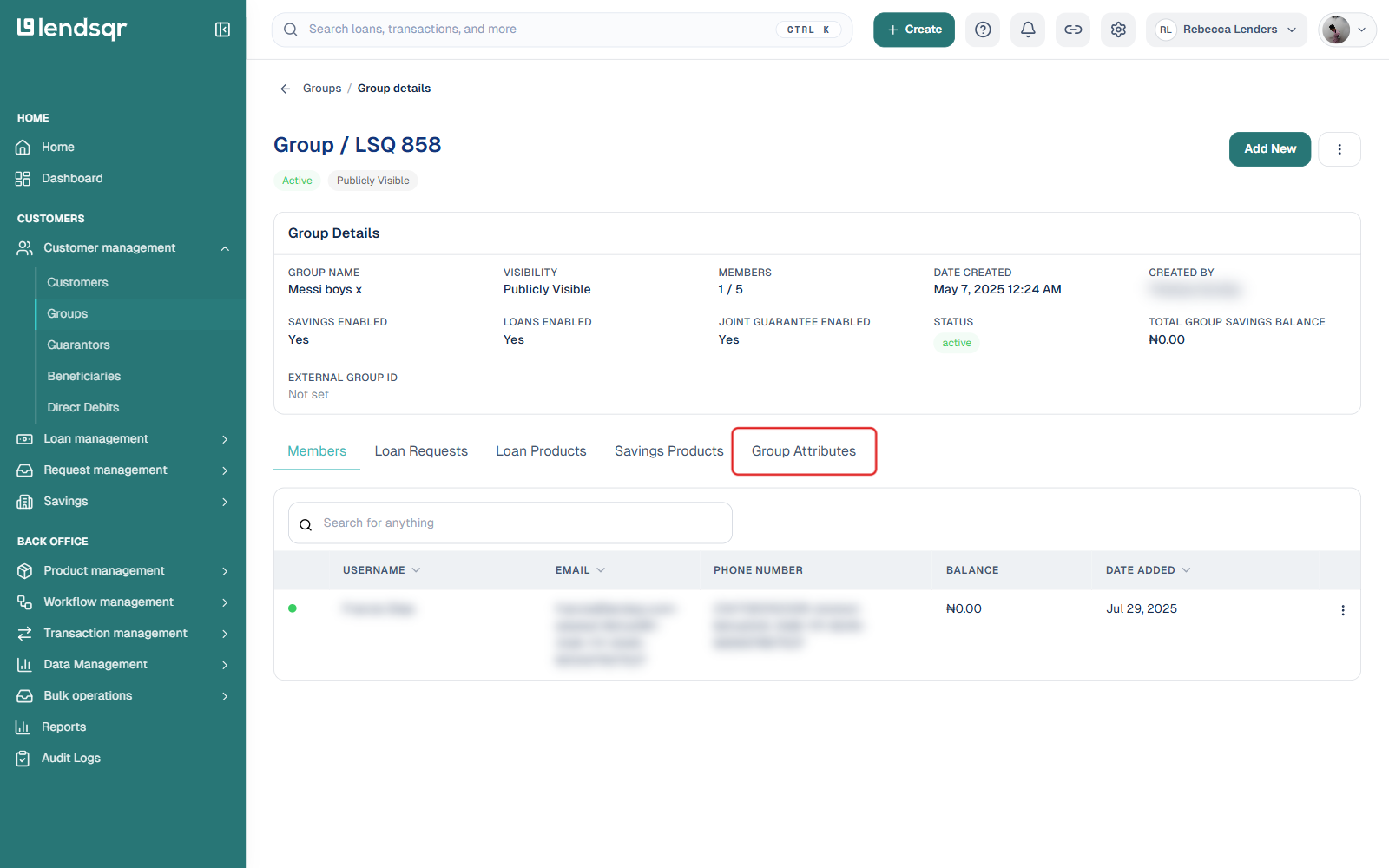
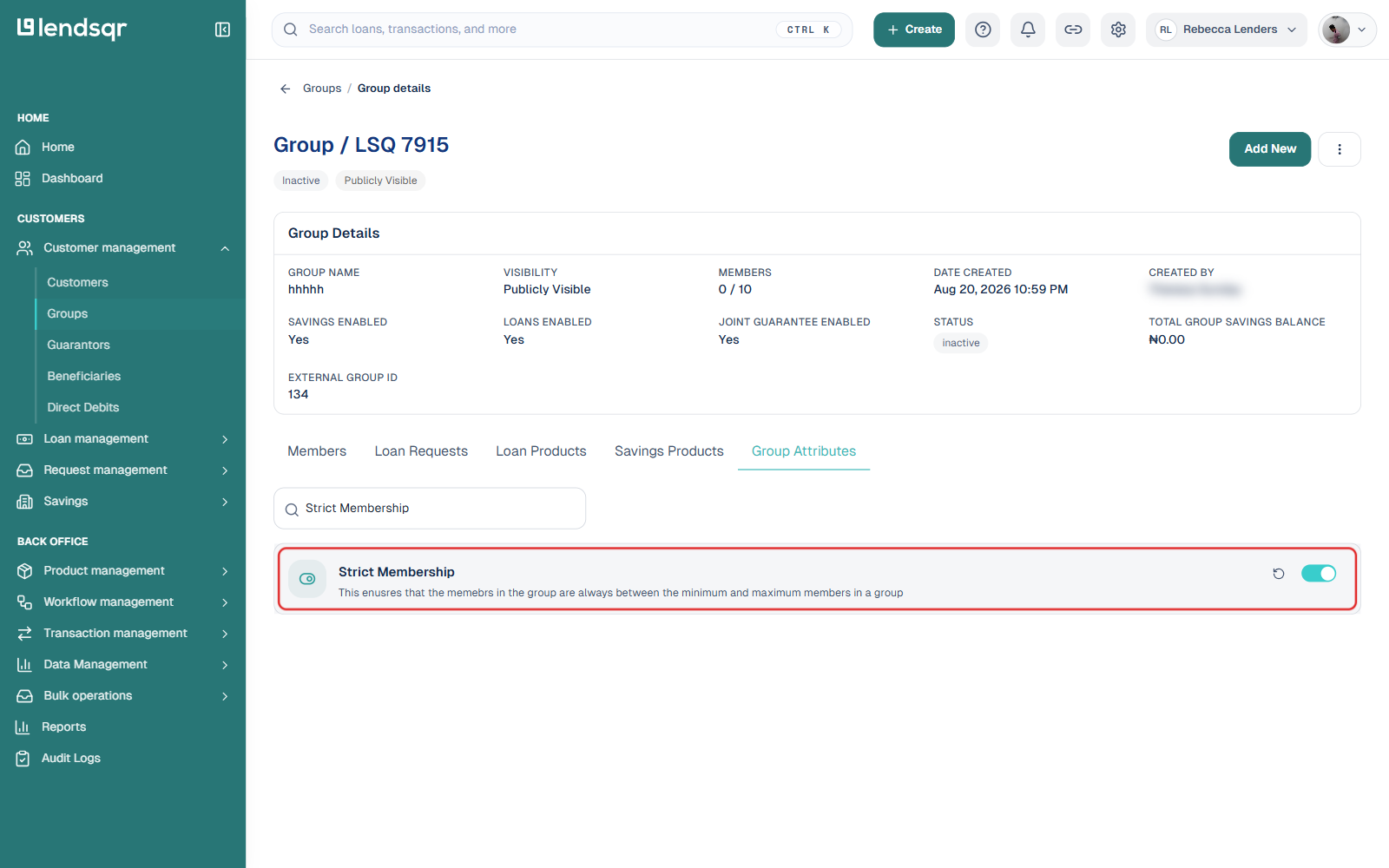
On the group details page, click the “Group Attributes” tab.
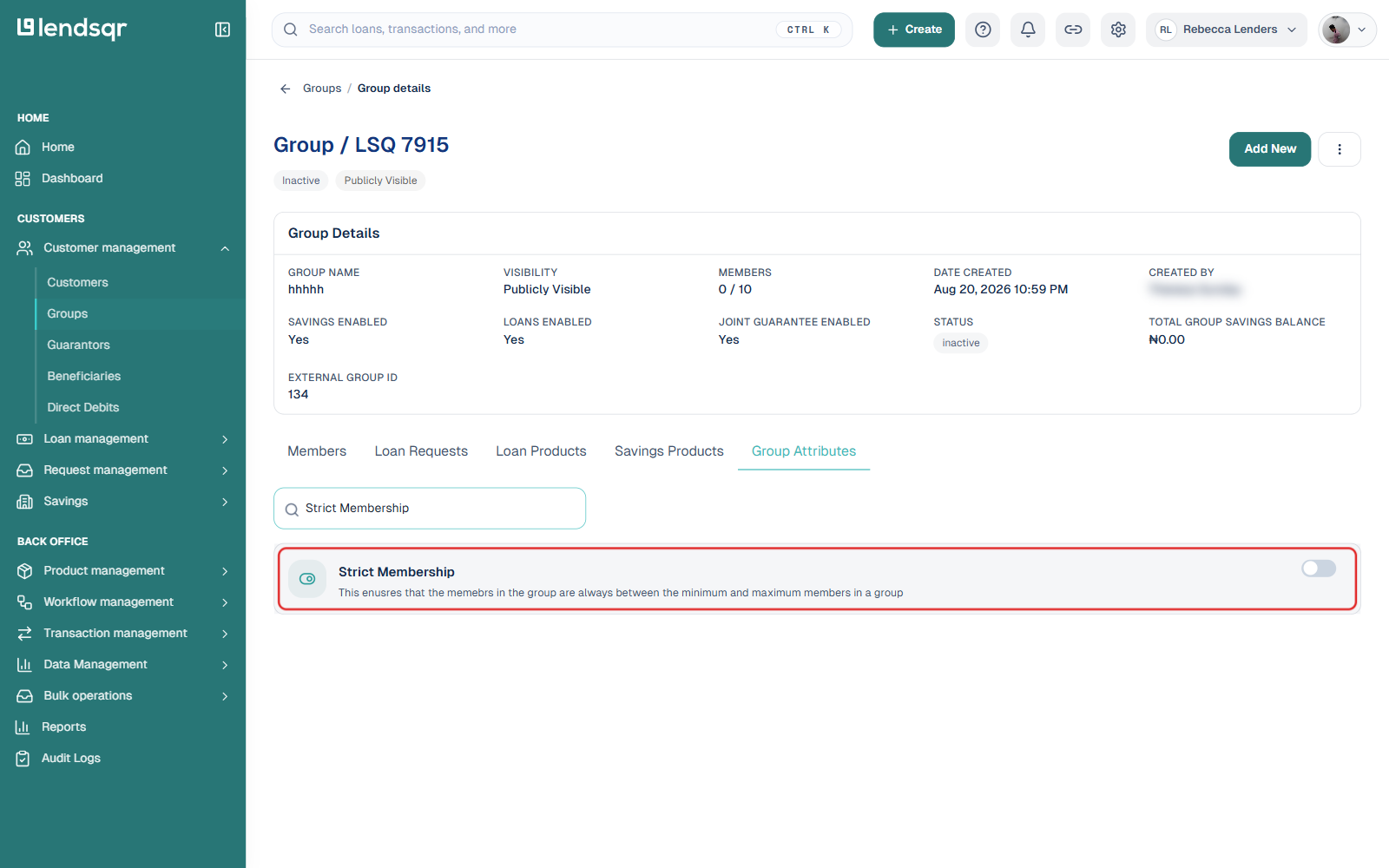
This opens a searchable list of individual group settings rather than a single form. Type “Strict Membership” into the search box at the top to filter the list down to just that setting.
Switch the “Strict Membership” toggle on. Unlike the older flow, there is no separate Edit modal or Submit/Confirm step: the setting applies as soon as you switch it, and a small revert icon appears next to it so you can undo the change if needed.
How to disable strict membership
Since the setting applies immediately, disabling it is just as direct: return to the group’s Group Attributes tab, search for “Strict Membership” again, and switch the toggle off. There is no separate confirmation step, the group returns to standard membership rules as soon as you switch it. You can also click the revert icon next to the setting to reset it back to its default state.
Before rolling back, consider why the setting was enabled in the first place. If strict membership was put in place to address a specific risk or compliance requirement, disabling it without resolving the underlying issue may reintroduce the same problems. Document the reason for the rollback and review the group’s membership status before and after making the change.
Why strict membership matters
Open group structures work well in informal settings. But as lending operations grow, looser membership rules create risk. Unverified members can join groups, guarantee loans they can’t support, and expose the entire group to default.
Strict membership addresses this directly. It puts the lender in control of group composition and ensures that every member in a group has been verified and approved. This protects other group members, reduces portfolio risk, and keeps your lending operation running on a foundation of trust.
For lenders managing large numbers of groups across different borrower segments, strict membership also makes compliance and audit processes more straightforward. Every group has a verified, accountable membership list.