Access your Back Office at your fingertips.
Download the app now on Google Play Store.
Scan the QR code
You can also scan QR code with your phone to download the app.
What does an abandoned loan request mean in Lendsqr?
Updated
On this page
In digital lending, not every borrower who starts an application sees it through to the end. Some stop midway through filling out a form. Others receive a loan offer from the system and decide not to accept it. When either of these scenarios occurs on your Lendsqr platform, the system automatically labels the application as an abandoned loan request.
Understanding what this status means, why it happens, and how to respond to it is an important part of managing a healthy loan pipeline. This guide explains the abandoned status in full, walks you through how to locate and review these requests on the admin console, and outlines what you can do with the data to improve your lending operation.
What is an abandoned loan request?
An abandoned loan request is a loan application that a borrower started but did not complete or accept. In Lendsqr, the system automatically marks these requests as “abandoned” when the borrower stops the process midway or declines the final offer.
There are two primary situations in which a loan request receives the abandoned status:
The borrower received a loan offer but chose not to accept it. After the system processed their application and generated an offer, the borrower reviewed it and decided not to proceed. The offer expired or was actively declined, and the request moved to abandoned status.
The borrower started filling the application form but never completed it. They may have uploaded some documents, filled in some personal details, or progressed partway through the application journey before stopping entirely and not returning to finish.
In both cases, the request becomes inactive. Importantly, an abandoned loan request that was never disbursed has no negative impact on the borrower’s credit record or their eligibility for future applications. The system simply registers that the current request did not result in a loan.
How abandoned differs from other request statuses
Lendsqr uses several statuses to describe the different states a loan request can be in. It helps to understand how abandoned compares to two closely related statuses:
Abandoned vs. declined. A declined request is one that a lender administrator reviewed and rejected. The lender made a decision to say no. An abandoned request, on the other hand, is one where the borrower chose not to continue or did not complete their application. The action (or inaction) came from the borrower, not the lender.
Abandoned vs. failed. A failed request is typically one where the system processed the application but it did not pass one or more automated checks, such as eligibility scoring or KYC verification. An abandoned request is not about failing any check. The borrower simply did not finish or accept the process.
Keeping these distinctions clear helps your team interpret pipeline data accurately and avoids misreading why a particular application did not result in a disbursement.
Common reasons borrowers abandon loan requests
Borrowers drop off at various stages for a range of reasons. Understanding the most common ones can help you identify patterns and address friction points in your application process.
The interest rate or repayment terms were not acceptable. The borrower reviewed the offer, saw the interest rate or the total repayment amount, and decided the cost of the loan was too high. This is one of the most common reasons for abandonment, particularly on competitive products.
The offered amount or tenor did not meet their needs. The borrower may have applied for a specific amount and received an offer for a lower figure. Similarly, if the maximum tenor available on a product is shorter than what they require, they may choose to abandon rather than accept unfavourable terms.
The borrower was browsing or comparing options. Not all borrowers who start an application intend to take a loan immediately. Some are exploring what they qualify for or checking terms across multiple lenders before committing. These requests frequently end up as abandoned once the borrower decides to go elsewhere.
Technical issues or a lengthy application process. Some borrowers encounter problems completing the process, such as difficulty uploading a document, slow load times, or confusion about what a particular step requires. If the experience feels too difficult or takes too long, they give up before finishing.
The borrower found a better offer elsewhere. A borrower may have been in active conversations with multiple lenders at the same time. If another lender offered better rates, a longer tenor, or a faster disbursement timeline, they may have accepted that offer and abandoned yours.
Changed circumstances. The borrower may have started the application when they had an urgent need but resolved that need through other means before completing it. Personal financial situations can change quickly, and a loan that felt necessary on Monday may no longer be required by Friday.
Why abandoned loan requests matter to lenders
It is tempting to dismiss abandoned requests as applications that simply did not work out. In reality, they carry useful information that can directly improve your lending business. Here is why tracking them matters:
They reveal conversion gaps in your pipeline. If a large number of applications make it to the offer stage but then get abandoned, that tells you something specific: borrowers are getting through your initial checks, but they are not happy with what the system offers them. That is a pricing or product design signal, not a credit risk signal.
They help you identify drop-off points in the application journey. If borrowers consistently abandon at the document upload stage, the application flow may be too demanding or unclear at that point. If they drop off at the offer screen, your pricing may need a review.
They keep your active pipeline clean and focused. When abandoned requests are automatically separated from pending or active applications, your team can focus attention on the requests that are still actionable. You waste less time filtering through stale or incomplete entries.
They provide data to improve your products. Patterns in your abandoned requests can inform decisions about loan product configuration. If the data consistently shows that borrowers on a particular product abandon after seeing a 30-day repayment schedule, that is a clear prompt to consider adding a longer tenor option to that product.
A practical example: a salary advance lender notices that many employees start applications but abandon them after reviewing the repayment schedule. By reviewing these abandoned requests, the lender realises the tenor is too short for some staff. Adjusting the product to offer a longer repayment period results in a meaningful improvement in how many applications convert to disbursed loans.
How Lendsqr handles abandoned loan requests
Lendsqr automatically detects and labels abandoned requests so you do not need to manually sort through your loan pipeline to identify them. The system separates these requests and makes them accessible through a dedicated view in the admin console. This automation keeps your pipeline organised and gives you visibility into application drop-offs without requiring extra manual work from your team.
Once you access the abandoned requests view, you can click on any individual request to see more information about the borrower and the specific request, including where they were in the application process and the details of the loan they were applying for.
How to view abandoned loan requests on the admin console
Follow the steps below to access and review all abandoned loan requests on your Lendsqr admin console. Work through the steps in order.
Step 1: Navigate to the loan requests tab
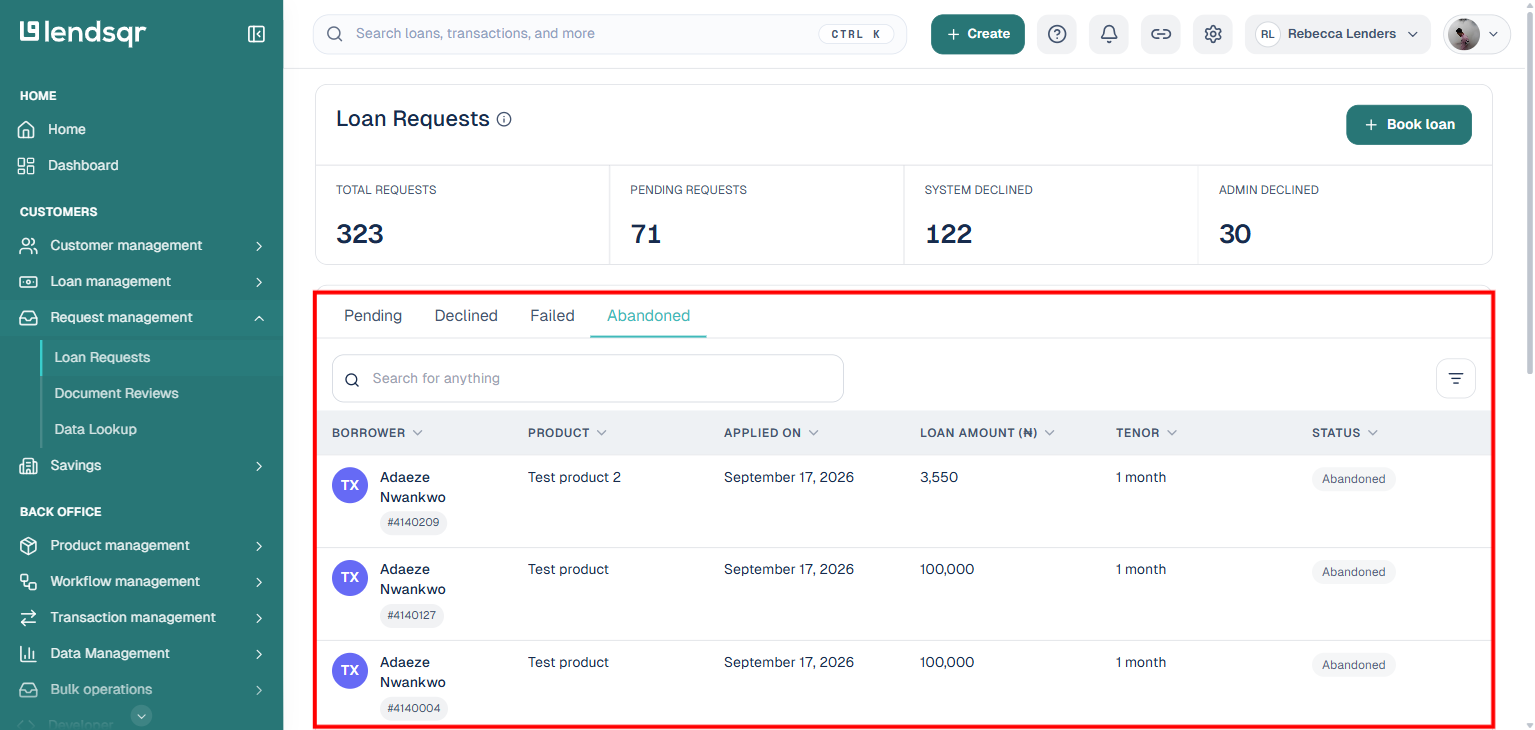
Log in to the Lendsqr admin console at app.lendsqr.com. On the left-hand navigation panel, open Request management and click “Loan Requests”. The system loads the loan requests list, with stat cards for Total Requests, Pending Requests, System Declined, and Admin Declined at the top.
Step 2: Select the Abandoned tab
Below the stat cards, the list is organized into status tabs: Pending, Declined, Failed, and Abandoned. Click “Abandoned”. The page updates to display every loan request currently marked as abandoned on your platform, with columns for Borrower, Product, Applied On, Loan Amount, Tenor, and Status.
Step 3: Click on an individual abandoned request
To view the full details of a specific abandoned request, click on the row for that request. The system opens the abandoned loan request detail page, which gives you a complete view of the borrower’s profile information and the details of the loan they applied for. You can use this information to understand how far the borrower progressed through the application, what loan product they were applying for, and other relevant data points.
Step 4: Review the information
On the detail page, you can find more information about the borrower and their request. Use this information to understand the context of the abandonment and decide whether any follow-up action is needed or worthwhile. You can review details across multiple abandoned requests over time to start identifying patterns.
What to do with abandoned request data
Reviewing abandoned requests is only useful if you act on what you find. Here are the most effective ways to use this information to improve your lending operation:
Use the data alongside other performance metrics. Combine your abandoned request data with information on approval rates, disbursement volumes, and repayment performance to get a well-rounded picture of how your lending operation is performing and where the biggest opportunities for improvement lie.
Adjust your loan product configuration. If abandonment data shows that borrowers consistently drop off after reviewing their offer, consider whether the interest rate, maximum loan amount, or tenor options on that product need to be updated. You can edit any existing loan product directly from the Product Management section of the admin console.
Simplify the application experience. If borrowers are dropping off during the form or document upload stages rather than after receiving an offer, the problem may be with the application flow itself. Consider reviewing the number of steps in your process and whether the instructions for each step are clear enough for your target borrower audience.
Identify trends by product or time period. Review abandoned requests across different loan products and across different time periods to see where abandonment rates are highest. A product with consistently high abandonment may need a more thorough review than one where abandonment is rare.
Next steps
Regularly review abandoned loan requests in your Lendsqr admin console to spot trends.
Use the insights to refine your loan products and application process.
Combine this data with other metrics, such as approval rates and disbursement volumes, for a complete picture of performance.
With automatic status tracking in Lendsqr, abandoned loan requests are clearly identified and separated. This helps you maintain a clean pipeline and make data-driven improvements to your lending process, so you can focus on active applications while gaining useful insights to improve offers and conversion rates.
Ready to better understand your loan pipeline? Log in to your lendsqr admin console and start exploring your loan requests today.