Access your Back Office at your fingertips.
Download the app now on Google Play Store.
Scan the QR code
You can also scan QR code with your phone to download the app.
Enabling decentralized disbursements on Lendsqr
Updated
On this page
Introduction
You run a lending operation with branches in three cities. Each branch manages its own loan book and serves its own borrowers. But every disbursement still routes through one central account. When the Lagos branch needs to disburse ten loans on a Friday afternoon, they are waiting on whoever manages the central account to action each one.
That bottleneck slows your operation down. It creates dependency between branches that should be able to move independently. And it puts unnecessary pressure on a single point of control.
Decentralized disbursements on Lendsqr fix this. Each branch gets its own disbursement wallet. Each branch disburses directly to its own borrowers. Your headquarters retains full visibility across all branches from one platform. Everyone moves faster without losing oversight.
This guide explains what decentralized disbursements are, why they matter for multi-branch lenders, and how to set them up on Lendsqr.
What are decentralized disbursements?
Decentralized disbursements allow each branch in your lending organization to manage its own loan disbursements independently. Instead of all loans routing through one central disbursement account, each branch operates its own dedicated wallet. When a borrower in that branch receives a loan, the funds come from that branch’s wallet, not from a shared organizational account.
The lender’s headquarters still has centralized oversight. All branch activity remains visible on the same platform. The difference is operational. Each branch controls its own funding and disbursement without needing to route every transaction through a central desk.
This is particularly valuable for lenders with multiple city offices, agent networks, or separate business units that serve distinct borrower segments. For more on how disbursement accounts and balances work on Lendsqr, see: What is the difference between disbursement and service balances?
Why decentralized disbursements matter for multi-branch lenders
Consider a microfinance institution with branches in Lagos, Kano, and Accra. Each branch has its own loan officers, its own borrower relationships, and its own daily disbursement schedule. Under a centralized model, all three branches compete for access to the same account. A delay at headquarters affects borrowers across all three cities simultaneously.
Under a decentralized model, Lagos disburses from the Lagos wallet, Kano from the Kano wallet, and Accra from the Accra wallet. Each branch funds its own account, manages its own disbursement timing, and operates without depending on the others. Headquarters can see all three wallets and their activity from the same admin console at any time.
This structure does three things for growing lending operations. It speeds up disbursement by removing the central bottleneck. It gives branch managers accountability over their own financial resources. And it makes your operation more resilient because a funding issue in one branch does not block disbursements in another.
Before you begin
You need admin-level access to configure office settings and system configurations on the Lendsqr admin console. Confirm that you have the right permissions before starting.
Also, confirm that the branches you want to set up as independent disbursement units do not already have wallets attached to them. If a branch was created previously without the Create Account checkbox selected, you may need to update it or create a new office entry with the wallet option enabled.
Setting up a branch with a disbursement wallet
To set up a branch with its own disbursement wallet on the admin console, complete the following steps.
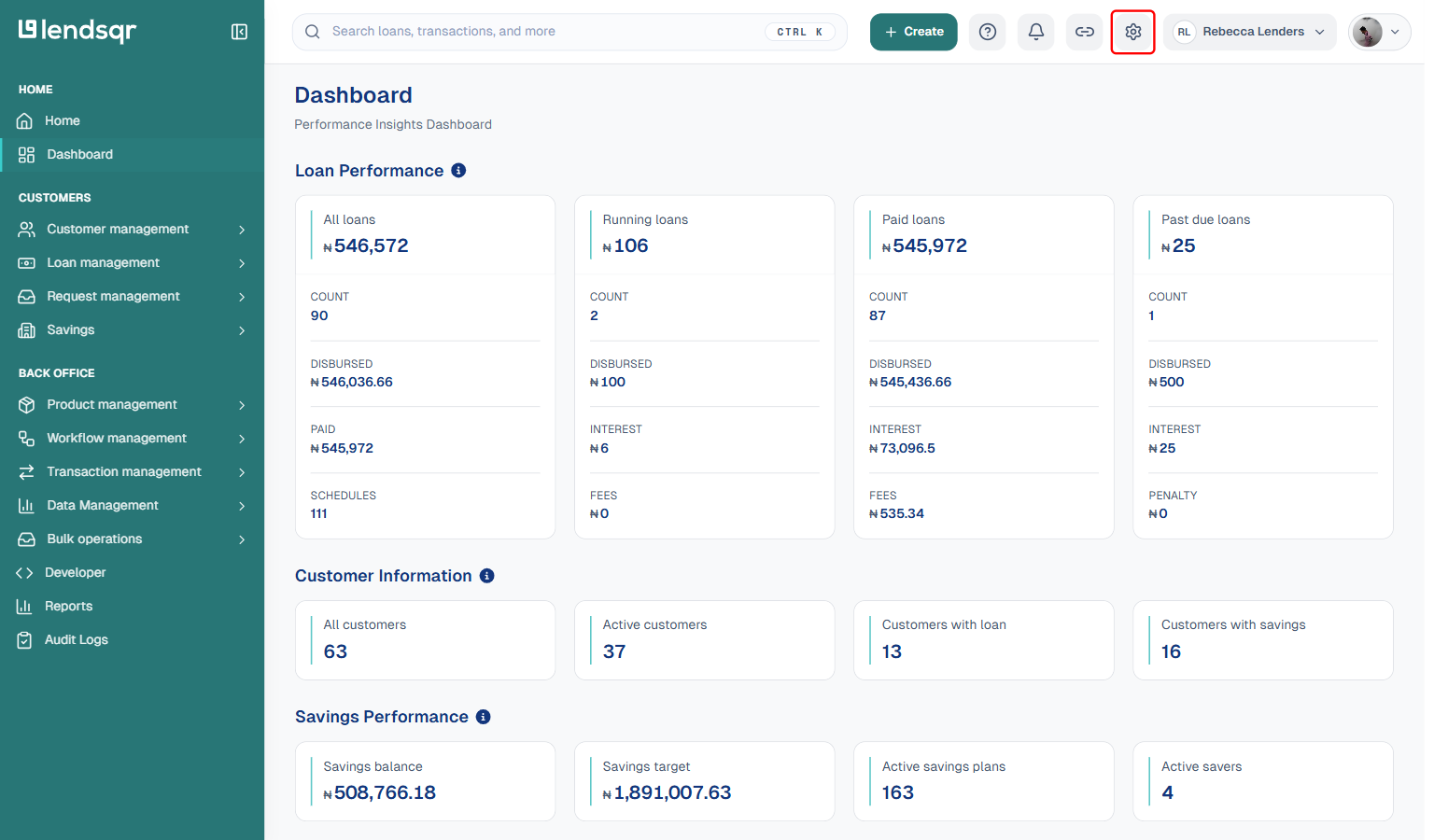
Login to the admin console and click on the Settings icon (the gear icon at the top right).
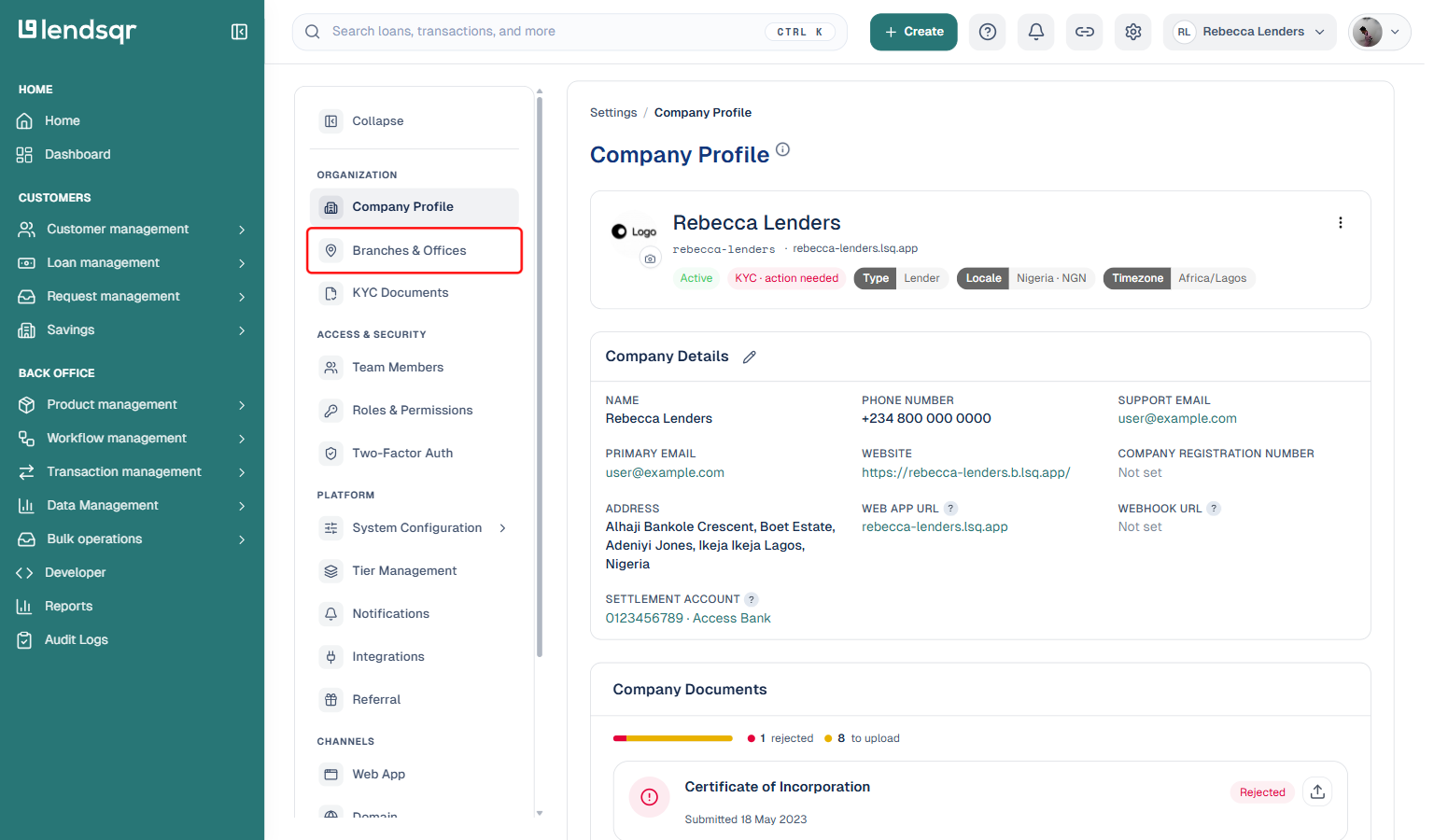
Under the Organization section, select Branches & Offices.
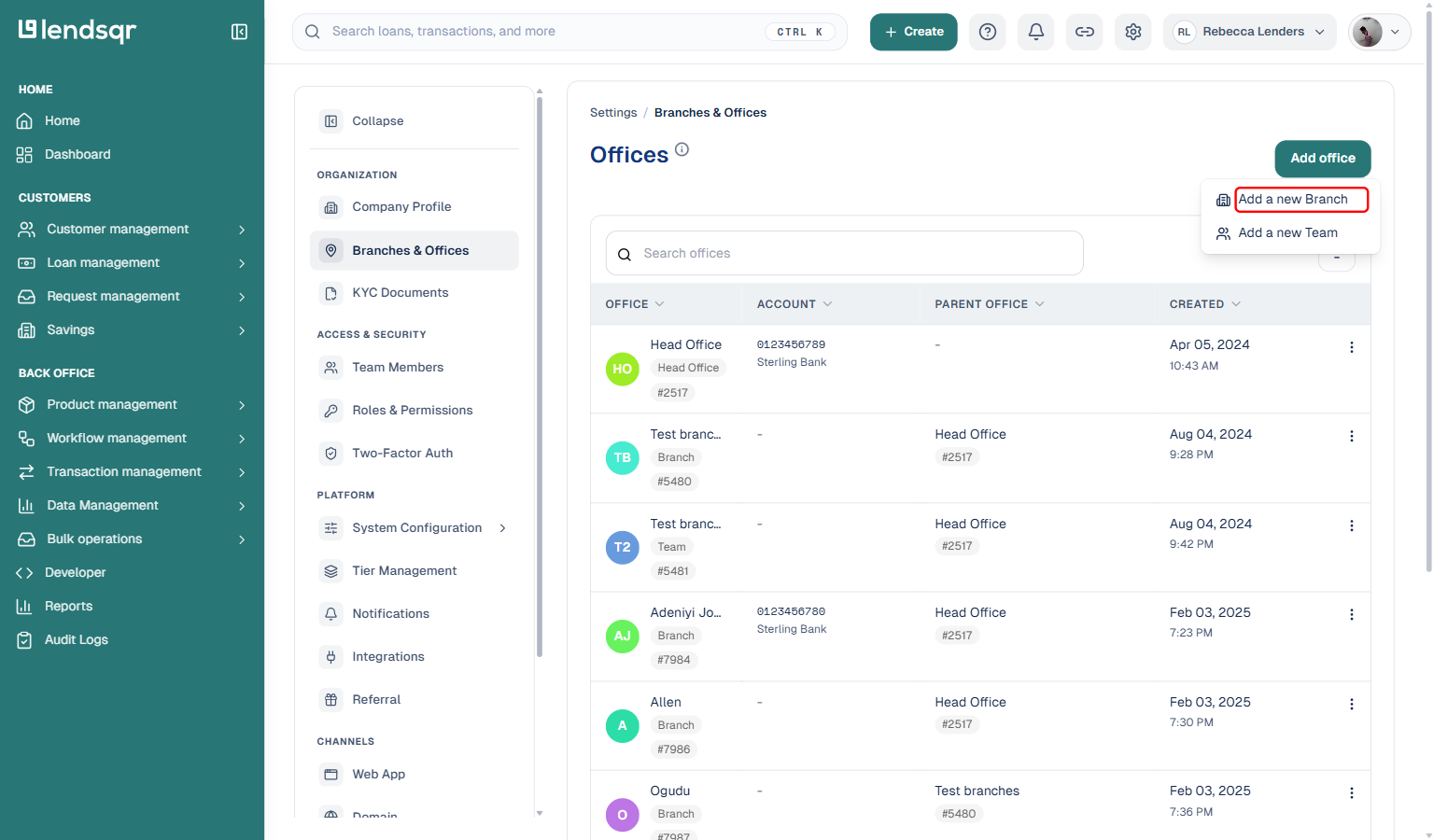
Click Add office, then choose Add a new Branch from the menu that appears. The office type (Branch or Team) is chosen here, not inside the form.
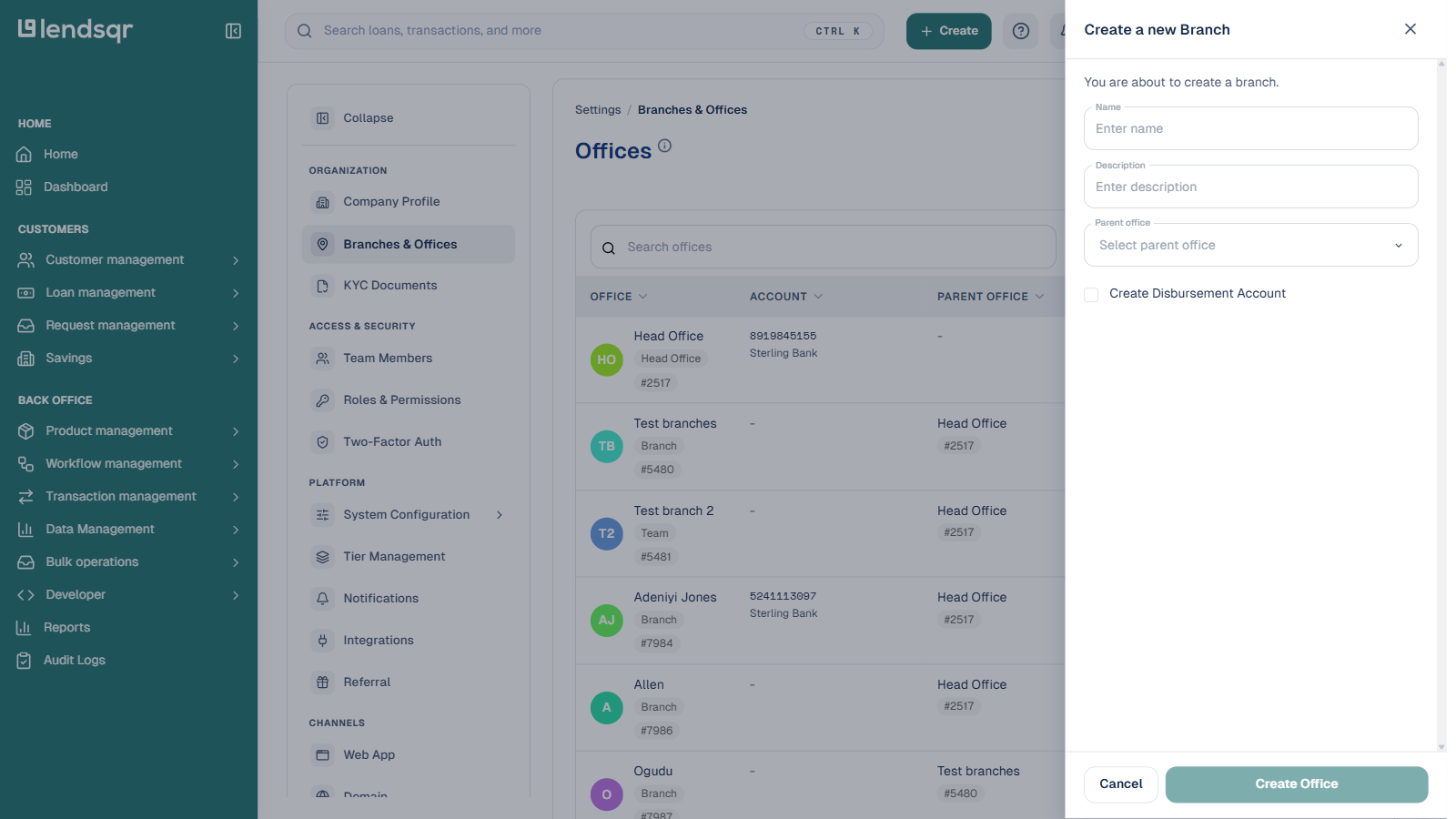
Fill in the Name, Description, and Parent office fields, and tick the Create Disbursement Account checkbox so a wallet is attached to the new branch. Click Create Office.
The new branch, along with its wallet account number, appears among the offices for your organization once it has been created.
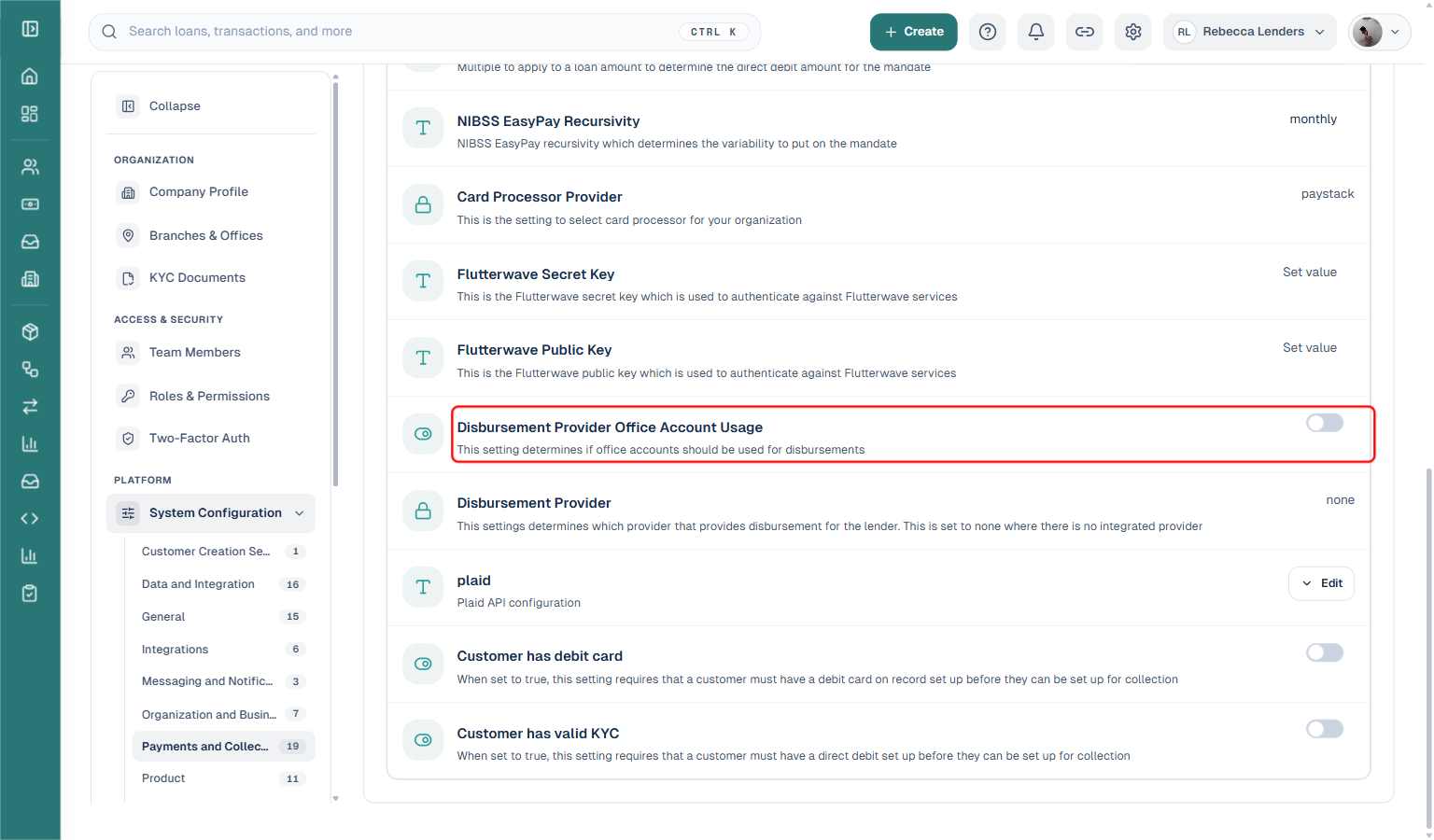
To have disbursements draw from each branch’s own wallet instead of the central disbursement account, go to Settings > System Configuration > Payments and Collection, find Disbursement Provider Office Account Usage, and switch it on. This is an organization-wide setting, not a per-transaction choice.
What happens after you enable decentralized disbursements
Once the configuration is active, each branch’s loan disbursements draw automatically from that branch’s own wallet instead of the central disbursement account, based on which office originated the loan. The Disbursement Transactions page does not have a manual wallet picker; the routing happens behind the scenes once the setting is on.
Your headquarters retains full visibility. The admin console still shows all branch wallets and their transaction activity from one place. You can monitor balances, review disbursement history, and compare branch activity without leaving the platform.
Each branch wallet needs to be funded separately. Branch managers are responsible for ensuring their wallets have sufficient funds before disbursement sessions. Your finance team should establish a clear process for transferring funds into each branch wallet ahead of scheduled disbursement runs.