Access your Back Office at your fingertips.
Download the app now on Google Play Store.
Scan the QR code
You can also scan QR code with your phone to download the app.
How to enable NIN verification on your loan product
Updated
On this page
Identity fraud is one of the most common risks digital lenders face in Nigeria. Someone applies using another person’s details, passes basic checks, and receives funds they never intend to repay. By the time the lender notices, the money is gone.
Requiring borrowers to verify their National Identification Number (NIN) is one of the most effective ways to stop this. Lendsqr lets lenders enable this on any loan product through two separate settings: one controls whether and when the NIN is collected from the borrower at all, and the other controls when the system actually runs the verification check against it.
This guide explains what NIN verification does in lending, how these two settings relate to each other, and how to configure both in your admin console.
Why NIN verification matters for lenders
A National Identification Number (NIN) is a unique identity number the Nigerian government assigns to every citizen through the National Identity Management Commission (NIMC). It links to a person’s biometric data, including fingerprints and facial image. This makes it one of the most reliable identity credentials available to lenders in Nigeria.
When a lender enables NIN verification on a loan product, the system cross-checks the borrower’s NIN record against their BVN data. If the details match, the borrower passes. If they do not, the application stops until the issue gets resolved.
This matters for four reasons.
Fraud prevention. A fraudster applying with stolen identity details would need both the NIN and BVN of the same person to align. NIN verification makes this combination significantly harder to fake.
Compliance. Regulatory expectations around Know Your Customer (KYC) requirements in Nigeria are increasing. Collecting and verifying NIN data helps lenders demonstrate that they took reasonable steps to confirm borrower identity before disbursing funds.
Portfolio quality. Loans made to verified borrowers tend to perform better than those made without proper identity confirmation. Borrowers who know their real identity is on record are less likely to default strategically.
Cost control. Each NIN check typically has a cost. Where that check runs in the borrower journey affects how many checks you pay for on applications that never actually turn into disbursed loans.
Two settings, two different jobs
It is easy to assume NIN verification is a single on/off switch, but Lendsqr splits it into two settings that work together:
Require NIN controls whether the borrower has to provide their NIN at all, and if so, at what point they are asked for it, before or after submitting the loan request, on whichever channel they apply from (web or the mobile app).
NIN Verification controls when the system actually runs the verification check against the NIN that was collected, comparing it with the borrower’s BVN data. This is separate from collection: a NIN can be collected early but verified later.
In practice, most lenders set these consistently (for example, collect and verify both before the loan request), but they can be configured independently.
Require NIN: whether and when it is collected
This setting has three options:
before-loan-request
The borrower must provide their NIN before the system lets them submit a loan application at all. This is the stricter setting: it filters out applicants who cannot supply a NIN early and reduces wasted processing time on applications that would fail later anyway. The trade-off is friction, some borrowers abandon the application at this step even when they are legitimate customers.
after-loan-request
The borrower can submit the loan application first and provide their NIN afterward, as a required step before the loan can move further. This keeps the initial application smooth, at the cost of unverified applicants sitting in your pipeline for longer.
none
NIN is not required for this product at all. Use this for products where NIN is not needed, or where you rely on other identity verification methods.
NIN Verification: when the check itself runs
Once a NIN has been collected, this setting decides when the system actually verifies it against BVN data:
Loan application
The NIN is verified as part of the application itself, before the request reaches your team. This catches identity mismatches as early as possible.
Loan approval
Verification runs later, at the point your team approves the loan, rather than at the point the borrower applied. Since a NIN check typically has a cost, and many applications are abandoned or declined before they ever reach approval, this option means you are only paying for a verification check on loans that make it as far as approval. It keeps the up-front application experience unaffected by the verification step, at the cost of leaving unverified applicants in your pipeline for longer, similar to the trade-off with Require NIN’s after-loan-request option.
How to configure both settings
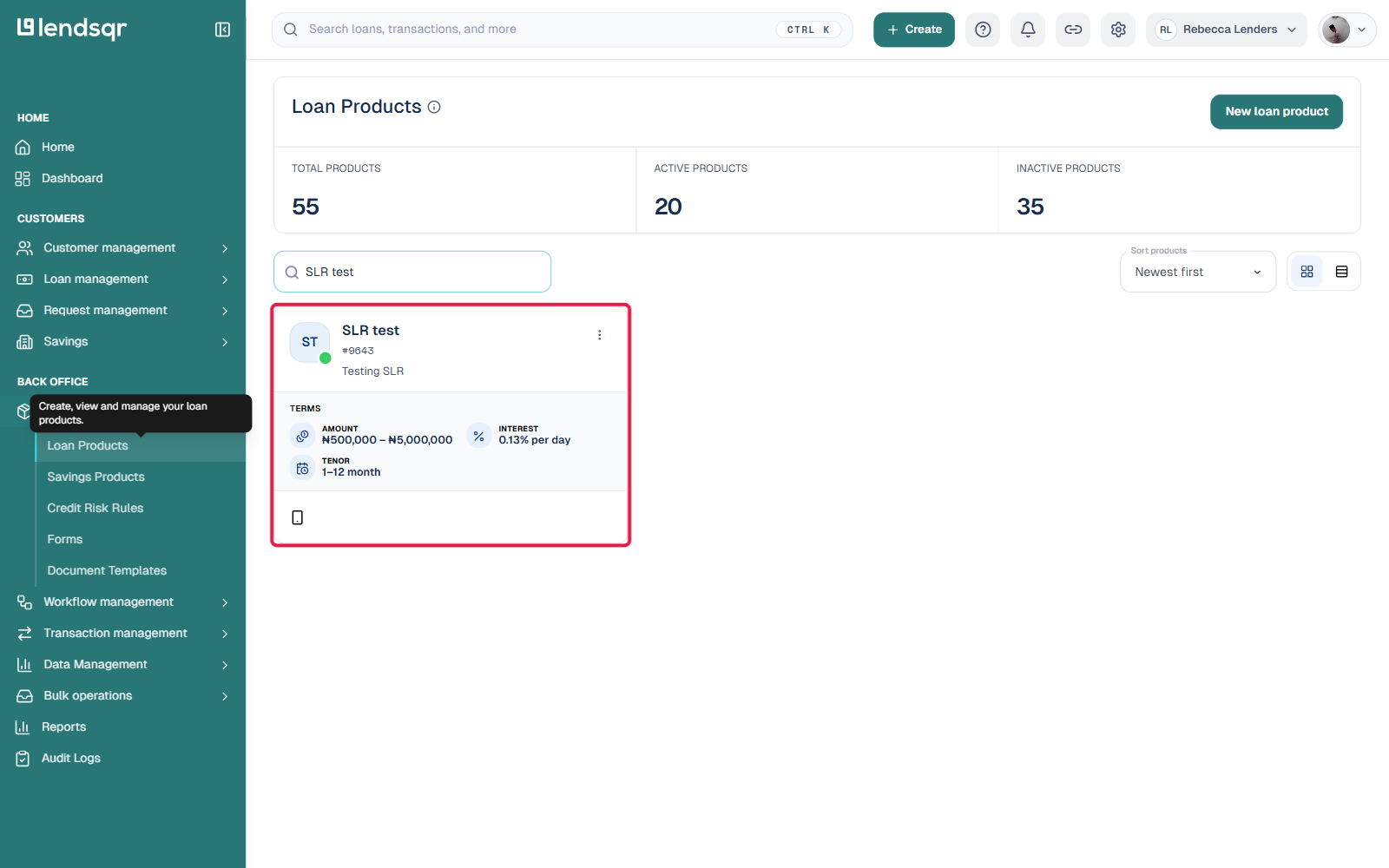
Log in to your Lendsqr admin console. From the side navigation, click Product Management, then select Loan Products.
Open the loan product you want to configure.
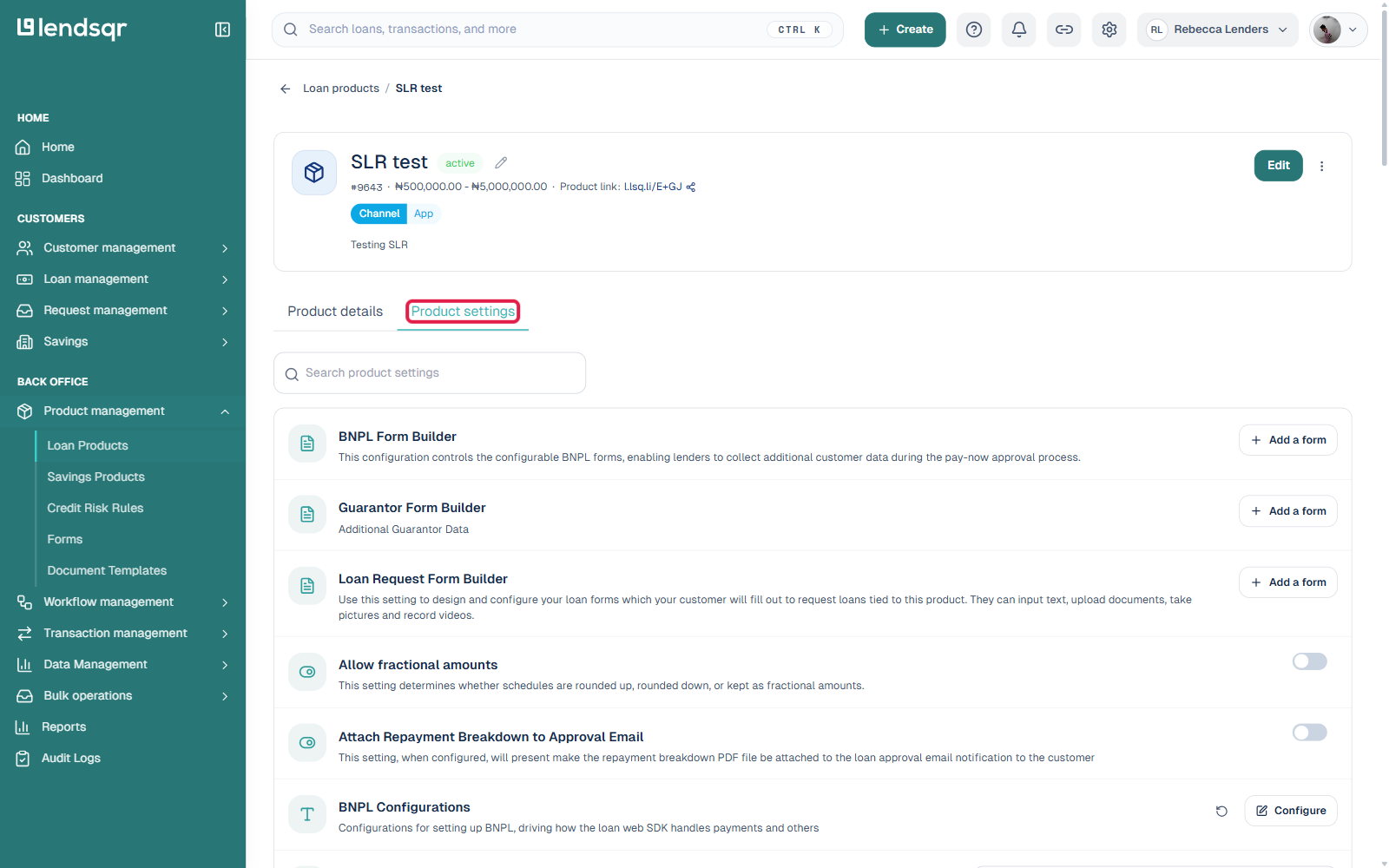
Click the Product settings tab. This opens a searchable list of individual settings for the product rather than one long form, so use the search box to filter down to NIN instead of scrolling through everything.
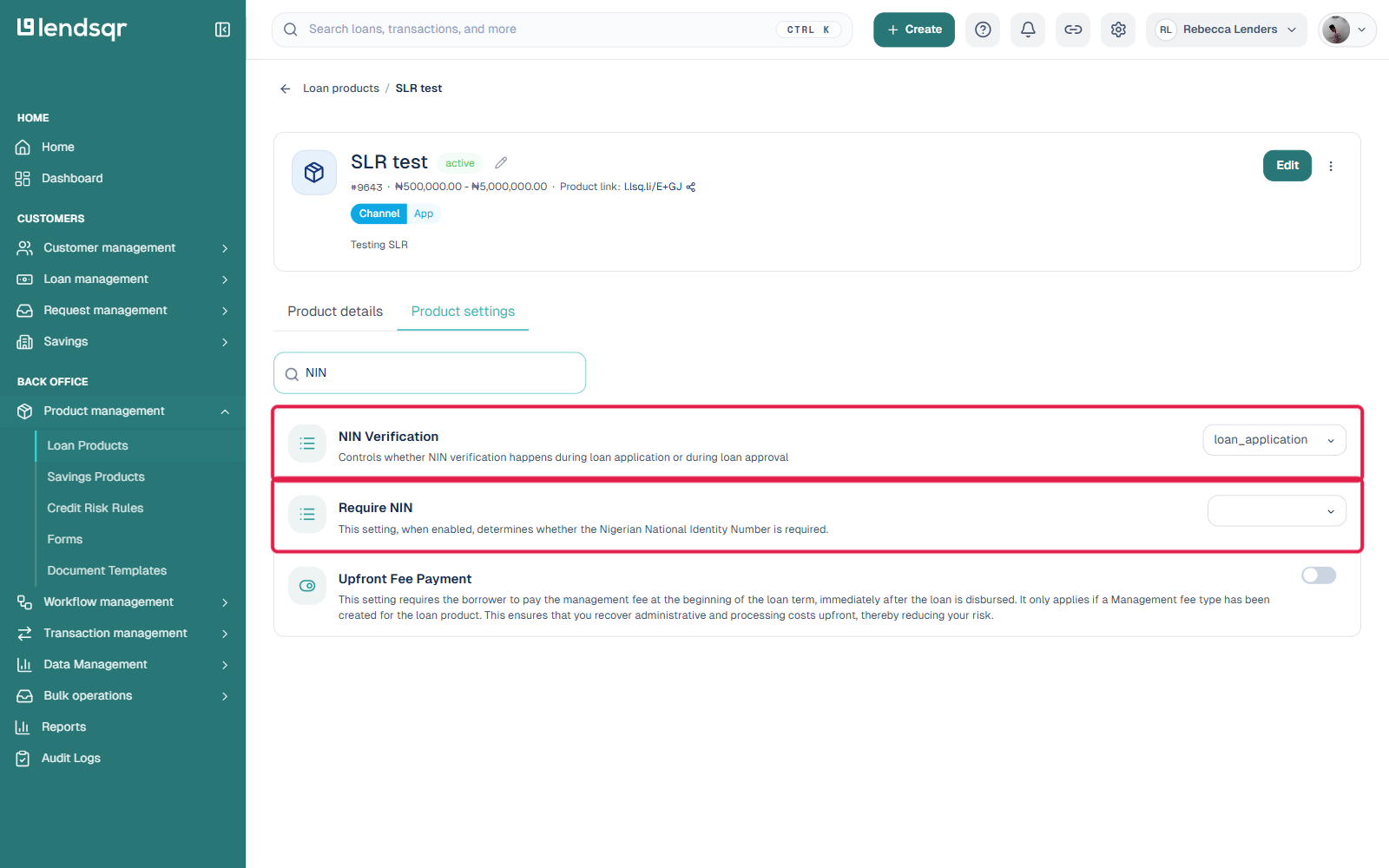
Searching “NIN” surfaces both settings together: NIN Verification with its Loan application / Loan approval dropdown, and Require NIN with its none / before-loan-request / after-loan-request dropdown. Set each one independently to match the behavior you want.
Product setting changes like these apply as soon as you make them, there is no separate Save button to click.
What to keep in mind after configuring these settings
Once these settings are active on a product, every new loan application under that product follows the choices you made. Existing loans already in the pipeline are not affected.
If borrowers struggle to pass NIN verification because of mismatches between their NIN and BVN records, you can adjust which fields the system cross-checks. This separate configuration is covered in the guide: How to fix NIN verification mismatches on your loan applications.
For a broader understanding of how identity verification fits into your KYC setup on Lendsqr, read the Introduction to KYC. For more on managing fraud risk in digital lending, visit the Lendsqr blog.