Access your Back Office at your fingertips.
Download the app now on Google Play Store.
Scan the QR code
You can also scan QR code with your phone to download the app.
How to get video and audio recordings from your customers
Updated
On this page
Why video and audio recordings matter in loan applications
In today’s competitive lending market, lenders need to engage customers innovatively. Allowing loan applicants to send video and audio messages as part of their loan application adds a personal touch, fosters trust, and provides a better understanding of the borrower’s intentions.
For example, a local food vendor applying for a microloan could submit a short video explaining that she needs the loan to buy a larger stove to meet growing customer demand. In the video, she describes her daily sales, regular customer base, and how the loan will help increase her income, enabling her to repay in weekly installments. This visual and verbal context helps the lender better assess her credibility and business potential, especially in the absence of formal financial records.
The evolution of loan application processes
Traditional loan applications rely heavily on written forms, financial statements, and documentary evidence. While these elements remain important, they often fail to capture the full story of a borrower’s situation, especially for informal sector workers, small business owners, and individuals without extensive financial documentation.
Video and audio recordings bridge this gap by allowing borrowers to present themselves directly to loan officers. A borrower’s tone of voice, body language, and ability to articulate their business plans provide valuable signals that paper applications cannot convey.
These human elements help lenders make more informed decisions, particularly in markets where traditional credit scoring is less effective.
By accommodating different communication styles, lenders can serve a broader customer base while gathering richer application information.
Benefits for lenders implementing multimedia applications
First, multimedia submissions provide deeper insight into borrower credibility and intent. When you can see and hear applicants explaining their loan purpose, you gain context that written applications cannot provide. A borrower who speaks passionately and knowledgeably about their business demonstrates engagement and understanding that suggests higher repayment likelihood.
Video and audio also help detect fraud and inconsistencies. It becomes much harder for someone to misrepresent themselves when they must appear on camera and speak about their situation. Lenders can compare information provided in the video with written application details to identify discrepancies that warrant further investigation.
The feature improves efficiency in loan processing by reducing the need for multiple phone calls and in-person interviews. Instead of scheduling calls to clarify application details, loan officers can review submitted videos at their convenience, gathering the same information in less time.
For lenders serving rural or remote areas, video and audio submissions eliminate the need for borrowers to travel long distances for in-person interviews. This expands your serviceable market while reducing borrower burden, making your products more accessible and attractive.
Benefits for borrowers
Video and audio submissions allow borrowers to present themselves as complete individuals rather than just data points. Someone with limited formal education or weak documentation can still demonstrate their capability, trustworthiness, and business acumen through a well-articulated video explanation.
The format also helps borrowers explain complex or unusual situations that do not fit neatly into standard application forms. A farmer seeking a loan for irrigation equipment can show their land, explain seasonal cash flows, and describe how the investment will improve yields in ways that a written application cannot capture.
For borrowers who are nervous about formal processes, recording a video in the comfort of their home or business may feel less intimidating than sitting across from a loan officer for an interview. This comfort can lead to more authentic and informative submissions.
The multimedia option also saves borrowers time and money. Instead of taking time off work to visit a branch for an interview, they can record and submit their video whenever convenient, reducing the opportunity cost of applying for credit.
Use cases across different lending scenarios
For microlending to informal sector workers, videos are particularly valuable. A market trader can film their stall, show their inventory, and explain their customer base. A hairdresser can demonstrate their salon setup and discuss their regular clientele. These visual elements provide context that compensates for the lack of formal financial records.
Agricultural loans benefit significantly from video submissions. Farmers can show their land, crops, or livestock while explaining their production cycles, market access, and how loan proceeds will be invested. This visual evidence helps lenders understand the agricultural operation in ways that written descriptions cannot achieve.
Educational loans can incorporate videos where students or parents explain their educational goals, career aspirations, and repayment plans. Hearing the commitment and clarity in an applicant’s voice provides signals about their seriousness and likelihood of completing their education.
Emergency or medical loans might include brief video explanations of the situation, helping lenders process urgent requests more quickly while maintaining appropriate due diligence. A parent explaining their child’s medical emergency creates empathy and context that speeds decision-making.
Understanding the custom form builder and JSON configuration
To enable video and audio recording capabilities, Lendsqr uses a flexible custom form builder that operates through JSON configuration. Understanding this system helps you customize the feature to match your specific requirements.
The custom form builder accepts JSON payloads that specify exactly what fields should appear in your loan application form, what type of input each field accepts, and what validation rules apply.
The JSON structure includes several key components. The meta section provides basic information about the form, including its name, description, version, status, and associated URL. This metadata helps you organize and manage multiple custom forms across different loan products.
The fields array within each section defines the individual input elements that borrowers interact with. Each field has properties including an ID for internal reference, a name, a type that determines what kind of input it accepts, a label that appears to users, a description providing guidance, and validation rules that enforce requirements.
For media capture, three field types are relevant. The audio type creates an audio recording interface where borrowers can record voice messages. The video type provides video recording capability. The image type allows borrowers to capture still photographs.
Validation rules for media fields can include requirements like whether the field is mandatory, minimum duration or file size, and maximum duration or file size. These constraints ensure you receive usable submissions while preventing extremely large files that burden your infrastructure.
Step-by-step guide to enable video and audio recordings
Configuring video and audio recording capability for your loan products involves several straightforward steps in the Lendsqr admin console.
1. Login to the Admin Console
Open your web browser and log into the Lendsqr admin console with your credentials.
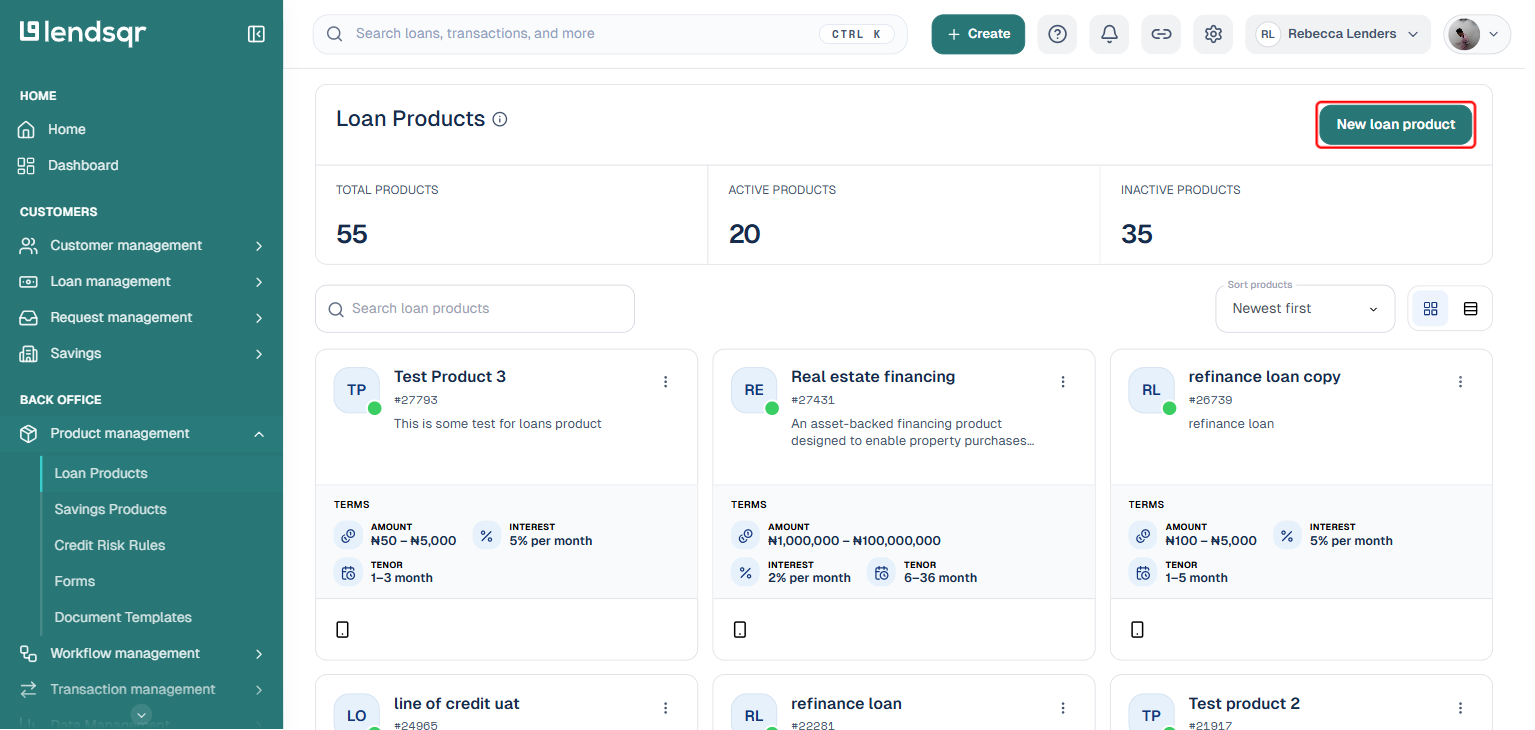
2. Click on “Loan Products” under Product Management
From the main dashboard, go to Product Management and select Loan Products. This will display a list of all the loan products you have created.
3. Create a Loan Product or Open an Existing One
If you need to create a new loan product, click on the Create button. If you want to an existing loan product, click on the product name to open it.
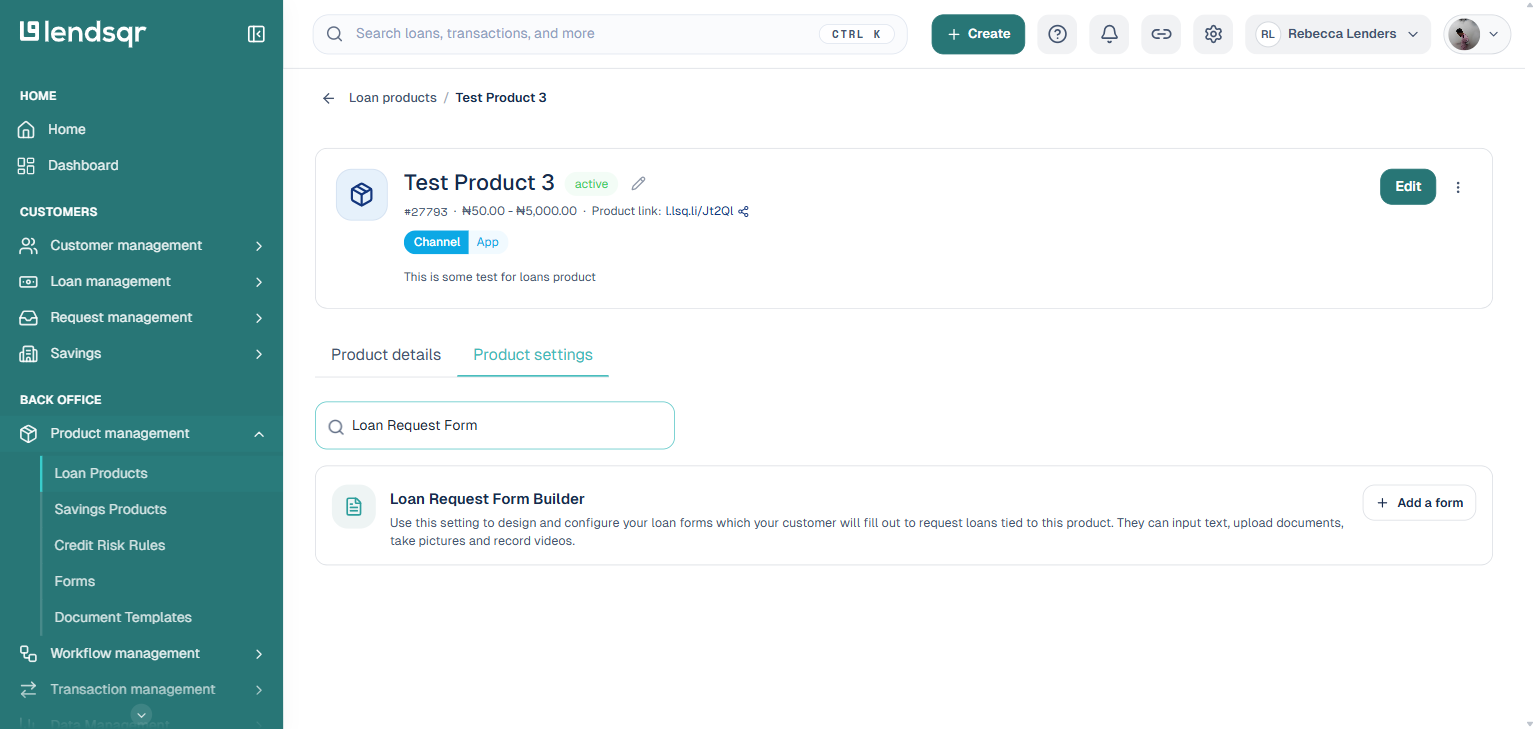
4. Click on the “Product settings” Tab on the Product Page
On the loan product detail page, navigate to the Product settings tab. Here, you can search for and manage individual product settings.
Step 5: Locate the “Loan Request Form Builder” setting
Use the search box to find the Loan Request Form Builder setting.
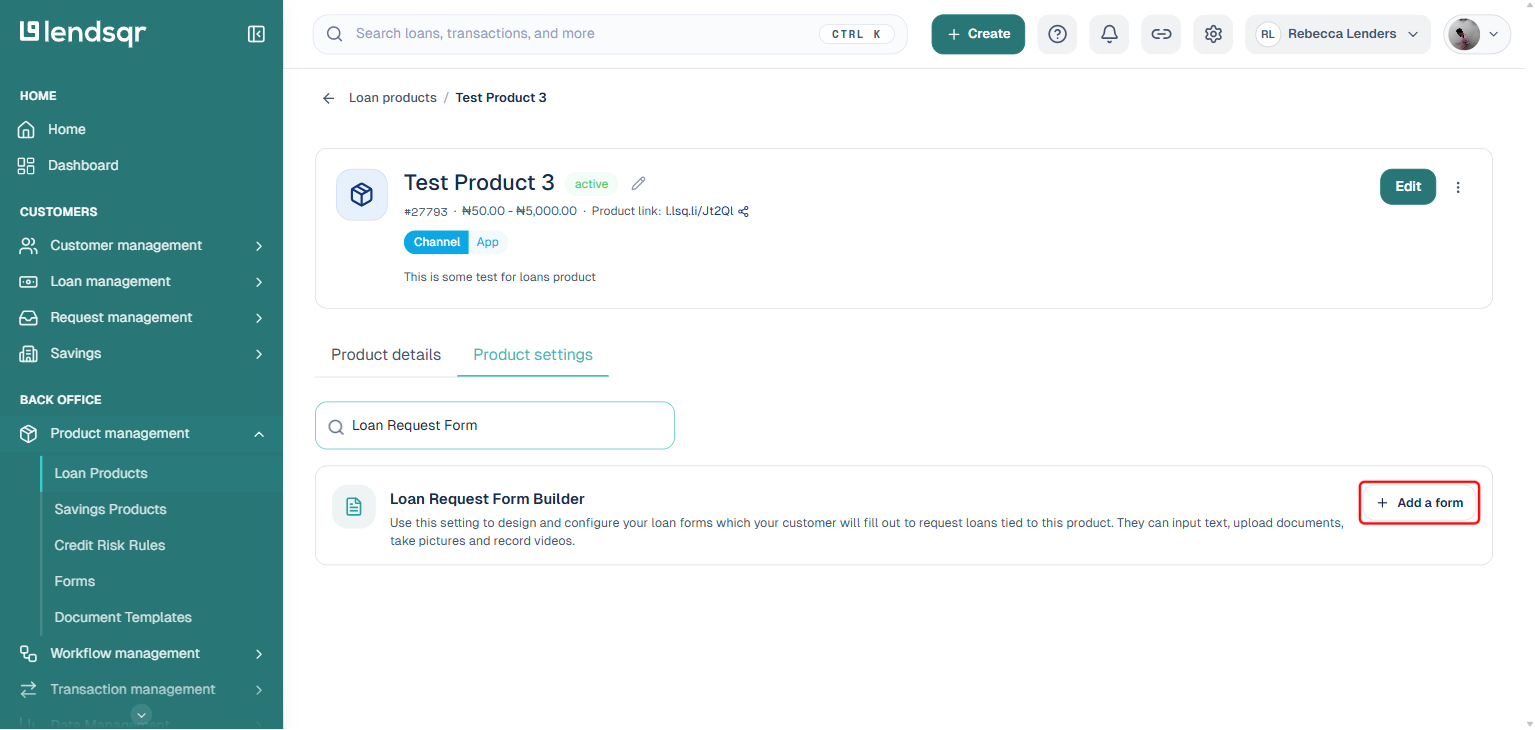
Click the Add a form button, then Create a new form. This opens the form designer.
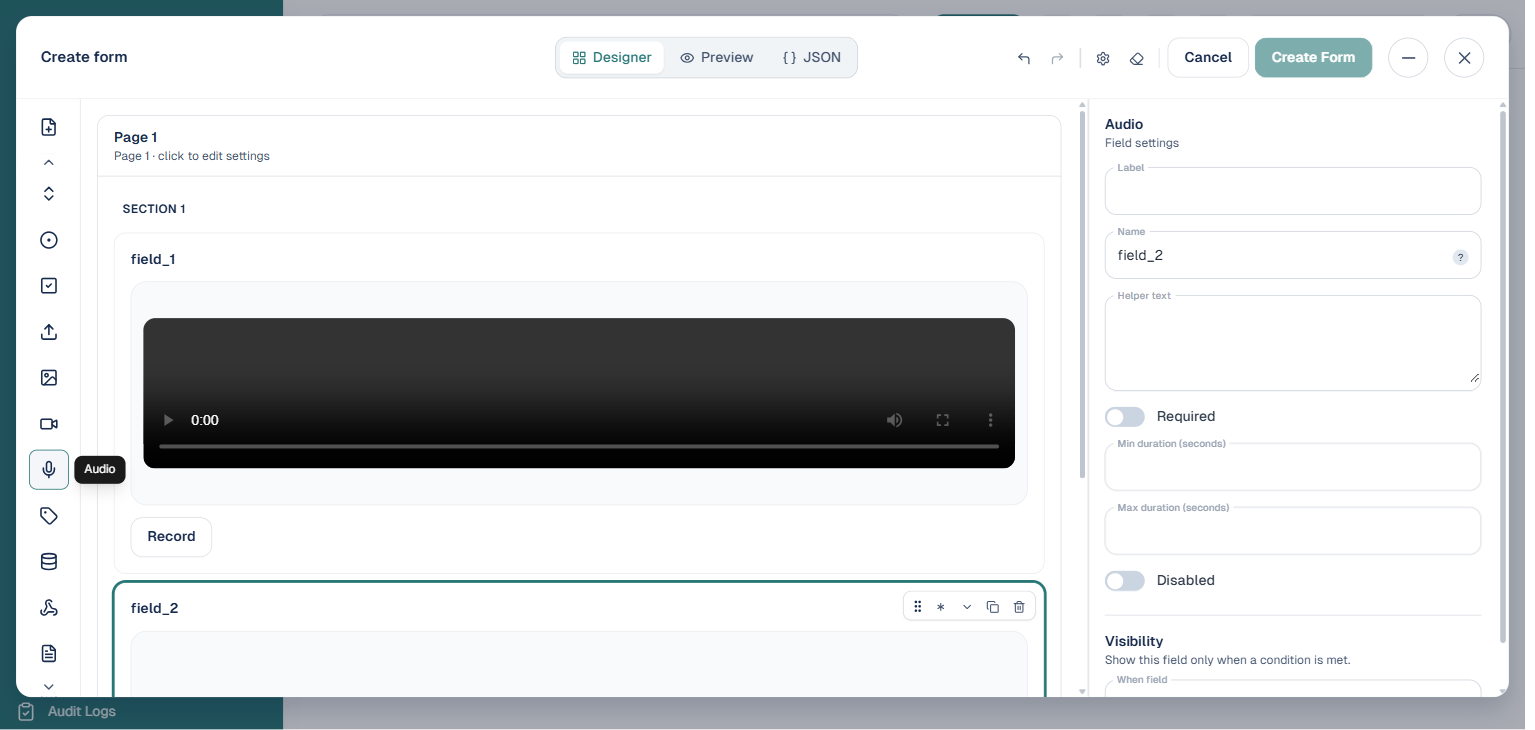
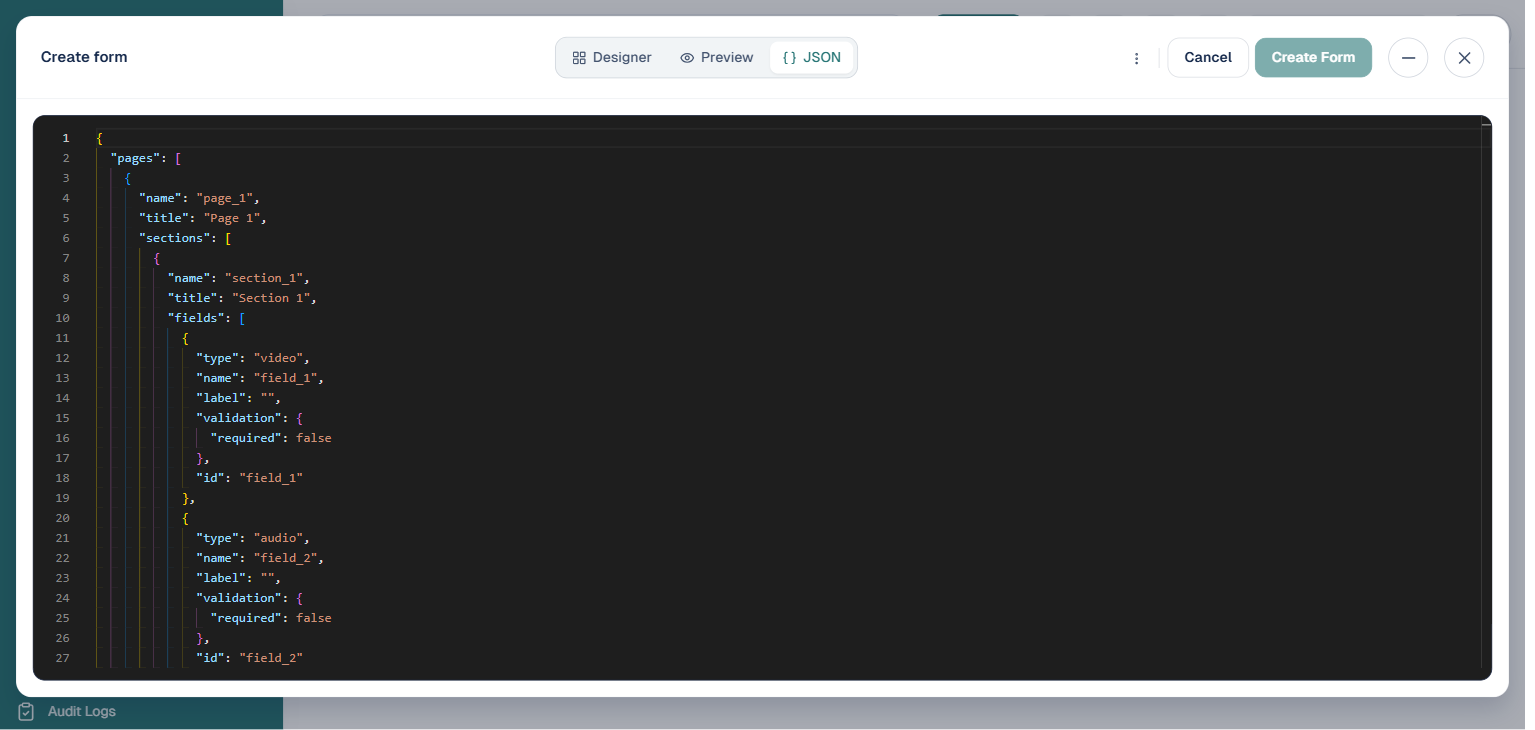
Step 6: Add your fields, either visually or by pasting a JSON payload
The form designer now offers two ways to build your form. You can click the Video, Audio, or Image buttons in the left-hand field palette to drag those field types directly onto the canvas, then configure each field’s label, whether it is required, and its minimum and maximum duration in the settings panel on the right. Or, if you prefer to work from a payload, switch to the JSON tab at the top of the designer and paste or edit the structure directly, using the payload below as a starting point or reference.
{"meta": {"name":"Test CLF loan","description":"Some random description","version":"1.0","status":"active","url":"https://lcdd.lsq.app/"},"pages": [{"name":"Test Media for CLF","title":"Media CLF loans","description":"Description for Media loans","actions": [{"type":"submit","label":"Submit Loan","message":"You are about to submit your loan request. Please confirm your submissions and click submit to proceed?"},{"type":"cancel","label":"Cancel","message":"If you cancel this, all the information you have provided will be discarded. Are you sure you want to do this?"} ],"sections": [{"name":"Test Media Loans","description":"Follow the instructions","fields": [{"id":"audio","name":"Audio","type":"audio","label":"Record an Audio","description":"Record an Audio","validation":{"required":true,"minimum_length":5,"maximum_length":10}},{"id":"video","name":"video","type":"video","label":"Record a Video","description":"Record a Video","validation":{"required":true,"minimum_length":5,"maximum_length":10}},{"id":"image","name":"Image","type":"image","label":"Image","description":"Take a Picture","validation":{"required":true}} ]} ]} ]}
If you used the JSON tab, simply paste the payload into the editor there. You can customize the meta information to reflect your actual loan product name and description. You can also adjust validation rules, changing the minimum and maximum lengths to suit your requirements, or make fields optional by setting required to false.
Step 7: Click on “Create Form”
Once you have added and configured your fields, either visually or via JSON, click the Create Form button to save the form. Then select it from the Loan Request Form Builder setting on your loan product. Your loan product will now include video, audio, and image capture capabilities in its application form.
Best practices for implementing multimedia loan applications
Successfully deploying video and audio recording features requires more than just technical configuration. Follow these best practices to maximize the benefits while maintaining a smooth borrower experience.
Provide clear instructions to borrowers about what they should include in their videos and audio recordings. Create guidelines explaining what information is most helpful, how long recordings should be, and what specific questions they should address. Without guidance, borrowers might submit unfocused content that does not provide the information you need.
Set appropriate duration limits that balance information quality with file size management. Very short recordings might not provide sufficient detail while very long recordings create storage and review burdens. For most applications, one to three minute videos provide good balance.
Train your loan officers on how to review and evaluate multimedia submissions. Create rubrics or checklists that help ensure consistent assessment across different reviewers. What signals should they look for? What red flags warrant additional scrutiny? Standardized evaluation processes improve fairness and accuracy.
Ensure your infrastructure can handle the storage and bandwidth requirements of video files. Videos consume significantly more storage than text or even images. Plan your storage capacity accordingly and implement compression where appropriate to manage costs.
Protect borrower privacy by securing video and audio files appropriately. These recordings contain sensitive personal information and must be stored with the same security standards as other loan application data. Implement access controls ensuring only authorized personnel can view submissions.
Consider offering multimedia submission as optional rather than mandatory for some loan products. While it provides valuable information, requiring video might exclude borrowers who lack suitable devices or internet connectivity. Making it optional maximizes accessibility while still gathering rich data from those who can provide it.
Monitor completion rates to understand if multimedia requirements create friction. If many borrowers start applications but abandon them at the video recording stage, the feature might be too intimidating or technically challenging. Simplifying instructions or providing examples might improve completion.
Provide examples of good video submissions to help borrowers understand expectations. Sample videos showing appropriate length, content, and quality guide borrowers toward submissions that meet your needs while building their confidence in the process.
Multimedia loan applications represent a significant evolution in how lenders gather and assess information. By combining traditional documentation with the personal touch of video and audio, you create a more complete picture of each borrower while building stronger relationships and making more informed credit decisions.