Access your Back Office at your fingertips.
Download the app now on Google Play Store.
Scan the QR code
You can also scan QR code with your phone to download the app.
How to reverse a loan
Updated
On this page
Reversing a loan allows you to cancel a disbursed loan and return the funds to your disbursement account provided the borrower has not used the funds. This is a critical operational feature for maintaining financial accuracy and preventing unused loans from remaining active in your system.
This guide explains when and how to reverse a loan on the Pecunia admin console, including requirements, system checks, and common failure scenarios.
What does it mean to reverse a loan?
A loan reversal recalls disbursed funds back from a borrower’s wallet. It is only possible when the borrower has not yet withdrawn the money. If the funds are still sitting in their Lendsqr wallet, the disbursement can be undone.
This is different from settling or terminating a loan. Settlement closes a loan that has been partially or fully repaid. Termination ends a loan due to default or agreement. Reversal specifically undoes a disbursement where the money was never actually used by the borrower.
Real-world scenarios where reversal applies:
A loan was disbursed to the wrong borrower account due to a data entry error.
A borrower was approved and funded but then immediately flagged for fraud.
An admin approved a test loan that was never meant to disburse.
A disbursement was triggered in error and the borrower confirms they have not touched the funds.
Overview
A loan reversal applies to loans that have already been:
Approved
Disbursed to the user’s wallet
However, the borrower must not have withdrawn or used any portion of the funds.
When a loan is reversed:
The system retrieves the full disbursed amount from the user’s wallet
The funds are returned to your disbursement account
The loan status is updated to Reversed
When should you reverse a loan?
You should consider reversing a loan in the following scenarios:
The borrower no longer wants the loan after disbursement
Funds were disbursed in error
The borrower has not accessed or withdrawn the funds
A verification or compliance issue is identified post-disbursement
⚠️ Note: If the borrower has already used any part of the loan, reversal will not be possible.
Prerequisites
Before attempting to reverse a loan, ensure the following conditions are met:
If you cannot see the Reverse Loan option, your role may not have sufficient permissions.
2. Loan must be disbursed
The loan must be in an active state (e.g., Running)
Funds must already be credited to the user’s wallet
3. Full loan amount must be available in wallet
The system performs an automatic validation:
Confirms that 100% of the disbursed amount is still in the user’s wallet
Ensures no withdrawals or transfers have occurred
If this condition is not met, the reversal will fail
How to reverse a loan on Lendsqr
To do this, kindly follow the steps below:
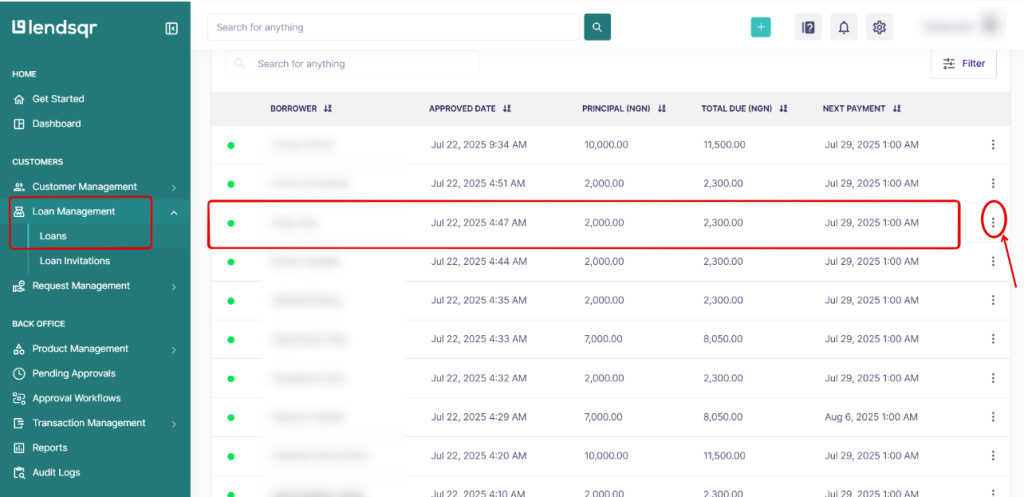
Step 1: Navigate to Loans
Log in to the Pecunia admin console
Go to Loan Management
Click on Loans
Locate the loan you want to reverse
Click the three-dot menu (⋮) next to open the loan detail page
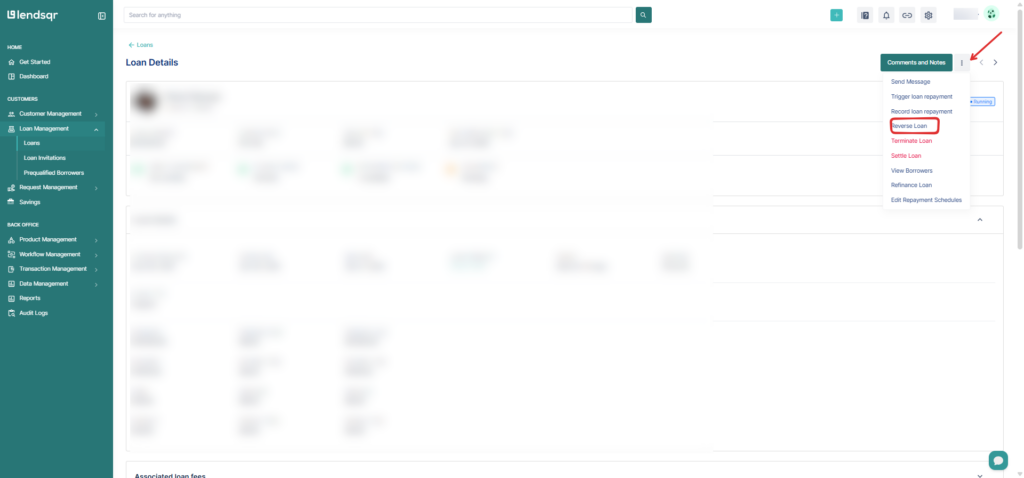
Step 2: Initiate reversal
On the loan detail page, look for the Comments and Notes button near the top right. Click the three-dot menu (…) directly beside it.
From the dropdown, select Reverse Loan.
Step 3: Enter reversal reason
A modal will appear prompting for additional details
Provide a clear reason for the reversal (e.g., “User requested cancellation”)
This helps with audit tracking and internal documentation
Click Submit, The system will:
Verify wallet balance
Reverse the transaction if conditions are met
Step 6: Confirm Outcome
The loan status will update to Reversed
Funds will be returned to your disbursement account
What happens after a reversal?
Once reversed, the loan status changes to Reversed and the borrower’s wallet balance is adjusted accordingly. The funds are returned to your disbursement account. The borrower will receive a notification and can no longer access those funds.
A reversed loan is a permanent action. It cannot be undone. If the borrower still needs a loan, a new application must be submitted.
Edge cases and operational scenarios
1. Partial Withdrawal
Even if a small portion of the loan is used
The reversal will fail completely
There is no partial reversal functionality.
2. Instant transfers to bank
If your product uses bank disbursement:
Funds may move from wallet to bank immediately
This makes reversal impossible
3. Delayed reversal attempt
The longer you wait, the higher the chance funds have been used
Reversal success decreases over time
4. Multiple admin actions
If another admin modifies the loan (e.g., repayment or restructuring)
Reversal may no longer be valid
Troubleshooting and common errors
“Loan reversal failed”
Possible causes:
Funds have been partially or fully withdrawn
Wallet balance is lower than disbursed amount
Resolution:
Confirm wallet balance
Consider alternative actions (e.g., repayment or recovery)
“Reverse loan option not visible”
Possible Causes:
Insufficient permissions
Loan is not in a reversible state
Resolution:
Check admin role permissions
Confirm loan has been disbursed
“Loan still active after reversal attempt”
Possible causes:
Reversal request was not successfully submitted
System validation failed
Resolution:
Retry the process
Confirm success message appears
Important considerations
1. No impact on used loans
Reversal only applies to unused funds. If the borrower has accessed the loan:
You must proceed with normal repayment or recovery processes
2. Audit and traceability
Always provide a clear reason for reversal
This ensures proper audit logs and compliance tracking
3. Impact on loan status
After reversal:
Loan is no longer active
It does not require repayment
Status becomes Reversed, indicating a cancelled disbursement
Best practices
Reverse loans immediately after identifying an issue
Monitor disbursements closely to catch errors early
Communicate with borrowers before reversing (if applicable)
Avoid delays that may lead to fund usage
Frequently asked questions
What if the Reverse Loan option does not appear in the menu?
The Reverse Loan option only appears if the loan is in a Disbursed or Running state and the funds are still in the borrower’s wallet. If the borrower has already withdrawn the funds, or if the loan is in a different status (e.g., Settled or Terminated), the option will not be available. Verify the borrower’s wallet balance first.
Who can reverse a loan?
Only admins with the appropriate permissions can reverse a loan. If you do not see the option in the three-dot menu, contact your Super Admin to check your role permissions.
Is a reversal different from a refund?
Yes. A reversal recalls funds from the borrower’s Lendsqr wallet. It does not process a bank transfer to the borrower. If a borrower has already withdrawn funds and needs money returned to their bank account, that would require a manual refund process, not a reversal.
Conclusion
Reversing a loan on Pecunia is a straightforward but time-sensitive process. It allows you to cancel disbursed loans cleanly—provided the funds remain untouched.
By understanding the system checks, prerequisites, and limitations, you can ensure accurate financial records and avoid unnecessary exposure to risk.