Access your Back Office at your fingertips.
Download the app now on Google Play Store.
Scan the QR code
You can also scan QR code with your phone to download the app.
Modifying decision settings
Updated
On this page
Lenders do not approve every loan application the same way. The criteria used to approve or decline a borrower often change based on risk appetite, market conditions, or product strategy.
For example, a lender may tighten credit checks during periods of high default rates or relax certain rules to increase loan volume during a growth phase.
On Lendsqr, these decisions are controlled through your decision settings. These settings define the rules and checks that determine whether a borrower is approved, declined, or flagged for further review.
What do decision settings mean in lending?
Decision settings are the rules that guide how loan applications are evaluated.
They define what conditions a borrower must meet before a loan can be approved. These conditions may include:
Identity verification checks
Credit score thresholds
Income or affordability requirements
Fraud detection signals
Internal behavioral scoring
Instead of reviewing every application manually, lenders rely on these rules to automate decisions and maintain consistency.
Decision settings are not fixed. They are adjusted over time to reflect real lending performance and strategy.
Common reasons for modifying decision settings include:
Reducing default rates
Increasing approval rates
Testing new credit policies
Responding to fraud patterns
Adjusting to economic conditions
Example scenario
A lender notices that borrowers with low income stability are defaulting more frequently. To reduce risk, they update their decision settings to require stricter income verification and introduce an additional affordability check.
As a result, fewer high-risk borrowers are approved, and overall loan performance improves.
This shows how small changes in decision settings can directly affect lending outcomes.
How decision settings affect loan approvals
Every loan application passes through the configured decision rules before a final outcome is reached.
When you modify these settings, you change:
Who qualifies for a loan
Which applications are flagged for review
How strict or flexible your approval process is
The balance between growth and risk
For example:
Increasing credit score thresholds reduces approvals but improves portfolio quality
Removing a check may increase approvals but introduce higher risk
Adding fraud detection modules may slow approvals but prevent losses
Understanding this balance is important before making any changes.
When to modify decision settings
You should consider updating decision settings when:
Default rates increase beyond acceptable levels
Approval rates are too low or too high
New data sources become available
Fraud patterns evolve
New loan products require different evaluation criteria
Decision settings should reflect your current lending strategy, not just your initial setup.
How to modify decision settings on Lendsqr
Follow these steps to update your decision rules:
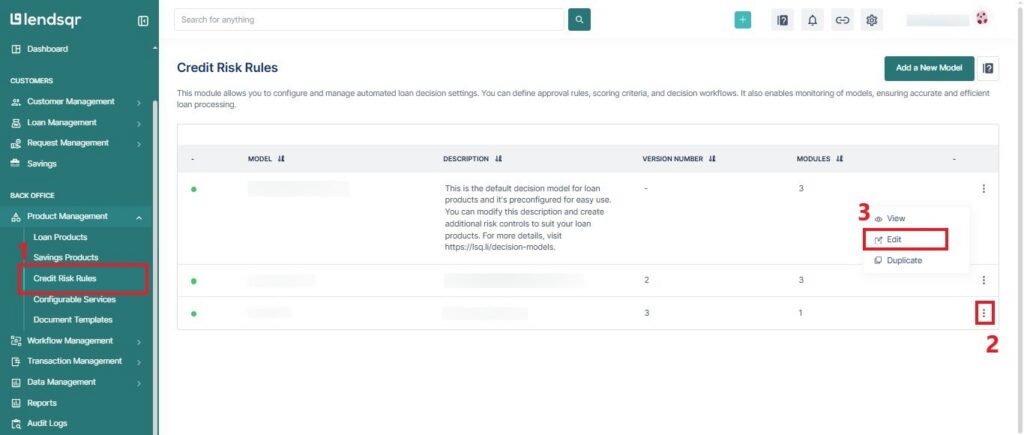
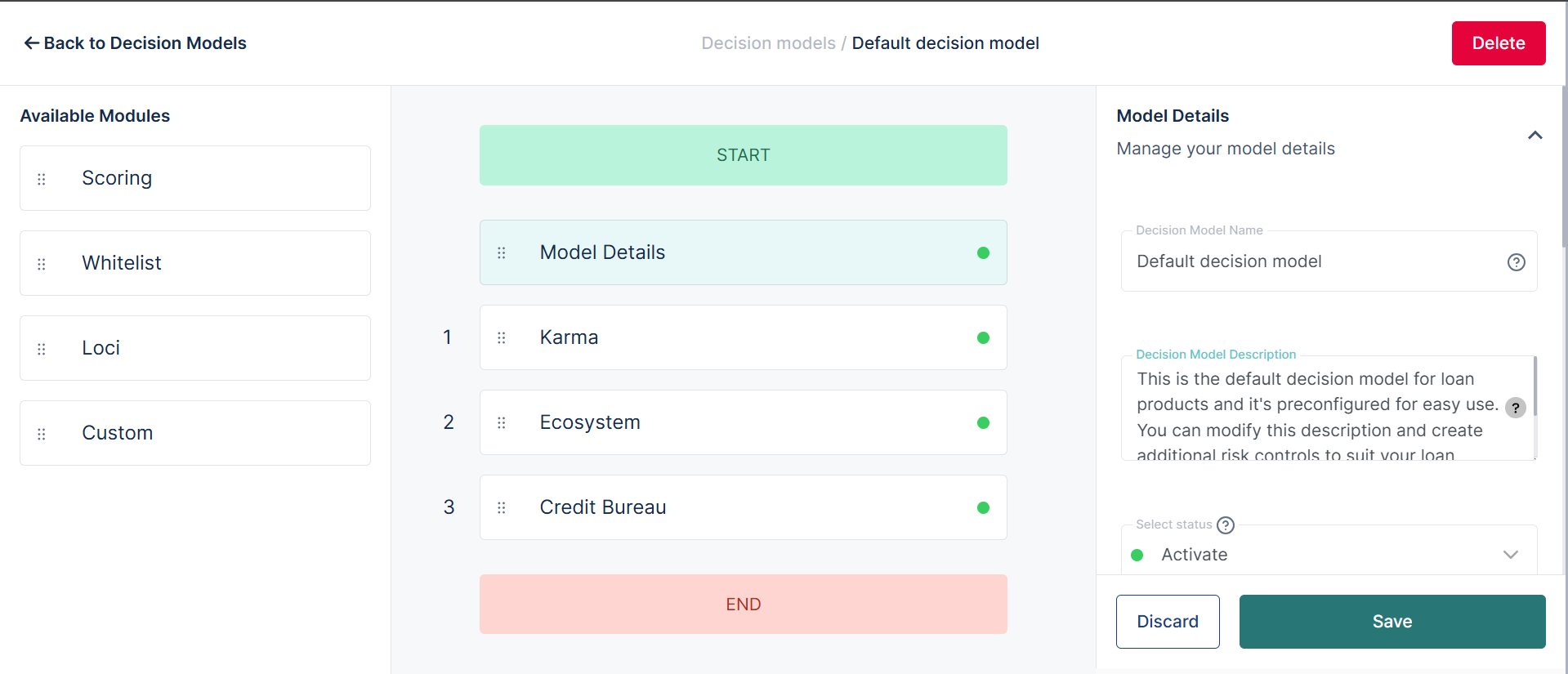
Navigate to the “Credit Risk Rules” sub-tab under the “Product Management” tab in the Back Office section.
On the existing model of your choice, click on the options button (represented by the 3-dots) and select “Edit”.
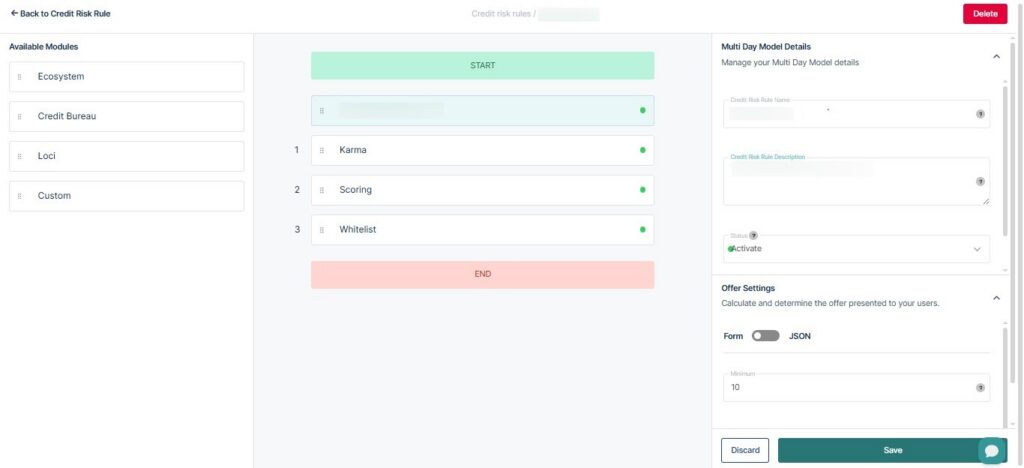
In the decision-setting segment, change the desired fields (for instance, you can change the setting requiredto false for the whitelist, as this will bypass the whitelist check)
You can also change the sequence of a setting (e.g., changing the ecosystem sequence to 2), making it the second check in the sequence.
Then click on “Save Changes” to proceed.
What happens after you modify decision settings
Changes to decision settings take effect immediately for new applications.
This means:
New borrowers will be evaluated using the updated rules
Existing applications may not be affected unless reprocessed
Approval outcomes may change based on the new criteria
For example, if you increase your minimum income requirement, some borrowers who previously qualified may now be declined.
Risks and considerations when modifying decision rules
Changing decision settings can significantly impact your lending performance.
1. Over-tightening rules
If rules become too strict, approval rates may drop sharply, reducing loan volume and revenue.
2. Over-relaxing rules
If rules are too lenient, more borrowers may be approved, but default rates may increase.
3. Unintended rule conflicts
Changes in one module may affect how other modules behave, leading to unexpected outcomes.
4. Lack of testing
Applying changes without testing can introduce errors or misclassify borrowers.
Best practices for adjusting decision settings
To manage decision settings effectively:
Test changes before full rollout
Track approval and default rates after updates
Adjust one variable at a time
Align rules with your credit policy
Review performance regularly
For example, if you add a fraud check, monitor flagged applications and confirm whether they match real fraud cases.
How decision settings fit into your lending strategy
Decision settings sit at the core of your lending operations.
They determine:
Your risk tolerance
Which customers qualify
The quality of your loan portfolio
How efficiently your team operates
Strong decision rules allow you to scale lending without losing control of risk.
Decision settings give you direct control over how your system evaluates loan applications. By adjusting these rules, you can respond to risk trends, improve loan performance, and align approvals with your business goals.
With Lendsqr, you can update decision settings inside your decision models without rebuilding your entire workflow.