Access your Back Office at your fingertips.
Download the app now on Google Play Store.
Scan the QR code
You can also scan QR code with your phone to download the app.
What is tier management?
Updated
On this page
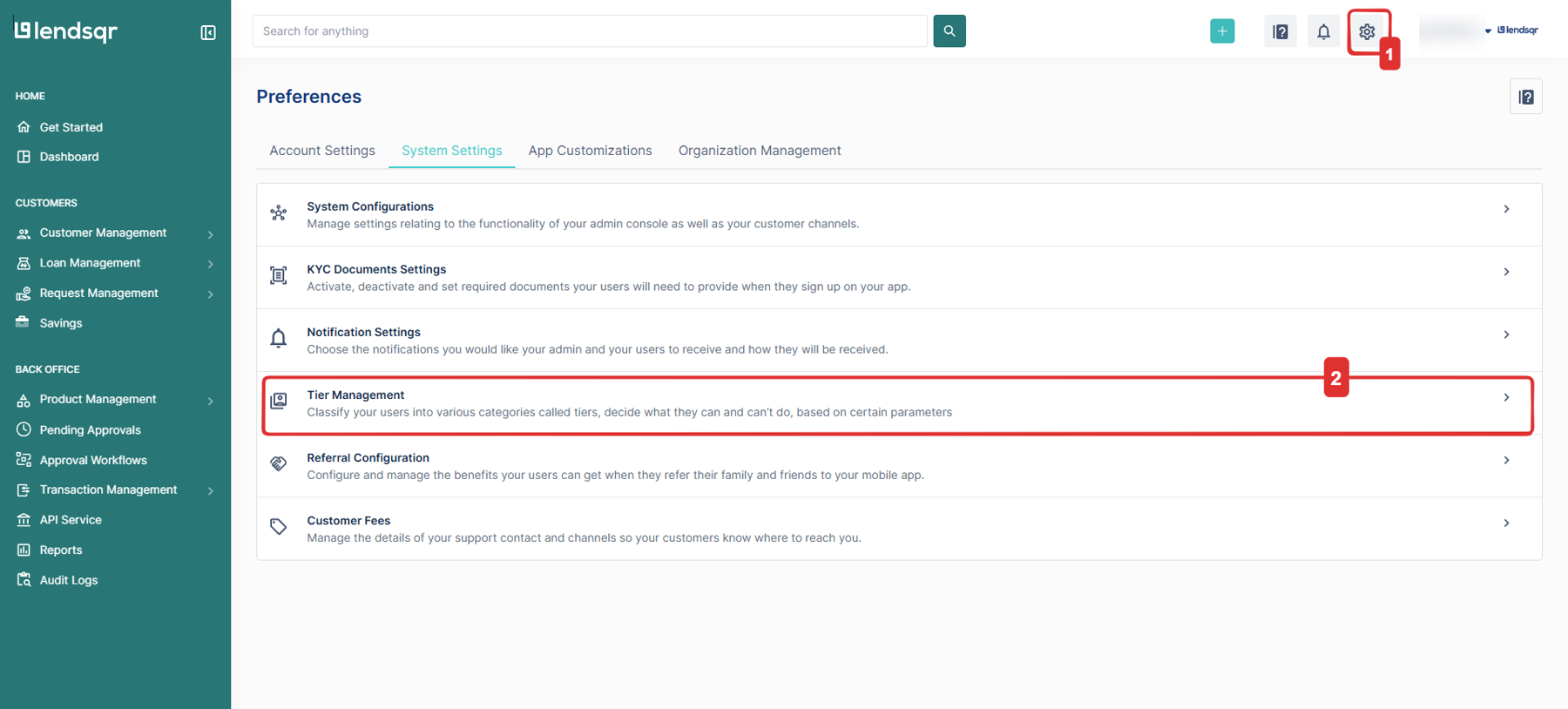
Tier management is a feature within the Lendsqr admin console that allows lenders to classify borrowers into distinct categories called tiers. Each tier is defined by a set of conditions that a borrower must meet, and each tier grants specific rights and limits to the users who belong to it.
Understanding tier management
Imagine a microfinance lender onboards hundreds of new borrowers every week. Some sign up with just a phone number, while others provide a government-issued identity document, proof of address, and have already completed several repayments on other platforms. Treating all of these borrowers the same way and giving them identical loan limits and access rights creates unnecessary risk. Tier management is how lenders on Lendsqr solve this problem.
The tiers are represented visually as stars on a user’s profile within the admin console, making it easy to identify a borrower’s standing at a glance. A one-star profile indicates a lower tier with basic access, while a higher star count reflects a more verified, higher-trust borrower.
Rather than applying a single flat set of rules to all users, tier management gives lenders the flexibility to define graduated access based on how much a borrower has been verified. A borrower who has completed full identity verification and demonstrated responsible repayment behavior can be granted more access than one who is just getting started.
Each tier you create comes with its own set of requirements and limits. These can include:
The type of identity documents a borrower must submit
The number of successful loan repayments they must have completed
The maximum transaction or withdrawal amount they are permitted
Any other conditions you define as appropriate for your platform
For example, a borrower in tier one may have a maximum withdrawal limit of $100, while a borrower in tier two, having met additional verification requirements, may be permitted to withdraw up to $500. The specific amounts and conditions are entirely up to the lender to configure.
Once a borrower meets the conditions for a higher tier, they can be moved up automatically based on your configured logic, or manually upgraded from the admin console by an authorized administrator. Downgrading is equally possible, giving lenders full control over access at all times.
Setting up tiers on the admin console
Tiers are created and managed directly within the Lendsqr admin console. To define a tier, you specify the conditions that a borrower must satisfy before being placed in or upgraded to that tier. These conditions are flexible and can be tailored to fit your lending product and your organization’s risk appetite.
Once your tiers are configured, the system continuously evaluates your borrowers against the defined conditions and assigns each user to the appropriate tier. Administrators can view any user’s current tier on their profile page and take manual action when needed upgrading a high-value customer or downgrading one who no longer meets the requirements.
Tier management serves two important purposes: it gives lenders greater control over their platform, and it acts as a built-in security mechanism.
From a control perspective, tier management ensures that higher-risk actions such as large withdrawals or access to premium loan products are only available to borrowers who have earned that access through verified behavior and documentation. This reduces the likelihood of fraud and supports a healthier loan portfolio.
From a security perspective, the tiering system ensures that only borrowers who have met your specified know-your-customer requirements gain elevated rights. A borrower who has not completed identity verification will remain in a lower tier with limited access until they do. This is particularly valuable in markets where borrower documentation can be inconsistent or where fraud risk is elevated.
Lenders have full control over tier assignments from the admin console. You can:
View a borrower’s current tier on their profile page
Manually upgrade a borrower who has met the requirements for a higher tier
Manually downgrade a borrower whose account shows signs of irregularity or non-compliance
Configure automatic tier upgrades that trigger when a borrower meets predefined conditions
This flexibility allows lenders to balance automated workflows with manual oversight, ensuring that tier assignments always reflect the true state of each borrower’s verification and repayment history.
To get the most out of tier management on Lendsqr, consider the following:
Start with a simple structure. Begin with two or three tiers and add more only as your lending operations grow and your requirements become clearer.
Align tier conditions with your risk policy. The requirements for each tier should reflect your organization’s actual know-your-customer and risk acceptance standards.
Review your tiers periodically. As your borrower base evolves, your tier structure should evolve with it. Reassess whether the conditions you have set are still appropriate.
Use manual overrides carefully. While the admin console allows manual upgrades and downgrades, these should be used with clear internal guidelines to prevent inconsistency.
Document your tier logic. Keeping a record of why each tier is configured the way it is helps with internal audits, compliance reviews, and onboarding new team members.