Access your Back Office at your fingertips.
Download the app now on Google Play Store.
Scan the QR code
You can also scan QR code with your phone to download the app.
How to use the Loan Savings Multiplier for smarter loan eligibility
Updated
On this page
Lending is not just about approving or declining applications. It is about ensuring loans go to customers who have demonstrated the right financial behaviour. One of the most effective ways to do this is to link a borrower’s loan eligibility directly to their savings balance, rewarding customers who save consistently with access to larger loan amounts, while protecting your portfolio from borrowers with little to no financial cushion.
The Loan Savings Multiplier on the Lendsqr admin console makes this possible. It is a configuration that applies a multiplier to a borrower’s total savings balance to determine whether they qualify for the loan amount they are requesting. The more a customer saves, the more they can borrow.
This guide explains what the multiplier is, how it works alongside other eligibility checks, how to configure it step by step, and how to choose the right multiplier value for different borrower segments and risk profiles.
What is the Loan Savings Multiplier?
The Loan Savings Multiplier is a product attribute that introduces a savings-based eligibility check into your loan approval process. When a borrower applies for a loan, the system multiplies their total savings balance by the multiplier value you have configured.
If the result is greater than or equal to the loan amount requested, the borrower passes this check and moves on to the next stage of the decision process. If the result is less than the loan amount, the application is declined at this stage and the borrower receives a system-generated notification explaining the outcome.
The logic works as follows:
If (Multiplier × Total Savings Balance) is greater than or equal to the loan amount requested → the borrower passes the multiplier check
If (Multiplier × Total Savings Balance) is less than the loan amount requested → the application is declined at this stage
In short: the more your customers save, the more they can borrow.
Why the Loan Savings Multiplier matters
Drives a savings culture When borrowers know that their loan limit is directly tied to how much they save on your platform, they are motivated to build and maintain a savings balance. Over time, this creates a healthier, more engaged customer base and strengthens the financial discipline of your borrower pool.
Manages lending risk By tying loan eligibility to actual customer liquidity on your platform, the multiplier reduces the risk of approving loans that borrowers cannot realistically repay. A borrower with a meaningful savings balance has demonstrated both the ability to set aside money and a commitment to the platform, both of which are positive indicators of repayment behaviour.
Creates fairness and transparency Loan eligibility is determined by each customer’s own financial behaviour rather than arbitrary thresholds. Borrowers who want access to larger loans have a clear and actionable path to get there: save more. This transparency builds trust and reduces the perception of unfairness in lending decisions.
Supports portfolio quality For lenders managing large volumes of applications, the multiplier acts as an automatic first-line filter that removes high-risk applications before they reach manual review, freeing up your team to focus on borderline cases that genuinely require human judgment.
Real-world examples
Example 1: Passing the multiplier check A lender configures a loan product with a Savings Multiplier of 2. A borrower applies for a loan of ₦30,000 and has a total savings balance of ₦20,000.
Calculation: 2 × ₦20,000 = ₦40,000
Since ₦40,000 is greater than or equal to ₦30,000, the borrower passes the multiplier check and moves on to the next eligibility stage.
Example 2: Failing the multiplier check Using the same product, a different borrower applies for ₦30,000 but has a savings balance of only ₦10,000.
Calculation: 2 × ₦10,000 = ₦20,000
Since ₦20,000 is less than ₦30,000, the application is declined at this stage. The borrower receives a system-generated notification informing them of the outcome. To qualify for this loan amount in future, they would need to increase their savings balance to at least ₦15,000 before reapplying.
Example 3: Adapting for different markets and currencies A lender in Kenya configures a BNPL loan product with a Savings Multiplier of 3. A borrower applies for KES 15,000 and has a savings balance of KES 6,000.
Calculation: 3 × KES 6,000 = KES 18,000
Since KES 18,000 is greater than or equal to KES 15,000, the borrower passes the check. The multiplier works the same way regardless of currency, making it equally applicable for lenders operating across different markets in Africa and beyond.
How the multiplier works alongside other eligibility checks
The Loan Savings Multiplier is one of several eligibility checks that run as part of Lendsqr’s automated decisioning engine, Oraculi. Oraculi evaluates loan applications using multiple modules sequentially, which may include checks such as:
Karma blacklist checks
Credit bureau reports
Ecosystem data
Custom scoring rules
The Loan Savings Multiplier
Because these checks run together to form a comprehensive risk assessment, passing the savings multiplier check does not guarantee loan approval. A borrower must satisfy all configured eligibility criteria to receive a loan offer. For example, a borrower may have sufficient savings to pass the multiplier check but still be declined because they appear on a credit blacklist or fail a credit bureau check.
This means the multiplier should be thought of as one layer of your overall eligibility framework, not a standalone approval mechanism.
What happens when a borrower is declined
When a borrower’s application is declined because they fail the savings multiplier check, the system automatically generates a notification informing them of the outcome. Lenders cannot currently customise the content of this notification, as messaging is handled by the system.
A decline at this stage is not necessarily final. If a lender reviews the borrower’s profile manually and determines they are still creditworthy despite failing the automated check, the lender can use the Prequalify feature to manually prequalify that borrower for a loan. Prequalifying effectively overrides the automated decline and bypasses the standard decision rules for that specific customer, without changing the product’s global settings.
This makes prequalifying a useful tool for handling edge cases, for example a long-standing borrower with a strong repayment history who temporarily has a low savings balance due to a large withdrawal.
Before you start
Roles and permissions Configuring the Loan Savings Multiplier requires the standard Loan Products permission. Any team member who has been granted permission to edit loan products on the admin console can configure this setting. There is no separate or additional permission required.
Decide on your multiplier value before opening the admin console The multiplier value you set will directly affect how many of your borrowers qualify for loans. Before configuring, consider the savings behaviour of your existing borrower base and the risk profile of the loan product.
Step-by-step: how to configure the loan savings multiplier
Step 1: Log in to the admin console
Open your web browser and log in to your Lendsqr admin console using your work email address and password.
Step 2: Navigate to loan products
On the left navigation pane, locate Back Office, expand “Product Management”, and select “Loan Products”. This will display a list of all the loan products you have created.
Step 3: Open or create a loan product
Click on the name of the loan product you want to configure. If you need to create a new loan product first, click the “New loan product” button and complete the product setup before proceeding.
Step 4: Open the Product settings tab and search for the setting
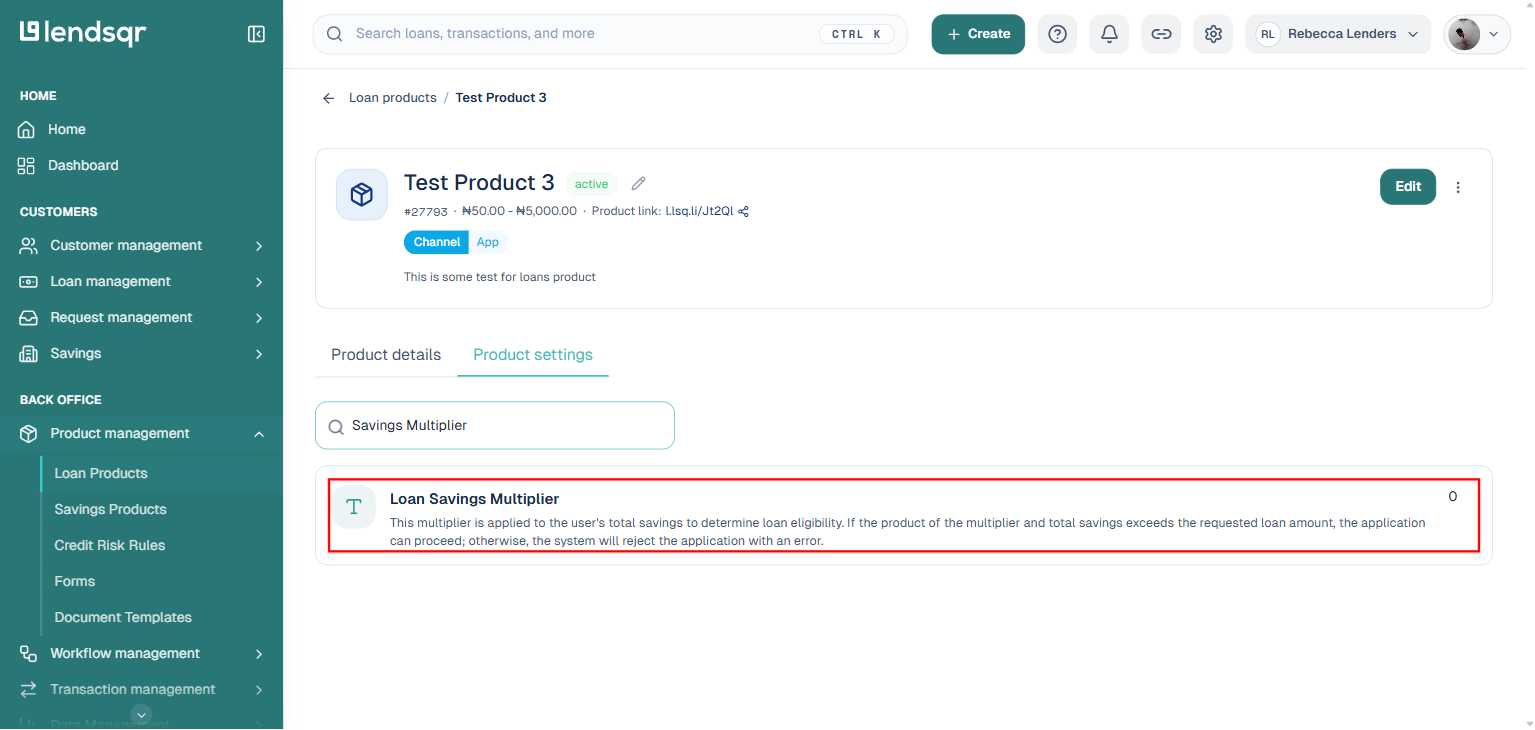
Click on the “Product settings” tab. This tab lists every configurable attribute for the product as a single searchable list, rather than a fixed page of sections. Type “Savings Multiplier” into the “Search product settings” box to filter directly to the “Loan Savings Multiplier” setting, whose description reads: “This multiplier is applied to the user’s total savings to determine loan eligibility. If the product of the multiplier and total savings exceeds the requested loan amount, the application can proceed; otherwise, the system will reject the application with an error.”
Step 5: Click the value to edit it
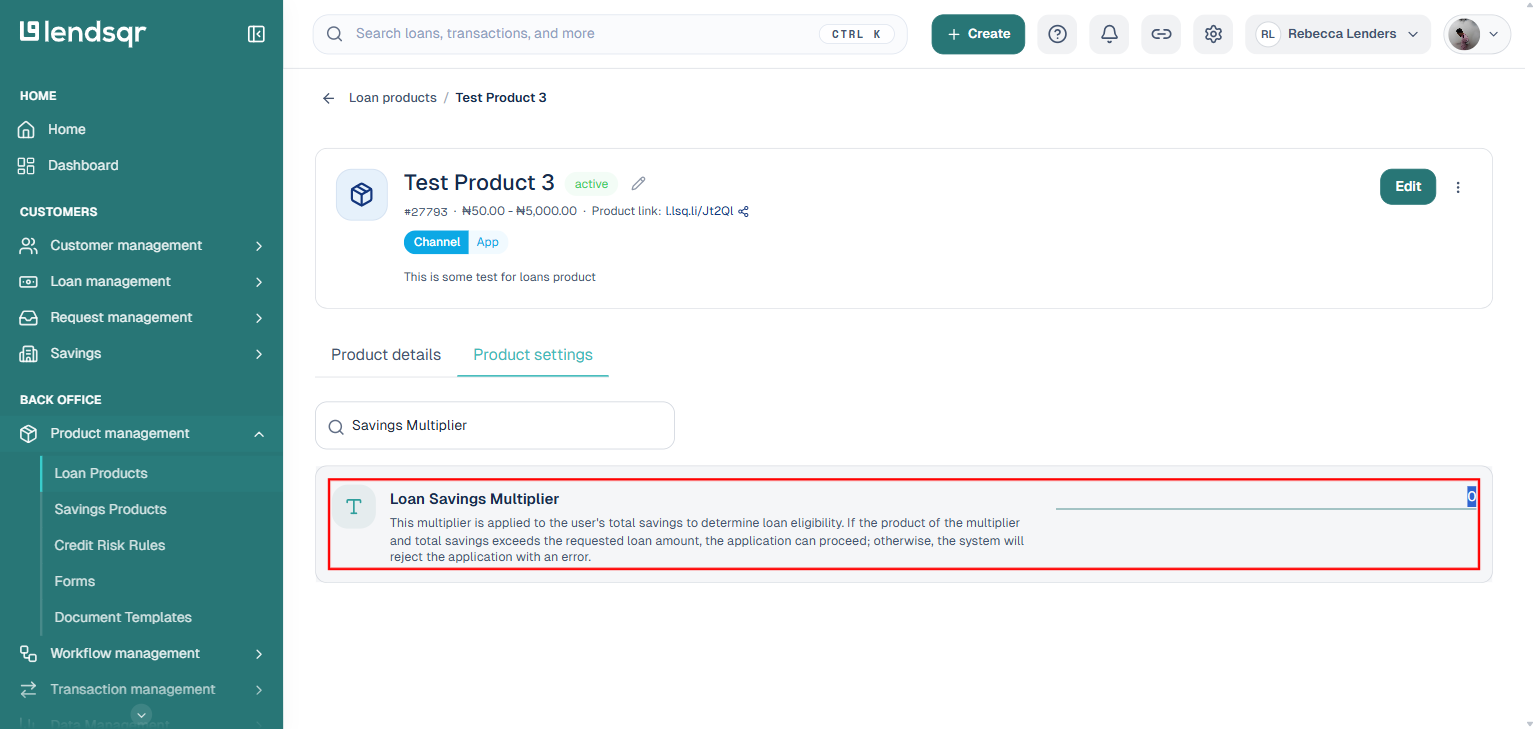
Click directly on the current value shown next to the setting (it defaults to 0, meaning the check is effectively disabled). This turns it into an editable number field in place, there is no separate three-dot menu or edit panel to open.
Step 6: Enter the multiplier value and confirm
Enter your chosen multiplier value in the field. The value should be a whole number, for example 1, 2, or 3. Confirm the field (for example, by pressing Enter or clicking away) to save the new value immediately, no separate Submit or Save button is required for this setting.
Choosing the right multiplier value
The multiplier value you set has a direct impact on how many borrowers qualify for loans on that product. A higher multiplier means borrowers need more savings relative to the loan amount, which is stricter and reduces risk but may also reduce approval rates. A lower multiplier is more permissive and increases approval rates but offers less protection against default.
Here is a general guide for different borrower segments and risk profiles:
Low-risk, established borrowers For borrowers with a strong repayment history and consistent savings behaviour on your platform, a multiplier of 1 is appropriate. This means a borrower needs savings equal to or greater than the loan amount to qualify, which is a relatively low bar for customers who have demonstrated financial discipline.
Mid-risk borrowers or new customers For borrowers who are newer to the platform or have a moderate risk profile, a multiplier of 2 is a reasonable starting point. This requires borrowers to have savings worth at least half the loan amount, striking a balance between accessibility and risk protection.
Higher-risk products or unsecured loans For loan products that carry higher risk, such as unsecured personal loans or larger loan amounts, a multiplier of 3 or higher provides a stronger layer of protection. This limits access to borrowers who have built a meaningful savings balance, which is a positive indicator of financial discipline and platform engagement.
New platforms with limited savings data If your platform is new and most borrowers do not yet have significant savings balances, starting with a lower multiplier of 1 and increasing it over time as your borrower base matures is a sensible approach. This avoids excluding too many borrowers early on while the savings culture on your platform is still developing.
Monitoring after configuration
After enabling the Loan Savings Multiplier, monitor the following to assess its impact:
Approval rates Track whether the multiplier is causing a significant drop in approval rates. If too many applications are being declined at this stage, consider whether the multiplier value is appropriately calibrated for your borrower base.
Default rates Over time, compare default rates on loans approved under the multiplier check against historical data. A reduction in defaults is a strong indicator that the feature is working as intended.
Savings growth Monitor whether average savings balances are increasing among active borrowers. If borrowers are responding to the incentive and saving more to access larger loans, this is a positive signal for both your portfolio quality and your platform engagement.