Access your Back Office at your fingertips.
Download the app now on Google Play Store.
Scan the QR code
You can also scan QR code with your phone to download the app.
How to create a new customer before booking a loan request
Updated
On this page
Introduction
A customer walks into a lending branch requesting an urgent loan.
They have:
Never used your app
Not completed registration
No existing profile in your system
Before you can approve or disburse the loan, you must first create a customer profile in the system.
This ensures the loan is properly linked, tracked, and managed.
Why customer creation is required before loan booking
In Lendsqr, every loan must be tied to a customer profile.
Customer creation is required because it enables:
Identity tracking across the loan lifecycle
Credit history recording
Repayment tracking
Risk assessment linkage
Without a customer profile, the system cannot process or track any loan activity.
What is manual loan booking and who uses it?
Manual loan booking is the process by which an admin books a loan on behalf of a borrower directly from the Lendsqr admin console rather than the borrower applying through the web app themselves.
This is commonly used by:
Field lending operations: Agents who meet borrowers in person, collect their information, and book loans on their behalf.
Walk-in lenders: Microfinance institutions and cooperative societies where members apply for loans in person at a branch.
Migrations: Lenders moving loan portfolios from a previous platform who need to recreate existing loan relationships in Lendsqr.
Before a loan can be manually booked, the borrower must exist as a registered user in your platform. If they are new, you need to create their profile first.
Note: Only admins with the Super Admin role can manually book a loan. Ensure you have the correct permissions before proceeding.
When you need to manually create a customer
You typically do this when:
A borrower is onboarding offline or in-branch
A customer cannot complete app registration
You are handling a support-assisted loan request
You are processing walk-in or emergency loans
You are migrating users from another system
For Nigerian lenders
You have two ways to create a customer, depending on how you want to start.
1. Create a customer using the BVN flow (recommended) This option is faster because it pulls existing customer data.
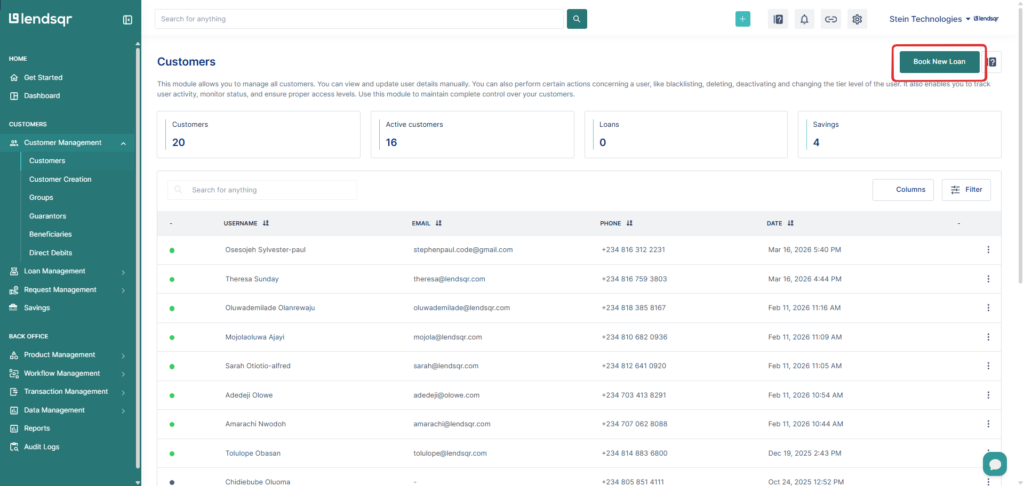
Navigate to Customers, Loans, or Loan Requests
Click Book New Loan
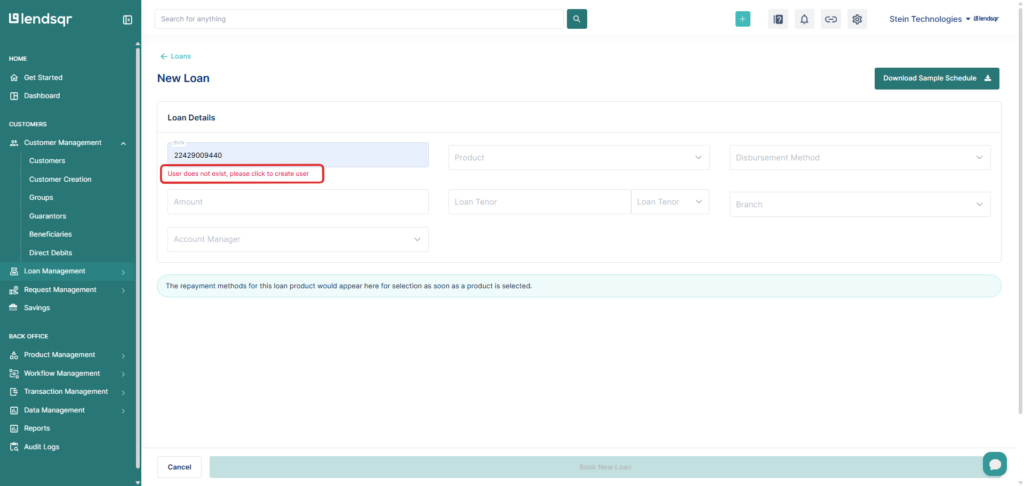
Enter the customer’s BVN
If the customer does not exist, a red prompt will appear
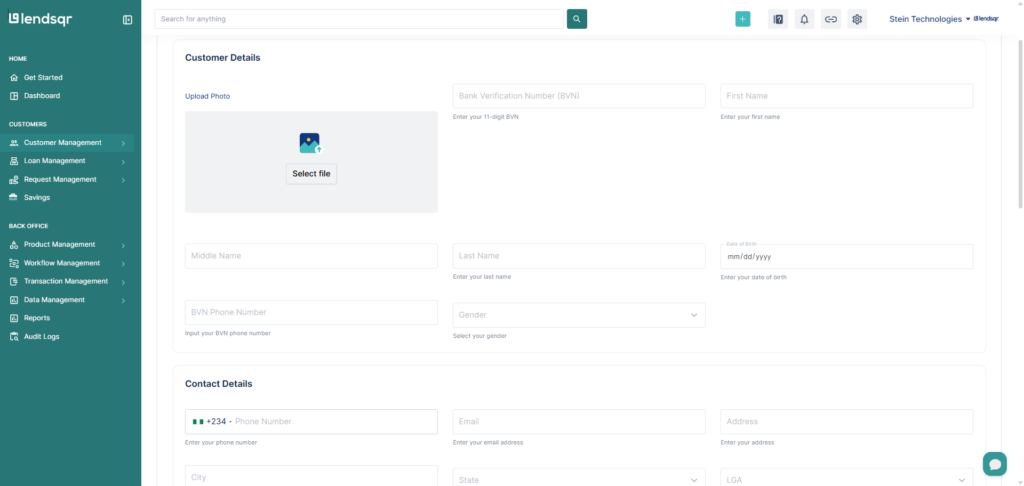
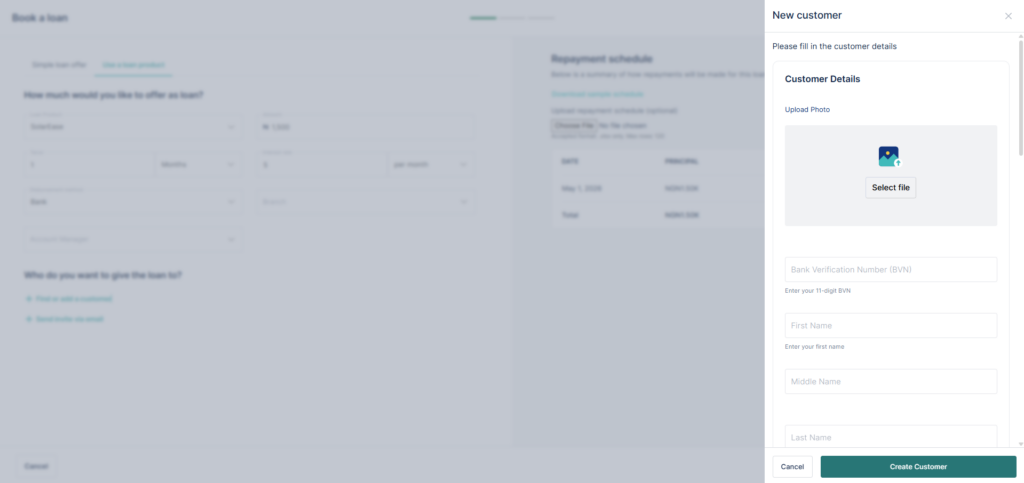
Click the prompt to open the customer creation form
Review the prefilled details and complete any missing information
Click Create Customer
Once done, you can proceed to book the loan immediately.
This flow works best when you have the customer’s BVN and want to reduce manual entry.
2. Create a customer manually (no BVN prefill) Use this when BVN is unavailable or not required.
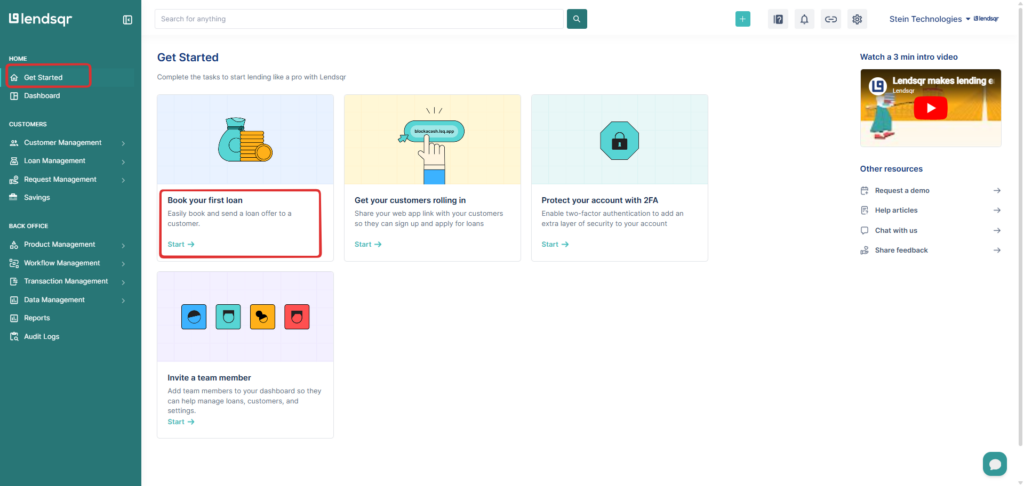
Go to the Get Started page
Click Start on the Book your first loan card
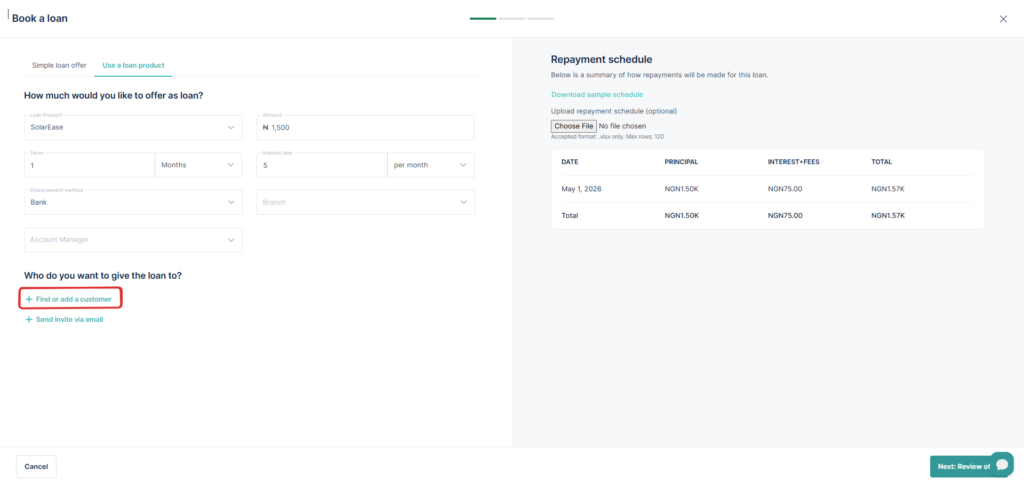
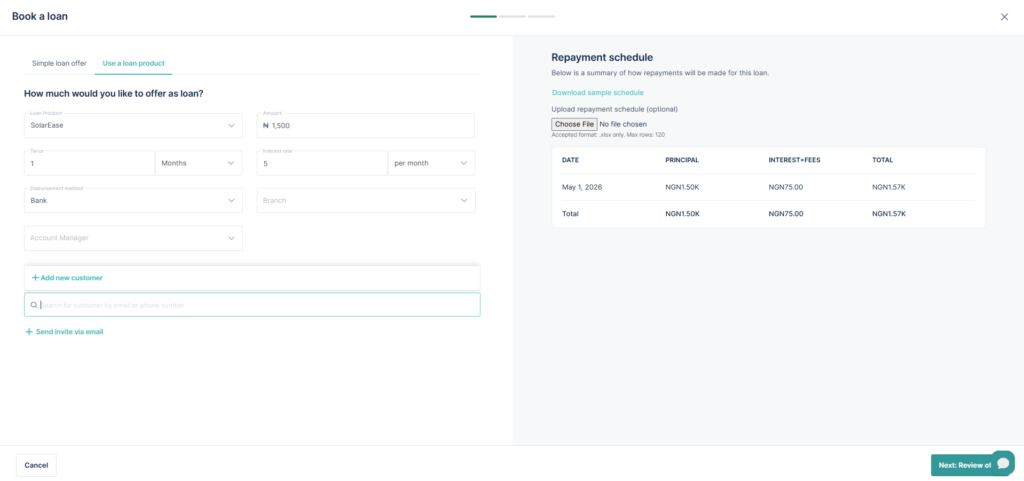
Click on Find or add new customer
Select Add New Customer
Fill in all required customer details
Click Submit to create customer
After creating the profile, continue with the loan booking process.
What’s the difference?
The BVN flow pre-populates customer data, so you spend less time entering details. The manual flow requires you to enter everything yourself.
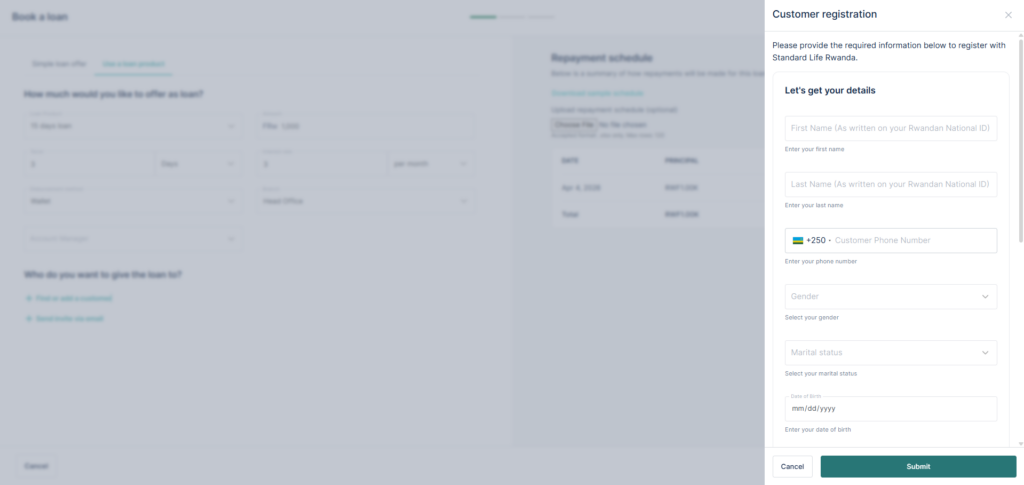
For international (Non-Nigerian) lenders
There is only one flow, and it is fully manual.
Navigate to Customers, Loans, or Loan Requests or even the Get started page
Click Book New Loan
Click on Find or Add a new customer
Select Add New Customer
Enter all required customer details
Click Submit to create customer
Once the profile is created, proceed to book the loan.
Required customer information
The exact fields depend on your country and regulatory setup, but the following are typically required:
First name
Last name
Gender
Date of birth
Phone number
Address
For Nigerian lenders using the BVN flow, some of this information will be prefilled.
If you need to update the fields shown or make changes to what is required, contact [email protected]
Important note
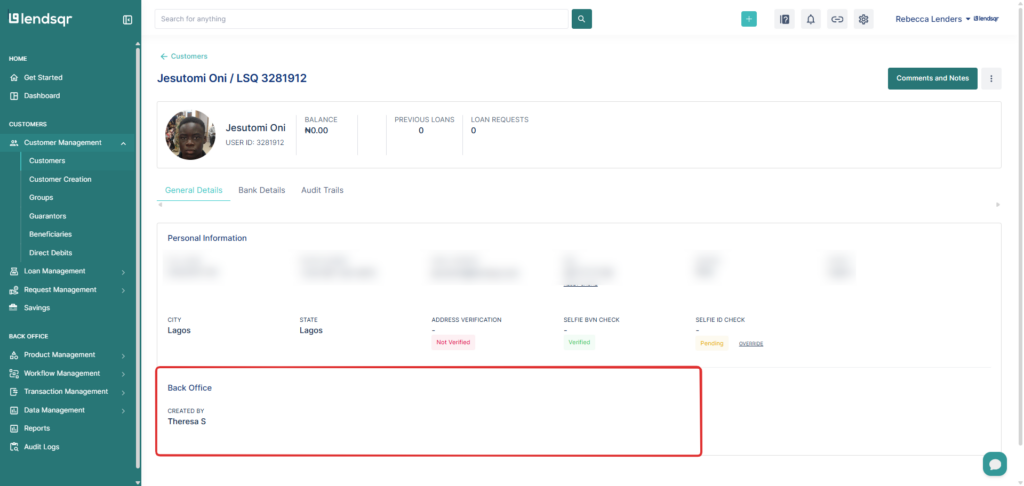
When a customer is created manually, the admin who created the user is displayed when viewing the customer’s details on the customer page.
Real-world examples
Example 1: Walk-in customer
A customer visits your branch requesting a ₦100,000 loan.
You create their profile using BVN
System pulls identity data
You immediately proceed to loan booking
Example 2: Support-assisted onboarding
A customer is unable to register due to app issues.
Support agent manually creates profile
Customer is onboarded offline
Loan is booked immediately after creation
Example 3: Emergency lending
A borrower needs urgent funds in a market setting.
Agent creates customer on the spot
Loan is booked manually
Funds are disbursed quickly
What happens after customer creation?
Once a customer is created:
Their profile becomes active in the system
They can receive loans
Their repayment history is tracked
They appear in reporting and analytics dashboards
This ensures full traceability of all lending activities.
Important notes
Customer creation must happen before loan booking
BVN flow is preferred because it reduces manual errors
Required fields vary by lender configuration
A customer cannot have a loan without a valid profile
Common issues and fixes
Issue: Customer already exists → Use search instead of creating a duplicate profile
Issue: BVN not found → Proceed with manual customer creation
Issue: Missing fields during creation → Ensure required KYC fields are completed before submission
Frequently asked questions
Can I book a loan without creating a customer profile first?
No. The borrower must be a registered user in your Lendsqr platform before a loan can be booked for them. If they are not yet registered, create their profile first using the steps above.
Does the borrower need to complete account activation before I can disburse?
For loans disbursed to the borrower’s Lendsqr wallet, the borrower must activate their account before they can withdraw the funds. The loan can be approved and the wallet credited without activation, but the borrower will not be able to access or transfer the funds until they complete the activation process.
Is manual loan booking subject to credit risk rule checks?
When booking manually through the offline channel, the loan product must be configured for offline use. Credit risk rule checks may differ from those applied to web app applications, depending on your product’s channel configuration.