Access your Back Office at your fingertips.
Download the app now on Google Play Store.
Scan the QR code
You can also scan QR code with your phone to download the app.
Where do customers see their mandates on the app?
Updated
On this page
In digital lending, direct debit mandates are key for ensuring that repayments are collected automatically and on time. It’s important for your borrowers to be able to view and track their mandate status
The Lendsqr web app makes it easy for your customers to view the status of their mandates in just a few steps. Whether they’re checking to confirm if your mandate is active or still pending, here’s how they can find that information:
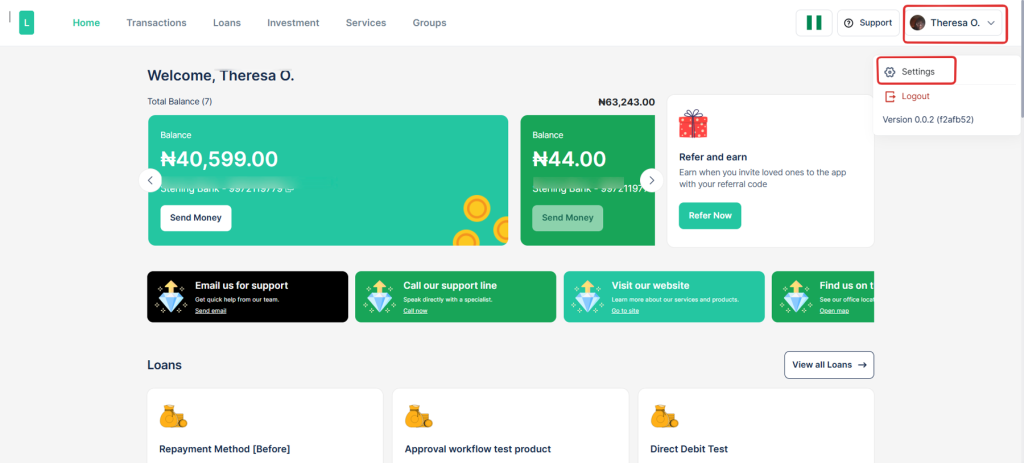
1. Login to the web app using your credentials.
2. Navigate to the Settings section from the profile dropdown.
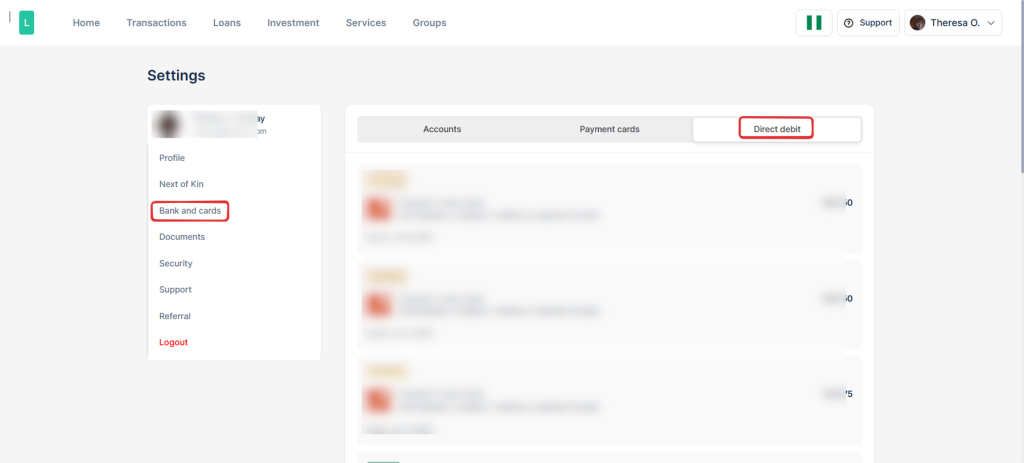
3. Scroll down and click on “Banks and Cards.”
4. Tap on “Direct Debit” to see mandate details.
Each mandate listed will display its current status. A green status means the mandate is active and successfully linked to your bank account. A yellow status means the mandate is pending and hasn’t been fully activated yet.